
1. Introduzione
The VIDCASTIVE 4K Mini Body Camera L20 is a compact, wearable camera designed for capturing high-quality point-of-view (POV) video and photos. Its small size, magnetic and clip mounts, and 4K resolution make it suitable for various activities, including outdoor sports, daily vlogging, and personal recording. This manual provides essential information for setting up, operating, maintaining, and troubleshooting your camera.

Image: The VIDCASTIVE 4K Mini Body Camera L20.
2. Cosa c'è nella scatola
Verifica che tutti gli articoli siano presenti nel tuo pacco:
- Telecamera
- Cavo USB-C
- 12-Piece Accessory Kit (various mounts and clips)
- Manuale d'uso
- Memory Card (64GB V30-rated, pre-installed)

Image: All included accessories for the VIDCASTIVE 4K Mini Body Camera L20.
3. Prodotto finitoview
The VIDCASTIVE L20 features a compact design with a 1.47-inch display for real-time viewing and playback. It records in 4K/30fps and includes a 750mAh rechargeable battery for up to 150 minutes of continuous recording.
Componenti della fotocamera
- Lente: Main camera lens for capturing video and photos.
- Display da 1.47 pollici: For menu navigation, live viewe riproduzione.
- Pulsante di accensione: To turn the camera on/off and confirm selections.
- Pulsante Modalità: To switch between video, photo, and playback modes, and navigate menus.
- Porta USB-C: Per la ricarica e il trasferimento dei dati.
- Slot per scheda microSD: Per l'inserimento della scheda di memoria.
- Microfono: Per la registrazione audio.
4. Impostazione
4.1 Caricamento della fotocamera
Before first use, fully charge the camera. Connect the provided USB-C cable to the camera's USB-C port and the other end to a USB power adapter (not included) or a computer's USB port. The camera supports recording while charging.

Image: The camera connected to a power source via USB-C cable for charging.
4.2 Inserimento della scheda di memoria
The camera comes with a pre-installed 64GB V30-rated high-speed Micro SD card. If you need to insert or replace the card, ensure the camera is powered off. Open the Micro SD card slot cover and gently insert the card with the gold contacts facing the front of the camera until it clicks into place. Close the cover securely.

Image: A Micro SD card being inserted into the camera's slot.
4.3 Accensione/Spegnimento
- Per accendere: Tenere premuto il pulsante di accensione per alcuni secondi finché lo schermo non si illumina.
- Per spegnere: Tenere premuto il pulsante di accensione per alcuni secondi finché lo schermo non si spegne.
4.4 Impostazioni iniziali
Upon first power-on or after a reset, you may need to set the date, time, and language. Use the Mode button to navigate through options and the Power button to confirm selections on the 1.47-inch display.
5. Istruzioni per l'uso
5.1 Registrazione video
From the main menu, select 'Video Record'. Press the Power button to start recording. A red indicator light will flash, and a timer will appear on the screen. Press the Power button again to stop recording. Videos are saved to the Micro SD card in MP4 format.
5.2 Scattare foto
From the main menu, select 'Photo Shot'. Press the Power button to capture a photo. Photos are saved to the Micro SD card.
5.3 Riproduzione
From the main menu, select 'Playback'. Use the Mode button to navigate through your recorded videos and photos. Press the Power button to view un selezionato file.
5.4 Connettività WiFi e utilizzo delle app
The camera features built-in WiFi for connecting to your smartphone via a dedicated companion app. This allows for live preview, wireless video transfer, and direct sharing. Refer to the app's instructions for detailed pairing and usage.

Image: The camera displaying WiFi connection information, with a smartphone showing the companion app interface.
5.5 Opzioni di montaggio
The camera is designed for versatile mounting with its magnetic body and included accessory kit. Common mounting methods include:
- Supporto magnetico: Attach directly to metallic surfaces or use with the magnetic necklace mount for hands-free recording on clothing.
- Montaggio a clip: Securely attach to shirt pockets, backpack straps, or other fabric edges.
- Supporto per casco: Use the helmet adapter for POV recording during cycling or other activities.
- Supporto per bici: Attach to bicycle handlebars for stable recording.
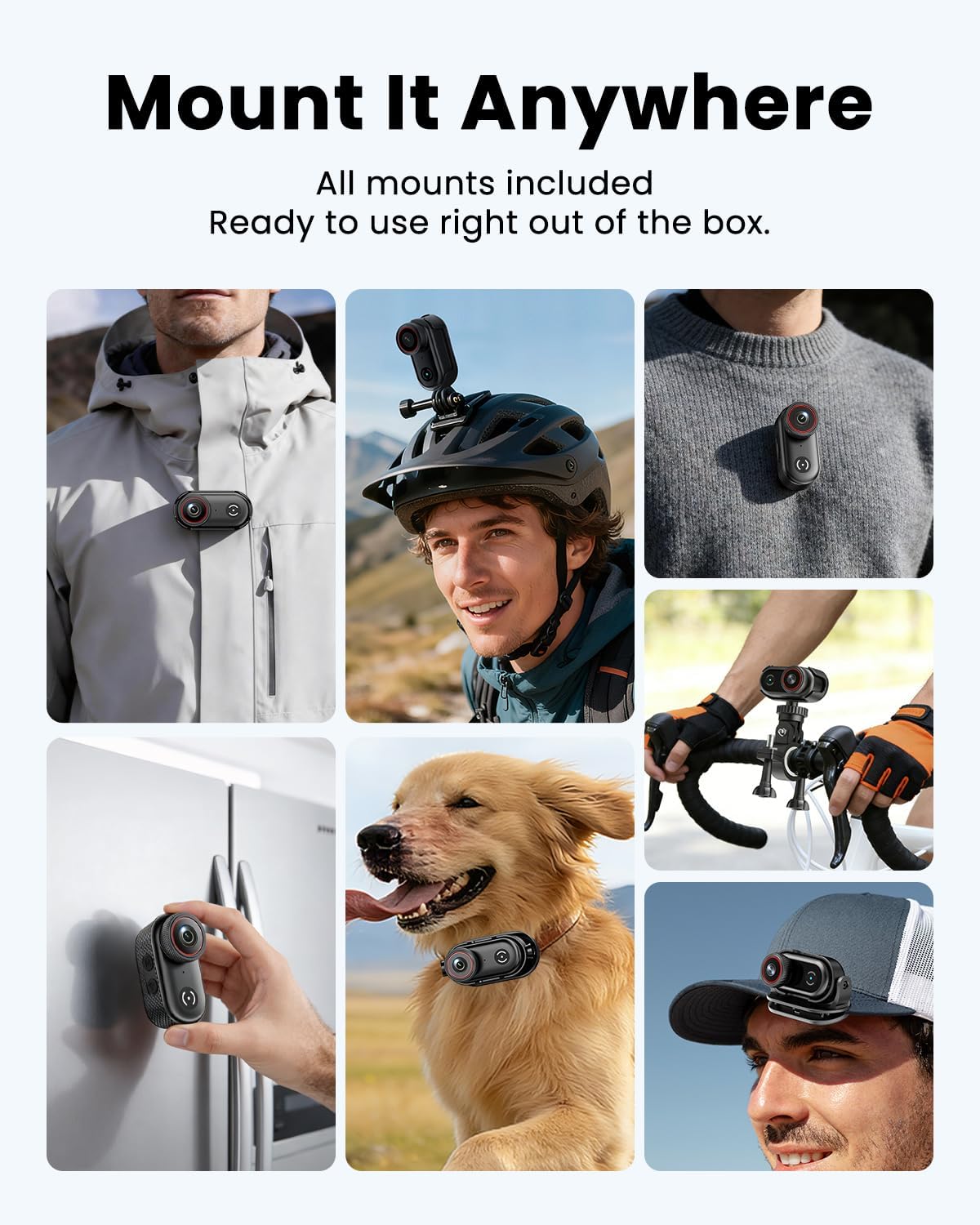
Image: The camera clipped onto a shirt for wearable recording.

Image: The camera mounted on a bicycle helmet.

Image: The camera mounted on bicycle handlebars.
6. Manutenzione
6.1 Pulizia
Utilizzare un panno morbido e asciutto per pulire il corpo macchina. Per l'obiettivo, utilizzare un panno e una soluzione specifici per la pulizia delle lenti. Evitare l'uso di prodotti chimici aggressivi o materiali abrasivi.
6.2 Conservazione
Store the camera in a cool, dry place away from direct sunlight and extreme temperatures. Ensure the battery is partially charged (around 50%) if storing for extended periods to prolong battery life.
6.3 Gestione della scheda di memoria
Esegui regolarmente il backup del tuo footage and format the Micro SD card in the camera's settings to maintain optimal performance and prevent data corruption. A V30-rated card is recommended for 4K recording.
7. Risoluzione Dei Problemi
If you encounter issues with your VIDCASTIVE L20 camera, refer to the following common solutions:
- La fotocamera non si accende: Assicurati che la batteria sia carica. Collega la fotocamera a una fonte di alimentazione e riprova.
- "Please plug in SD card" message: Verify that the Micro SD card is correctly inserted. Try re-inserting the card or using a different compatible V30-rated card. Ensure the card is not damaged.
- Scarsa qualità video/foto: Ensure the lens is clean. Check the recording resolution settings. Ensure sufficient lighting.
- Scarsa qualità audio: Assicurarsi che il microfono non sia ostruito.
- Camera freezing or unresponsive: Press and hold the Power button for 10-15 seconds to force a restart. If the issue persists, perform a factory reset via the camera's settings menu (note: this will erase custom settings).
- Problemi di connessione WiFi: Ensure the camera's WiFi is enabled and your smartphone is within range. Restart both the camera and your phone. Reinstall the companion app if necessary.
Se i problemi persistono dopo aver provato questi passaggi, contattare l'assistenza clienti.
8. Specifiche
| Caratteristica | Specificazione |
|---|---|
| Marca | VIDCASTIVO |
| Numero di modello | L20 |
| Risoluzione di acquisizione video | 4K |
| Formato di acquisizione video | MP4 |
| Dimensioni dello schermo | 1.47 pollici |
| Durata media della batteria | 2.5 ore (150 minuti) |
| Dimensioni della memoria flash installata | 64 GB (V30-rated) |
| Tecnologia di connettività | USB, Wi-Fi |
| Tecnologia del sensore fotografico | CMOS |
| Apertura massima | 2.8 anni |
| Livello di resistenza all'acqua | Non resistente all'acqua |
| Stabilizzazione dell'immagine | Anti-Shake (Digital) |
| Peso dell'articolo | 0.37 Kilograms (approx. 1.59 oz / 45g) |
9. Garanzia e supporto
9.1 Informazioni sulla garanzia
The VIDCASTIVE 4K Mini Body Camera L20 comes with a Garanzia del produttore di 1 annoLa presente garanzia copre i difetti di materiali e fabbricazione in condizioni di normale utilizzo. Si prega di conservare la prova d'acquisto per eventuali reclami in garanzia.
9.2 Assistenza clienti
For technical assistance, warranty claims, or any questions regarding your product, please contact VIDCASTIVE customer support through the retailer's platform or the official VIDCASTIVE website. Provide your model number (L20) and a detailed description of the issue for faster service.