
1. Istruzioni di sicurezza
Read all safety warnings and instructions before operating this machine. Failure to follow the warnings and instructions may result in electric shock, fire, or serious injury.
Sicurezza generale
- Always wear appropriate personal protective equipment (PPE) such as safety glasses and non-slip footwear.
- Ensure the power cord is in good condition and free from damage. Do not use the machine if the cord is frayed or damaged.
- Do not operate the machine in wet conditions or near standing water unless specifically designed for such use.
- Tenere i bambini e il personale non autorizzato lontano dall'area operativa.
- Unplug the machine from the power outlet before performing any adjustments, changing accessories, or maintenance.
- Do not use the machine for purposes other than its intended use.
Sicurezza elettrica
- This machine operates on 110 Volts. Ensure the power supply matches the machine's requirements.
- Do not expose the machine to rain or wet conditions. Water entering an electrical appliance will increase the risk of electric shock.
- Never carry the machine by the power cord or yank the cord to disconnect it from an outlet.
- Use only extension cords that are rated for outdoor use and have a grounding plug.
2. Prodotto finitoview
The VEVOR BL-5L2E550-01 Commercial Floor Scrubber Machine is a versatile and powerful tool designed for various floor cleaning and polishing tasks. It features a robust motor and adjustable speed settings to handle different cleaning requirements.

Figure 2.1: VEVOR Commercial Floor Scrubber Machine. This image shows the overall design of the floor scrubber, highlighting its sturdy handle and base with a rotating brush.
Caratteristiche principali:
- Powerful Variable Speed Motor: Equipped with a 0.75 HP commercial motor, offering adjustable speeds from 1200 to 1900 RPM for diverse cleaning needs.
- Applicazione versatile: Suitable for various indoor spaces including stores, offices, warehouses, and garages.
- 13-inch Cleaning Width: Provides efficient coverage for daily and deep cleaning tasks.
- Dry Carpet Care: Designed for effective carpet cleaning, reducing water usage and drying time.
- Effort-Saving Operation: Features adjustable rubber wheels, a 43 ft (13 m) power cord, and a stainless steel handle for comfortable use.
- Kit di accessori completo: Includes multiple pads and brushes for cleaning various surfaces like grout, hardwood, laminate, vinyl, concrete, and carpets.

Figure 2.2: Powerful Commercial Motor. This graphic illustrates the machine's variable speed motor, capable of up to 1900 RPM, and demonstrates its application for both high-speed deep cleaning and low-speed gentle care.
3. Assemblaggio e configurazione
Before first use, ensure all components are present and undamaged. Refer to the included parts list in the specifications section.
Disimballaggio
- Rimuovere con attenzione tutti i componenti dalla confezione.
- Inspect the machine and accessories for any signs of shipping damage. Contact customer support if any damage is found.
- Conservare i materiali di imballaggio per un eventuale stoccaggio o trasporto futuro.
Maniglia di montaggio
- Attach the handle pole to the main body of the scrubber. Ensure it is securely fastened using the provided hardware.
- Adjust the handle to a comfortable operating height. The stainless steel handle is designed to reduce back strain during use.
Attaching Pads/Brushes
The machine comes with a hook & loop pad driver. To attach a pad or brush:
- Assicurarsi che la macchina sia scollegata.
- Place the desired pad (e.g., microfiber, polishing, stripping) or brush onto the hook & loop pad driver. Ensure it is centered and firmly attached.
- For brushes, align the brush with the driver and twist to lock it into place.

Figure 3.1: All-in-One Surface Cleaning Solution. This image displays the range of included accessories, such as the blue microfiber pad, red polishing pad, black stripping pad, green brush, orange brush, and blue brush, each designed for specific cleaning tasks.
4. Funzionamento
Before operating, ensure the floor area is clear of large debris. Always test cleaning solutions on an inconspicuous area first.
Pulizia generale
- Select the appropriate brush or pad for the floor type (refer to Figure 3.1).
- Plug the machine into a grounded 110V outlet.
- Turn on the machine. Adjust the speed using the variable speed control knob. For general cleaning, a medium speed is often sufficient.
- Guide the machine across the floor in overlapping passes. The adjustable rubber wheels assist in maneuverability.
- For optimal results, use a suitable cleaning solution according to the floor type.

Figure 4.1: Operating the Scrubber. A user demonstrates operating the VEVOR floor scrubber on a tiled floor, effectively cleaning spills and dirt.
Deep Cleaning / Stripping
For heavy soils, old wax, or tire marks:
- Utilizzare il Black Stripping Pad or Orange Brush.
- Set the machine to a higher RPM (1500-1900 RPM) for maximum cleaning power.
- Apply a strong stripping solution as recommended by the solution manufacturer.
- Work in small sections, allowing the solution to dwell if necessary before scrubbing.
Lucidatura
For maintaining coated floors like hardwood and laminate:
- Allega il Red Polishing Pad.
- Set the machine to a lower RPM (1200-1500 RPM) for gentle care.
- Use a suitable floor polish or buffing compound.
- Move the machine steadily over the floor to achieve an even shine.
Cura dei tappeti
For cleaning carpets and reducing dust/footprint buildup:
- Utilizzare il Blue Microfiber Pad or a suitable carpet brush.
- The dry carpet care method reduces water use and detergent soaking.
- Move the machine slowly over the carpeted area.
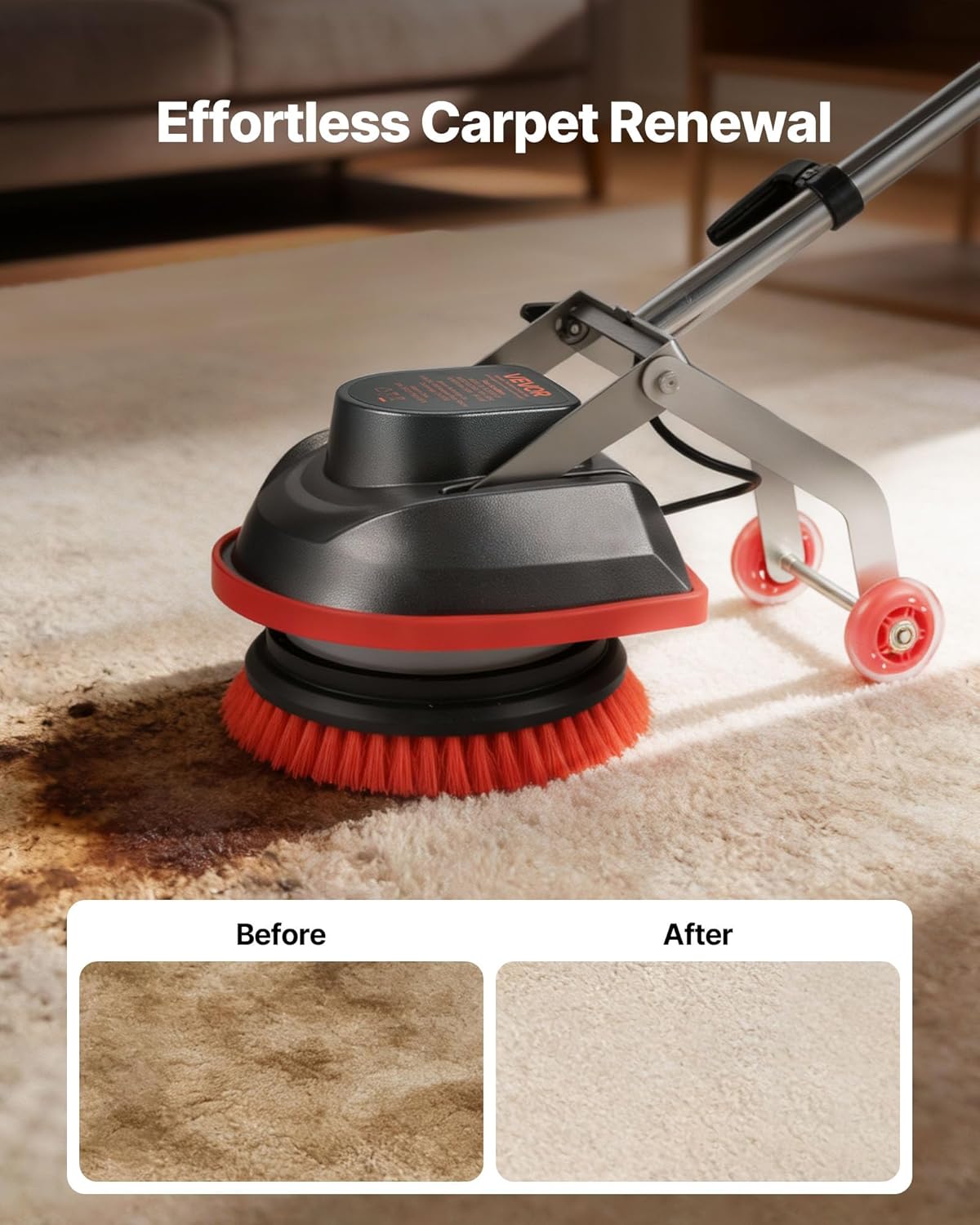
Figure 4.2: Effortless Carpet Renewal. This image shows a 'Before' and 'After' comparison of a carpet, demonstrating the machine's effectiveness in removing stains and renewing carpet appearance.
Ergonomics and Maneuverability

Figure 4.3: Effort-Saving for High Frequency Use. This image illustrates the machine's ergonomic features, including a sturdy handle for reduced fatigue and a cord wrap to prevent tangling, enhancing user comfort during extended operation.
5. Manutenzione e conservazione
Regular maintenance ensures the longevity and optimal performance of your VEVOR floor scrubber.
Dopo ogni utilizzo
- Unplug the Machine: Scollegare sempre l'apparecchio dalla corrente prima di pulirlo.
- Clean Pads/Brushes: Remove and thoroughly clean any pads or brushes used. Rinse them with water and allow them to air dry completely.
- Macchina per la pulizia: Usa l'annuncioamp cloth to wipe down the exterior of the machine, removing any dirt, dust, or cleaning solution residue.
- Ispezionare il cavo: Check the power cord for any cuts, abrasions, or damage.
Magazzinaggio
- Store the machine in a clean, dry area, away from direct sunlight and extreme temperatures.
- Ensure the power cord is neatly wrapped around the cord wrap hooks to prevent tangling and damage.
- Store pads and brushes separately once dry.
6. Risoluzione Dei Problemi
This section addresses common issues you might encounter with your floor scrubber. If you experience a problem not listed here, contact customer support.
| Problema | Possibile causa | Soluzione |
|---|---|---|
| La macchina non si accende | Nessuna alimentazione; Cavo di alimentazione danneggiato; Interruttore difettoso | Check power outlet and circuit breaker; Inspect power cord for damage; Contact customer support if switch is faulty. |
| Brush/Pad not rotating | Brush/Pad incorrectly attached; Obstruction; Motor issue | Ensure brush/pad is securely attached; Remove any obstructions; Contact customer support if motor is faulty. |
| Scarse prestazioni di pulizia | Incorrect pad/brush for surface; Worn pad/brush; Insufficient cleaning solution | Select appropriate pad/brush; Replace worn pads/brushes; Use recommended cleaning solution. |
| La macchina vibra eccessivamente | Unbalanced pad/brush; Loose components | Ensure pad/brush is centered and securely attached; Check for loose screws or parts and tighten if necessary. |
7. Specifiche
Detailed technical specifications for the VEVOR BL-5L2E550-01 Commercial Floor Scrubber Machine.

Figure 7.1: Product Dimensions and Included Accessories. This diagram provides a visual representation of the machine's dimensions and lists all the accessories included in the package.
| Caratteristica | Dettaglio |
|---|---|
| Numero di modello | BL-5L2E550-01 |
| Marca | VEVOR |
| Fonte di alimentazione | Elettrico con cavo |
| Voltage | 110 Volt |
| Potenza massima | 0.75 cavalli |
| Adjustable Speed (No-Load) | 1200-1900 giri/min |
| Larghezza di pulizia | 13 pollici (330.2 mm) |
| Lunghezza del cavo di alimentazione | 43 piedi (13 m) |
| Peso dell'articolo | 34.5 libbre (15.65 kg) |
| Dimensioni articolo (L x P x A) | 43.70 x 12.80 x 7.87 pollici (1110 x 325 x 200 mm) |
| Materiale | Stainless Steel, Rubber |
| Componenti inclusi | 1 x Black Stripping Pad, 1 x Blue Microfiber Pad, 1 x Floor Scrubber, 1 x Green Brush, 1 x Red Polishing Pad, 1 x Orange Brush, 1 x Blue Brush, 1 x Hook & Loop Pad Driver, 1 x User Manual |
| Codice UPC | 197988363583 |
8. Garanzia e assistenza clienti
VEVOR products are designed for durability and performance. For specific warranty information regarding your BL-5L2E550-01 Commercial Floor Scrubber Machine, please refer to the warranty card included with your purchase or visit the official VEVOR websito.
If you encounter any issues, require technical assistance, or have questions about your product, please contact VEVOR customer support. Have your model number (BL-5L2E550-01) and purchase details ready for faster service.
For the latest support information and contact methods, please visit: www.vevor.com/support


