
Introduzione
This user manual provides essential information and instructions for the safe and efficient operation of your FIREBAT AS1 Laptop. Please read this manual thoroughly before using the device and retain it for future reference. This document covers setup, operation, maintenance, and troubleshooting for the FIREBAT AS1 model with AMD Ryzen 7430U processor.
Prodotto finitoview
The FIREBAT AS1 is a 15.6-inch Full HD IPS laptop designed for productivity and entertainment. It features an AMD Ryzen 7430U processor, integrated AMD Radeon Graphics, and a versatile port selection.
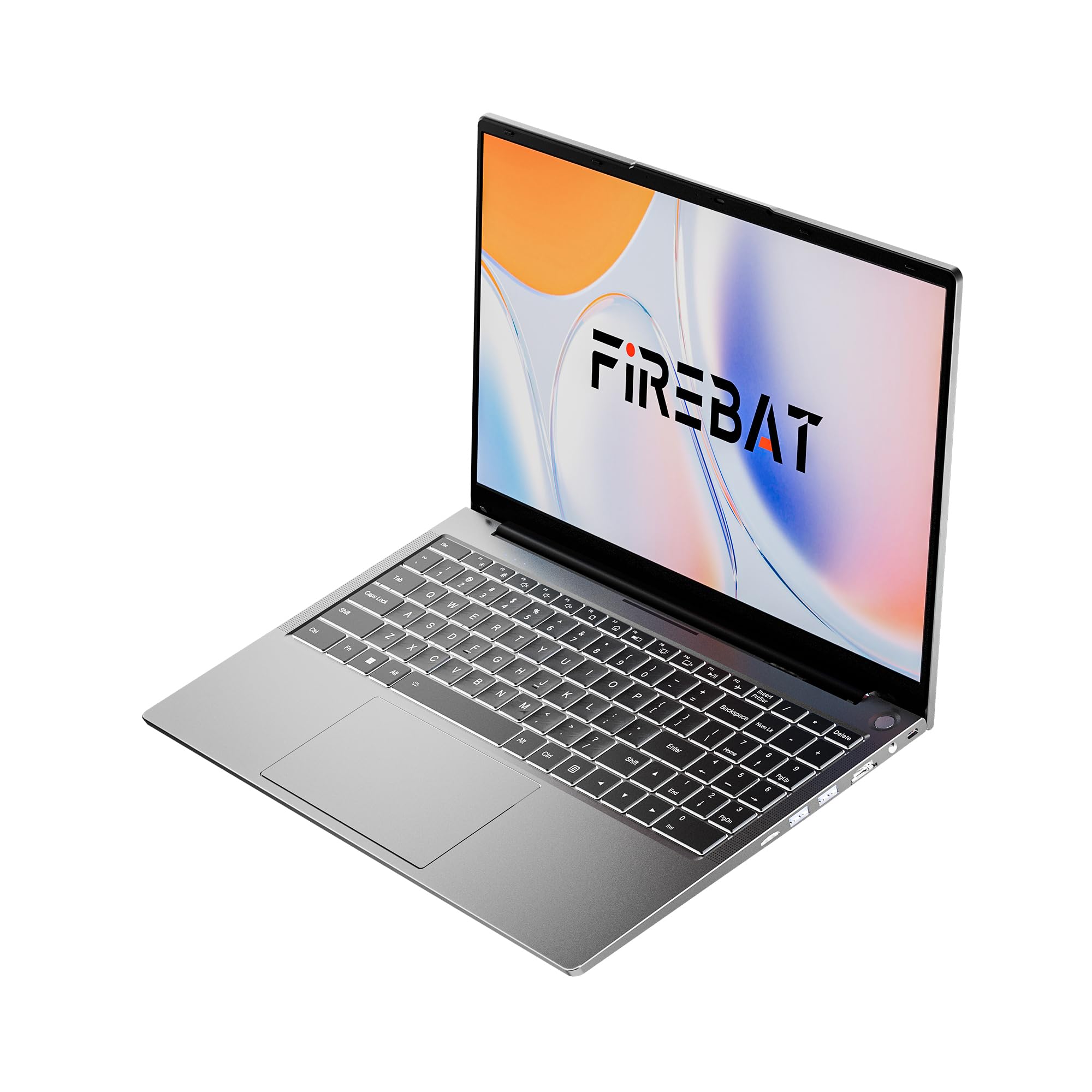
Figure 1: FIREBAT AS1 Laptop (Closed View)
Caratteristiche principali
- Processore: AMD Ryzen 5 7430U (6 core/12 thread, fino a 4.3 GHz)
- Display: 15.6-inch Full HD (1920x1080) IPS
- Memoria: 16GB DDR4 RAM (Expandable up to 64GB)
- Magazzinaggio: SSD M.2 da 512 GB (espandibile fino a 2 TB)
- Grafica: Grafica AMD Raon integrata
- Tastiera: Full-sized backlit keyboard with numeric keypad
- Connettività: Wi-Fi 6, Bluetooth 5.2, RJ45 Ethernet
- Porte: USB 3.2 Gen1 Type-A, USB 3.2 Gen1 Type-C (PD 100W, DP1.4), HDMI 1.4, SD Card Reader, 3.5mm Audio Jack
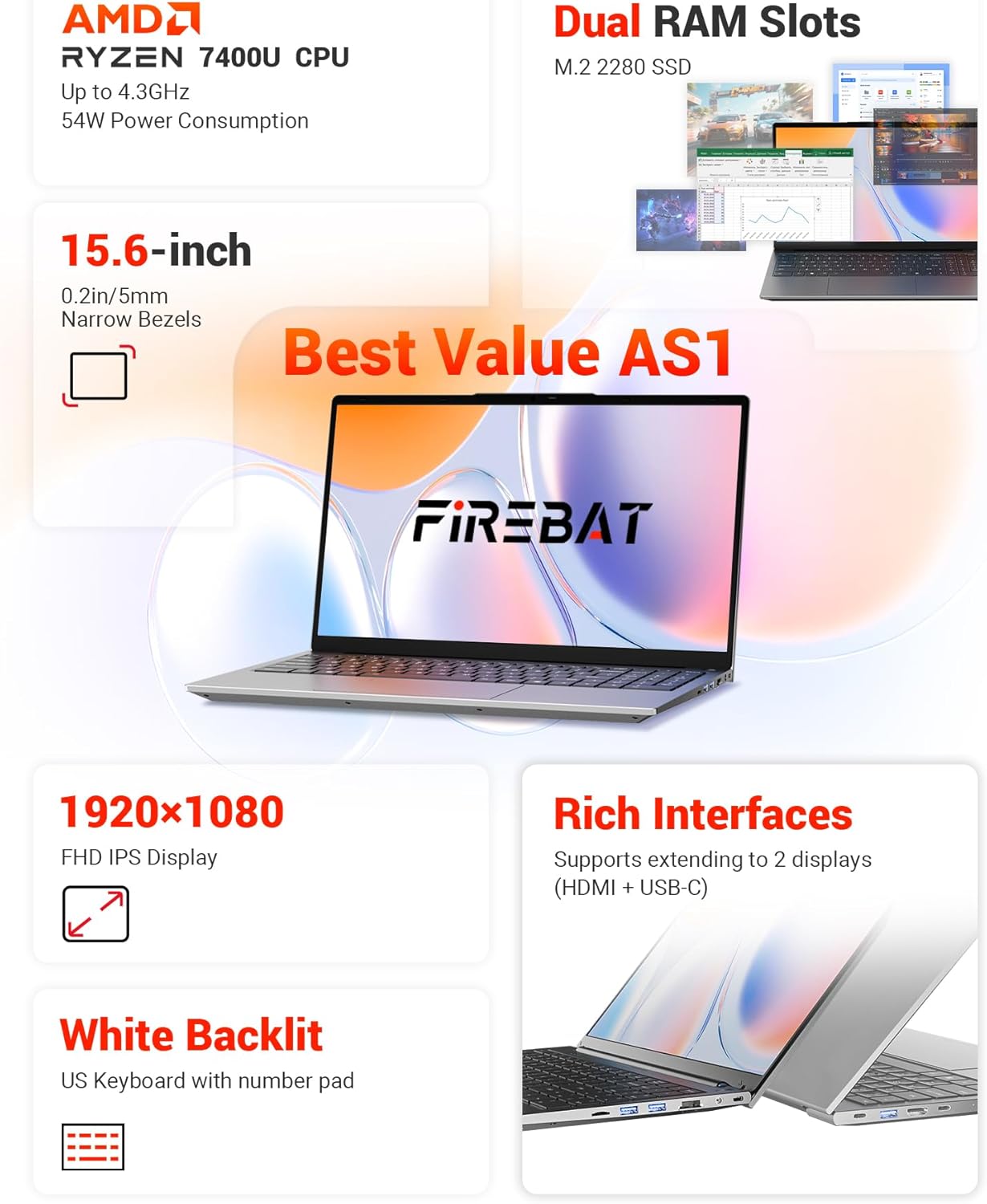
Figura 2: Oltreview of FIREBAT AS1 Laptop Features
Questa immagine fornisce una panoramica completaview of the FIREBAT AS1 laptop's core components and features, including the AMD Ryzen 7430U CPU, expandable dual RAM slots, M.2 2280 SSD support, 15.6-inch Full HD IPS display, white backlit keyboard with numeric pad, and various connectivity ports.

Figure 3: Ultra-Portable Design of FIREBAT AS1 Laptop
The image illustrates the laptop's ultra-portable design, emphasizing its compact 15.6-inch form factor, lightweight build at 3.7 lbs (1.69 kg), slim profile of 0.6 inches (15.9 mm), and a versatile 180-degree lay-flat hinge for flexible viewangoli di inclinazione.
Porte e connettori
The FIREBAT AS1 laptop offers a variety of ports for connecting peripherals and external displays:
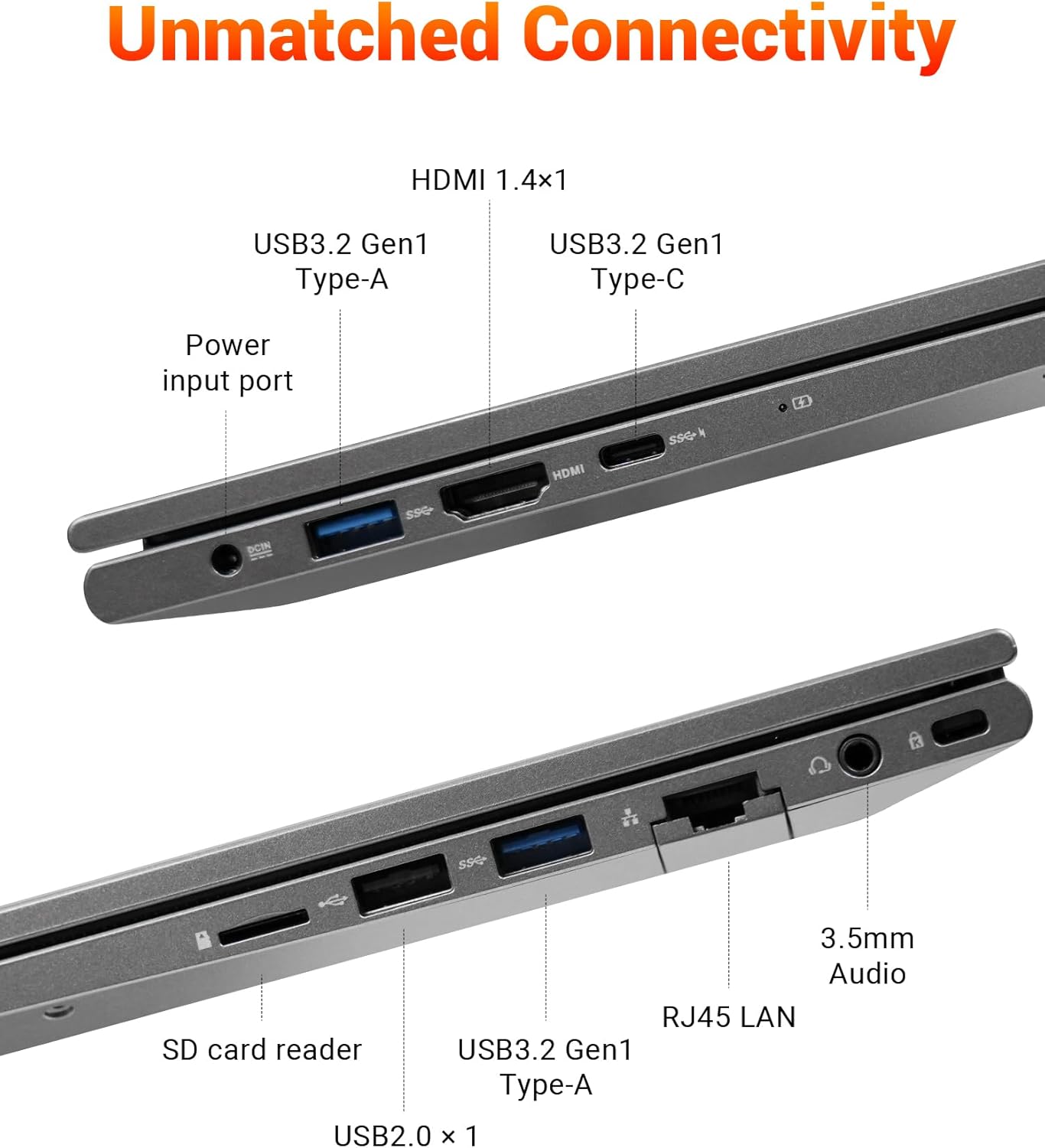
Figure 4: FIREBAT AS1 Laptop Connectivity Ports
This image details the comprehensive connectivity options available on the FIREBAT AS1 laptop. It highlights the various ports on both sides, including USB 3.2 Gen1 Type-A, HDMI 1.4, USB 3.2 Gen1 Type-C (supporting PD 100W and DP1.4), the power input port, an SD card reader, RJ45 LAN port, and a 3.5mm audio jack.
- Lato sinistro: Power Input, USB 3.2 Gen1 Type-A, HDMI 1.4, USB 3.2 Gen1 Type-C (Power Delivery & DisplayPort)
- Lato destro: USB 2.0 Type-A, SD Card Reader, RJ45 LAN, 3.5mm Audio Jack, USB 3.2 Gen1 Type-A
Impostare
Disimballaggio e accensione iniziale
- Estrarre con cautela il computer portatile e tutti gli accessori dalla confezione.
- Collegare l'adattatore di alimentazione alla porta di ingresso dell'alimentazione del laptop e quindi a una presa di corrente.
- Open the laptop lid. The laptop may power on automatically or you may need to press the power button located on the top right of the keyboard.
- Seguire le istruzioni visualizzate sullo schermo per completare la configurazione iniziale di Windows.
Connessione a una rete
- Wifi: Fare clic sull'icona Wi-Fi nella barra delle applicazioni, selezionare la rete desiderata, immettere la password e fare clic su Connetti.
- Collegamento Ethernet: Connect an Ethernet cable from your router or modem to the RJ45 LAN port on the right side of the laptop.
Istruzioni per l'uso
Accensione/spegnimento e modalità sospensione
- Accensione: Premere il pulsante di accensione.
- Fermare: Fare clic sul pulsante Start, quindi su Arresta > Arresta il sistema.
- Modalità risparmio: Chiudere il coperchio del laptop o fare clic sul pulsante Start, quindi su Alimentazione > Sospensione.
Tastiera e touchpad
- The laptop features a full-sized keyboard with a dedicated numeric keypad for efficient data entry.
- The keyboard is backlit. Use the function keys (Fn + Fx) to adjust backlight brightness or toggle it on/off.
- Il touchpad di precisione supporta i gesti multi-touch per la navigazione. Per la personalizzazione, consultare le impostazioni di Windows.
Collegamento di display esterni
The FIREBAT AS1 supports connecting up to two external displays simultaneously via HDMI and USB-C (DisplayPort Alt Mode).
- HDMI: Connect an HDMI cable from your monitor to the HDMI port on the left side of the laptop.
- USB-C: Connect a compatible USB-C to DisplayPort or USB-C to HDMI cable/adapter from your monitor to the USB-C port on the left side.
- Una volta connesso, premere Tasto Windows + P to select your display mode (Duplicate, Extend, Second screen only).
Video 1: FIREBAT AMD 7430U Laptop Computer Overview
Questo video fornisce una panoramica generaleview of the FIREBAT AS1 laptop, showcasing its design, display quality, and various features in action.
Manutenzione
Pulizia del portatile
- Utilizzare un panno morbido e privo di lanugine dampcon acqua o un detergente per schermi per pulire il display.
- Use a soft brush or compressed air to clean dust from the keyboard and ventilation grilles.
- Evitare l'uso di prodotti chimici aggressivi o materiali abrasivi.
Cura della batteria
- Per una durata ottimale della batteria, evitare di scaricarla completamente frequentemente.
- Quando non lo si utilizza per lunghi periodi, conservare il computer portatile in un luogo fresco e asciutto.
- Se si conserva la batteria per un lungo periodo, assicurarsi che sia carica al 50-70%.
RAM and SSD Upgrades
The FIREBAT AS1 laptop supports user-upgradable RAM and SSD. It features dual-channel RAM slots (up to 64GB) and an M.2 2280 SSD slot (up to 2TB).

Figura 5: Interno View con slot RAM e SSD
Un interno view of the FIREBAT AS1 laptop, illustrating the dual-channel DDR4 RAM slots, which can be upgraded to 64GB, and the M.2 2280 SSD slot, supporting NVMe/SATA drives up to 2TB for expanded storage.
Video 2: How to Add RAM to FIREBAT AS1 Laptop
Watch this video for a step-by-step guide on how to safely add or upgrade RAM modules in your FIREBAT AS1 laptop.
Nota: Opening the laptop for upgrades may require specific tools and care. Refer to the video and consult professional assistance if unsure.
Risoluzione dei problemi
Problemi comuni e soluzioni
- Il portatile non si accende:
- Assicurarsi che l'adattatore di alimentazione sia collegato saldamente sia al laptop sia a una presa di corrente funzionante.
- Verificare che la presa di corrente funzioni collegandovi un altro dispositivo.
- Se la batteria è completamente scarica, lasciarla caricare per qualche minuto prima di provare ad accenderla.
- Nessuna visualizzazione sullo schermo:
- Assicurarsi che il portatile sia acceso.
- Se è collegato un monitor esterno, provare a scollegarlo.
- Adjust display brightness using the function keys.
- Problemi di connettività Wi-Fi:
- Assicurati che il Wi-Fi sia abilitato nelle impostazioni di Windows.
- Riavvia il router e il modem.
- Controlla se altri dispositivi riescono a connettersi alla stessa rete Wi-Fi.
- La tastiera o il touchpad non rispondono:
- Riavviare il portatile.
- Ensure no external devices are interfering.
Per ulteriore assistenza, fare riferimento alle informazioni di supporto fornite nella sezione Garanzia e supporto.
Specifiche
| Caratteristica | Specificazione |
|---|---|
| Marca | PIPISTRELLO |
| Numero di modello | AS1 7430U |
| Sistema operativo | Default (Windows) |
| Modello CPU | Processore AMD Ryzen 5 7430U |
| Velocità della CPU | Fino a 4.3 GHz |
| Numero di processori | 6 |
| Memoria RAM installata | 16 GB DDR4 |
| Dimensione massima della memoria RAM | 64 GB |
| Descrizione del disco rigido | 512 GB SSD (Expandable to 2TB) |
| Dimensioni dello schermo | 15.6 pollici |
| Risoluzione massima dello schermo | 1920x1080 pixel |
| Tipo di visualizzazione | Informazione pubblica |
| Coprocessore grafico | Scheda grafica AMD Radeon |
| Tecnologia di connettività | Bluetooth, Ethernet, HDMI, USB, Wi-Fi |
| Compatibilità wireless | 802.11ax (Wi-Fi 6) |
| Porte USB totali | 4 |
| Numero totale di porte HDMI | 1 |
| Dimensioni dell'articolo | 14 x 9 x 0.78 pollici |
| Peso dell'articolo | 3.69 libbre |
| Colore | Grigio |
Garanzia e supporto
Informazioni sulla garanzia
The FIREBAT AS1 Laptop comes with a Garanzia del produttore di 1 annoLa presente garanzia copre i difetti di materiali e fabbricazione in condizioni di normale utilizzo. Si prega di conservare la prova d'acquisto per eventuali reclami in garanzia.
Assistenza clienti
For technical support, warranty inquiries, or any questions regarding your FIREBAT AS1 Laptop, please contact FIREBAT customer service:
- E-mail: supporto@firebatpc.com
- Websito: www.firebatpc.com