
1. Prodotto finitoview
The ATK N9 Tri-Mode Gaming Headset is designed for gamers requiring flexible connectivity, clear audio, and reliable communication across multiple devices. It supports 3.5 mm wired, 2.4G wireless, and Bluetooth connections, allowing seamless switching between gaming consoles, PC, and mobile devices. Stereo-tuned dynamic drivers deliver balanced sound, enhancing in-game audio cues such as footsteps, gunfire, and environmental effects. The detachable noise-canceling microphone improves voice clarity for team communication, online gaming, and voice calls. Its over-ear design, with soft ear cushions and an adjustable headband, ensures a comfortable fit for extended gaming sessions. The headset is compatible with PS5, PS4, PC, Nintendo Switch, and mobile devices. For Xbox Series X|S, audio and microphone functions are supported via the 3.5 mm wired connection.

2. Contenuto della confezione
Verifica che tutti gli articoli elencati di seguito siano inclusi nel tuo pacchetto:
- ATK N9 Pro/White Gaming Headset
- Microfono staccabile con cancellazione del rumore
- Cavo di ricarica USB-C
- Cavo audio da 3.5 mm
- 2.4G Wireless USB Adapter
- Manuale dell'utente (questo documento)

3. Configurazione iniziale
3.1. Caricare l'auricolare
Before first use, fully charge the headset using the provided USB-C charging cable. Connect the USB-C end to the headset's charging port and the USB-A end to a compatible USB power source (e.g., PC, wall adapter). The LED indicator will show charging status.
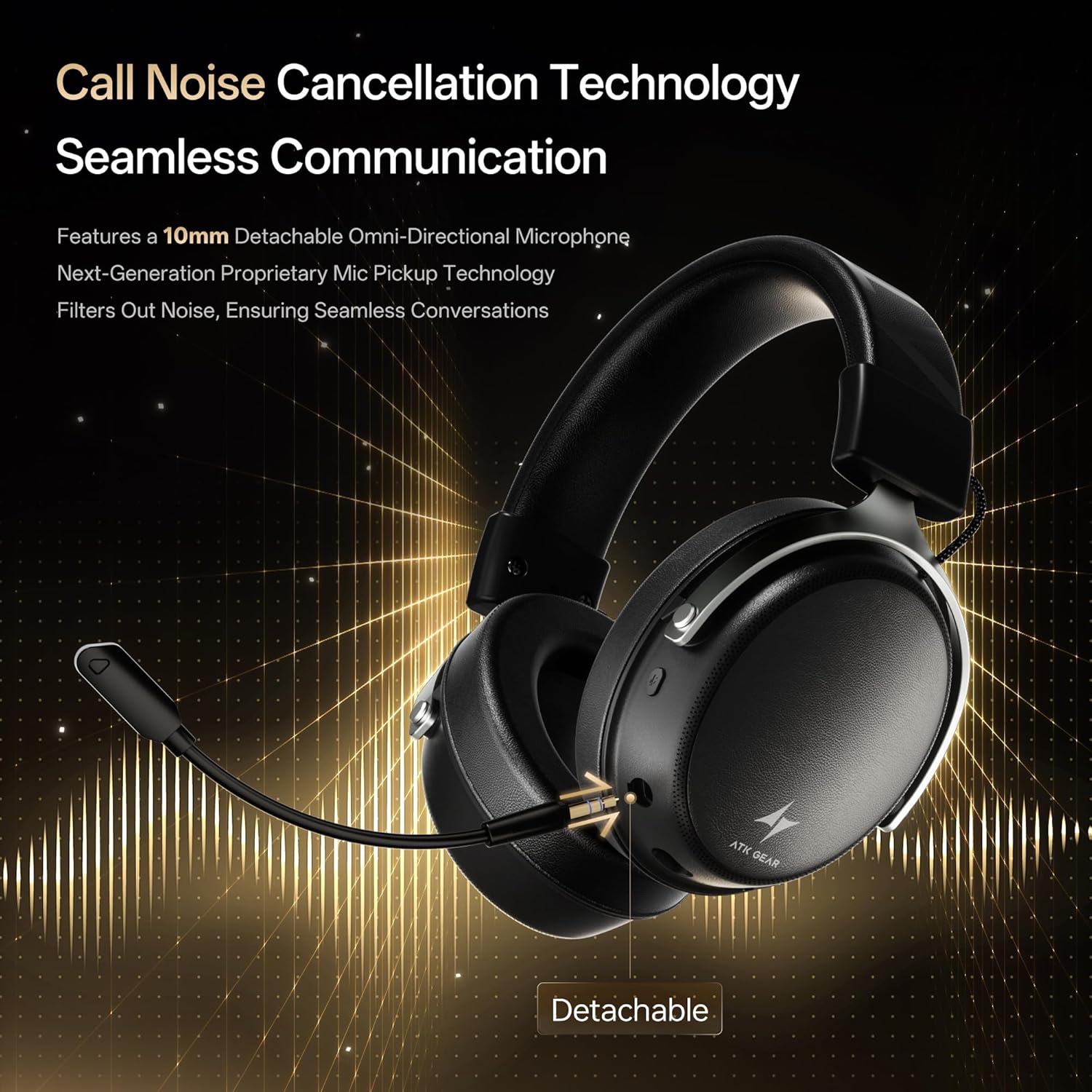
3.2. Collegamento del microfono
Insert the detachable boom microphone into the microphone port on the left earcup until it clicks into place. Ensure it is securely connected for optimal voice pickup.
3.3. Opzioni di connettività
The ATK N9 Pro/White headset offers three connectivity modes:
- Modalità wireless 2.4G: For PC, PS4, PS5, and Nintendo Switch (docked mode).
- Plug the 2.4G wireless USB adapter into an available USB port on your device.
- Accendi l'auricolare.
- Switch the headset to 2.4G mode using the mode switch. The headset will automatically pair with the adapter.
- Adjust audio output settings on your device if necessary to select the headset.
- Modalità Bluetooth: For mobile devices, PC, and Nintendo Switch (handheld mode).
- Power on the headset and switch to Bluetooth mode. The LED indicator will flash, indicating pairing mode.
- On your device, go to Bluetooth settings and select "ATK N9 Pro" from the list of available devices.
- Una volta connesso, l'indicatore LED emetterà una luce fissa.
- Modalità cablata da 3.5 mm: For Xbox Series X|S, PS4, PS5, PC, Nintendo Switch, and mobile devices.
- Collegare un'estremità del cavo audio da 3.5 mm al jack da 3.5 mm delle cuffie.
- Connect the other end to the 3.5mm audio port on your device (e.g., controller, PC audio jack).
- The headset will operate in wired mode, bypassing wireless functions.

4. Istruzioni per l'uso
4.1. Controlli delle cuffie
The ATK N9 Pro/White headset features intuitive controls located on the earcups:
- Pulsante di accensione: Press and hold to power on/off. Short press for play/pause (in 2.4G/Bluetooth mode).
- Interruttore di modalità: Toggle between 2.4G wireless, Bluetooth, and wired modes.
- Volume Up/Down Wheel: Ruotare per regolare il volume dell'audio.
- Pulsante di disattivazione del microfono: Premere per disattivare/riattivare il microfono.
- Spatial Audio Button: Press to activate/deactivate 3D Spatial Audio.
- Mic Monitoring Button: Press to enable/disable microphone monitoring (sidetone).
4.2. Utilizzo del microfono
The detachable noise-canceling microphone is designed for clear communication. Position the microphone approximately 1-2 inches from your mouth for optimal voice pickup. Use the microphone mute button on the headset to quickly mute your voice when needed.
4.3. Regolazione della vestibilità
The headset features an adjustable headband and soft ear cushions for comfort. Extend or retract the headband to achieve a snug yet comfortable fit. The earcups are designed to fully enclose your ears for passive noise isolation and comfort during long gaming sessions.
5. Specifiche tecniche
| Caratteristica | Specificazione |
|---|---|
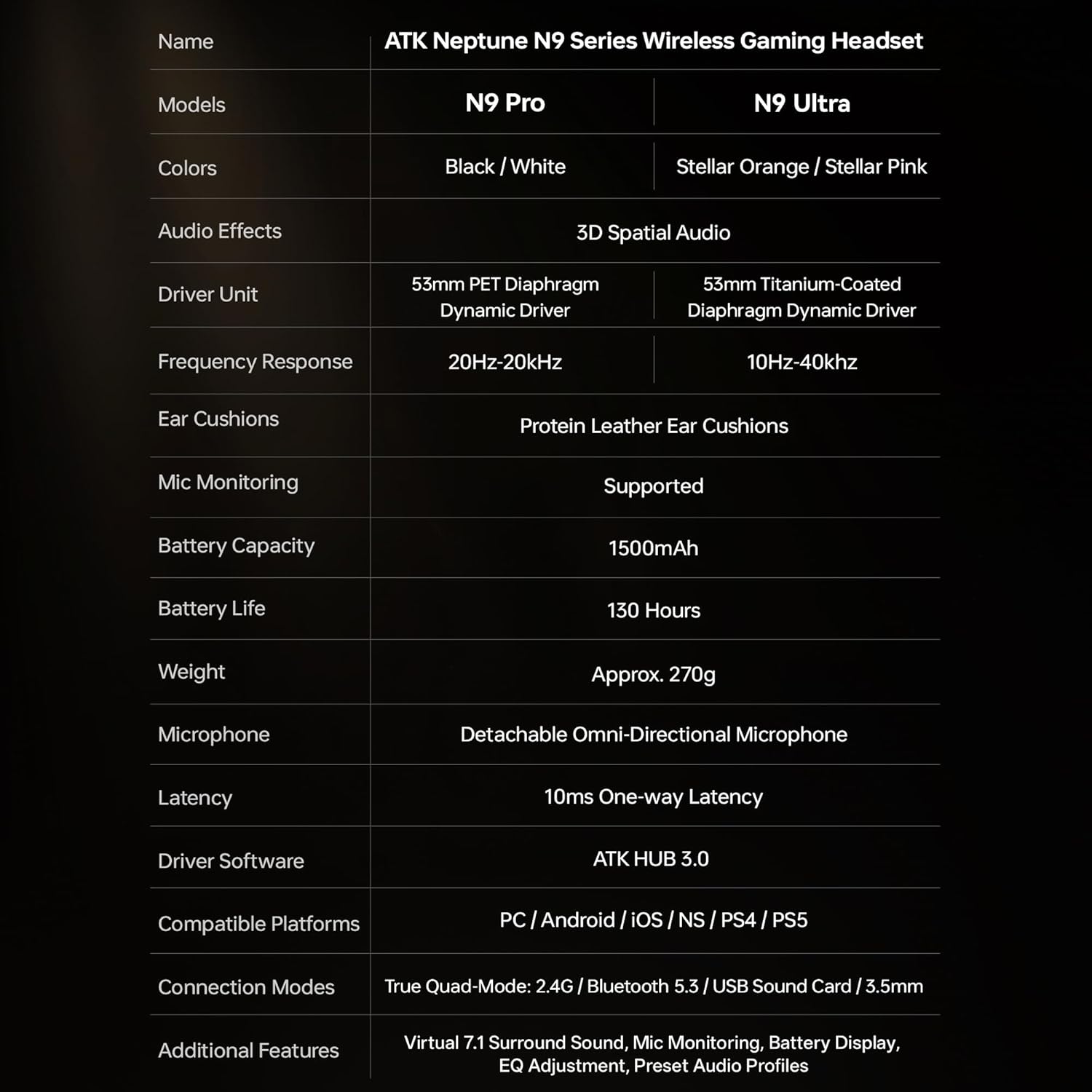
| Nome del modello | ATK N9 Pro |
| Connettività | 3.5mm Wired, 2.4G Wireless, Bluetooth 5.3 |
| Tipo di conducente | Driver dinamico |
| Dimensioni del conducente | 53 millimetri |
| Gamma di frequenza | 20 Hz - 20,000 Hz |
| Impedenza | 64 Ohm |
| Microfono | Detachable Noise-Canceling Omni-Directional |
| Capacità della batteria | 1500 mAh |
| Durata della batteria | Fino a 130 ore |
| Latency (2.4G) | 10 Milliseconds (one-way) |
| Peso | 270 grammi |
| Posizionamento dell'orecchio | Sopra l'orecchio |
| Dispositivi compatibili | PS5, PS4, PC, Nintendo Switch, Mobile Devices, Xbox Series X|S (wired) |
| Caratteristiche aggiuntive | 3D Spatial Audio, Mic Monitoring, Volume Control |

6. Cura e manutenzione
- Pulizia: Per pulire le cuffie, utilizzare un panno morbido e asciutto. Evitare l'uso di prodotti chimici aggressivi o materiali abrasivi.
- Magazzinaggio: Conservare le cuffie in un luogo fresco e asciutto, lontano dalla luce solare diretta e da temperature estreme.
- Cura della batteria: Per prolungare la durata della batteria, evitare di scaricare completamente le cuffie frequentemente. Caricarle regolarmente, anche se non vengono utilizzate per periodi prolungati.
- Resistenza all'acqua: Il visore non è resistente all'acqua. Evitare l'esposizione ai liquidi.
7. Risoluzione Dei Problemi
7.1. Nessun audio/volume basso
- Ensure the headset is powered on and connected in the correct mode (2.4G, Bluetooth, or 3.5mm wired).
- Controlla la rotellina del volume sull'auricolare e le impostazioni del volume del tuo dispositivo.
- For wireless modes, ensure the headset is paired correctly and selected as the audio output device in your system settings.
- Se si utilizza un cavo da 3.5 mm, assicurarsi che il cavo sia completamente inserito sia nell'auricolare che nel dispositivo.
7.2. Microfono non funzionante
- Assicurarsi che il microfono sia fissato saldamente all'auricolare.
- Controllare che il pulsante di disattivazione del microfono sull'auricolare sia attivato.
- Verifica che il microfono dell'auricolare sia selezionato come dispositivo di input nelle impostazioni audio del tuo dispositivo.
- For Xbox Series X|S, ensure you are using the 3.5mm wired connection for microphone support.
7.3. Problemi di connettività
- Wireless 2.4G: Ensure the USB adapter is firmly plugged in. Try a different USB port.
- Bluetooth: Ensure the headset is in pairing mode. Forget the device on your phone/PC and re-pair. Keep the headset within the 5-meter Bluetooth range.
- Generale: Power cycle both the headset and your connected device.
8. Garanzia e supporto
8.1. Informazioni sulla garanzia
The ATK N9 Pro/White Gaming Headset comes with a Garanzia di 6 mesi dalla data di acquisto. La presente garanzia copre difetti di fabbricazione e di lavorazione in condizioni di normale utilizzo. Non copre danni causati da uso improprio, incidenti, modifiche non autorizzate o normale usura.
8.2. Assistenza clienti
For further assistance, technical support, or warranty claims, please contact ATK customer service through the retailer where the product was purchased or visit the official ATK websito per le informazioni di contatto del supporto.