
1. Introduzione
This manual provides essential instructions for the assembly, operation, and maintenance of your Merax Twin Size Bunk Bed with Two Built-in Gaming Desks. This innovative bunk bed is designed to maximize space efficiency, offering a comfortable sleeping area, dual gaming desks, integrated USB charging ports, and pegboard organizers. Please read this manual thoroughly before assembly and use to ensure safe and correct operation.
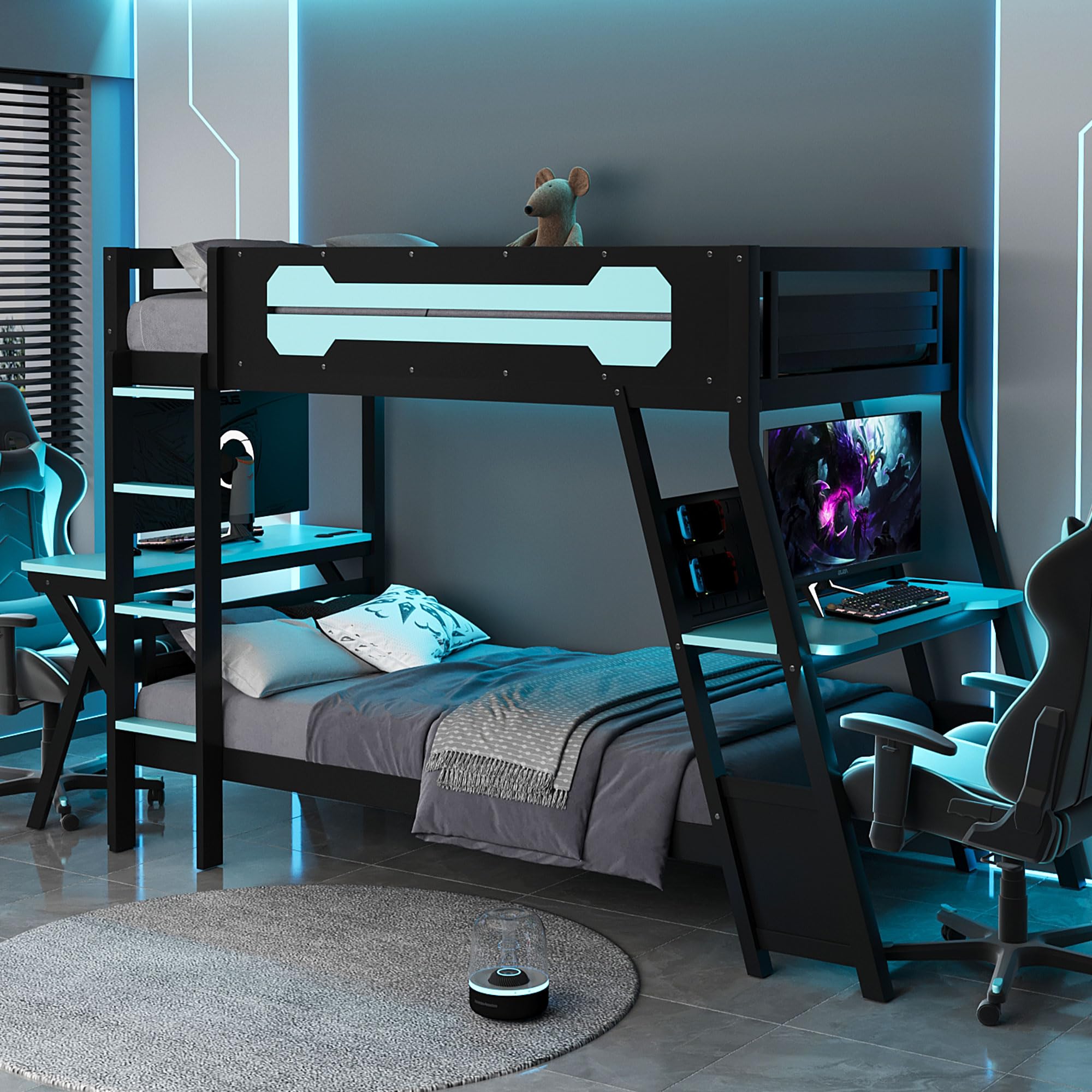
Figure 1: Merax Twin Size Bunk Bed with Gaming Desks (Model ZT00571).
2. Informazioni sulla sicurezza
Adherence to these safety guidelines is crucial for preventing injury and ensuring the longevity of your bunk bed.
- Leggi tutte le istruzioni: Before assembly and use, carefully read and understand all instructions provided in this manual and any accompanying documentation.
- Assemblea per adulti richiesta: This product requires adult assembly. Ensure all parts are correctly installed and secured before use.
- Capacità di peso: Do not exceed the recommended weight capacity for each bunk. Refer to the Specifications section for details.
- Sicurezza della cuccetta superiore: The top bunk is not suitable for children under 6 years of age. Always use the provided ladder for access to the top bunk.
- Parapetti: Ensure guardrails are always in place on the top bunk.
- Dimensioni del materasso: Use only mattresses of the specified size to prevent gaps that could lead to entrapment.
- Niente scherzi: Vietare i giochi violenti sopra o sotto il letto.
- Ventilazione: Ensure adequate ventilation around the USB charging ports to prevent overheating.
- Ispezione regolare: Controllare periodicamente tutti i bulloni, le viti e i collegamenti per assicurarsi che siano ben serrati. Serrare nuovamente se necessario.
- Materiali infiammabili: Keep flammable materials away from the bed and electrical components.
3. Contenuto della confezione
Before beginning assembly, verify that all components listed in the separate hardware and parts list (typically included in the product packaging) are present and undamaged. If any parts are missing or damaged, do not proceed with assembly. Contact customer support immediately.
I componenti tipici includono:
- Bed frame components (headboards, footboards, side rails, slats)
- Componenti della scala
- Gaming desk components (2 sets)
- Pegboard organizers (2 sets)
- USB charging port units (2 units)
- Pacchetto di ferramenta (viti, bulloni, dadi, rondelle, chiave a brugola)
- Istruzioni di montaggio (documento separato)
4. Istruzioni per l'installazione e il montaggio
Assembly of the Merax Twin Size Bunk Bed requires two adults. Follow the detailed step-by-step instructions provided in the separate assembly manual included with your product. The general steps are outlined below:
- Preparare l'area: Clear a spacious area for assembly. Lay out all parts on a soft, clean surface to prevent scratches.
- Montare il telaio inferiore del letto: Connect the side rails to the headboard and footboard of the lower bed using the provided hardware.
- Installare le doghe inferiori del letto: Secure the wooden slats to the lower bed frame.
- Montare il telaio superiore del letto: Connect the side rails to the headboard and footboard of the upper bed.
- Installare le doghe superiori del letto: Secure the wooden slats to the upper bed frame.
- Attacca la scala: Securely attach the ladder to the designated side of the bunk bed.
- Assemble Gaming Desks: Follow the specific instructions to assemble the two gaming desks.
- Attach Desks and Pegboards: Mount the assembled gaming desks and pegboard organizers to the bunk bed frame as indicated in the assembly manual.
- Install USB Ports: Integrate the USB charging port units into the designated slots on the desks. Ensure proper cable routing and connection to a power source (if applicable, refer to specific wiring instructions).
- Ispezione finale: Double-check all connections, bolts, and screws to ensure they are tight and secure. Ensure the bed is stable and level.

Figura 2: Un assemblato view of the bunk bed, highlighting the integrated desks and pegboards.
5. Istruzioni per l'uso
This section details the use of the integrated features of your Merax bunk bed.
5.1. Gaming Desks
The bunk bed features two built-in gaming desks, one on each side of the lower bunk. These desks provide a dedicated space for computers, monitors, and other gaming or study equipment. Ensure that the weight placed on each desk does not exceed its capacity (refer to specifications or separate desk manual if provided).

Figure 3: Detail of the integrated gaming desk with USB ports.
5.2. Porte di ricarica USB
Each gaming desk is equipped with integrated USB charging ports. To use them:
- Ensure the bunk bed's power cable (if applicable) is securely plugged into a functional wall outlet.
- Connect your USB-powered devices (e.g., headsets, controllers, tablets, smartphones) to the USB ports.
- The ports are designed for charging and may also support data transfer depending on the specific model.
Attenzione: Do not overload the USB ports. Avoid using damaged cables or adapters. Disconnect devices when not in use.
5.3. Pegboard Organizer
A pegboard organizer is located above each desk. This system allows for customizable storage of gaming accessories, headphones, controllers, and other small items using standard pegboard hooks (not included unless specified). Arrange your items to keep your workspace tidy and efficient.
6. Manutenzione
Una manutenzione regolare contribuirà a preservare le condizioni e la sicurezza del tuo letto a castello.
- Pulizia: Wipe down the bed frame, desks, and pegboards with a soft, damp panno. Evitare prodotti chimici aggressivi o detergenti abrasivi che potrebbero danneggiare la finitura.
- Controllo hardware: Periodically (e.g., monthly or quarterly) inspect all bolts, screws, and connections. Tighten any loose hardware to ensure structural integrity.
- Cura della porta USB: Keep USB ports free of dust and debris. Do not force plugs into the ports.
- Cura del legno: For the wood components, avoid prolonged exposure to direct sunlight or extreme temperature changes, which can cause warping or cracking.
7. Risoluzione Dei Problemi
Questa sezione affronta i problemi più comuni che potresti incontrare.
| Problema | Possibile causa | Soluzione |
|---|---|---|
| Il letto sembra traballante o instabile. | Hardware sciolto. | Inspect all bolts and screws. Tighten any that are loose. Ensure the bed is on a level surface. |
| Le porte USB non sono dispositivi di ricarica. | Power cable disconnected; faulty device cable; overloaded ports. | Ensure the bed's power cable is securely plugged in. Try a different USB cable or device. Avoid connecting too many high-power devices simultaneously. |
| Le parti non si allineano durante il montaggio. | Orientamento errato delle parti; difetto di fabbricazione. | Review the assembly manual to ensure parts are oriented correctly. Do not force parts. If a defect is suspected, contact customer support. |
If you encounter issues not listed here or require further assistance, please contact Merax customer support.
8. Specifiche
| Caratteristica | Dettaglio |
|---|---|
| Numero di modello | Numero di modello: ZT00571 |
| Marca | Merax |
| Tipo | Twin Size Bunk Bed |
| Colore (come reviewndr) | Nuvola Blu |
| Materiale | Legna |
| Dimensioni del prodotto (L x P x A) | 107.3" x 41.1" x 65" |
| Peso dell'articolo | 80 libbre |
| Caratteristiche speciali | Two Built-in Gaming Desks, Integrated USB Desktop Ports, Pegboard Organizer, No Box Spring Needed, Space Saving |
| Dimensioni del materasso compatibili | Gemello |
| Codice GTIN (UPC) | 198573397679 |

Figure 4: Product dimensions for the Merax Twin Size Bunk Bed.
9. Garanzia e supporto
For detailed warranty information, please refer to the warranty card included with your product or visit the official Merax website. Merax typically offers a limited warranty covering manufacturing defects. Keep your proof of purchase for warranty claims.
For customer support, missing parts, or technical assistance, please contact Merax directly through their official website or the contact information provided in your product packaging. When contacting support, please have your model number (ZT00571) and purchase date readily available.
Merax Official Websito: Visita il negozio Merax su Amazon (per informazioni generali sul marchio)