
1. Prodotto finitoview
The Hunter ZenTech 52 Inch Smart Ceiling Fan (Model 53638) is designed for both indoor and covered outdoor spaces, offering quiet, efficient performance with advanced smart home integration. This 5-blade fan features a slim DC motor, adjustable LED lighting with TrueLight technology, and Wi-Fi connectivity for control via the HunterSMART app, Amazon Alexa, Google Assistant, and Apple HomeKit. It is ENERGY STAR certified and damp-rated for versatile use.
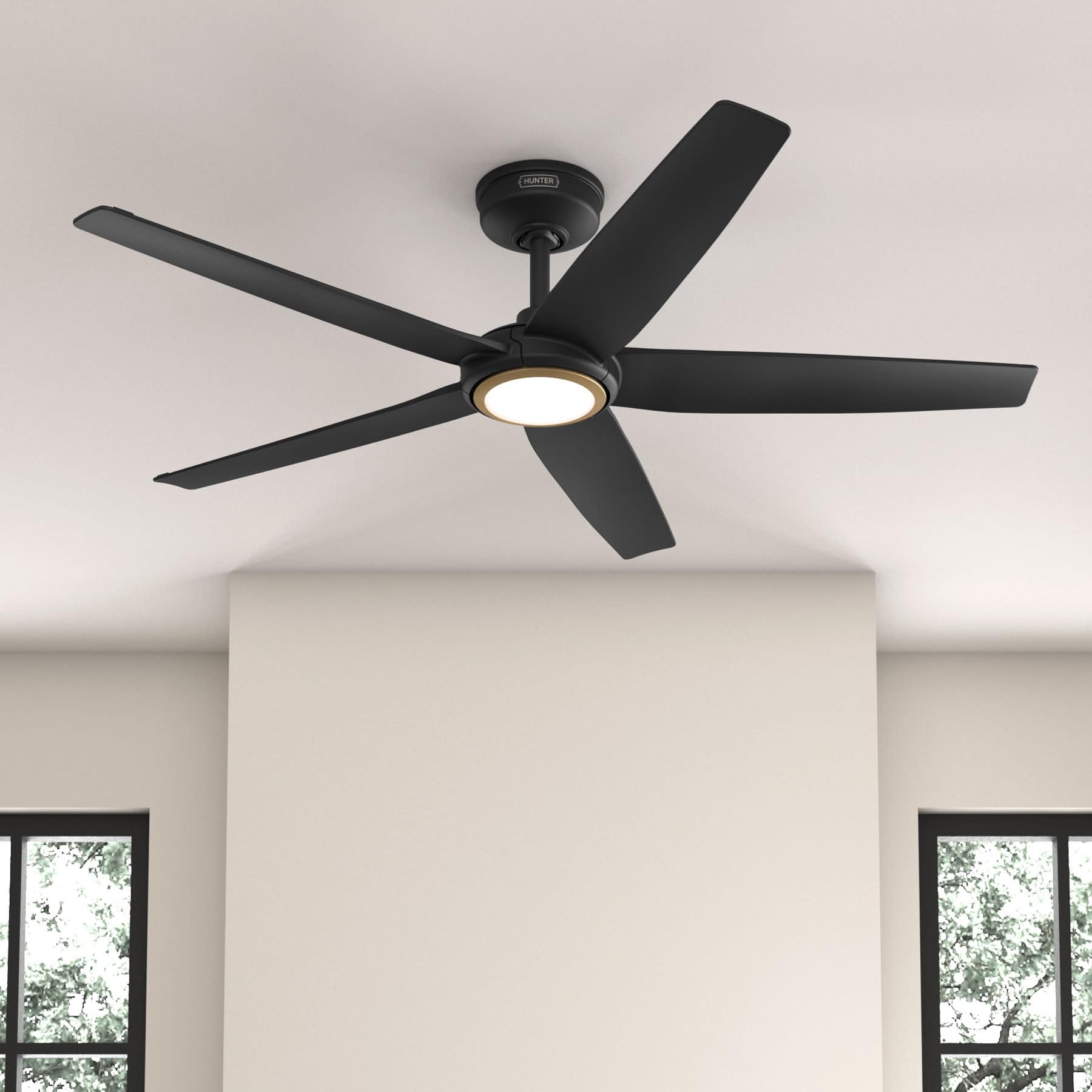
Figure 1: Hunter ZenTech 52 Inch Smart Ceiling Fan (Matte Black)
Caratteristiche principali:
- Progettazione avanzata: Ultra-slim DC motor for powerful, quiet airflow and a modern aesthetic.
- Integrazione della casa intelligente: HunterSMART technology for app and voice control via Amazon Alexa, Google Assistant, and Apple HomeKit.
- Illuminazione LED regolabile: TrueLight LED offers 10 brightness levels and 10 color temperatures, protected by a durable Duralight lens.
- SureSpeed Guarantee: Delivers strong, consistent airflow with quiet, wobble-free performance.
- Efficienza energetica: ENERGY STAR certified reversible 6-speed DC motor.
- Damp Valutazione: Suitable for indoor and covered outdoor areas.
2. Importanti istruzioni di sicurezza
Leggere attentamente tutte le istruzioni prima di iniziare l'installazione. Il mancato rispetto di queste istruzioni potrebbe causare scosse elettriche, incendi o lesioni personali.
- Prima di procedere all'installazione o alla manutenzione, scollegare sempre l'alimentazione dall'interruttore principale.
- Assicurarsi che tutti i collegamenti elettrici siano conformi alle normative e alle ordinanze locali. Se non si ha familiarità con i cablaggi elettrici, consultare un elettricista qualificato.
- The mounting structure must be capable of supporting the fan's weight (approximately 14.11 lbs).
- Do not bend blade brackets during installation or cleaning.
- Tenere le mani lontane dalle pale del ventilatore quando questo è in funzione.
- Questo ventilatore è damp-rated for use in covered outdoor areas but should not be exposed directly to water.
3. Contenuto della confezione
Prima di iniziare l'installazione, verificare che tutti i componenti elencati di seguito siano presenti nel pacchetto.
- Alloggiamento del motore del ventilatore da soffitto
- 5 Fan Blades
- Light Kit with Duralight Lens
- Asta di prolunga da 6 pollici
- Tettuccio e staffa di montaggio
- Telecomando palmare
- Pacchetto hardware (viti, rondelle, dadi per cavi)

Figure 2: ZenTech 52 Inch Fan Components
4. Guida all'installazione
Professional installation is recommended. Ensure the power is OFF at the circuit breaker before starting.
4.1 Montaggio della ventola
- Secure the mounting bracket to the ceiling junction box. The junction box must be listed for fan support.
- Assemble the downrod (6-inch included, compatible with up to 24-inch downrods) to the fan motor housing.
- Hang the fan assembly from the mounting bracket.
- Complete electrical wiring connections as per the wiring diagram provided in the full manual.
- Fissare le pale della ventola all'alloggiamento del motore.
- Install the light kit and Duralight lens.

Figure 3: ZenTech Fan installed in a covered outdoor space
5. Istruzioni per l'uso
The ZenTech fan can be operated using the included handheld remote control or through the HunterSMART app.
5.1 Funzionamento del telecomando
- Accensione/spegnimento ventola: Premere il pulsante della ventola per accenderla o spegnerla.
- Velocità della ventola: Utilizzare i pulsanti di velocità per scorrere tra 6 velocità della ventola.
- Luce accesa/spenta: Premere il pulsante della luce per accendere o spegnere la luce.
- Oscuramento della luce: Tieni premuto il pulsante della luce per attenuare o aumentare la luminosità.
- Temperatura del colore: Press the color temperature button to cycle through different color temperatures (warm to cool).
- Funzione inversa: Press the reverse button to change the fan's direction for seasonal use.
5.2 LED Light Control (TrueLight Technology)
The TrueLight LED system allows for precise control over your lighting environment. You can select from 10 brightness levels and 10 color temperatures to match your preference.

Figure 4: TrueLight LED Technology for adjustable lighting
6. Integrazione della casa intelligente
The ZenTech fan features HunterSMART technology, enabling seamless integration with popular smart home ecosystems.
6.1 Connecting to HunterSMART App
- Download the HunterSMART app from your device's app store.
- Follow the in-app instructions to create an account and add your ZenTech fan.
- Ensure your fan is powered on and your mobile device is connected to a 2.4 GHz Wi-Fi network during setup.
6.2 Compatibilità con il controllo vocale
Once connected to the HunterSMART app, you can link your fan to:
- Amazon Alexa
- Assistente Google
- Apple HomeKit
Refer to the respective smart home platform's instructions for linking smart devices.

Figure 5: HunterSMART Control Options
7. Cura e manutenzione
Una manutenzione regolare garantisce prestazioni ottimali e longevità del ventilatore da soffitto.
- Pulizia: Dust the fan blades and motor housing periodically with a soft, lint-free cloth. For damp-rated areas, wipe down with a slightly damp cloth, then dry thoroughly. Do not use abrasive cleaners or solvents.
- Controllo di tenuta: Annually, check all screws and connections for tightness. Vibrations can cause them to loosen over time.
- Kit luci: The LED light source is designed for long life and is not user-serviceable.
8. Guida alla risoluzione dei problemi
If you encounter issues with your ZenTech ceiling fan, refer to the table below for common problems and solutions.
| Problema | Possibile causa | Soluzione |
|---|---|---|
| La ventola non si avvia | Nessuna alimentazione al ventilatore; Collegamenti dei cavi allentati; Batteria del telecomando scarica. | Controllare l'interruttore automatico; verificare che tutti i collegamenti dei cavi siano saldi; sostituire la batteria del telecomando. |
| La luce non funziona | No power to the light kit; Loose wire connection; Light kit malfunction. | Check circuit breaker; Verify light kit wiring; Contact customer support if LED is faulty. |
| La ventola traballa | Loose blades or blade holders; Improperly balanced blades; Loose mounting bracket. | Ensure all blade screws are tight; Use a blade balancing kit (not included); Tighten mounting bracket screws. |
| Le funzionalità intelligenti non si connettono | Incorrect Wi-Fi network (not 2.4 GHz); Incorrect app setup; Router issues. | Ensure connection to 2.4 GHz Wi-Fi; Re-attempt app setup; Restart router and fan. |
9. Specifiche tecniche
| Specificazione | Dettaglio |
|---|---|
| Marca | Cacciatore |
| Nome del modello | ZenTech |
| Numero di modello | 53638 |
| Misurare | 52 pollici |
| Colore | Nero opaco |
| Dimensioni del prodotto | 52"P x 52"L x 11.78"A |
| Peso dell'articolo | 14.11 libbre |
| Numero di lame | 5 |
| Tipo di motore | DC |
| Numero di velocità | 6 |
| Capacità del flusso d'aria | 5443.94 piedi cubi al minuto |
| Cosatage | 17 watt |
| Voltage | 120 Volt |
| Uso interno/esterno | Interno, esterno coperto (Damp Valutato) |
| Caratteristiche speciali | LED Light, Quiet Operation, Water Resistant, Wi-Fi Enabled |
| Tipo di controllore | Controllo app, controllo remoto |
| Certificazioni | Certificazione ETL, Energy Star, FCC |
| Lunghezza dell'asta | 6 pollici (inclusi) |
10. Informazioni sulla garanzia
The Hunter ZenTech 52 Inch Smart Ceiling Fan is backed by Hunter's commitment to quality. It includes a limited lifetime motor warranty, ensuring long-term confidence in your product. For full warranty details and terms, please refer to the documentation included with your fan or visit the official Hunter Fan Company websito.
11. Assistenza clienti
If you require further assistance, have questions about installation, operation, or troubleshooting that are not covered in this manual, please contact Hunter Fan Company customer support. You can typically find contact information on the official Hunter Fan Company websito o all'interno della confezione del prodotto.