
1. Informazioni importanti sulla sicurezza
Leggere attentamente tutte le istruzioni di sicurezza prima di utilizzare la stampante per garantirne un funzionamento sicuro e corretto. Conservare il presente manuale per riferimento futuro.
- Non esporre la stampante all'acqua o a umidità eccessiva.
- Avoid extreme temperatures. Operate and store the printer in a cool, dry environment.
- Use only the provided charging cable and approved power adapters.
- Non tentare di smontare o riparare la stampante da soli. Contattare l'assistenza clienti per ricevere assistenza.
- Tenere la stampante lontano dalla portata dei bambini.
2. Prodotto finitoview
The Bewinner Portable Pocket Printer is a compact and lightweight thermal label printer designed for on-the-go printing needs. It connects wirelessly to smartphones and tablets via an app, offering a variety of templates for labels, lists, and messages.

The Bewinner Portable Pocket Printer, a compact thermal label printer.
Caratteristiche principali:
- Design portatile: Compatto e leggero, facile da trasportare.
- Connettività wireless: Seamless connection to iOS and Android smartphones via app.
- Rich Functions: One-click printing with various templates for labels, lists, and messages.
- Uso multiuso: Ideal for clothing and jewelry labels, price tags, address labels, QR codes, and study aids.
- Safe Printing: Inkless thermal printing technology for clear prints without odors.
3. Contenuto della confezione
Assicurarsi che tutti gli articoli siano presenti nel pacco:
- 1 x Portable Thermal Printer
- 1 x Cavo di ricarica
- 1 x Manuale utente
4. Impostazione
4.1 Caricamento della stampante
Before initial use, fully charge the printer. Connect the provided Type-C charging cable to the printer's charging port and plug the other end into a compatible USB power adapter (not included).
- La spia di carica indicherà lo stato di carica.
- Una carica completa richiede in genere circa 2-3 ore.
4.2 Installazione della carta termica
The printer uses thermal paper rolls with a size of approximately 57x50mm (2.2x2.0 inches).
- Open the printer's cover by gently pressing the release button or lifting the designated area.
- Inserire il rotolo di carta termica nello scomparto, assicurandosi che il lato di stampa della carta sia rivolto verso la testina di stampa.
- Pull a small portion of the paper out of the printer's exit slot.
- Chiudere saldamente il coperchio della stampante finché non scatta in posizione.

View of the printer with its cover open, demonstrating the correct way to install the thermal paper roll.
4.3 Installazione dell'app
The Bewinner Portable Pocket Printer operates via the 'Eleph-label' mobile application.
- Cercare the 'Eleph-label' app on your device's app store (e.g., Apple App Store for iOS, Google Play Store for Android).
- Scarica e installa l'applicazione.
- Follow the on-screen instructions within the app to complete the setup.
For more information or support regarding the app, you may visit: http://gzhztz.com/en/?case/105.html
5. Istruzioni per l'uso
5.1 Accensione/Spegnimento
- Per accendere: Premere e tenere premuto il pulsante di accensione finché la spia non si accende.
- Per spegnere: Premere e tenere premuto nuovamente il pulsante di accensione finché la spia non si spegne.
5.2 Connessione al dispositivo
The printer connects to your smartphone or tablet via Bluetooth through the 'Eleph-label' app.
- Assicurati che la stampante sia accesa e che si trovi nel raggio d'azione del tuo dispositivo mobile.
- Open the 'Eleph-label' app on your smartphone or tablet.
- Within the app, navigate to the device connection settings.
- Select the Bewinner printer from the list of available Bluetooth devices to establish a connection.

The printer's wireless connectivity with both smartphones and tablets for convenient operation.

The printer connected wirelessly to a smartphone, demonstrating the mobile printing function.
5.3 Stampa delle etichette
Once connected, you can begin creating and printing labels using the 'Eleph-label' app.
- Open the 'Eleph-label' app and select a template or create a new label design.
- Customize the text, images, and layout as desired. The app offers various material themes and options for different label types.
- Confirm the label content and settings.
- Initiate printing with the one-click print function within the app.
- The printer will automatically print the label. Tear off the printed label along the serrated edge.
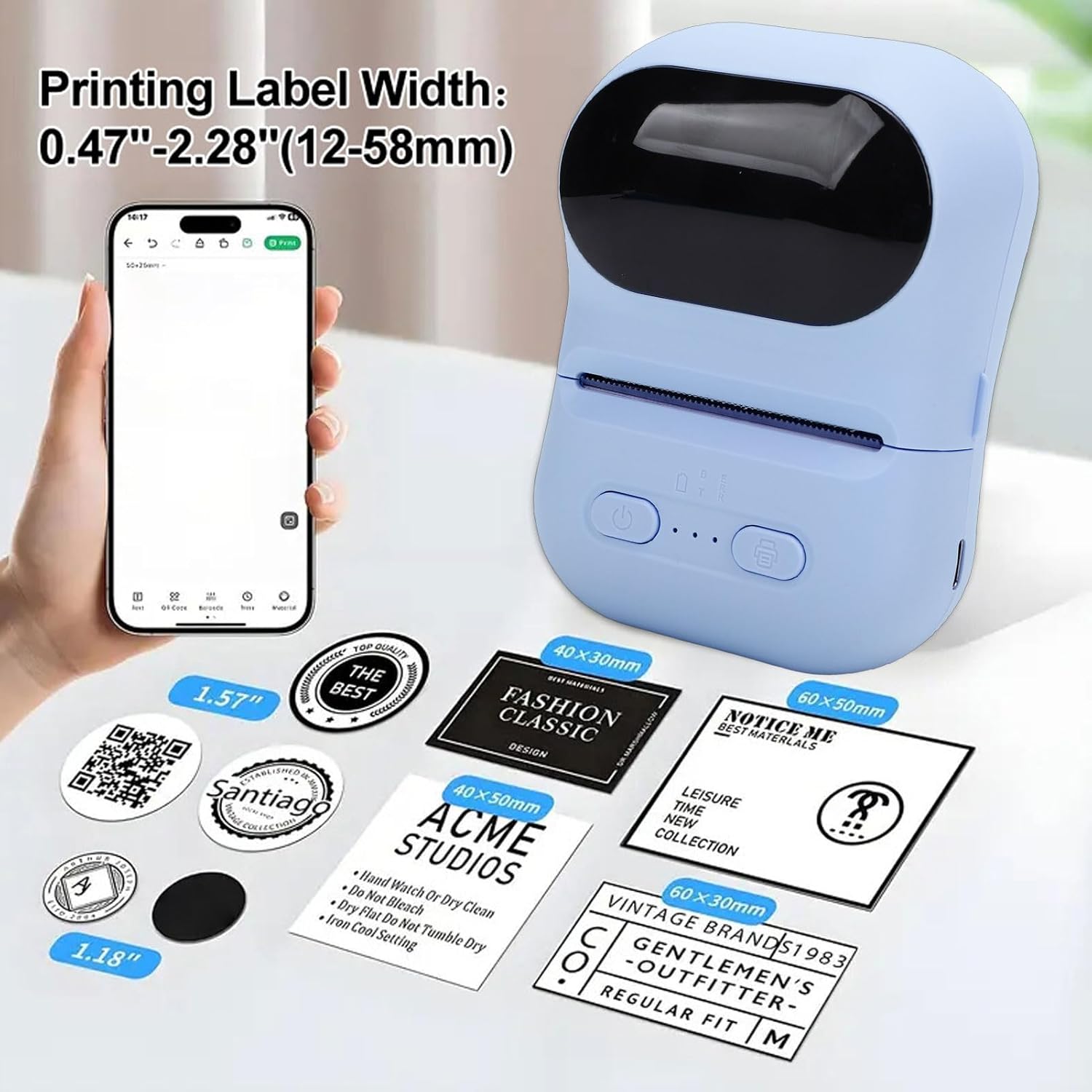
Examples of labels printed by the device, illustrating different widths and designs.

Illustrations of the printer's versatility for small business applications, including price tags, clothing labels, address labels, and QR codes.
6. Manutenzione
6.1 Pulizia della testina di stampa
Per mantenere la qualità di stampa, pulire periodicamente la testina di stampa.
- Assicurarsi che la stampante sia spenta.
- Aprire il coperchio della stampante.
- Pulire delicatamente la testina di stampa con un batuffolo di cotone leggermenteamparricchito con alcol isopropilico.
- Lasciare asciugare completamente la testina di stampa prima di chiudere il coperchio e accendere la stampante.
6.2 Storing the Printer and Thermal Paper
- Conservare la stampante in un luogo fresco e asciutto, lontano dalla luce solare diretta e da temperature estreme.
- Keep thermal paper rolls in their original packaging or in a dark, dry place to prevent premature fading or damage.
7. Risoluzione Dei Problemi
If you encounter issues with your printer, refer to the following common problems and solutions:
| Problema | Possibile causa | Soluzione |
|---|---|---|
| La stampante non si accende. | Batteria scarica; il pulsante di accensione non è premuto correttamente. | Caricare la stampante; tenere premuto il pulsante di accensione per alcuni secondi. |
| Impossibile connettersi all'app. | Bluetooth is off; Printer is out of range; App issue. | Ensure Bluetooth is enabled on your device; Move printer closer; Restart the app and printer. |
| Scarsa qualità di stampa o stampe vuote. | Thermal paper installed incorrectly; Print head dirty; Low battery. | Reinstall paper with printing side facing up; Clean the print head; Charge the printer. |
| Inceppamento della carta. | Paper not aligned; Foreign object in paper path. | Open cover, remove jammed paper carefully, and reinstall correctly; Check for obstructions. |
8. Specifiche
| Caratteristica | Specificazione |
|---|---|
| Marca | Vincitore |
| Nome del modello | Bewinnerwxo0u51g32-13 |
| Metodo di stampa | Stampa termica |
| Parametro di stampa | 200DPI |
| Tipo di batteria | Batteria agli ioni di litio |
| Capacità della batteria | 1100mAh |
| Interfaccia di ricarica | Tipo C |
| Metodo di connessione | Bluetooth (via Eleph-label APP) |
| Formato della carta | Circa 57x50 mm (2.2x2.0 pollici) |
| Dimensioni del prodotto | 5.51"P x 3.94"L x 2.76"A |
9. Informazioni sulla garanzia
This product is covered by a manufacturer warranty for 90 days from the date of purchase. Please retain your proof of purchase for warranty claims. The warranty covers defects in materials and workmanship under normal use.
La garanzia non copre:
- Danni causati da incidenti, abusi, usi impropri, inondazioni, incendi, terremoti o altre cause esterne.
- Damage caused by operating the product outside the permitted or intended uses described by Bewinner.
- Damage caused by service performed by anyone who is not a representative of Bewinner.
10. Assistenza clienti
For further assistance, technical support, or warranty inquiries, please contact Bewinner customer service through the retailer where the product was purchased or refer to the official Bewinner websito per le informazioni di contatto.
Please have your model number (Bewinnerwxo0u51g32-13) and proof of purchase ready when contacting support.