
Introduzione
This manual provides essential information for setting up, operating, and maintaining your VIBOX V-582 PC Gamer. Please read these instructions carefully before using your new computer to ensure optimal performance and longevity. Keep this manual for future reference.
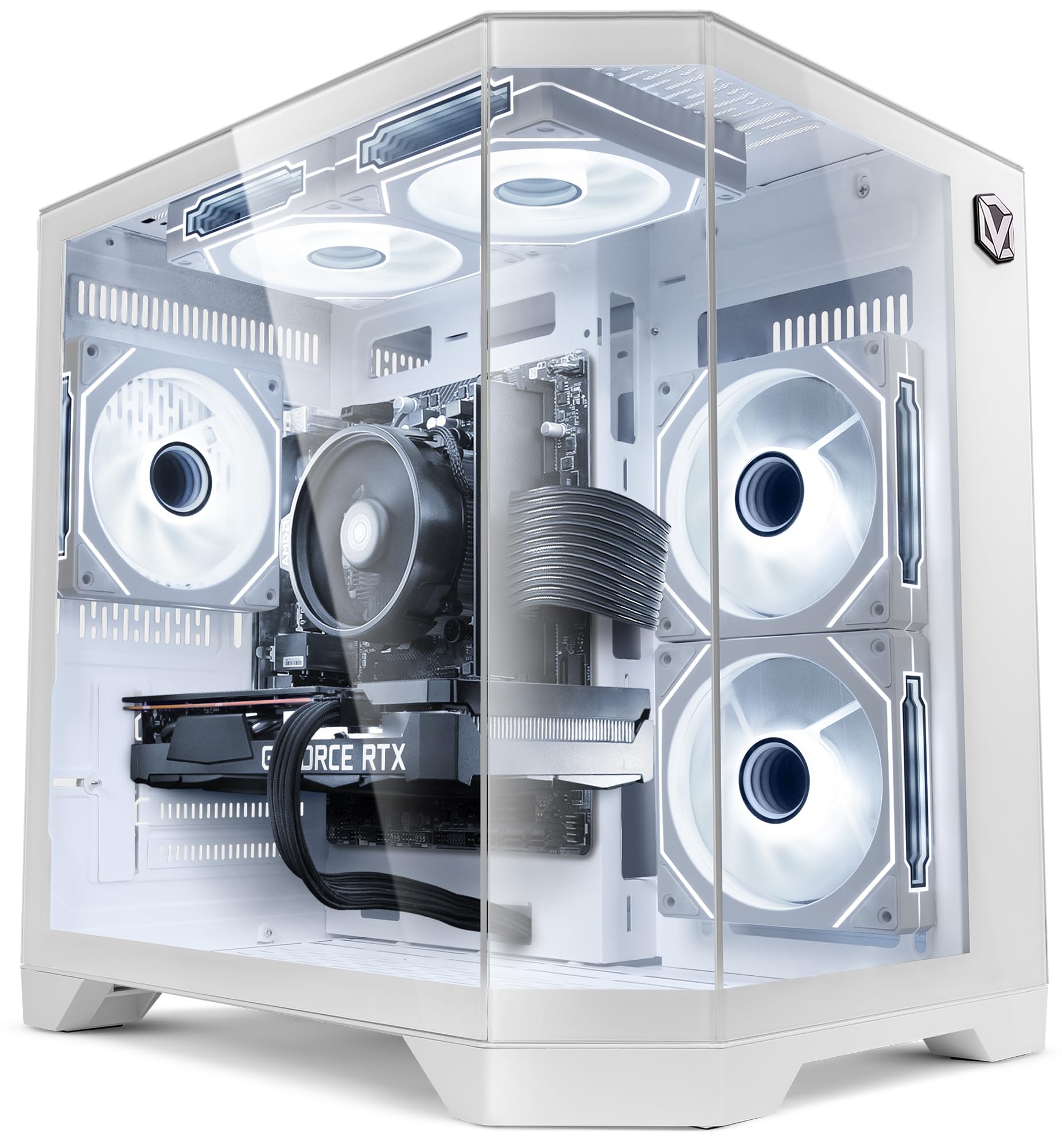
Image: The VIBOX V-582 PC Gamer, a white desktop computer tower with a transparent side panel showcasing internal components and RGB lighting.
Informazioni sulla sicurezza
- Ensure the computer is placed on a stable, flat surface to prevent accidental falls.
- Do not block ventilation openings. Adequate airflow is crucial for cooling.
- Keep the computer away from direct sunlight, heat sources, and liquids.
- Use only the power supply unit provided with the computer.
- Scollegare il cavo di alimentazione prima di effettuare operazioni di pulizia o manutenzione.
- Do not attempt to open the computer case unless instructed by technical support, as this may void your warranty.
Contenuto della confezione
Verificare che tutti gli articoli siano presenti nel pacco:
- VIBOX V-582 PC Gamer Desktop Computer
- Power Cable (Type C/EF – 2-pin European/hybrid FR-DE plug)
- USB Wi-Fi 6 AX900 and Bluetooth 5.4 Adapter
- Documentazione (Guida rapida, Informazioni sulla garanzia)
- RGB Lighting Remote Control (if applicable, based on "Éclairage RVB" in box content)
Note: Peripherals such as a monitor, keyboard, and mouse are typically sold separately unless specified in your purchase order.
Impostare
1. Disimballaggio e posizionamento
Carefully remove the computer from its packaging. Place it on a flat, stable surface with sufficient space around it for proper ventilation. Avoid placing it in enclosed spaces or near heat sources.

Image: Diagram illustrating the dimensions of the PC case: 37.5cm height, 29.5cm depth, 22cm width, with an 8cm base.
2. Collegamento di periferiche
Connect your monitor, keyboard, mouse, and other peripherals to the appropriate ports on the back and front of the computer.
- Monitorare: Connect your monitor using an HDMI or DisplayPort cable to the dedicated graphics card ports (Nvidia GeForce RTX 5050).
- Tastiera/mouse: Use the USB ports for your keyboard and mouse.
- Audio: Connect headphones or speakers to the audio jacks.
- Rete: For wired internet, connect an Ethernet cable to the LAN port. For wireless, insert the provided USB Wi-Fi adapter.
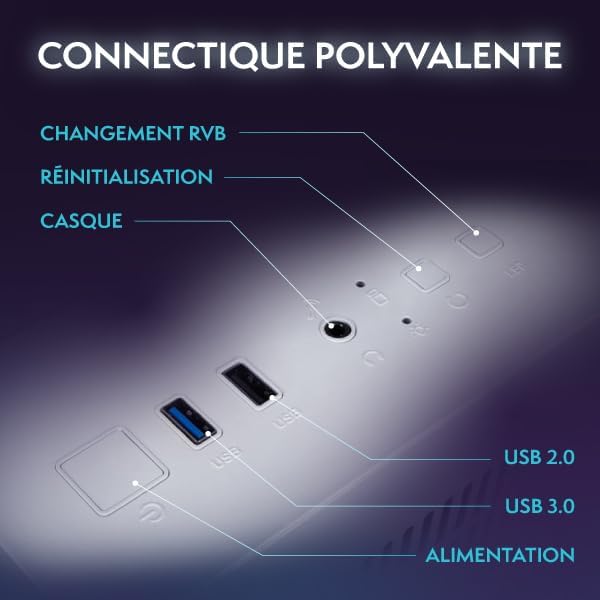
Image: Front panel connectivity, showing USB 2.0 and USB 3.0 ports, headphone jack, power button, reset button, and RGB change button.
3. Collegamento elettrico
Connect the power cable to the power supply unit on the back of the computer, then plug the other end into a wall outlet.
4. Accensione iniziale e configurazione di Windows
Press the power button on the front of the computer. The system will boot up, and you will be guided through the initial Windows 11 Home setup process. Follow the on-screen instructions to configure your language, region, network, and user account.
Utilizzo del PC
Utilizzo di base
Your VIBOX V-582 comes pre-installed with Windows 11 Home, offering a user-friendly interface. Explore the Start Menu for applications, use the taskbar for quick access, and manage filecon File Esploratore.

Image: Windows 11 Home interface highlighting features such as faster loading times with DirectStorage, enhanced graphics with AutoHDR, and optimized CPU performance.
Connettività
- Wi-Fi 6: Connect to high-speed wireless networks using the included USB adapter.
- Bluetooth 5.4: Pair wireless devices such as headphones, controllers, or speakers.
- Porte USB: Utilize the multiple USB 2.0 and USB 3.0 ports for various peripherals and external storage devices.
- Uscita video: The Nvidia GeForce RTX 5050 graphics card supports HDMI 2.1 and DisplayPort for connecting up to multiple high-resolution displays.
Controllo dell'illuminazione RGB
Your PC features customizable RGB lighting for the internal fans. Use the dedicated RGB change button on the front panel or the provided remote control (if included) to cycle through various colors and lighting modes.

Image: Hex RGB Infinity 120mm fans, illustrating customizable lighting options with multiple colors and RGB modes.
Manutenzione
Pulizia
- Regularly clean the exterior of the computer with a soft, dry cloth.
- Use compressed air to gently clear dust from ventilation grilles and fan blades. Ensure the computer is powered off and unplugged before cleaning.
- Do not use liquid cleaners directly on the computer.
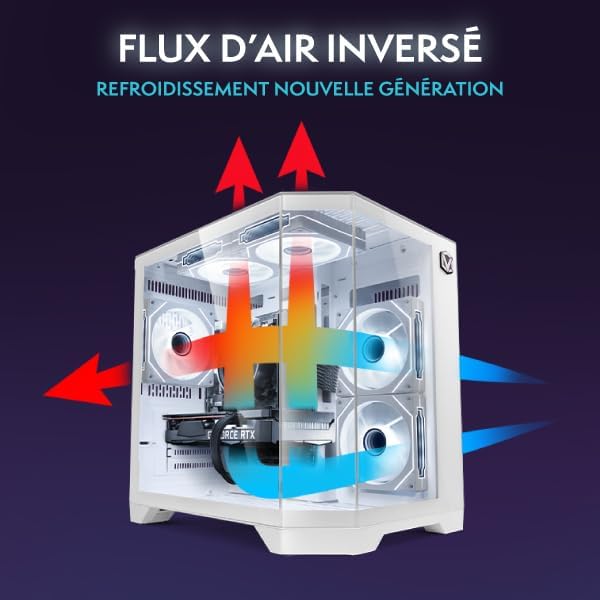
Image: Reverse airflow diagram, illustrating how the cooling system directs air through the PC case to optimize circulation and reduce heat buildup.
Aggiornamenti software
Keep your Windows operating system, drivers (especially graphics drivers), and applications updated to ensure security, stability, and optimal performance. Windows Update can be accessed via the Settings menu.
Risoluzione dei problemi
Se riscontri problemi, prova i seguenti passaggi prima di contattare l'assistenza:
- Nessun potere: Ensure all power cables are securely connected to the computer and the wall outlet. Check if the power outlet is functional.
- Nessuna visualizzazione: Verify that the monitor is powered on and correctly connected to the graphics card ports (HDMI/DisplayPort) on the back of the PC, not the motherboard ports. Try a different cable or monitor if possible.
- Blocchi/arresti anomali del sistema: Restart the computer. Ensure all drivers are up to date. Check for sufficient ventilation to prevent overheating.
- Prestazioni lente: Close unnecessary applications. Check for malware. Ensure your SSD has sufficient free space.
- Nessuna connessione internet: For Wi-Fi, ensure the USB adapter is installed and drivers are updated. Check network settings in Windows. For wired, ensure the Ethernet cable is connected and your router is working.
Per problemi persistenti, fare riferimento a guida utente ufficiale (PDF) or contact VIBOX customer support.
Specifiche
| Componente | Dettaglio |
|---|---|
| Nome del modello | V-582 (VTX-8) |
| Processore (CPU) | AMD Ryzen 5 5500 (6 Cores, 12 Threads, 3.6 GHz Base, 4.2 GHz Max Boost) |
| Scheda grafica (GPU) | Nvidia GeForce RTX 5050 (8GB GDDR7, HDMI 2.1, DisplayPort) |
| Memoria RAM | 16 GB DDR4 (2666 MHz) |
| Magazzinaggio | SSD SATA da 500 GB |
| Sistema operativo | Windows 11 Casa |
| Connettività wireless | Wi-Fi 6 AX900, Bluetooth 5.4 |
| Porti | 4x USB (total), 1x HDMI, 2x Output Ports (likely DisplayPort/other video out), Audio Jacks |
| Raffreddamento | Air Cooling (5x 120mm RGB Fans) |
| Dimensioni (L x P x A) | Dimensioni: 35 x 28 x 38 cm |
| Colore | Bianco |
| Potenza Tipo spina | Type C/EF – 2-pin (European/hybrid FR-DE) |
Garanzia e supporto
Your VIBOX V-582 PC Gamer comes with a comprehensive warranty:
- Garanzia sulle parti: 2 anni
- Garanzia di manodopera: Tutta la vita
For technical assistance, warranty claims, or further inquiries, please contact VIBOX customer support through their official website or the retailer where you purchased the product. Please have your product model (V-582) and purchase details ready when contacting support.
Puoi anche visitare il VIBOX Brand Store on Amazon per ulteriori informazioni e risorse.