
Prodotto finitoview
The BTMETER BT-881W is a versatile digital instrument designed to measure various environmental parameters, including wind speed, ambient temperature, humidity, and Wet Bulb Globe Temperature (WBGT). It serves as both a digital anemometer and a heat stress monitor, suitable for indoor and outdoor applications.
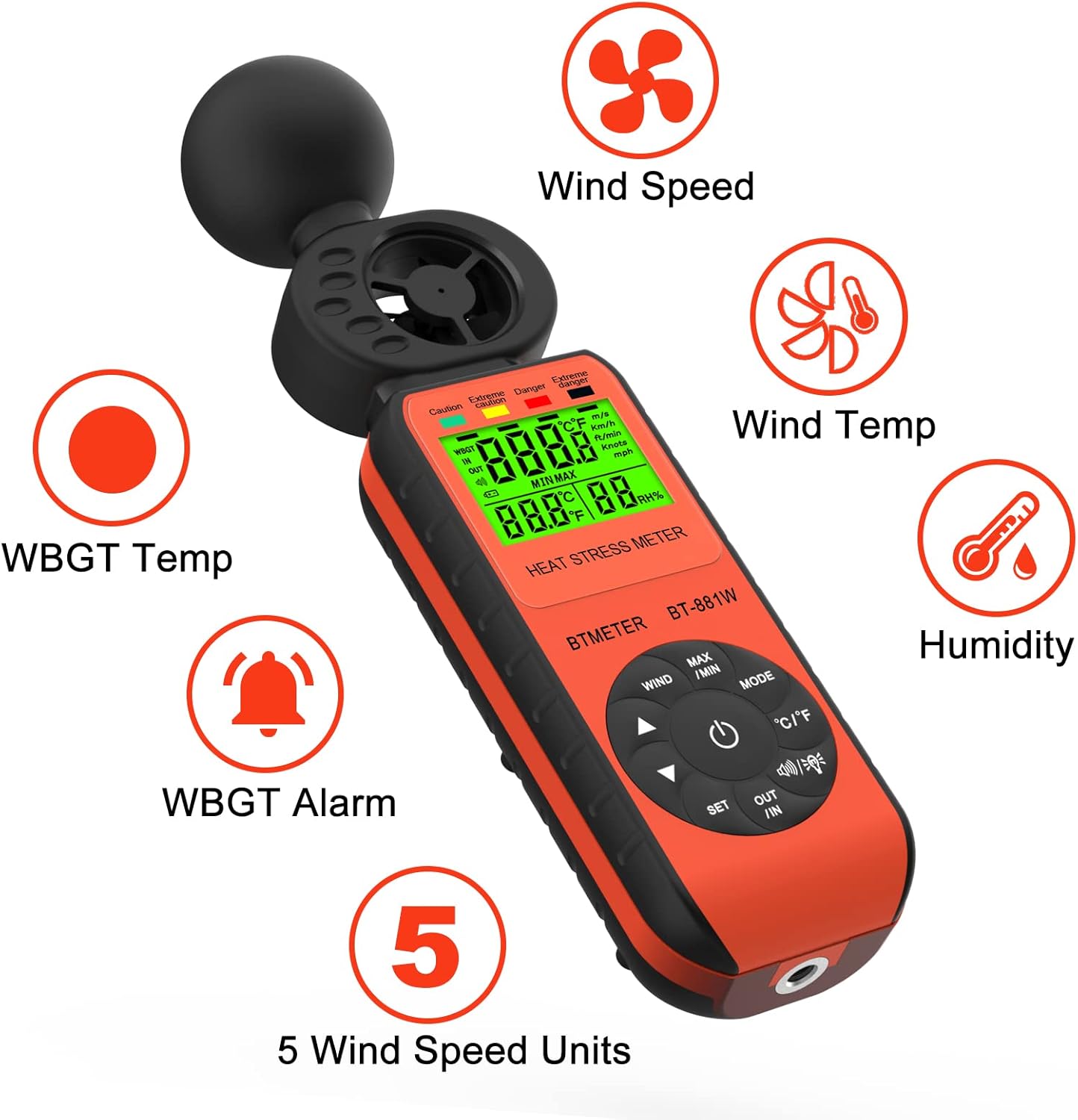
Figure 1: BTMETER BT-881W Heat Stress Meter Anemometer with its primary functions: Wind Speed, Wind Temperature, WBGT Temperature, Humidity, WBGT Alarms, and 5 Wind Speed Units.
Caratteristiche principali:
- Misurazione multifunzionale: Measures wind speed, ambient temperature, humidity, and WBGT.
- Alta precisione: Features upgraded wind and temperature sensors for precise readings.
- WBGT Monitoring: Includes WBGT alarms and supports indoor/outdoor WBGT measurement modes.
- Facile da usare: Offers 5 air velocity units, 2 temperature units, data hold, backlit LCD, and auto power-off.
- Treppiede montabile: Equipped with a 1/4" screw hole for tripod installation.
Impostare
Installazione della batteria:
Il BT-881W richiede una batteria da 9 V (non inclusa). Per installare la batteria:
- Individuare il coperchio del vano batteria sul retro del dispositivo.
- Aprire il coperchio.
- Inserire una batteria da 9 V, assicurandosi della corretta polarità.
- Chiudere saldamente il coperchio del vano batterie.
Montaggio su treppiede (opzionale):
For stable measurements, the device can be mounted on a tripod. A 1/4" screw hole is located at the bottom of the unit.
- Locate the 1/4" screw hole at the base of the meter.
- Align the meter with your tripod's mounting screw.
- Gently twist the meter onto the tripod until it is secure.

Figura 2: Posteriore view of the BT-881W showing the battery compartment and dimensions.
Istruzioni per l'uso
Accensione/spegnimento:
- Premere il tasto Energia pulsante per accendere il dispositivo.
- Il dispositivo è dotato di una funzione di spegnimento automatico per preservare la durata della batteria.
Mode Switching (Wind Speed / WBGT):
Premere il tasto MODALITÀ button to switch between wind speed measurement and WBGT (Wet Bulb Globe Temperature) measurement.
Wind Speed Unit Selection:
In wind speed mode, press the VENTO button to cycle through the 5 available air velocity units: m/s, Ft/min, Knots, Km/h, Mph.

Figure 3: Display showing various wind speed units and the tripod mounting option.
Temperature Unit Switching (°C / °F):
Premere il tasto ° C / ° F pulsante per passare dalle unità di temperatura Celsius a Fahrenheit e viceversa.
Indoor/Outdoor WBGT Mode:
In modalità di visualizzazione WBGT, premere il tasto NEL button to switch between indoor and outdoor WBGT measurement modes. This helps account for differences in temperature, humidity, and direct or radiant sunlight.
Funzione di conservazione dei dati:
Premere il tasto Massimo/minimo button briefly to activate the data hold function, which freezes the current measurement on the display. Press again to release.
WBGT Alarm Settings:
The device can alert you when the black globe temperature (TG) level reaches a set threshold (20~50°C).
- Premere il tasto IMPOSTATO pulsante per accedere alla modalità di impostazione della sveglia.
- Utilizzare i pulsanti freccia (▲ / ▼) to adjust the alarm temperature value.
- When WBGT alarms are triggered, the backlight color changes to red.

Figure 4: WBGT alarm levels and corresponding temperature ranges (Caution, Extreme Caution, Danger, Extreme Danger).
Dimostrazione video:
Video 1: Official BTMETER 881W Heat Stress Meter Anemometer demonstration, covering unboxing, basic operation, and feature highlights.
Manutenzione
- Mantenere il dispositivo pulito e asciutto. Utilizzare un morbido, damp panno per la pulizia; non utilizzare detergenti abrasivi o solventi.
- Quando non lo si utilizza, conservare il dispositivo nella sua custodia protettiva per evitare danni.
- Rimuovere la batteria se il dispositivo non verrà utilizzato per un periodo prolungato per evitare perdite.
- Evitare di esporre il dispositivo a temperature estreme, luce solare diretta o elevata umidità.
Risoluzione dei problemi
If you encounter issues with your BTMETER BT-881W, consider the following common troubleshooting steps:
- Il dispositivo non si accende: Verificare che la batteria da 9 V sia installata correttamente e abbia una carica sufficiente. Sostituire la batteria se necessario.
- Letture imprecise: Ensure the sensors are clean and unobstructed. Allow the device to equilibrate to the environment for several minutes, especially for WBGT measurements.
- Problemi di visualizzazione: If the display is dim or flickering, replace the battery.
- WBGT alarm not working: Verify that the alarm temperature is set correctly in WBGT mode.
Per ulteriore assistenza, consultare la sezione Supporto.
Specifiche
| Numero di modello | BT-881W |
| Dimensioni del prodotto | 2.05 x 1.57 x 8.19 pollici (5.2 x 4.0 x 20.8 cm) |
| Peso dell'articolo | 4.96 once (0.31 libbre) |
| Fonte di alimentazione | Alimentato a batteria (è richiesta 1 batteria da 9 V, non inclusa) |
| Tipo di visualizzazione | LCD |
| Tecnologia | Ultrasonico |
| Gamma di velocità del vento | 0~30 m/s |
| Intervallo di temperatura ambiente | 0 ~ 50 ° C (32 ~ 122 ° F) |
| Precisione della temperatura | ±0.6°C (±2°C overall) |
| Umidità ambiente | 0.1%~99.9% UR |
| WBGT Temperature Range | 32~122°F (Celsius/Fahrenheit Switchable) |
| Tipo di materiale | Plastica |
| Componenti inclusi | 1*Heat Stress Meter, 1* User manual |
Garanzia e supporto
Informazioni sulla garanzia:
The BTMETER BT-881W comes with a Garanzia del produttore di 1 anno. All BTMETER electrical products are strictly calibrated before shipment.
Supporto tecnico:
BTMETER provides lifetime technical support for this product. For any technical inquiries, troubleshooting assistance, or warranty claims, please contact BTMETER customer service directly. Refer to the contact information provided with your purchase or visit the official BTMETER websito per i dettagli del supporto.