
1. Introduzione
Thank you for choosing the AIYIMA S4000 Active Bookshelf Speakers. These speakers are designed to deliver high-fidelity audio with versatile connectivity options, suitable for various applications including home entertainment, PC audio, and professional studio monitoring. Please read this manual thoroughly before use to ensure proper setup and operation.
2. Istruzioni di sicurezza
Per prevenire incendi, scosse elettriche o danni al prodotto, osservare le seguenti linee guida di sicurezza:
- Non esporre questo apparecchio a pioggia o umidità.
- Non posizionare sull'apparecchio oggetti contenenti liquidi, come ad esempio vasi.
- Assicurare una ventilazione adeguata. Non ostruire le aperture di ventilazione.
- Non installare vicino a fonti di calore come radiatori, bocchette di riscaldamento, stufe o altri apparecchi (inclusi amplificatori) che producono calore.
- Proteggere il cavo di alimentazione dall'essere calpestato o schiacciato, in particolare in corrispondenza di spine, prese di corrente e nel punto in cui escono dall'apparecchio.
- Utilizzare solo accessori/componenti specificati dal produttore.
- Scollegare questo apparecchio durante i temporali o quando non viene utilizzato per lunghi periodi.
- Affidare tutte le operazioni di manutenzione a personale di assistenza qualificato. L'assistenza è necessaria quando l'apparecchio è stato danneggiato in qualsiasi modo.
3. Contenuto della confezione
Si prega di verificare che tutti gli articoli siano presenti nella scatola:
- AIYIMA S4000 Studio Monitors (2 units)
- Cavo audio RCA
- Cavo audio XLR
- Manuale dell'utente (questo documento)
- Magnetic Grilles (2 units)
- Rubber Feet (8 units)
- Cavo di alimentazione
- Telecomando IR senza fili
4. Prodotto finitoview
4.1 Pannello frontale
The front panel features the horn-loaded tweeter and the 4-inch woofer, along with a multi-function rotary control for volume and input selection.

Immagine: anteriore e posteriore view of the AIYIMA S4000 speakers. The front shows the tweeter and woofer, while the rear displays all input/output ports and controls.
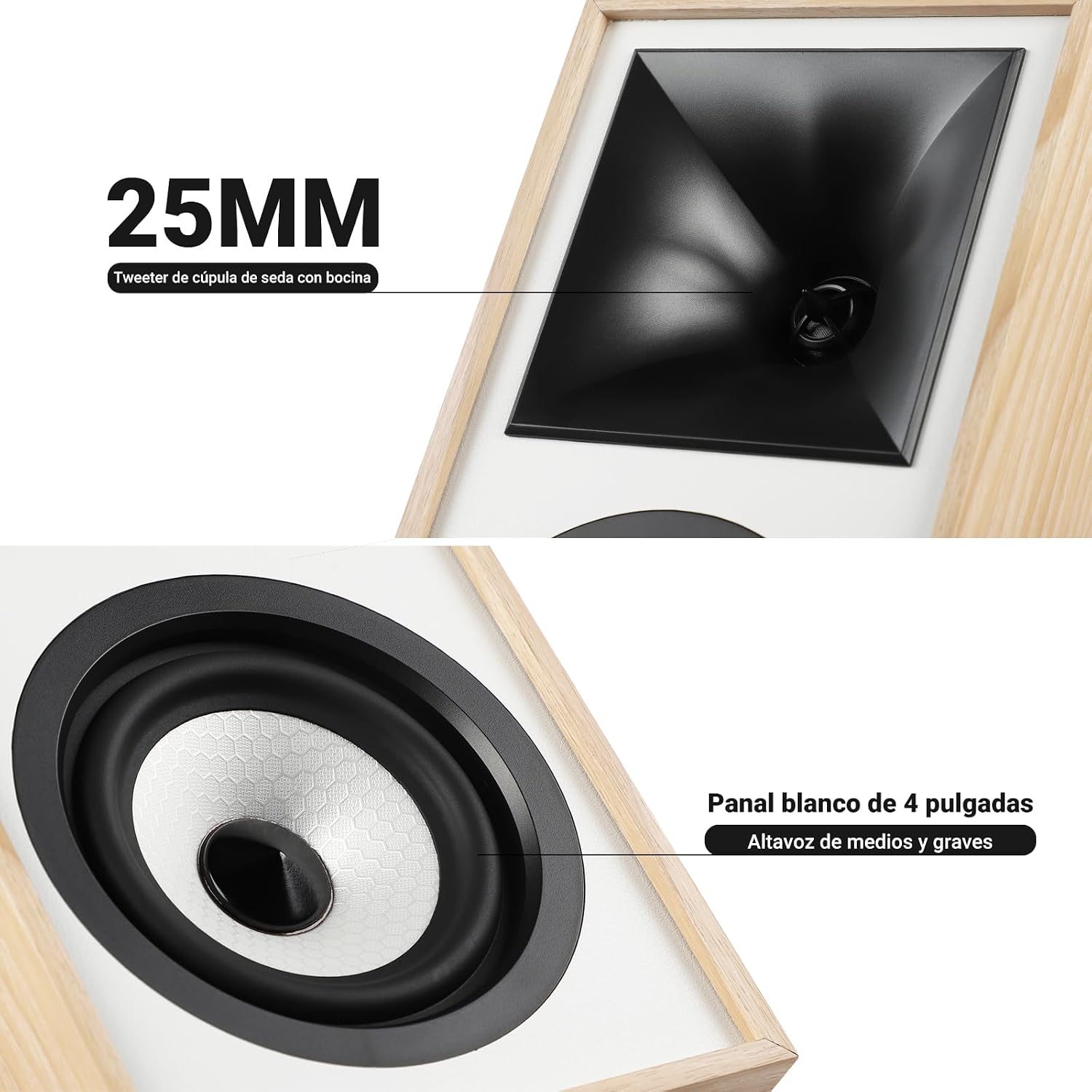
Immagine: Primo piano view of the 25mm horn-loaded silk dome tweeter and the 4-inch white cone woofer on the AIYIMA S4000 speaker.
The S4000 incorporates a 1.25-inch horn-loaded tweeter for enhanced vocal clarity and a 4-inch woofer for deep bass. The cabinet is constructed from 15mm high-density MDF to reduce resonance and distortion.
4.2 Pannello posteriore
The rear panel houses all connectivity ports and additional controls.
Immagine: dettagliata view of the rear panel of the AIYIMA S4000 speaker, showing the volume, treble, and bass knobs, RCA and XLR inputs, SUB OUT, power switch, and power input.
- Volume/Input Selector: Rotary knob for volume adjustment and input source selection (Bluetooth, RCA, XLR).
- Controllo degli acuti: Manopola per regolare le alte frequenze.
- Controllo dei bassi: Manopola per regolare le basse frequenze.
- Ingresso RCA: For connecting devices via RCA cables.
- Ingresso XLR: Professional balanced input for mixers, audio interfaces, etc.
- USCITA SUB: Output for connecting an external active subwoofer.
- Interruttore di alimentazione: Per accendere o spegnere gli altoparlanti.
- Ingresso alimentazione CA: For connecting the power cable (AC 100V-240V).
- SPK-L OUT: Output to connect the passive left speaker.
5. Impostazione
5.1 Posizionamento degli altoparlanti
For optimal sound quality, place the speakers on a stable surface, such as a bookshelf or speaker stands. Position them at ear level and equidistant from your listening position. Ensure there is adequate space behind the speakers for the L-shaped bass reflex port to function effectively.

Image: AIYIMA S4000 speakers positioned on a wooden cabinet, demonstrating a typical home setup with a turntable.
5.2 Collegamento delle sorgenti audio
The S4000 offers multiple input options:
- Ingresso RCA: Connect your audio source (e.g., CD player, TV, PC) to the RCA ports on the rear panel using the provided RCA cable.
- Ingresso XLR: For professional audio equipment like mixers or audio interfaces, use XLR cables to connect to the balanced XLR inputs. This input is resistant to interference.
- Bluetooth 5.0: Per la connessione wireless, fare riferimento alla sezione 6.4 per le istruzioni di associazione Bluetooth.

Image: AIYIMA S4000 speaker shown connected to a laptop and electronic keyboard, highlighting the professional balanced input capabilities.
5.3 Connecting an External Subwoofer (SUB OUT)
To enhance bass performance, you can connect an active subwoofer to the SUB OUT port on the rear panel. The system will automatically adjust the crossover frequency, converting your setup into a 2.1 audio system.

Image: AIYIMA S4000 speakers set up with a television and an external subwoofer, illustrating the SUB OUT functionality for a 2.1 home cinema experience.
5.4 Collegamento di alimentazione
Connect the provided power cable to the AC Power Input on the rear panel of the active speaker, then plug it into a wall outlet (AC 100V-240V). Connect the active speaker to the passive speaker using the SPK-L OUT port.
6. Istruzioni per l'uso
6.1 Accensione/spegnimento
Flip the Power Switch on the rear panel to the "ON" position to turn on the speakers. Flip it to "OFF" to power them down.
6.2 Volume Control and Input Selection
The multi-function rotary control on the front panel adjusts the volume. Press the knob to cycle through input sources: Bluetooth (BT), RCA, and XLR. The current input will be indicated by an LED.
6.3 Regolazione dei bassi e degli acuti
Use the independent Bass and Treble knobs on the rear panel to fine-tune the sound according to your preference and audio source. Adjustments range from -6dB to +6dB.
6.4 Associazione Bluetooth
- Turn on the speakers and select Bluetooth input using the front panel knob or remote control. The Bluetooth indicator light will flash.
- Sul tuo dispositivo (smartphone, tablet, computer), attiva il Bluetooth e cerca "AIYIMA S4000".
- Select "AIYIMA S4000" to pair. Once connected, the Bluetooth indicator light will stop flashing and remain solid.
- Ora puoi riprodurre l'audio in modalità wireless dal tuo dispositivo.

Image: AIYIMA S4000 speaker in a room setting, illustrating its Bluetooth 5.0 connectivity for wireless audio streaming.
6.5 Utilizzo del telecomando
The included wireless IR remote control allows you to adjust volume, select input modes, and control playback (play/pause, next/previous track for Bluetooth) from up to 20 meters away without requiring line-of-sight.

Image: Composite image showing the AIYIMA S4000 speakers, a close-up of the 15mm MDF cabinet construction, an internal view of the L-shaped bass reflex port, and the wireless remote control.
7. Manutenzione
- Pulizia: Use a soft, dry cloth to clean the speaker cabinets. Do not use liquid cleaners or abrasive materials.
- Magazzinaggio: Se si conservano gli altoparlanti per un periodo prolungato, scollegarli dall'alimentazione e conservarli in un luogo fresco e asciutto, preferibilmente nella confezione originale.
- griglie: The magnetic grilles can be removed for cleaning or for a different aesthetic. Handle them gently to avoid damage.
8. Risoluzione Dei Problemi
| Problema | Possibile causa | Soluzione |
|---|---|---|
| Nessun suono |
|
|
| Suono distorto |
|
|
| Problemi di connessione Bluetooth |
|
|
| Il telecomando non funziona |
|
|
If the problem persists, please contact AIYIMA customer support.
9. Specifiche

Image: Diagram showing the dimensions of the AIYIMA S4000 speakers: 280mm (11.02 inches) height, 185mm (7.28 inches) depth, and 145mm (5.70 inches) width.
| Caratteristica | Specificazione |
|---|---|
| Nome del modello | S4000 |
| Marca | AIYIMA |
| Tipo di altoparlante | Bookshelf, Active, 2-way, Surround Sound |
| Canali audio | 2.1 (with SUB OUT) |
| Potenza massima in uscita | 80 Watts RMS (2x40W RMS: 2x25W Bass/Mid, 2x15W Treble) |
| Risposta in frequenza | 45 Hz - 20 kHz |
| Diametro del woofer | 4 pollici |
| Tipo tweeter | 1.25-inch Horn-loaded Silk Dome |
| Tecnologia di connettività | Bluetooth 5.0, RCA, XLR |
| Portata Bluetooth | Up to 20 meters (wireless remote also 20m) |
| Metodo di controllo | Touch (front knob), Remote Control |
| Materiale del mobile | 15mm High-density MDF |
| Fonte di alimentazione | AC 100V-240V (Power Cable) |
| Dimensioni del prodotto (P x L x A) | 18.5 x 14.5 x 28 cm (7.28 x 5.70 x 11.02 pollici) |
| Peso del prodotto | 6.9 kg (coppia) |
| Colore | Brown (wood finish) |
| Usi consigliati | Home Entertainment, PC Audio, Recording Studios, Home Cinema |
10. Garanzia e supporto
AIYIMA products come with a standard manufacturer's warranty. For detailed warranty information, please refer to the warranty card included in your package or visit the official AIYIMA websito.
For technical support, troubleshooting assistance, or service inquiries, please contact AIYIMA customer support through their official channels. Please have your product model number (S4000) and purchase information ready when contacting support.
Produttore: AIYIMA