
1. Introduzione
This manual provides detailed instructions for the installation, operation, and maintenance of your ANJIELO SMART 4-Wire Video Door Intercom System. Please read this manual thoroughly before installation and use to ensure proper function and safety. Keep this manual for future reference.
2. Prodotto finitoview
The ANJIELO SMART 4-Wire Video Door Intercom System offers enhanced security and convenience for your home. It features a 7-inch WiFi-enabled monitor and a 1080p outdoor doorbell camera. Key functionalities include two-way audio communication, remote monitoring via the Tuya app, night vision, and multiple unlocking methods.
Caratteristiche principali:
- Audio bidirezionale: Communicate with visitors at your door from the indoor monitor or your smartphone.
- Monitor touch da 7 pollici: High-resolution display with touch controls and hands-free function.
- 1080p Doorbell Camera: Features a 120° wide-angle lens, built-in infrared sensor for night vision, and an IP65 waterproof and dustproof rating.
- Tuya WiFi Smart Home Compatible: Seamless integration with the Tuya app for remote monitoring and control.
- Metodi di sblocco 3 in 1: Unlock your door using an IC card, the Tuya app, or directly from the indoor monitor.
- Sistema espandibile: Supports up to 1 outdoor unit and 4 indoor monitors, allowing internal communication between monitors.

Immagine: Oltreview of the ANJIELO SMART 4-Wire Video Door Intercom System, highlighting its main components and smart home integration.
3. Cosa c'è nella scatola
Disimballare con cura la scatola e assicurarsi che tutti gli articoli siano presenti e in buone condizioni. Se alcuni articoli risultano mancanti o danneggiati, contattare l'assistenza clienti.
- Unità campanello esterno
- Monitor da interno da 7 pollici
- Adattatore di alimentazione (15 V 1.2 A)
- Manuale di istruzioni
- Sbloccare il cavo
- Cavo a 4 pin
- Screws and Rubber Plugs for mounting
- Hanging Plate for monitor
- Schede IC (7 incluse)

Image: All components included in the product package, such as the outdoor doorbell, indoor monitor, cables, power supply, mounting hardware, and IC cards.
4. Configurazione e installazione
The system uses a 4-wire connection for communication between the outdoor doorbell and the indoor monitor. Ensure power is disconnected before beginning installation.
4.1 Montaggio del campanello esterno
- Choose a suitable location near your entrance, approximately 1.5 meters (5 feet) from the ground, avoiding direct sunlight or rain exposure (though the unit is IP65 rated).
- Use the provided screws and rubber plugs to securely mount the doorbell unit.
- Assicurarsi che la telecamera abbia uno spazio libero e libero da ostacoli view dell'ingresso.

Image: The outdoor doorbell camera providing a 120-degree ultra-wide-angle view della zona d'ingresso.
4.2 Montaggio del monitor interno
- Select a convenient indoor location for the monitor, such as a wall in your living room or kitchen.
- Attach the hanging plate to the wall using screws.
- Connect the wiring to the monitor as per the wiring diagram (refer to the included instruction manual for detailed diagram).
- Mount the monitor onto the hanging plate.
4.3 Collegamenti di cablaggio
Connect the outdoor doorbell unit to the indoor monitor using the provided 4-pin cable. Ensure correct polarity and secure connections. If connecting an electronic lock, use the unlock cable and refer to the detailed wiring diagram in the included manual.
4.4 Collegamento di alimentazione
Connect the 15V 1.2A power adapter to the indoor monitor and plug it into a standard power outlet. The system will power on automatically.
4.5 Configurazione dell'app Tuya
- Scarica l'app Tuya Smart o Smart Life dall'app store del tuo smartphone.
- Registrati o accedi al tuo account.
- Follow the in-app instructions to add your ANJIELO SMART monitor to the app. This typically involves putting the monitor into pairing mode and connecting it to your home WiFi network.
5. Istruzioni per l'uso
5.1 Rispondere a una chiamata
When a visitor presses the doorbell button, the indoor monitor(s) will ring, and a live video feed from the outdoor camera will appear. Your smartphone (if connected via Tuya app) will also receive a notification.
- Dal monitor: Tap the 'Answer' icon on the screen to initiate two-way audio communication.
- Da Smartphone: Open the Tuya app and tap the notification to view il feed live e comunicare.

Image: Illustration of the two-way video intercom function, demonstrating communication between a visitor at the doorbell and a resident using the indoor monitor.
5.2 Apertura della porta
You have three methods to unlock a connected electronic lock:
- Tramite Indoor Monitor: Durante una chiamata o mentre viewing the live feed, tap the 'Unlock' icon on the monitor screen.
- Tramite l'app Tuya: Dal vivo view in the app, tap the 'Unlock' button.
- Tramite carta IC: Present a pre-programmed IC card to the card reader on the outdoor doorbell unit.
5.3 Monitoraggio remoto
Using the Tuya app on your smartphone, you can view the live feed from the outdoor doorbell camera anytime, anywhere, as long as your monitor is connected to WiFi and your phone has internet access.

Image: Users accessing the video intercom system remotely via their smartphones, enabling two-way audio and viewing from different locations.
5.4 Surveillance Footage Riproduzione
The system supports 24-hour real-time monitoring and recording. You can review recorded video clips directly from the indoor monitor or through the Tuya app.
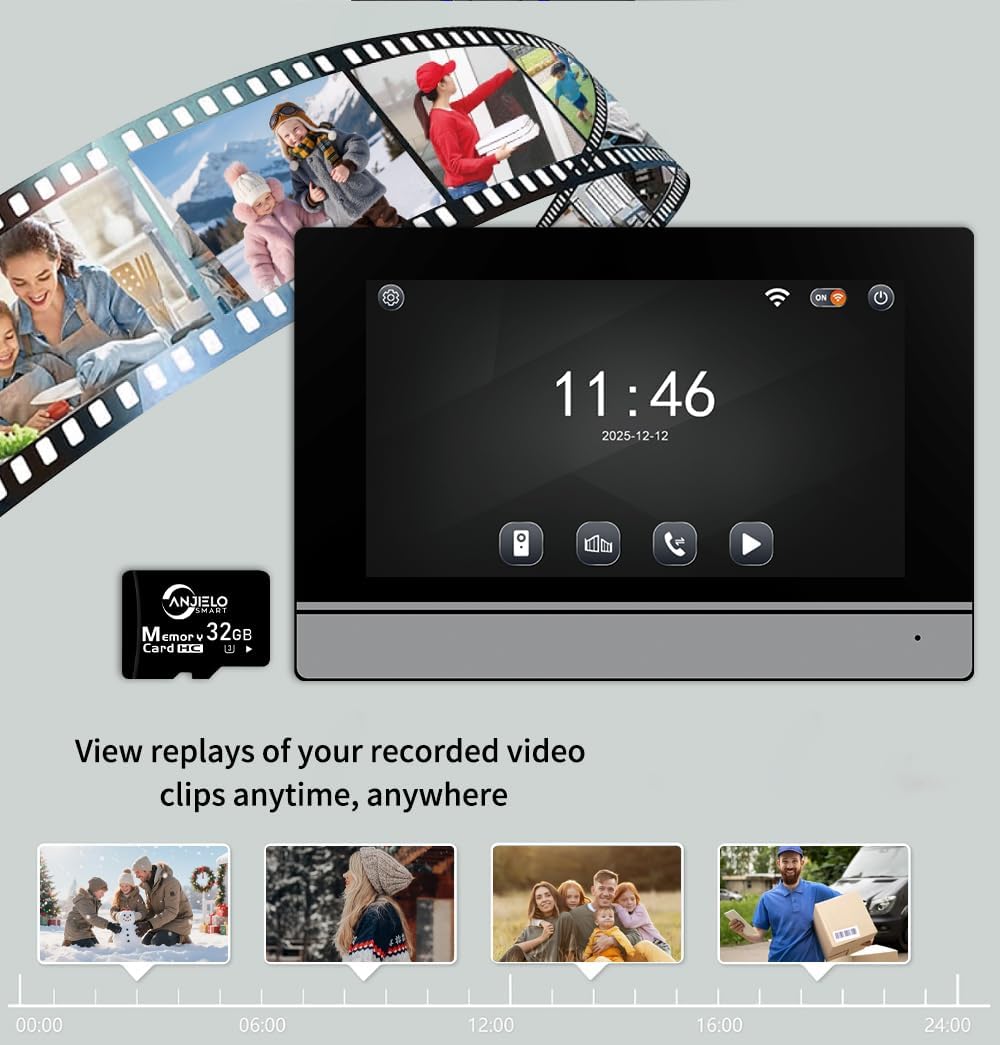
Image: The indoor monitor screen showing a timeline for playback of recorded surveillance footage, demonstrating 24-hour monitoring.
5.5 Internal Communication (Multi-Monitor Systems)
If you have multiple indoor monitors, they can communicate with each other (audio only). Refer to the detailed instructions in the included manual for initiating internal calls.

Image: A diagram illustrating the system's capability to support one outdoor unit and up to four indoor units, with internal communication between monitors.
6. Manutenzione
Una manutenzione regolare garantisce la longevità e le prestazioni ottimali del vostro sistema interfonico.
- Pulizia: Utilizzare un morbido, damp cloth to clean the outdoor doorbell camera lens and the indoor monitor screen. Avoid abrasive cleaners or solvents.
- Verifica della connessione: Controllare periodicamente tutti i collegamenti elettrici per assicurarsi che siano saldi e privi di corrosione.
- Aggiornamenti software: Keep the Tuya app updated to the latest version. Check the app or manufacturer's website for any firmware updates for the monitor or doorbell.
- Protezione ambientale: While the outdoor unit is IP65 rated, extreme weather conditions can still affect performance. Ensure proper installation to minimize exposure to harsh elements.

Image: The outdoor doorbell unit, showcasing its IP65 protection rating, indicating resistance to dust and water.
7. Risoluzione Dei Problemi
Se riscontri problemi con il tuo sistema, fai riferimento ai seguenti problemi comuni e alle relative soluzioni:
| Problema | Possibile causa | Soluzione |
|---|---|---|
| Nessun video sul monitor/app | Cablaggio allentato, problema di alimentazione, malfunzionamento della telecamera. | Check all 4-wire connections. Ensure power adapter is plugged in. Restart the system. |
| Nessun audio durante la chiamata | Problema con microfono/altoparlante, problema di cablaggio. | Verify wiring. Check monitor volume settings. |
| Impossibile sbloccare la porta | Electronic lock not connected, wiring issue, IC card not programmed. | Ensure electronic lock is properly wired. Program IC cards as per manual. |
| Connessione Wi-Fi instabile | Weak WiFi signal, incorrect password, router issue. | Ensure monitor is within WiFi range. Re-enter WiFi password. Restart router. |
| La visione notturna non funziona | Infrared sensor blocked or faulty. | Clean the camera lens. Ensure no obstructions. |
Se il problema persiste dopo aver provato queste soluzioni, contattare l'assistenza clienti ANJIELO SMART.
8. Specifiche
| Caratteristica | Dettaglio |
|---|---|
| Marca | ANJIELO INTELLIGENTE |
| Numero di modello | 64008F-B+67024C-B |
| Fonte di alimentazione | Elettrico con cavo (15V 1.2A) |
| Tecnologia di connettività | Cablato (4 fili), WiFi (per app) |
| Risoluzione di acquisizione video | Formato: 1080p |
| Angolo della telecamera del campanello | Grandangolo 120° |
| Metodo di controllo | App, tocco |
| Dispositivi compatibili | Smartphone (app Tuya) |
| Portata massima | 100 Meters (wired connection) |
| Dimensioni articolo (L x P x A) | 5.9 x 1.9 x 8.6 pollici (circa) |
| Protection Rating (Outdoor Unit) | IP65 antipolvere e impermeabile |
| Temperatura di esercizio | da -30°C a +60°C |
| Metodo di installazione | Avvitare |
9. Garanzia e supporto
For warranty information and customer support, please refer to the warranty card included in your product package or visit the official ANJIELO SMART website. You can also contact the seller directly through your purchase platform for assistance.
Produttore: ANJIELO INTELLIGENTE
ASIN: B0GL212P4W