
1. Prodotto finitoview
The Samsung Galaxy S26 Ultra 5G is a high-performance smartphone featuring a built-in Privacy Display, advanced AI capabilities, a 200MP camera system, and a powerful Snapdragon 8 Elite Gen 5 processor. It is designed for enhanced productivity, entertainment, and secure communication.

The Samsung Galaxy S26 Ultra 5G is available in multiple colors, showcasing its sleek design and integrated AI capabilities.
2. Cosa c'è nella scatola
Verifica che tutti gli articoli siano presenti nella confezione del prodotto:
- Smartphone Samsung Galaxy S26 Ultra 5G
- Cavo dati USB Type-C a Type-C
- Perno di espulsione SIM
- Guida rapida
- Penna S.

The standard items included in the Samsung Galaxy S26 Ultra 5G retail package.
3. Configurazione iniziale
3.1. Inserimento della scheda SIM
- Individua il vassoio della scheda SIM sul lato del dispositivo.
- Inserire lo spillo di espulsione della SIM nel piccolo foro accanto al vassoio per aprirlo.
- Inserisci la/le tua/e scheda/e Nano-SIM nel vassoio con i contatti dorati rivolti verso il basso.
- Spingere delicatamente il vassoio nella fessura finché non scatta in posizione.
3.2. Accensione e spegnimento
- Per accendere: Press and hold the Side key until the Samsung logo appears.
- Per spegnere: Press and hold the Side key and Volume Down button simultaneously, then tap 'Power off' on the screen. Alternatively, swipe down from the top of the screen to open the Quick Panel, tap the Power icon, and select 'Power off'.
3.3. Utilizzo della S Pen
The S Pen is integrated into your Galaxy S26 Ultra 5G. Remove it from its slot to automatically launch Air Command, providing quick access to S Pen features like creating notes, smart select, and screen write.
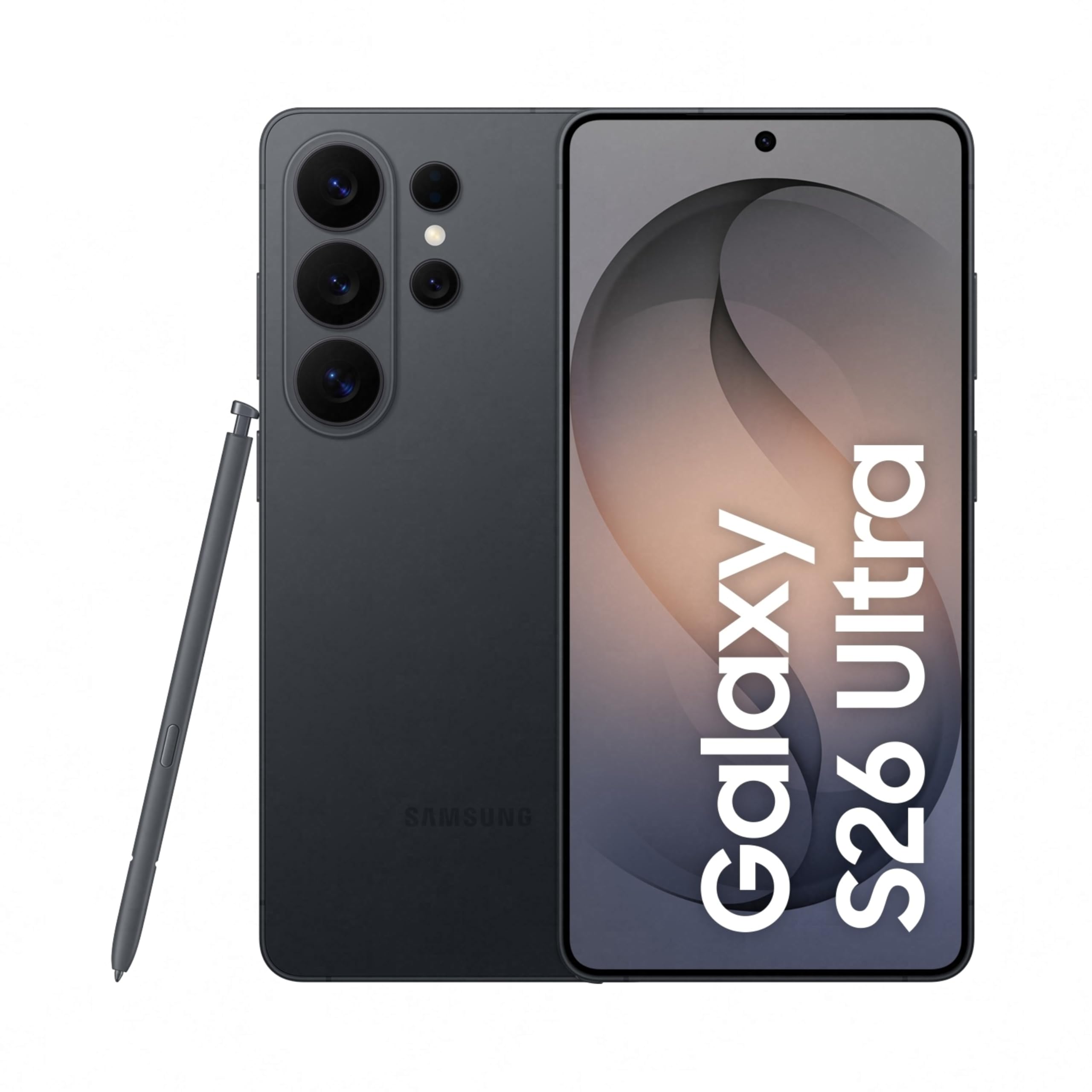
The Samsung Galaxy S26 Ultra 5G with its S Pen, ready for initial setup.
4. Caratteristiche principali e funzionamento
4.1. Privacy Display
The built-in Privacy Display allows you to control the viewability of your screen content. When activated, the screen's pixels dynamically adjust to dim content for viewers from the side, ensuring your personal information remains private in public spaces. You can customize its settings to activate for specific apps or notifications.

The Privacy Display feature ensures that screen content is only visible to the user, obscuring it from those viewing from the side.
4.2. Agentic AI Experience
The Galaxy S26 Ultra 5G integrates advanced AI features to simplify daily interactions:
- Now Nudge: Intelligently reduces steps and offers real-time suggestions based on your context.
- Cercatore: Quickly locate information on your device or the web directly from the home screen.
- One UI 8.5: Personalize your device's interface and experience with enhanced customization options.

An illustration of quick shortcuts and AI-driven suggestions within the Samsung One UI.
4.3. Sistema di telecamere
Cattura foto e video di alta qualità con il versatile sistema di fotocamere:
- 200MP High Resolution Camera: Delivers detailed images with crisp textures and clarity.
- Notturnografia: Enhanced noise reduction for bright and clear videos and photos in low-light conditions.
- Photo Assist: Utilize AI for studio-level photo editing, including object removal and background adjustments.
- Studio creativo: Generate personalized stickers from your photos with ease.
- 100x AI-powered Space Zoom: Achieve clear zoomed-in shots with AI assistance.
- Horizontal Lock: Keeps the frame steady for stable video recording, even when moving.

An illustration detailing the multi-lens camera system of the Galaxy S26 Ultra 5G, including its 200MP main sensor and telephoto lenses.

Example of a clear image captured in low-light conditions using the Nightography feature.

A screen capture demonstrating the Photo Assist feature, which provides studio-level editing tools directly on the device.

An interface showing how to generate personalized stickers from photos using the Creative Studio feature.
4.4. Prestazioni e batteria
The Galaxy S26 Ultra 5G is equipped with:
- Snapdragon 8 Elite Gen 5 for Galaxy: A powerful, customized processor for demanding tasks and graphic-intensive games.
- Redesigned Vapor Chamber: Efficiently dissipates heat to maintain optimal performance during extended use.
- Batteria da 5000 mAh: Provides long-lasting power for all-day use, with up to 31 hours of video playback.
- Ricarica super veloce 3.0: Supports up to 60W charging speed, reaching up to 75% charge in approximately 30 minutes.
- Super Fast Wireless Charging: Supports up to 25W wireless charging speed.

A visual representation of the Snapdragon 8 Elite Gen 5 processor, highlighting its NPU, GPU, and CPU components for enhanced performance.

Graphic indicating the Super Fast Charging capability, allowing the device to reach 75% charge in approximately 30 minutes.
4.5. Sicurezza
Your device is protected by defense-grade Knox security, ensuring on-device data protection. Samsung Wallet provides a fast, reliable, and secure payment solution.

The Knox Vault logo, representing the device's enhanced security features.
5. Manutenzione
5.1. Assistenza generale
- Keep your device dry. Moisture can damage the device.
- Avoid exposing your device to extreme temperatures.
- Clean your device with a soft, dry cloth. Do not use harsh chemicals.
- Proteggere lo schermo con una pellicola protettiva e utilizzare una custodia protettiva.
5.2. Resistenza all'acqua
The Galaxy S26 Ultra 5G is water-resistant. However, avoid intentional submersion in water or exposure to high-pressure water jets. If the device gets wet, dry it thoroughly with a clean, soft cloth before use or charging.
6. Risoluzione dei problemi (domande frequenti)
What are the key features of Galaxy S26 Ultra?
- A 6.9-inch anti-reflective display with a refined Armor Aluminum frame.
- A 200 MP camera system with a wider F1.4 aperture for clearer pictures even at night.
- The powerful Snapdragon® 8 Elite Gen 5 for Galaxy with improved NPU, GPU, and CPU for smoother graphics.
- A world-first on mobile, all-new built-in Privacy Display provides added privacy when you're out in public.
What are the differences between Galaxy S26, S26+, and S26 Ultra?
- Galaxy S26 Ultra: Has a 6.9-inch display and a 200 MP camera. Its typical battery capacity is 5000 mAh for all-day power with 31 hours of video playback. It also has a built-in Privacy Display.
- Galaxy S26+: Has a 6.7-inch display and a 50 MP camera. Its typical battery capacity is 4900 mAh.
- Galaxy S26: Has a 6.3-inch display and a 50 MP camera. Its typical battery capacity is 4300 mAh.
Does Galaxy S26 Ultra have a better cooling system than S25 Ultra?
Yes, Galaxy S26 Ultra comes equipped with a newly designed Vapor Chamber that spreads heat more evenly inside the device, improving thermal performance by 21%. This improved heat dissipation prevents the hardware inside your Galaxy device from overheating, allowing it to maintain performance for longer multitasking, gaming, or streaming sessions.
Does Galaxy S26 Ultra have a better display than S25 Ultra?
Yes, Galaxy S26 Ultra has a better display than previous models thanks to improvements to the customized processor. mIDNle has improved image processing precision by 4 times for more vibrant visuals. Display quality is now sharper, clearer with more lifelike visuals with ProScaler's new improvements. The 6.9-inch Dynamic AMOLED 2x display also provides a peak brightness of 2600 nits.
How long does the battery last on Galaxy S26 Ultra?
Galaxy S26 Ultra's battery is optimized to provide a long battery life for all-day use. A typical capacity of 5000 mAh allows you to stream videos and play games throughout the day without having to regularly charge. You can watch videos for up to 31 hours.
How fast can Galaxy S26 Ultra be charged?
If you're looking for super-fast charging, you can quickly charge Galaxy S26 Ultra. Super Fast Charging 3.0 with increased power from 45 W to 60 W allows you to charge your device up to 75% in around 30 minutes.
What is Privacy Display, and how does it work?
Privacy Display is a built-in privacy screen that uses innovative technology to protect your device's display from prying eyes in public places. When activated, the screen's pixels move dynamically to keep the display visible when you look at it straight on, but then appear dimmed when seen from the side by the people around you. You can have the full screen hidden from view or choose custom settings to activate Privacy Display only for notifications or certain apps.
What storage options are available for Galaxy S26 Ultra?
Galaxy S26 Ultra has three storage options available: 1 TB, 512 GB, and 256 GB. 1 TB comes with 16 GB of memory. 512 GB and 256 GB come with 12 GB of memory.
What new AI features are available on Galaxy S26 Ultra?
Galaxy S26 Ultra comes with a set of new, deeper AI features that are easy and simple to use. You can now use written prompts in Photo Assist to get faster photo editing. Now Nudge is a new feature that intelligently understands what's on your screen and will provide suggestions, such as viewing your Calendar to add an event or the option to jump straight to your Gallery when someone asks you to share photos with them. Search with Finder allows you to search for information without looking through apps yourself, such as flight details or notes you have saved.
7. Specifiche
| Caratteristica | Dettaglio |
|---|---|
| Marca | SAMSUNG |
| Sistema operativo | Androide 16 |
| Memoria RAM | 12 GB |
| Modello CPU | Snapdragon 8 Elite Gen 5 |
| Velocità della CPU | 4.74 GHz |
| Capacità di archiviazione della memoria | 256 GB |
| Colore | Nero |
| Numero di slot per schede SIM | Doppia SIM |
| Tipo di connettore | USB tipo C |
| Funzione di sicurezza biometrica | Riconoscimento delle impronte digitali |
| Human Interface Types | Touchscreen con supporto per stilo |
| Livello di resistenza all'acqua | Resistente all'acqua |
| Risoluzione del sensore fotografico anteriore | 12 MP |
| Rear Facing Camera Photo Sensor Resolution | 10, 200, 50, 50 MP (Quad Camera) |
| Capacità della batteria | 5000 milioneamp Ore |
| Peso dell'articolo | 214 grammi |
| Dimensioni dell'articolo | 8 x 78 x 164 millimetri |
| Dimensioni dello schermo | 6.9 pollici |
| Risoluzione | 3120x1440 |
| Frequenza di aggiornamento | Frequenza 120 Hz |
| Tipo di visualizzazione | AMOLED |
| Tecnologia cellulare | 5G |
| Tecnologia di rete wireless | Bluetooth, NFC, USB, Wi-Fi |
| Anno del modello | 2026 |
| Paese di origine | India |
| Risoluzione di acquisizione video | 4 mila, 8 mila |
8. Garanzia e supporto
8.1. Informazioni sulla garanzia
The Samsung Galaxy S26 Ultra 5G comes with a 1-year manufacturer warranty for the device and a 6-month warranty for in-box accessories from the date of purchase.
8.2. Manufacturer and Support
Produttore: Samsung India Electronics Pvt ltd, 6th Floor, DLF Centre, Sansad Marg, New Delhi - 110001.
E-mail: support.india@samsung.com
Samsung offers an extensive service network with over 3300+ service touchpoints providing 24x7 support for Galaxy S26 Series devices.

An illustration highlighting Samsung's broad service network, offering 24x7 support across over 3300 touchpoints.