
1. Introduzione
The EPOMAKER TH108 V2 PRO is a full-size mechanical keyboard designed for versatility and performance. It features multi-mode connectivity (Bluetooth, 2.4GHz wireless, and wired USB-C), a customizable screen and knob, hot-swappable switches, RGB lighting, and a gasket-mounted design for a comfortable typing experience. This manual provides instructions for setting up, operating, maintaining, and troubleshooting your keyboard.
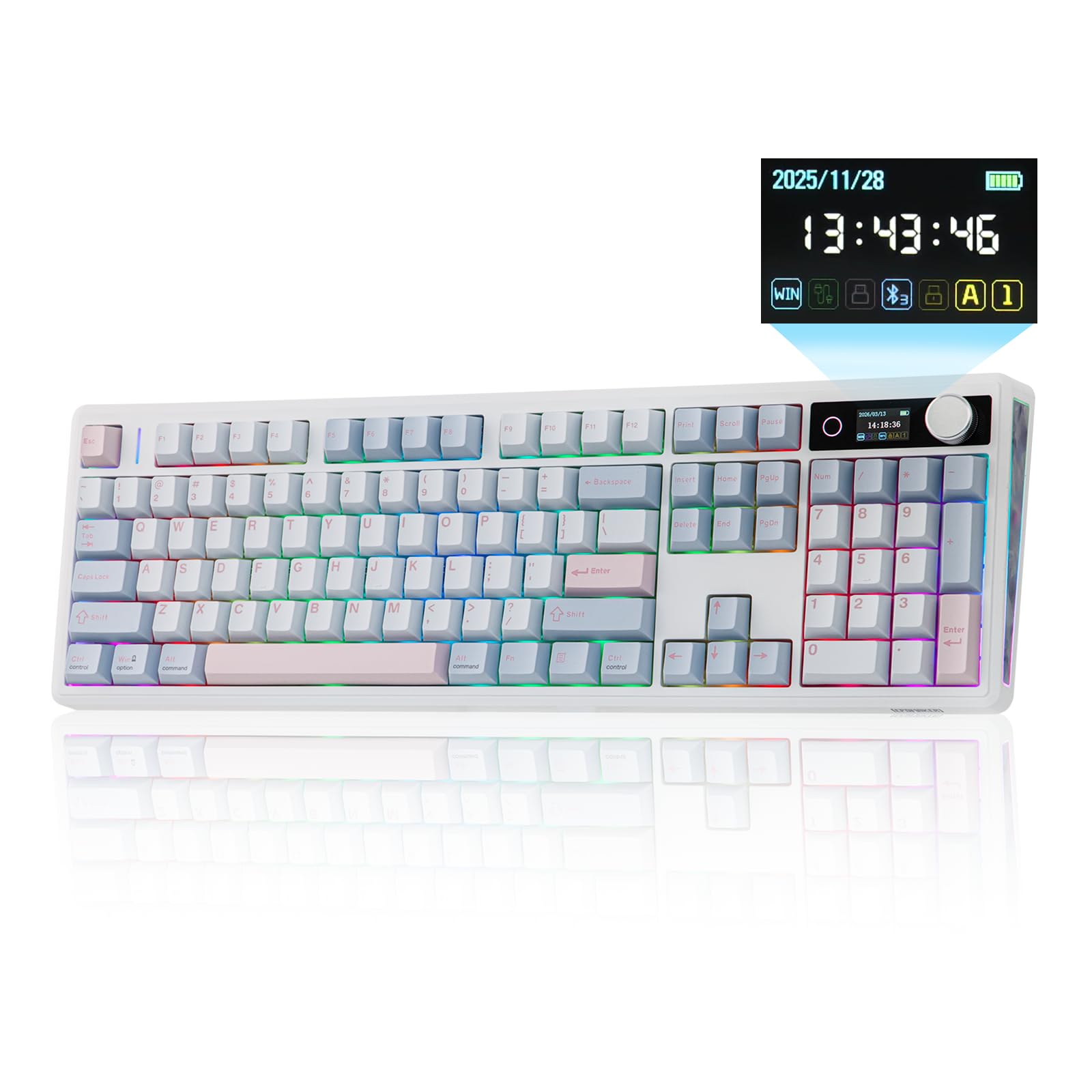
Figure 1.1: EPOMAKER TH108 V2 PRO Mechanical Keyboard
2. Cosa c'è nella scatola
- EPOMAKER TH108 V2 PRO Full-Sized Gaming Keyboard
- Detachable USB A-to-C Cable
- Wireless 2.4Ghz Receiver (stored under the left kick-stand)
- Extra Switch
- Estrattore 2 in 1 per interruttori e tasti
- Summarized Multilingual Manual and Product Card

Figure 2.1: Location of the 2.4Ghz Wireless Receiver
3. Prodotto finitoview
The TH108 V2 PRO keyboard integrates several features for enhanced user experience:
- Connettività multimodale: Supports Bluetooth, 2.4GHz wireless, and wired USB-C connections.
- Customizable Screen & Knob: A 1.06-inch functional glass screen displays real-time keyboard information, backlight settings, and supports custom GIFs or images. The rotary knob controls volume and screen pages, and is customizable.
- Interruttori sostituibili a caldo: Consente la facile sostituzione degli interruttori meccanici senza saldature.
- Progettazione del supporto della guarnizione: Multiple layers of sound-dampening materials (PORON, latex, IXPE, silicone, foams) provide a soft, bouncy typing feel and a deep acoustic profile.
- Illuminazione RGB: Features per-key adjustable south-facing LEDs, an integrated light bar, and a custom decor panel for vibrant lighting effects.
- Batteria a lunga durata: Equipped with a 10000mAh battery, providing up to 200 hours of continuous use.
- Mac/Windows Compatibility: Includes dedicated Mac modifier keycaps for seamless switching between operating systems.

Figure 3.1: Cushioned Gasket Structure

Figure 3.2: Pre-Lubed Linear Switches

Figure 3.3: Mac Modifier PBT Keycaps

Figure 3.4: Vibrant RGB Lighting
Video del prodotto
Video 3.1: Comparison between TH108 PRO and TH108 V2 PRO, highlighting key differences and improvements.
Video 3.2: Demonstrates the typing sound and feel of Creamy Jade and Sea Salt Silent V2 switches on the TH108 V2 PRO.
Video 3.3: Provides close-up views of various components and design elements of the TH108 V2 PRO keyboard.
4. Impostazione
4.1 Opzioni di connettività
The TH108 V2 PRO supports three connection modes:
- Modalità cablata: Connect the keyboard to your device using the provided USB A-to-C cable.
- Modalità wireless a 2.4 GHz: Insert the 2.4GHz USB receiver (found under the left kick-stand) into your device's USB port. Switch the keyboard's mode selector to 2.4G.
- Modalità Bluetooth: Impostare il selettore di modalità della tastiera su BT. Premere FN + Q/W/E per selezionare un canale Bluetooth. La spia luminosa lampeggerà, indicando la modalità di associazione. Cercare "TH108 V2 PRO" on your device and connect.
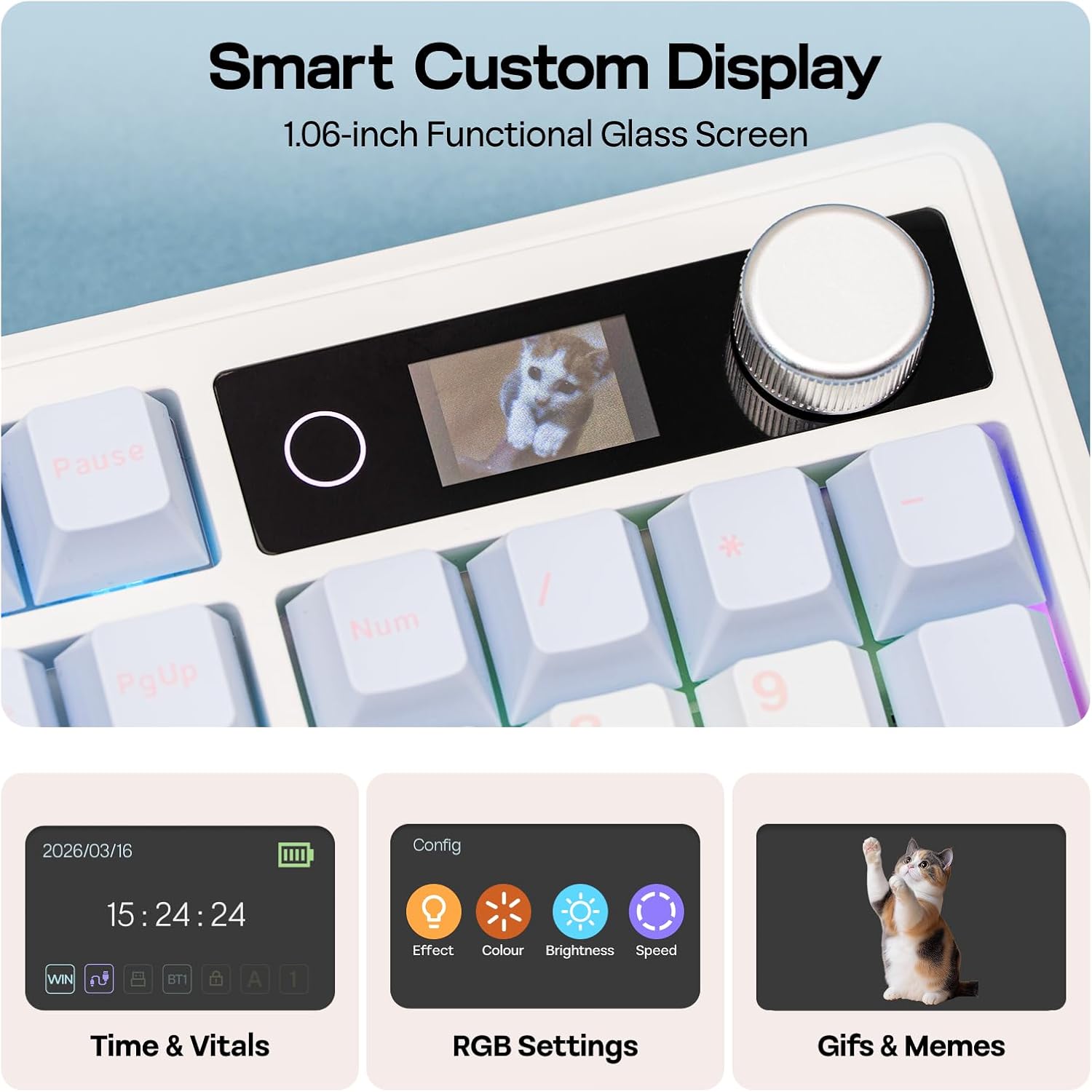
Figure 4.1: Connection Hub and Mode Switches
4.2 Cambio del sistema operativo
Use the dedicated switch on the keyboard to toggle between Windows (WIN) and Mac operating system layouts. This ensures correct key mapping for your system.
4.3 Addebito iniziale
Before first use, it is recommended to fully charge the keyboard using the provided USB-C cable. The screen will indicate charging status.
Video 4.2: An unboxing video of the TH108 V2 PRO, showing initial setup components.
5. Istruzioni per l'uso
5.1 Screen and Knob Functions
The 1.06-inch screen displays various information and settings. The rotary knob allows for quick adjustments:
- Default Knob Function: Ruota per regolare il volume. Premi per disattivare/riattivare l'audio.
- FN + Manopola: Toggles between screen pages (e.g., time, battery, connection status, RGB settings).
- Personalizzazione: The screen can display custom GIFs, drawings, or photos. This is managed via the web-compatible software.

Figure 5.1: Smart Custom Display and Knob
5.2 Controllo dell'illuminazione RGB
The keyboard features customizable RGB backlighting. You can adjust effects, colors, brightness, and speed using:
- Integrated Knob and Screen: Use FN + Knob to navigate to RGB settings on the screen, then use the knob to adjust.
- Scelte rapide da tastiera: Refer to the included quick guide for specific FN key combinations to change RGB modes.
- Web-Software basato su: For advanced customization, including per-key lighting and custom effects.
5.3 Software programmabile
The TH108 V2 PRO utilizes a web-compatible software for advanced customization. This software allows you to:
- Rimappa i tasti
- Record macros
- Customize RGB lighting
- Adjust keyboard settings
- Upload GIFs or images to the screen
Access the software via the official EPOMAKER website. It is compatible across various devices and operating systems.
Video 5.2: A guide on how to customize your TH108 V2 PRO using the available software and features.
6. Manutenzione
6.1 Pulizia
- Prima di pulire la tastiera, scollegarla da tutte le fonti di alimentazione.
- Utilizzare un panno morbido e privo di lanugine leggermente dampPulire i tasti e il telaio con acqua o una soluzione detergente delicata.
- Per rimuovere polvere e detriti tra i tasti, utilizzare aria compressa o una piccola spazzola.
- Evitare prodotti chimici aggressivi, abrasivi o umidità eccessiva.
6.2 Sostituzione dei tasti e degli interruttori
The TH108 V2 PRO features hot-swappable switches, allowing for easy replacement without soldering.
- Use the provided 2-in-1 switch-and-keycap puller.
- Per rimuovere un tasto, tirarlo delicatamente verso l'alto con l'apposito estrattore.
- To remove a switch, use the switch puller to grasp the top and bottom clips of the switch and pull straight upwards.
- When inserting a new switch, ensure the pins are straight and align with the PCB sockets. Press firmly until it clicks into place.
- When replacing keycaps, align them with the switch stem and press down gently.
7. Risoluzione Dei Problemi
- La tastiera non risponde:
- Assicurarsi che la tastiera sia carica.
- Check the connection mode switch (wired, 2.4GHz, Bluetooth) matches your setup.
- For 2.4GHz, ensure the receiver is properly inserted.
- Per il Bluetooth, associare nuovamente il dispositivo.
- Prova a connetterti tramite cavo USB-C per escludere problemi di connettività wireless.
- Illuminazione RGB non funzionante/errata:
- Check RGB settings via the screen or software.
- Ensure brightness is not set to zero.
- Update keyboard firmware if available.
- Le chiavi non si registrano:
- If a specific key is not working, try removing and re-inserting its switch.
- Ensure the switch pins are not bent.
- Test with a different switch if available.
- Problemi software:
- Ensure you are using a compatible browser (e.g., Chrome) for the websoftware basato su.
- Svuota la cache del browser o prova un browser diverso.
- Refer to the EPOMAKER support website for software-specific FAQs.
8. Specifiche
| Marca | EPOMAKER |
| Nome del modello | TH108 V2 PRO |
| Tecnologia di connettività | 2.4Ghz Wireless, Bluetooth, USB Cable |
| Descrizione della tastiera | Meccanico |
| Numero di chiavi | 104 |
| Disposizione della tastiera | Tastiera QWERTY |
| Tipo di interruttore | Linear, Linear Silent (depending on variant) |
| Caratteristiche speciali | Backlit, Ergonomic, Hot-Swappable, Programmable Keys, Volume Roller, Screen |
| Retroilluminazione della tastiera | Colore RGB |
| Fonte di alimentazione | Alimentato a batteria (10000 mAh) |
| Materiale | Plastic (Enclosure), Polycarbonate (Plate) |
| Dispositivi compatibili | Console di gioco, laptop, PC, smartphone, tablet |
| Sistema operativo compatibile | Android, Windows, Mac OS 11 Big Sur and above |
| Frequenza di polling (cablata) | 1000 Hz |
| Latency (Wired) | 2 millisecondo |
9. Garanzia e supporto
The EPOMAKER TH108 V2 PRO Mechanical Keyboard comes with a Garanzia di 1 anno dalla data di acquisto.
For technical support, warranty claims, or additional information, please visit the official EPOMAKER website or contact their customer service directly. You can also find more resources and product information on the Negozio EPOMAKER su Amazon.