
1. Introduzione
The TOPDON TOPBT600PLUS is a professional-grade 2-in-1 Battery and Resistance Tester designed for comprehensive battery diagnostics in various automotive and industrial settings. This device accurately tests 6V, 12V, and 24V battery systems, providing reliable data for flooded, AGM, GEL, and EFB lead-acid batteries. Additionally, it supports internal resistance measurements for lithium, alkaline, and carbon-zinc batteries. Featuring a bright 3.5-inch display and an onboard power supply, the BT600PLUS offers fast, versatile, and dependable performance.
2. Informazioni sulla sicurezza
Leggere tutte le avvertenze e le istruzioni di sicurezza prima di utilizzare questo prodotto. Il mancato rispetto di queste istruzioni può causare scosse elettriche, incendi o lesioni gravi.
- Protezione degli occhi: Quando si lavora in prossimità delle batterie, indossare sempre protezioni per gli occhi approvate dall'ANSI.
- Ventilazione: Assicurare un'adeguata ventilazione durante il test delle batterie, poiché possono emettere gas esplosivi.
- Acido della batteria: Evitare il contatto con l'acido della batteria. In caso di contatto, sciacquare immediatamente con acqua e consultare un medico.
- Scintille e fiamme: Tenere scintille, fiamme e materiali fumanti lontano dalle batterie.
- Utensili isolati: Utilizzare utensili isolati per evitare cortocircuiti accidentali.
- Collegamento corretto: Connect the tester leads correctly to the battery terminals (red to positive, black to negative).
- Ambiente operativo: Non utilizzare il dispositivo in damp o in condizioni di bagnato.
3. Prodotto finitoview
The TOPBT600PLUS features a robust design for professional use. Its main components include a 3.5-inch color display, control buttons, and two sets of test leads for versatile connection options.
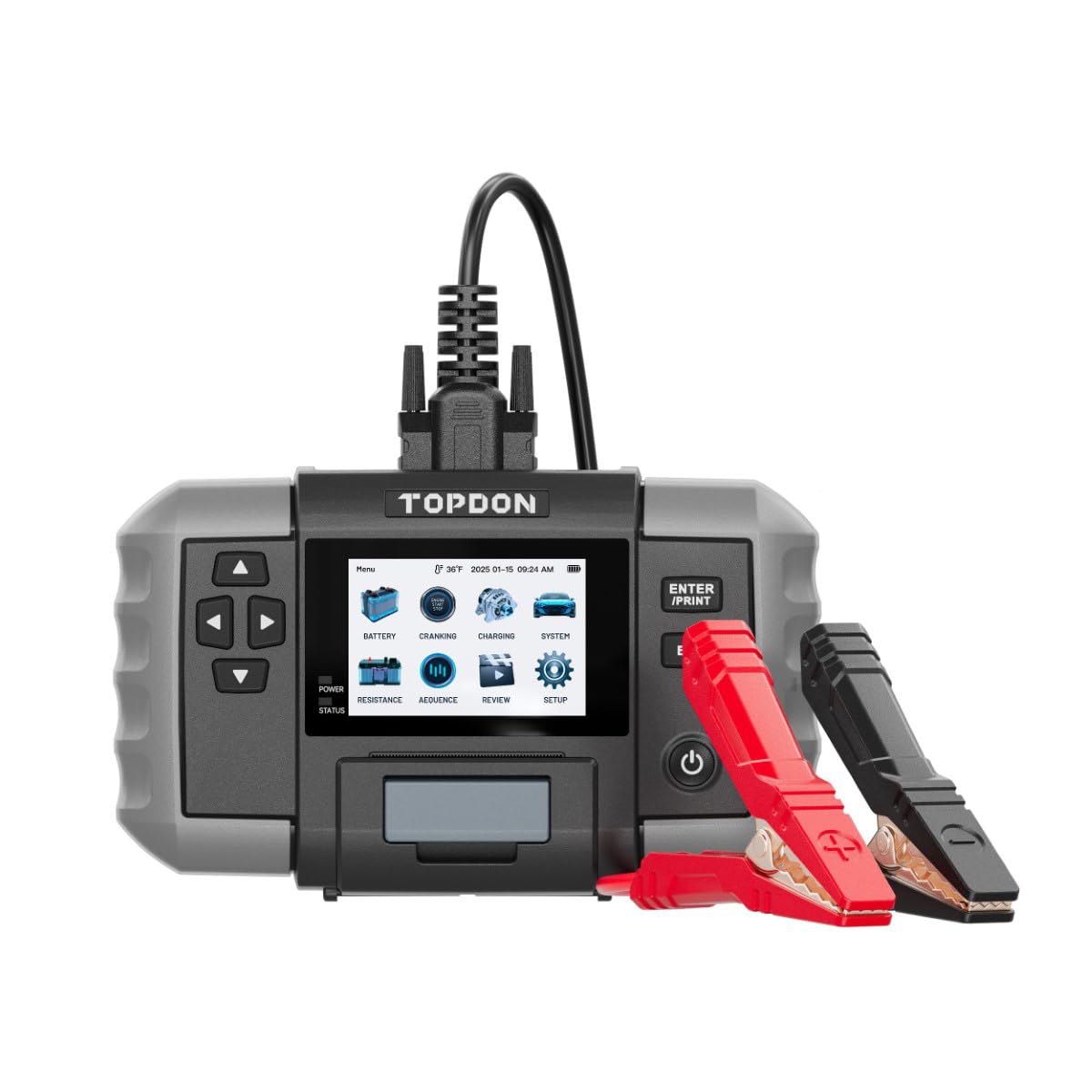
Figura 1: Davanti view of the TOPDON TOPBT600PLUS device. This image displays the main unit with its 3.5-inch screen and control buttons, along with the attached test leads.
The device's onboard power source allows for testing batteries down to 2V, enhancing its flexibility for various diagnostic scenarios.
4. Impostazione
Follow these steps to prepare your TOPBT600PLUS for operation:
- Disimballaggio: Carefully remove the TOPBT600PLUS from its packaging and inspect for any damage.
- Accensione iniziale: The device is equipped with an internal power source. Press the power button to turn it on.
- Collegamento dei cavi di prova: Ensure the test leads are securely connected to the device. The red clamp is for the positive (+) terminal, and the black clamp is for the negative (-) terminal.
- Preparazione della batteria: Per ottenere letture precise, assicurarsi che i terminali della batteria siano puliti e privi di corrosione.
5. Istruzioni per l'uso
The TOPBT600PLUS offers various testing modes for comprehensive battery analysis.
5.1. Prova della batteria
This mode performs cranking, charging, and system tests for 6V, 12V, and 24V batteries.
- Collegamento alla batteria: Attacca il cl rossoamp al terminale positivo (+) della batteria e al polo neroamp al terminale negativo (-) della batteria.
- Seleziona il tipo di batteria: On the device screen, select the appropriate battery type (e.g., Flooded, AGM, GEL, EFB).
- Input Battery Specifications: Entra l'avviamento a freddo della batteria Amps (CCA) or other relevant ratings as prompted.
- Avvia test: Follow the on-screen instructions to initiate the test. The device will guide you through cranking and charging system checks.
- View Risultati: The 3.5-inch display will show detailed results, including battery voltage, CCA value, internal resistance, and overall battery health status.
5.2. Test di resistenza
This mode measures the internal resistance of various battery chemistries.
- Collegamento alla batteria: Attacca il cl rossoamp al terminale positivo (+) della batteria e al polo neroamp al terminale negativo (-) della batteria.
- Select Resistance Test: Navigate to the Resistance Test option on the device menu.
- Select Battery Chemistry: Choose the correct battery chemistry (e.g., Lithium, Alkaline, Carbon-Zinc) if prompted.
- Avvia test: Initiate the test. The device will measure and display the internal resistance.
- Interpretare i risultati: Compare the measured resistance with the manufacturer's specifications for the battery to assess its condition.
5.3. Sequence Testing
The TOPBT600PLUS supports sequence testing for up to 500 batteries across 10 groups, ideal for batch testing.
- Setup Thresholds: Configura voltage or resistance thresholds within the device settings to automatically identify underperforming units.
- Eseguire i test: Connect and test batteries sequentially. The device will alert you if a battery falls outside the set parameters.
6. Manutenzione
Proper maintenance ensures the longevity and accuracy of your TOPBT600PLUS.
- Pulizia: Pulire il dispositivo con un panno morbido e asciutto. Non utilizzare detergenti abrasivi o solventi.
- Magazzinaggio: Conservare il tester in un ambiente asciutto e fresco, lontano dalla luce solare diretta e da temperature estreme.
- Lead Care: Inspect test leads regularly for damage. Replace if insulation is cracked or wires are exposed.
- Aggiornamenti software: Check the official TOPDON webperiodicamente per gli aggiornamenti del firmware, al fine di garantire prestazioni e compatibilità ottimali.
7. Risoluzione Dei Problemi
If you encounter issues with your TOPBT600PLUS, refer to the following common problems and solutions:
| Problema | Possibile causa | Soluzione |
|---|---|---|
| Il dispositivo non si accende | Low internal battery; device malfunction | Ensure the internal battery is charged. If issue persists, contact support. |
| Letture imprecise | Poor connection; dirty battery terminals; incorrect battery type selected | Pulisci i terminali della batteria. Assicurati che siano puliti.amps are securely attached. Verify correct battery type and specifications are entered. |
| Nessun output di visualizzazione | Screen damage; software error | Restart the device. If the screen remains blank, contact customer support. |
| Clamps get hot during testing | Loose connection; excessive current draw | Garantire clamps are tightly secured. Discontinue test if excessive heat is observed and check battery condition. |
8. Specifiche
Key technical specifications for the TOPDON TOPBT600PLUS:
- Marca: TOPDON
- Modello: TOPBT600PLUS
- Fonte di energia: Battery Powered (Internal)
- Volume di esercizio minimotage: 2 Volt
- Peso: 4.41 libbre
- Display: Schermo a colori da 3.5 pollici
- Supported Battery Types (Lead-Acid): Allagato, AGM, GEL, EFB
- Supported Battery Chemistries (Resistance Test): Lithium, Alkaline, Carbon-Zinc
- Volume di sistematage: 6V, 12V, 24V
9. Garanzia e supporto
For detailed warranty information, please refer to the warranty card included with your product or visit the official TOPDON websito. I termini di garanzia coprono in genere i difetti di fabbricazione per un periodo di tempo specificato a partire dalla data di acquisto.
For technical support, troubleshooting assistance, or service inquiries, please contact TOPDON customer support through their official websito o le informazioni di contatto fornite nella documentazione del prodotto.