
1. Introduzione
Thank you for choosing the ganopterygon G128M Smart Watch. This manual provides essential information for setting up, operating, and maintaining your device. Please read it carefully to ensure proper use and to maximize the watch's features.
Cosa c'è nella scatola
- Smartwatch (1 unità)
- Cinturino in silicone (1 unità)
- Cavo di ricarica magnetico (1 unità)
- Manuale dell'utente (1 unità)

Image: The ganopterygon G128M Smart Watch package contents, showing the smartwatch, a silicone strap, a magnetic charging cable, and the user manual.
2. Informazioni sulla sicurezza
- Non tentare di smontare o modificare l'orologio.
- Tenere l'orologio lontano da temperature estreme e dalla luce solare diretta.
- Avoid exposing the watch to strong impacts or chemicals.
- Consultare un medico prima di iniziare un nuovo regime di allenamento, soprattutto se si hanno problemi di salute preesistenti.
- Questo dispositivo non è un dispositivo medico e non deve essere utilizzato per diagnosi o trattamenti medici.
- Ensure the charging cable is used correctly to prevent damage or electric shock.
3. Guida all'installazione
3.1 Ricarica dello Smart Watch
Before first use, fully charge your ganopterygon G128M Smart Watch. Connect the magnetic charging cable to the charging points on the back of the watch and plug the USB end into a power adapter (not included) or a computer's USB port. A full charge typically takes approximately 2 hours.

Image: The smartwatch connected to its magnetic charging cable, illustrating the 300mAh battery and expected battery life of 5-7 days for normal use and 25 days standby.
3.2 Download e installazione dell'app
To unlock all features and synchronize data, download the companion app. Cercare "Da Fit" in your smartphone's app store (compatible with iOS 9.0+ and Android 5.0+).
3.3 Associazione con lo smartphone
- Assicurati che l'orologio sia carico e acceso.
- Abilita il Bluetooth sul tuo smartphone.
- Open the Da Fit app and follow the on-screen instructions to add a device.
- Select the "G128" model from the list of available devices.
- Conferma la richiesta di associazione sia sul telefono che sull'orologio.

Image: A visual guide demonstrating the steps to download the Da Fit app, enable Bluetooth, add the device, find the G128 model, and confirm pairing for Bluetooth calling functionality.
4. Istruzioni per l'uso
4.1 Navigazione di base
The ganopterygon G128M Smart Watch features a 2.01" HD touchscreen for intuitive control. Swipe left, right, up, or down to navigate through menus and functions. Tap to select items.

Image: A collage of different watch faces available on the G128M smartwatch, illustrating the 2.01" HD touchscreen and customizable display options.
Chiamate Bluetooth 4.2
Once paired, you can make and receive calls directly from your watch. The watch includes a built-in microphone and speaker.
- Rispondere alle chiamate: Quando ricevi una chiamata, tocca l'icona verde del telefono sullo schermo dell'orologio.
- Effettuare le chiamate: Accedi al tastierino numerico o all'elenco dei contatti sull'orologio per avviare una chiamata.
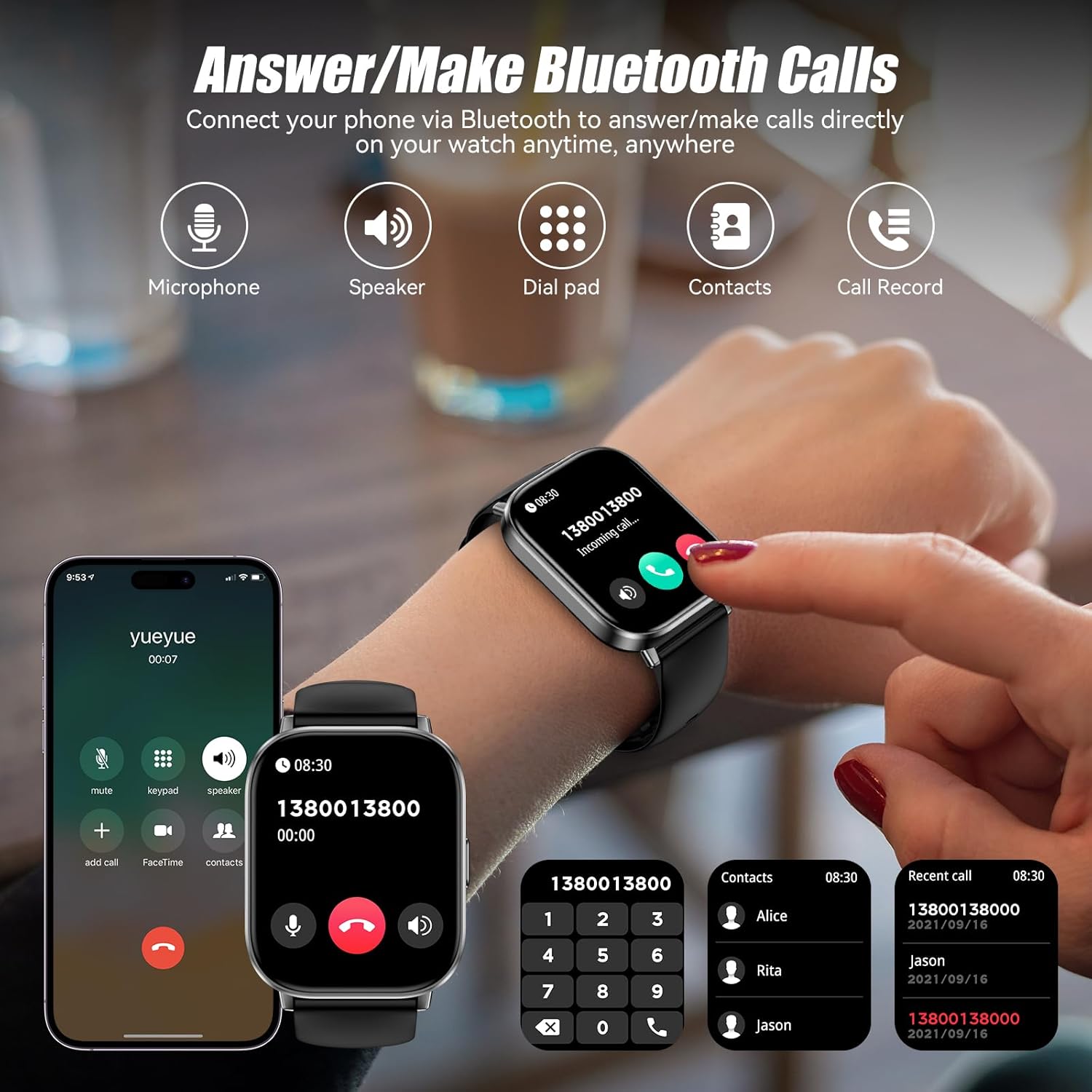
Image: The smartwatch screen showing options for Bluetooth calling, including a dial pad, contacts, and call history, alongside icons for microphone and speaker.
4.3 Monitoraggio sanitario
L'orologio monitora costantemente vari parametri relativi alla salute:
- Frequenza cardiaca: Monitora la tua frequenza cardiaca 24 ore su 24, 7 giorni su 7. View dati in tempo reale sull'orologio o tendenze dettagliate nell'app.
- Monitoraggio del sonno: Tracks your sleep patterns, including light, deep, and awake sleep stages.
- Salute delle donne: Fornisce monitoraggio e promemoria per i cicli mestruali.

Image: The smartwatch interface showing heart rate data, sleep duration, and a women's health tracking reminder, demonstrating the 24/7 health management capabilities.
4.4 modalità sportive
With over 120 sports modes, the watch records your workout data in real-time, helping you track progress and improve efficiency. Select your activity from the sports menu to begin tracking.

Image: A person cycling with the smartwatch visible, showing workout metrics like calories burned, distance, time, and steps, along with icons representing different sports modes.
4.5 Notifiche intelligenti
Receive notifications for calls, texts, and various social media apps directly on your watch. (Note: Replying to messages is not supported.)

Image: The smartwatch showing incoming message notifications and a voice assistant interface, demonstrating how to interact with the watch for daily tasks.
4.6 Altre funzioni
The G128M Smart Watch includes several practical tools:
- Assistente vocale: Utilizzare i comandi vocali per svolgere diverse attività.
- Controllo della musica: Controlla la riproduzione della musica sul tuo smartphone.
- Controllo della telecamera: Attiva da remoto l'otturatore della fotocamera del tuo telefono.
- Previsioni del tempo: Ottieni informazioni meteo aggiornate.
- Calcolatrice: Eseguire calcoli di base.
- Sveglia e timer: Imposta sveglie e timer.
- Trova telefono: Individua lo smartphone associato.
- Allenamento alla respirazione: Esercizi di respirazione guidata.
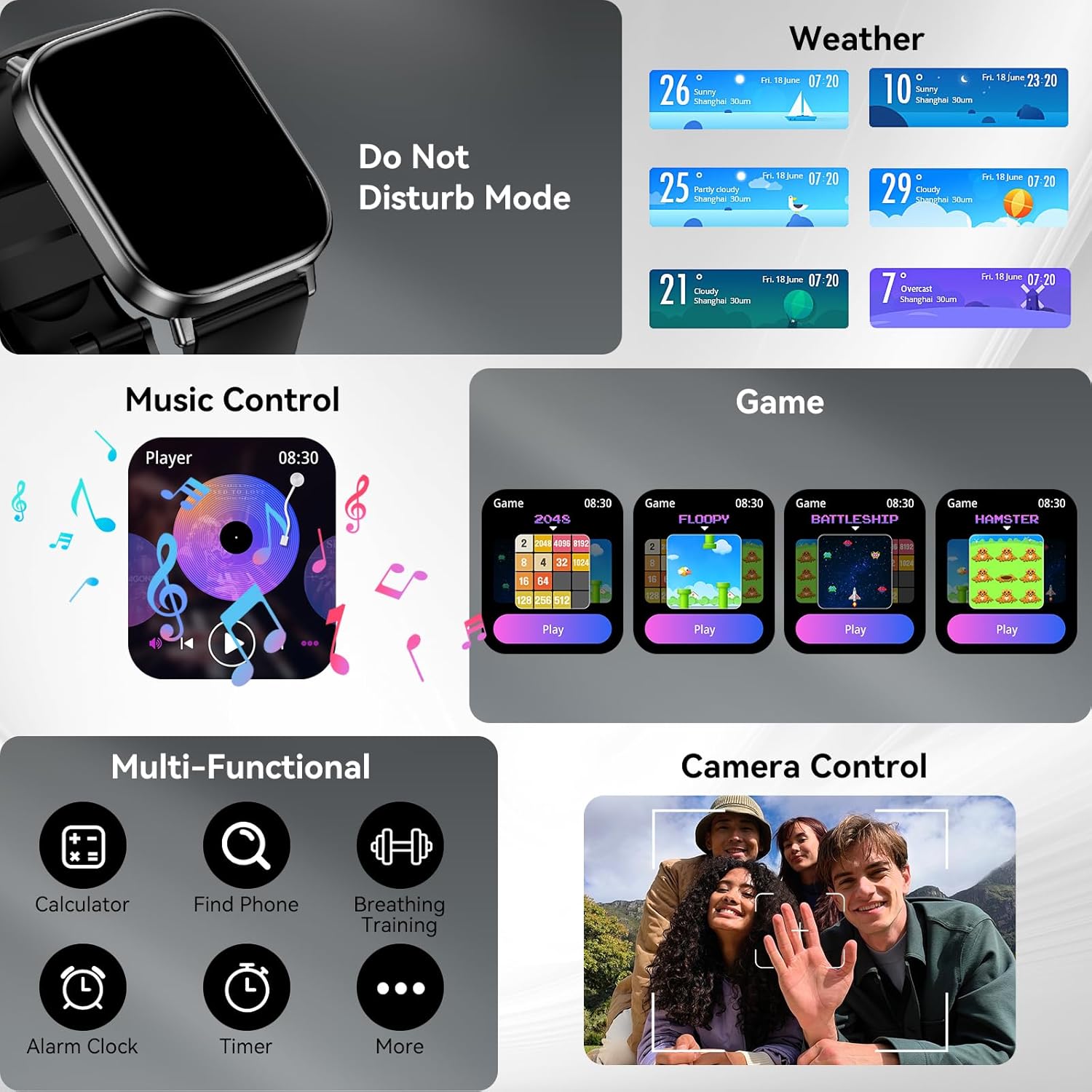
Immagine: Un completo view of the smartwatch's multi-functional capabilities, including weather display, music player controls, simple games, calculator, find phone, breathing training, alarm clock, and timer.
5. Manutenzione
5.1 Pulizia
Pulire regolarmente l'orologio e il cinturino con un panno morbido e asciutto. Se necessario, utilizzare un panno leggermenteamp panno e asciugare accuratamente. Evitare l'uso di prodotti chimici aggressivi o materiali abrasivi.
5.2 Resistenza all'acqua (IP67)
The ganopterygon G128M Smart Watch has an IP67 waterproof rating. This means it can withstand daily activities such as hand washing, rain, and light splashes. It is not suitable for swimming, showering with hot water, or diving. Do not immerse the watch in water for extended periods.

Image: A person on a surfboard wearing the smartwatch, with text indicating IP67 waterproof rating and warnings: "No Sauna" and "Do not immerse in water."
5.3 Cura della batteria
To prolong battery life, avoid fully discharging the watch frequently. Charge the watch using the provided magnetic charging cable. Store the watch in a cool, dry place when not in use for extended periods.
6. Risoluzione Dei Problemi
| Problema | Possibile soluzione |
|---|---|
| L'orologio non si accende | Assicurati che l'orologio sia completamente carico. Collegalo al caricabatterie per almeno 30 minuti. |
| Impossibile associare allo smartphone | Check if Bluetooth is enabled on your phone. Ensure the Da Fit app is open. Restart both the watch and phone. Forget the device in your phone's Bluetooth settings and try pairing again. |
| Notifiche non ricevute | Verify that notifications are enabled in the Da Fit app and in your phone's system settings for the app. Ensure the watch is connected via Bluetooth. |
| Dati sanitari imprecisi | Assicurati che l'orologio sia ben aderente al polso, né troppo stretto né troppo largo. Pulisci il sensore sul retro dell'orologio. |
| Problemi con le chiamate Bluetooth | Confirm the watch is properly connected for both data and call audio (check Bluetooth settings on your phone). Ensure the watch's volume is adjusted. |
7. Specifiche
| Caratteristica | Dettaglio |
|---|---|
| Nome del modello | G128M |
| Display | 2.01 Inches HD Touchscreen (320 x 320 Resolution) |
| Connettività | Bluetooth |
| Capacità della batteria | 300 milioneamp Ore (polimero di litio) |
| Durata della batteria (media) | 7 giorni |
| Tempo di ricarica | 2 ore |
| Grado di impermeabilità | Grado di protezione IP67 |
| Modalità Sportive | 120+ |
| Monitoraggio della salute | Heart Rate, Sleep, Female Cycle Tracking |
| Compatibilità | iOS 9.0 + / Android 5.0 + |
| Materiale della fascia | Silicone |
| Materiale della cassa | Acrilonitrile Butadiene Stirene (ABS) |
| Peso dell'articolo | 2.5 once |
8. Garanzia e supporto
8.1 Informazioni sulla garanzia
The ganopterygon G128M Smart Watch comes with a Garanzia del produttore di 2 anno. This warranty covers defects in materials and workmanship under normal use. It does not cover damage caused by misuse, accidents, unauthorized modifications, or failure to follow the instructions in this manual.
8.2 Assistenza clienti
For technical assistance, warranty claims, or any questions regarding your ganopterygon G128M Smart Watch, please refer to the contact information provided with your purchase or visit the official ganopterygon support website. Please have your model number (G128M) and purchase details ready when contacting support.