
Introduzione
The QFX R-58 is a portable retro-style radio designed for versatile audio entertainment. It features AM, FM, and Shortwave (SW) radio bands, Bluetooth connectivity for wireless audio streaming, and a built-in MP3 player supporting USB and TF card media. Power options include a rechargeable internal battery, USB charging, and supplemental solar charging for extended use. This manual provides essential information for operating and maintaining your device.
Caratteristiche principali:
- Radio multibanda: Access AM, FM, and Shortwave frequencies.
- Connettività Bluetooth: Trasmetti in streaming l'audio in modalità wireless dai dispositivi compatibili.
- Riproduzione MP3: Play music directly from USB drives or TF (MicroSD) cards.
- Batteria ricaricabile: Batteria integrata per uso portatile.
- Ricarica solare: Supplemental solar panel for charging in well-lit conditions.
- Antenna retrattile: Improves radio reception.
- Jack per cuffie: Per l'ascolto privato.
Impostare
1. Installazione della batteria
The QFX R-58 uses a replaceable 18650 lithium-ion battery. Ensure the battery is correctly inserted before first use.
- Individuare il vano batteria sul retro della radio.
- Slide the 'OPEN' latch to open the battery cover.
- Inserire la batteria 18650, assicurandosi della corretta polarità (+/-).
- Chiudere bene il coperchio della batteria.
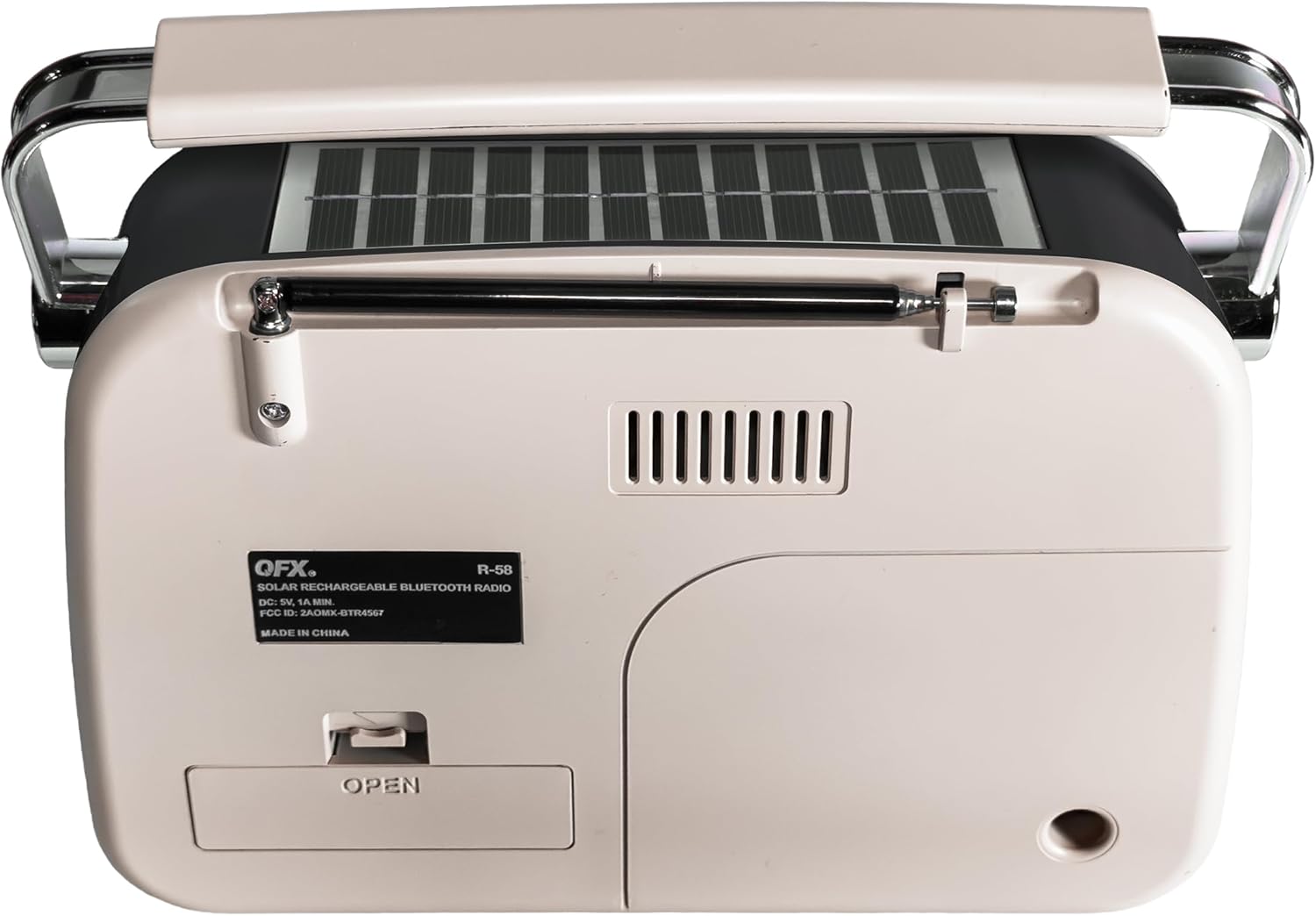
Figura 1: Indietro view of the QFX R-58 radio, highlighting the battery compartment.
2. Carica della batteria
The radio can be charged via USB-C or its integrated solar panel.
- Ricarica USB-C: Connect a USB-C cable to the DC-5V input port on the side of the radio and to a compatible USB power source (e.g., wall adapter, computer). The 'CHARGE' indicator light will illuminate.
- Ricarica solare: Place the radio with the solar panel facing direct sunlight. This provides supplemental charging and is most effective in bright conditions. The 'CHARGE' indicator light may glow dimly or brightly depending on light intensity.

Figure 2: Side panel with USB-C charging port and charge indicator.
3. Estensione dell'antenna
For optimal radio reception, extend the retractable antenna.
- Gently pull the antenna upwards from its housing until fully extended.
- Adjust the angle and direction of the antenna for the best signal reception.
Istruzioni per l'uso
1. Accensione/spegnimento e controllo del volume
- Per accendere la radio ON, rotate the ON/OFF Volume Wheel upwards.
- Per accendere la radio SPENTO, rotate the ON/OFF Volume Wheel downwards until it clicks.
- Adjust the volume by rotating the ON/OFF Volume Wheel.
2. Selecting Modes (Radio/Music/Bluetooth)
Use the toggle switch on the side panel to select your desired mode:
- MUSICA: For USB/TF card MP3 playback.
- Frequenza: Per la ricezione radio FM.
- AM: For AM radio reception.
- SW: For Shortwave radio reception.
To activate Bluetooth mode, press the 'M' (Mode) button until you hear the Bluetooth pairing prompt.
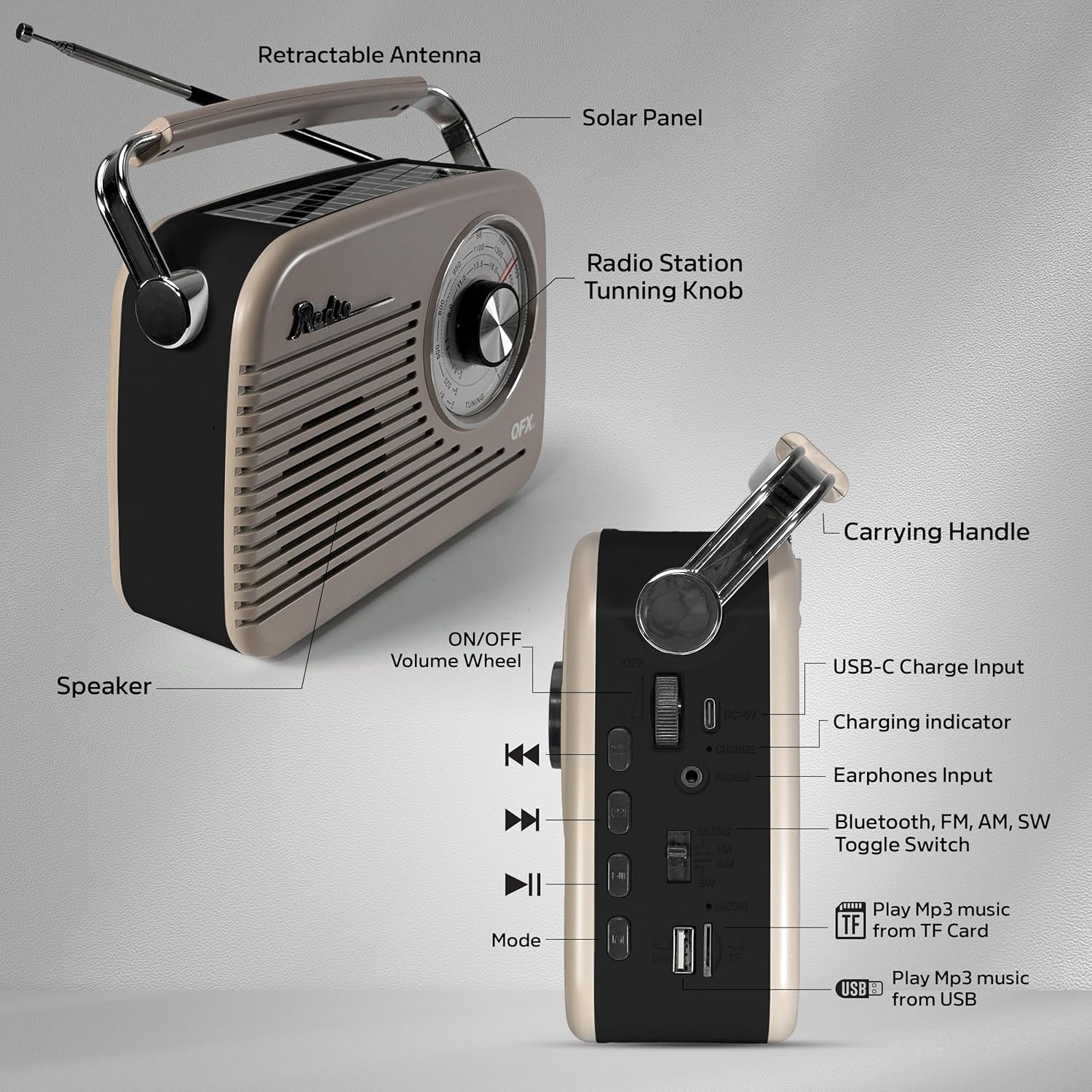
Figure 3: Labeled diagram of the QFX R-58 controls.
3. Radio Operation (AM/FM/SW)
- Select the desired band (FM, AM, or SW) using the toggle switch.
- Ruotare il Manopola di sintonia on the front panel to scan for radio stations.
- Extend and adjust the retractable antenna for optimal signal clarity.

Figure 4: Adjusting the radio tuning knob.
4. Accoppiamento Bluetooth
- Press the 'M' (Mode) button until the radio announces "Bluetooth". The Bluetooth indicator light will flash.
- Sul tuo dispositivo mobile, attiva il Bluetooth e cerca i dispositivi disponibili.
- Select "QFX R-58" from the list of devices to pair.
- Once paired, the radio will confirm with an audible prompt, and the Bluetooth indicator light will remain solid.
Figura 5: Associazione Bluetooth con un dispositivo mobile.
5. USB/TF Card MP3 Playback
- Inserire una chiavetta USB nella porta USB o una scheda TF (MicroSD) nello slot per schede TF.
- Switch the mode toggle to 'MUSIC'. The radio will automatically detect and begin playing MP3 files.
- Use the playback control buttons (Previous, Play/Pause, Next) to manage your music.
6. Uso delle cuffie
- Plug 3.5mm headphones into the 'PHONES' jack on the side panel for private listening.
- The internal speaker will automatically mute when headphones are connected.
Manutenzione
- Pulizia: Utilizzare un panno morbido e asciutto per pulire l'esterno della radio. Evitare detergenti abrasivi o solventi.
- Cura della batteria: If the radio will not be used for an extended period, remove the 18650 battery to prevent leakage. Store the battery in a cool, dry place.
- Pannello solare: Keep the solar panel clean and free of dust or debris to ensure efficient supplemental charging.
- Magazzinaggio: Store the radio in a dry environment, away from extreme temperatures and direct sunlight when not in use.
Risoluzione dei problemi
| Problema | Possibile causa | Soluzione |
|---|---|---|
| Nessuna alimentazione/La radio non si accende | La batteria è scarica o non è installata correttamente. | Charge the battery via USB-C. Ensure the 18650 battery is correctly inserted with proper polarity. |
| Scarsa ricezione radio | Antenna non estesa o area con segnale debole. | Fully extend the antenna and adjust its position. Try moving the radio to a different location. |
| Bluetooth non associato | La radio non è in modalità Bluetooth o il dispositivo è troppo lontano. | Ensure the radio is in Bluetooth mode (indicated by flashing light). Keep your device within 10 meters (33 feet) of the radio. |
| La scheda USB/TF non funziona | Modalità selezionata non corretta o non supportata file formato. | Switch to 'MUSIC' mode. Ensure files are in MP3 format. Check if the USB drive or TF card is properly inserted. |
| Solar charging indicator is dim | Luce solare insufficiente. | Move the radio to an area with direct, strong sunlight. Note that solar charging is supplemental. |
Specifiche
| Caratteristica | Dettaglio |
|---|---|
| Marca | QFX |
| Nome del modello | R-58-IVY |
| Tecnologia di connettività | Bluetooth |
| Tipo di altoparlante | Altoparlante singolo |
| Caratteristiche aggiuntive | USB Port, TF Card Slot, Solar Panel |
| Dimensioni dell'articolo (P x L x A) | 9.06"P x 2.95"L x 7.87"A |
| Peso dell'articolo | 2.31 libbre |
| Codice UPC | 606540005392 |
Garanzia e supporto
For warranty information and customer support, please refer to the documentation included with your purchase or visit the official QFX websito. Conservare la prova d'acquisto per eventuali reclami in garanzia.


