
1. Introduzione
Thank you for choosing the HomeTro Walking Pad Treadmill. This manual provides essential information for the safe and efficient operation, setup, and maintenance of your new fitness equipment. Please read this manual thoroughly before initial use and retain it for future reference.
2. Informazioni importanti sulla sicurezza
To reduce the risk of serious injury, read all important precautions and instructions in this manual before using the treadmill. HomeTro assumes no responsibility for personal injury or property damage sustained by or through the use of this product.
- Capacità di peso: Non superare il peso massimo dell'utente 300 libbre (136 kg).
- Posizionamento: Place the treadmill on a level, stable surface with at least 2 feet (0.6 meters) of clear space behind it and 1 foot (0.3 meters) on each side.
- Energia: Collegare il tapis roulant a una presa elettrica correttamente messa a terra. Non utilizzare prolunghe o adattatori.
- Bambini e animali domestici: Tenere bambini e animali domestici lontani dal tapis roulant, soprattutto durante il funzionamento.
- Arresto di emergenza: Always attach the safety key clip to your clothing before starting a workout. In an emergency, pulling the safety key will immediately stop the treadmill.
- Calzature: Quando si utilizza il tapis roulant, indossare sempre calzature sportive adatte.
- Salute: Consult your physician before starting any exercise program. Stop exercising immediately if you feel faint, dizzy, or experience pain.
- Regolazione dell'inclinazione: Ensure the treadmill is stable before and after adjusting the incline.
3. Contenuto della confezione
Dopo aver disimballato, assicurarsi che tutti i componenti siano presenti e integri:
- HomeTro Walking Pad Treadmill (Main Unit)
- Front Footpads (requires attachment)
- Telecomando
- Chiave di sicurezza
- Cavo di alimentazione
- Manuale dell'utente (questo documento)
4. Istruzioni per l'installazione
The HomeTro Walking Pad Treadmill is largely pre-assembled. Follow these steps for quick setup:
- Disimballare: Estrarre con cautela il tapis roulant dalla confezione.
- Attach Front Footpads: Locate the front footpads and securely attach them to the designated areas on the treadmill base.
- Unfold the Handle (if desired): If you plan to use the treadmill in running mode or prefer the handle for support, gently lift the handle until it locks into its upright position. Ensure it is securely locked.
- Posizionamento: Place the treadmill on a flat, stable surface. Ensure adequate clearance around the unit as described in the safety section.
- Collegamento elettrico: Collegare il cavo di alimentazione alla porta di alimentazione del tapis roulant e poi a una presa elettrica dotata di messa a terra.
- Accensione iniziale: Flip the main power switch (usually located near the power cord inlet) to the 'ON' position. The display should illuminate.

5. Istruzioni per l'uso
Your HomeTro Walking Pad Treadmill offers multiple modes and control options for a versatile workout experience.
5.1 Treadmill Modes and Speed Ranges
- Handle Raised (Running Mode): Speeds from 0.6 mph to 7.5 mph. Suitable for running and brisk walking.
- Handle Lowered (Walking Pad Mode): Speeds from 0.6 mph to 5 mph. Ideal for work-walking or casual walking under a desk.

5.2 Regolazione dell'inclinazione
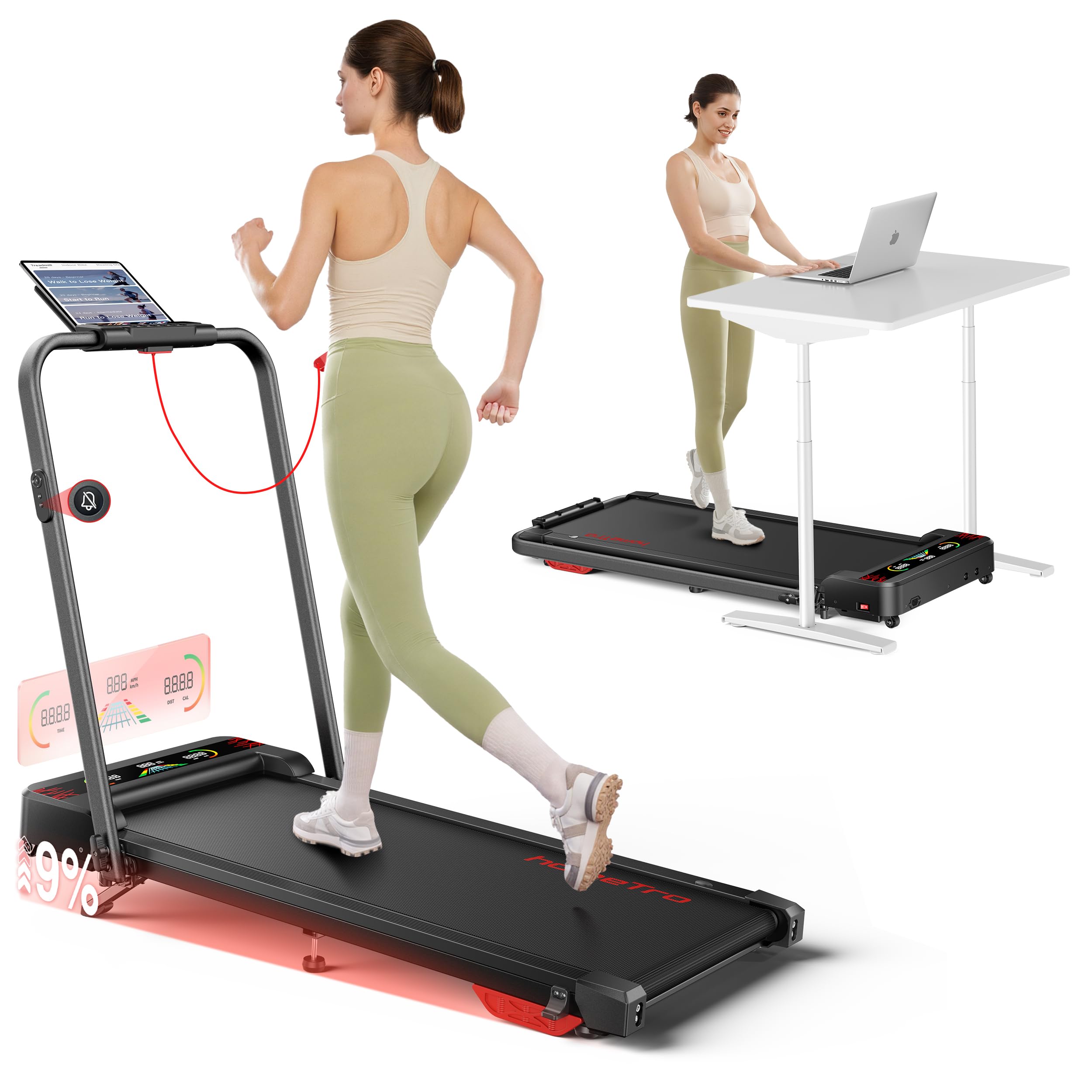
The treadmill features a 9% incline, which can be adjusted manually without tools. To adjust the incline, ensure the treadmill is off and unplugged. Lift the rear of the treadmill and position the incline support to the desired setting. Ensure it is securely locked before use.
5.3 Opzioni di controllo
You can control your treadmill using the remote control, handrail buttons, or the FITSHOW App.
- Telecomando: The magnetic remote allows for easy adjustments. It includes a mute button to silence operational beeps.
- Pulsanti del corrimano: Quick access buttons on the handrail provide convenient control during your workout.
- FITSHOW App (Bluetooth): Connect your treadmill via Bluetooth to the FITSHOW App on your smartphone or tablet. The app offers various training courses, real-time tracking, and guided workouts.

5.4 Schermate di visualizzazione
The treadmill features dual display screens for comprehensive workout feedback.
- Main LED Display: Located on the running machine, this RGB LED display lights up dynamically, providing an interactive visual experience.
- Handrail LED Display: A secondary display on the handrail clearly shows key metrics such as speed, time, distance, and calories burned.

5.5 Utilizzo della chiave di sicurezza
The safety key is a critical safety feature. Attach the clip of the safety key to your clothing before beginning your workout. If you need to stop the treadmill quickly, simply pull the safety key from its receptacle, and the treadmill will immediately cease operation.
6. Manutenzione
Una manutenzione regolare garantisce la longevità e le prestazioni ottimali del tuo tapis roulant.
- Pulizia: Pulisci le superfici del tapis roulant con un pannoamp panno dopo ogni utilizzo. Evitare l'uso di detergenti abrasivi o solventi.
- Lubrificazione della cinghia: Periodically check the running belt for dryness. Lubricate the belt according to the instructions provided with your treadmill's lubricant (usually every 3-6 months depending on usage).
- Tensione e allineamento della cinghia: If the running belt feels loose or drifts to one side, refer to the troubleshooting section or contact customer support for instructions on adjusting tension and alignment.
- Magazzinaggio: When not in use, the treadmill can be folded for compact storage. Use the built-in front wheels to easily move the folded unit. Store in a dry, cool place away from direct sunlight.
7. Risoluzione Dei Problemi
In caso di problemi con il tapis roulant, consulta i problemi più comuni e le relative soluzioni riportati di seguito. Se il problema persiste, contatta l'assistenza clienti.
| Problema | Possibile causa | Soluzione |
|---|---|---|
| Il tapis roulant non si accende. | Cavo di alimentazione scollegato, interruttore principale spento, interruttore automatico scattato. | Ensure power cord is securely plugged in. Turn main power switch to 'ON'. Check household circuit breaker. |
| Il nastro trasportatore si ferma inaspettatamente. | Safety key removed, motor overload, loose connection. | Ensure safety key is properly inserted. Reduce load on treadmill. Check power connections. |
| Running belt slips or feels loose. | Belt tension too low. | Adjust belt tension using the rear roller bolts (refer to specific instructions or contact support). |
| Il nastro trasportatore si sposta da un lato. | Disallineamento della cinghia. | Adjust belt alignment using the rear roller bolts (refer to specific instructions or contact support). |
| Rumore insolito durante il funzionamento. | Lack of lubrication, loose parts, foreign object. | Lubricate running belt. Check for and tighten any loose screws. Inspect for foreign objects. |
8. Specifiche
| Caratteristica | Specificazione |
|---|---|
| Marca | HomeTro |
| Numero di modello (ASIN) | B0GN6DFVNQ |
| Potenza del motore | 2.5 CV (picco) |
| Speed Range (Handle Raised) | 0.6 - 7.5 mph |
| Speed Range (Handle Lowered) | 0.6 - 5 mph |
| Inclinazione | 9% (Regolazione manuale) |
| Peso massimo dell'utente | 300 libbre (136 kg) |
| Livello di rumore | < 45 dB |
| Costruzione della cintura da corsa | 5 non-slip layers, 6 silicone shock absorbers, 2 soft rubber pads |
| Dimensioni da aperto (L x P x A) | 50" x 23" x 42" (127 cm x 58.4 cm x 106.7 cm) |
| Dimensioni piegate (L x P x A) | 50" x 25" x 4.4" (127 cm x 63.5 cm x 11.2 cm) |
| Peso del prodotto | 21 kg (46.3 libbre) |
| Colore | Nero |
| Metodi di controllo | Remote Control, Handrail Buttons, FITSHOW App (Bluetooth) |

9. Garanzia e supporto
For warranty information, technical support, or service inquiries, please refer to the warranty card included with your product or contact HomeTro customer service directly. Please have your model number (B0GN6DFVNQ) and purchase date available when contacting support.
Informazioni sui contatti: Please visit the official HomeTro websito o la pagina di supporto del tuo rivenditore per i dettagli di contatto più aggiornati.