
1. Introduzione
Thank you for choosing the Sharp 40HF2265E Full HD Google TV. This manual provides essential information for setting up, operating, and maintaining your television. Featuring integrated Google TV, HDR10 support, Dolby Digital audio, and Bluetooth connectivity, your new TV offers a rich entertainment experience. Please read this manual thoroughly before use to ensure proper operation and to maximize your viewpiacere.

Immagine 1.1: anteriore view of the Sharp 40HF2265E Full HD Google TV.
2. Cosa c'è nella scatola
Disimballare con attenzione il televisore e verificare che siano presenti tutti i seguenti elementi:
- Sharp 40HF2265E Television
- Cavo di alimentazione
- Telecomando (richiede 2 batterie AAA, non sempre incluse)
- Manuale dell'utente (questo documento)
- Scheda di garanzia
If any items are missing or damaged, please contact your retailer or Sharp customer support immediately.
3. Impostazione
3.1 Installazione dello stand
To install the TV stand, place the TV screen-down on a soft, flat surface to prevent scratches. Align the stand feet with the corresponding slots on the bottom of the TV and secure them with the provided screws. Ensure the stand is firmly attached before placing the TV upright.

Immagine 3.1: anteriore view of the TV with stand feet attached.
3.2 Montaggio a parete
If you prefer to wall-mount your TV, you will need a VESA-compatible wall mount (not included). The Sharp 40HF2265E supports a VESA mounting standard of 200 x 200 mm. Refer to the wall mount's instructions for installation. Always ensure the wall can support the weight of the TV and the mount.

Immagine 3.2: posteriore view of the TV, highlighting VESA mounting points and ports.
3.3 Collegamento delle periferiche
Connect your external devices to the appropriate ports on the back and side of the TV. The TV features multiple HDMI, USB, and other connectivity options.
- Porte HDMI: Per collegare lettori Blu-ray, console di gioco, decoder, ecc.
- Porte USB: Per collegare dispositivi di archiviazione USB per riprodurre contenuti multimediali o per gli aggiornamenti software.
- Porta Ethernet: Per una connessione Internet cablata.
- Ingresso antenna/cavo: Per collegare un'antenna o un segnale TV via cavo.
- Uscita audio: Per collegare sistemi audio esterni.
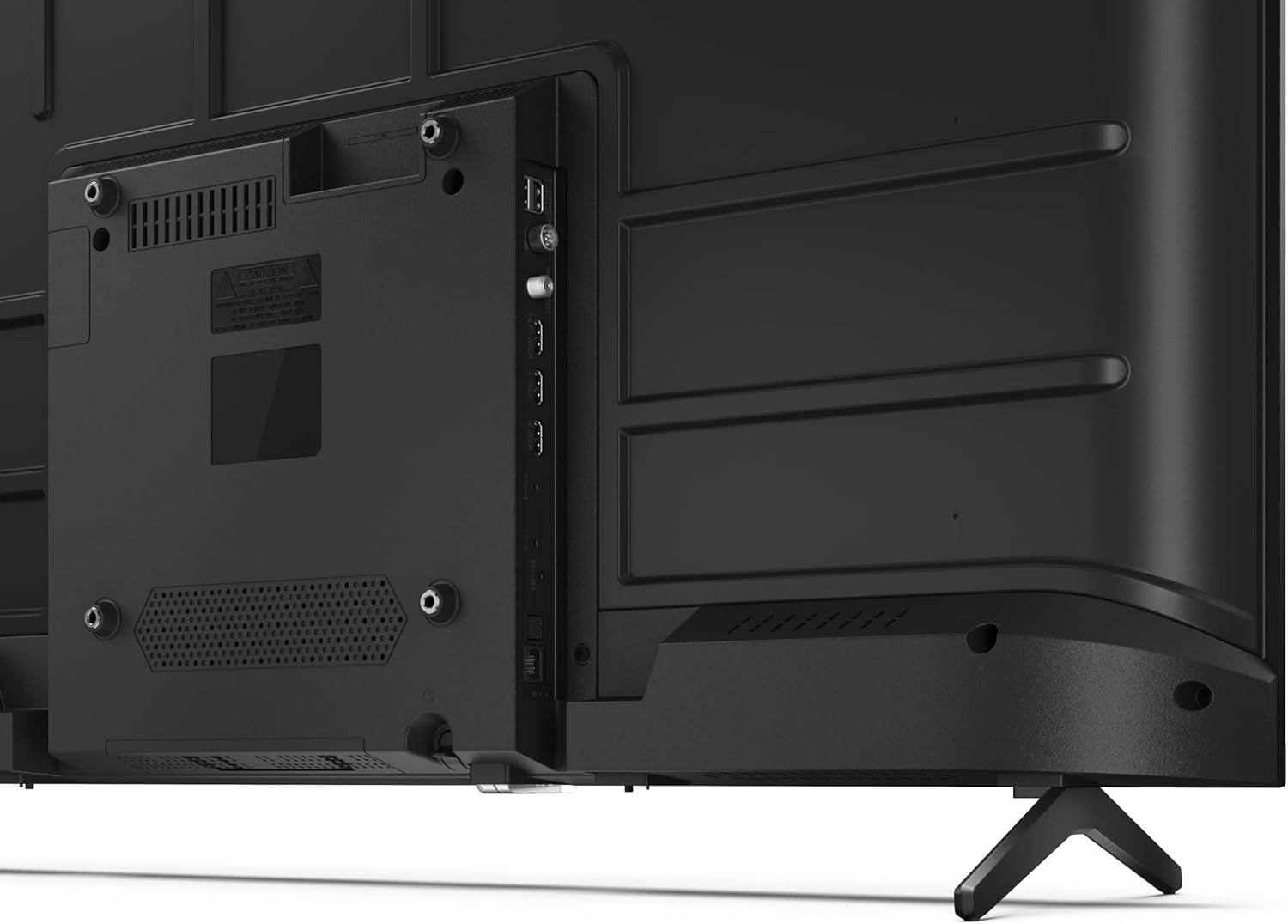
Immagine 3.3: Dettagliata view delle porte di connettività del televisore.
3.4 Accensione iniziale e configurazione di Google TV
After connecting all necessary cables, plug the power cable into an electrical outlet. Press the power button on the remote control or on the TV. Follow the on-screen instructions to complete the initial setup, including network connection, Google account login, and channel scanning.
4. Operativo
4.1 Funzioni del telecomando
The remote control allows you to navigate the TV's features. Common buttons include Power, Volume Up/Down, Channel Up/Down, Input Source, Home (Google TV), Navigation (directional arrows, OK), Back, and Google Assistant.
4.2 Interfaccia di Google TV
Your Sharp TV runs on Google TV, providing a personalized home screen with content recommendations from your subscriptions. Use the remote's navigation buttons to browse movies, shows, apps, and your library.

Image 4.1: The Google TV home screen on the Sharp 40HF2265E.
4.3 Selezione dell'ingresso
To switch between connected devices (e.g., HDMI 1, HDMI 2, TV tuner), press the 'Input' or 'Source' button on your remote control and select the desired input from the on-screen menu.
4.4 Impostazioni immagine e audio
Access the TV's settings menu to adjust picture modes (Standard, Vivid, Cinema, Game), brightness, contrast, color, and sound modes (Standard, Music, Movie, Speech). The TV supports HDR10 for enhanced contrast and color, and Dolby Digital for rich audio.

Image 4.2: Visual representation of HDR (High Dynamic Range) technology.
4.5 Assistente Google e Chromecast
Use the built-in Google Assistant for voice control. Press the Google Assistant button on your remote and speak your commands, such as searching for content, controlling smart home devices, or getting information. Chromecast allows you to cast content directly from compatible devices like smartphones or tablets to your TV.

Image 4.3: Google Assistant integration for voice commands.
4.6 Connettività Bluetooth
Pair Bluetooth-enabled devices such as headphones or soundbars with your TV for a wireless audio experience. Navigate to the TV's settings menu, select 'Remotes & Accessories', and then 'Pair new device' to connect.
5. Manutenzione
5.1 Pulizia del televisore
Always unplug the TV before cleaning. Use a soft, dry cloth to wipe the screen and TV body. For stubborn marks, lightly dampen the cloth with water or a specialized screen cleaner. Never use abrasive cleaners, waxes, or solvents.
5.2 Aggiornamenti software
La tua Google TV potrebbe ricevere aggiornamenti software automatici. Assicurati che la tua TV sia connessa a Internet per ricevere questi aggiornamenti, che possono migliorare le prestazioni e aggiungere nuove funzionalità. Puoi anche controllare manualmente la presenza di aggiornamenti nel menu delle impostazioni.
6. Risoluzione Dei Problemi
Se riscontri problemi con la tua TV, fai riferimento alle seguenti soluzioni comuni:
- Nessun potere: Controllare che il cavo di alimentazione sia collegato saldamente sia al televisore che alla presa a muro. Assicurarsi che la presa sia funzionante.
- Nessuna immagine/suono: Verify that the correct input source is selected. Check all cable connections (HDMI, antenna). Try restarting the TV.
- Il telecomando non funziona: Sostituisci le batterie (2 AAA). Assicurati che non ci siano ostacoli tra il telecomando e il sensore IR del televisore.
- Problemi di connessione di rete: For Wi-Fi, check your router and ensure the TV is within range. For wired connections, check the Ethernet cable. Try restarting your router and the TV.
- Problemi di qualità dell'immagine: Regola le impostazioni dell'immagine (luminosità, contrasto, nitidezza). Assicurati che la sorgente di ingresso fornisca un segnale di alta qualità.
For more complex issues, consult the comprehensive troubleshooting section in the full digital manual or contact Sharp customer support.
7. Specifiche
Below are the technical specifications for the Sharp 40HF2265E Full HD Google TV:

Image 7.1: Dimensions of the Sharp 40HF2265E TV.
| Caratteristica | Specificazione |
|---|---|
| Marca | Affilato |
| Numero di modello | 40HF2265E |
| Nome del modello | Serie HF |
| Anno del modello | 2025 |
| Dimensioni dello schermo | 40 pollici (81 centimetri) |
| Tecnologia di visualizzazione | GUIDATO |
| Risoluzione | 1080p (Full HD) |
| Frequenza di aggiornamento | Frequenza 60 Hz |
| Proporzioni | 16:9 |
| Rapporto di contrasto | 100000:1 |
| Screen Finish | Opaco |
| Tempo di risposta | 8 millisecondi |
| Tecnologia di retroilluminazione | GUIDATO |
| Supported HDR Format | HDR10, HLG |
| Miglioramento della qualità dell'immagine | Dynamic Contrast, HDR10, HLG |
| Motion Enhancement Technology | Motion Interpolation |
| Sistema operativo | TV di Google |
| Internet Applications | Apple TV, Google TV, Hulu, Prime Video, YouTube |
| Caratteristiche speciali | Bluetooth, Chromecast, Dolby Digital, HD Tuner |
| Tecnologia di connettività | Ethernet, USB, Wi-Fi |
| Tecnologia senza fili | Bluetooth |
| Versione Bluetooth | 5.0 |
| Screen Mirroring Technology | Chromecast, Google Cast |
| Porte HDMI totali | 3 |
| Porte USB 2.0 totali | 2 |
| Number of Composite Video Inputs | 1 |
| Ingresso audio | Mini composite/CVBS + audio input |
| Total Audio Output Ports | 2 |
| Modalità di uscita audio | Stereo |
| Codifica audio | DD |
| Integrated Surround Sound Format | Dolby AC-4, Dolby Digital, Dolby Digital Plus |
| Potenza massima in uscita dell'altoparlante | 16 Watt (2x8W) |
| Numero di canali audio | 2.0 |
| Sistema di trasmissione | DVB-T2/C/S/S2 |
| Codifica video | Formato MKV |
| Dimensioni del prodotto (PxLxA) | 8.4P x 89.2l x 50.9H cm |
| Peso dell'articolo | 5.4 chilogrammi |
| Peso senza supporto | 5.4 chilogrammi |
| Larghezza della base | 765 millimetri |
| Standard di montaggio VESA | 200 x 200 millimetri |
| Consumo energetico | 37 Watt |
| Voltage | 230 Volt |
| Remote Control Battery Size | AAA |
| Remote Control Battery Quantity | 2 |
| Parental Control Technology | Kindersicherung Über Google Tv |
| Disponibilità di pezzi di ricambio nell'UE | 7 anni |
8. Garanzia e supporto
8.1 Garanzia del prodotto
The Sharp 40HF2265E television comes with a 2-year manufacturer's warranty. Please refer to the included Warranty Card for detailed terms and conditions regarding coverage and service. Keep your proof of purchase for warranty claims.
8.2 Assistenza clienti
If you require further assistance, have questions not covered in this manual, or need technical support, please contact Sharp customer service. Contact information can typically be found on the Warranty Card or the official Sharp websito.


