
FUNYET NY-01
FUNYET 2026 14.1-inch Laptop User Manual
Modello: NY-01
Introduzione
This manual provides essential information for setting up, operating, maintaining, and troubleshooting your FUNYET 2026 14.1-inch Laptop. Please read this manual thoroughly before using your device to ensure proper function and longevity.
Cosa c'è nella scatola
Verificare che tutti gli articoli siano presenti nel pacco:
- FUNYET 2026 14.1-inch Laptop
- Power Adapter (12V2A DC)
- Manuale di istruzioni (questo documento)
- Scheda di garanzia
Prodotto finitoview
The FUNYET 2026 laptop is designed for productivity and entertainment, featuring a powerful processor and versatile connectivity.
Caratteristiche principali
- Sistema operativo: Pre-installed Windows 11 Pro for enhanced multitasking and security.
- Processore: Intel Celeron N5095 (4 cores, 4 threads, up to 2.9 GHz) for smooth performance.
- Memoria e archiviazione: 16GB LPDDR4 RAM and 512GB M.2 SSD, with support for up to 1TB TF Card expansion.
- Display: 14.1-inch IPS Full HD (1920x1080) screen, offering clear and vibrant visuals, with a 180° foldable hinge for flexible viewing.
- Connettività: Dual-band 5G Wi-Fi and Bluetooth 5.0 for fast and stable wireless connections.
- Porte: Includes 2x USB 3.0, 1x 3.5mm Headphone Jack, 1x 3.5mm DC Adapter port, 1x Mini-HDMI, and 1x TF Card slot.
- Batteria: Integrated 5000mAh battery providing 4-5 hours of normal use and over 50 hours of standby time.
- Fotocamera e audio: Built-in 0.3-megapixel front camera and dual microphones for video calls and online meetings.
Identificazione dei componenti
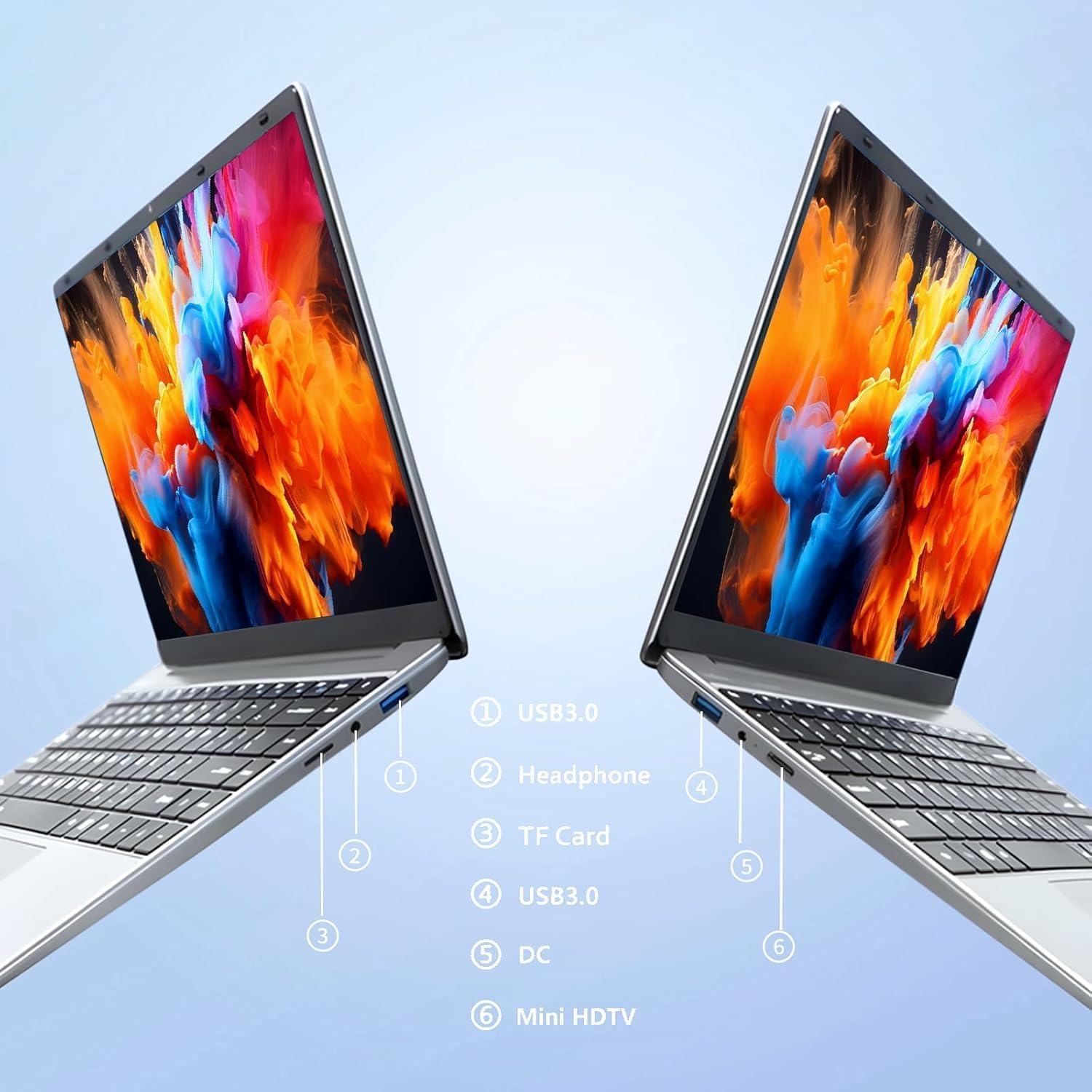
Immagine: Lato view of the laptop highlighting port locations.
This image illustrates the various ports available on the FUNYET 2026 laptop. On one side, you will find a USB 3.0 port, a 3.5mm headphone jack, and a TF Card slot. On the opposite side, there is another USB 3.0 port, the DC power input, and a Mini-HDMI port.

Immagine: Laptop screen displaying its 14-inch Full HD IPS features.
The laptop features a 14-inch Full HD (1920x1080) IPS display with a 16:9 aspect ratio and ultra-narrow bezels, providing a wide perspective and vivid images.

Immagine: Laptop demonstrating its 180-degree foldable hinge.
The laptop's hinge allows the screen to fold back 180 degrees, offering versatile viewing angles and usage modes.
Guida all'installazione
1. Ricarica iniziale
- Estrarre il portatile e l'adattatore di alimentazione dalla scatola.
- Connect the power adapter to the DC input port on the side of the laptop.
- Collegare l'adattatore di corrente a una presa a muro.
- Allow the laptop to charge for at least 30 minutes before first use, or until the battery indicator shows a sufficient charge.
2. Prima accensione
- Apri il coperchio del portatile.
- Press the power button, usually located on the keyboard deck or side.
- Seguire le istruzioni visualizzate sullo schermo per completare il processo di installazione di Windows 11 Pro, inclusa la selezione della lingua, la connessione di rete e la creazione dell'account utente.
3. Connessione al Wi-Fi
- During the initial Windows setup, you will be prompted to connect to a Wi-Fi network. Select your network from the list and enter the password.
- If setting up later, click the Wi-Fi icon in the taskbar, select your network, and click "Connect".
Istruzioni per l'uso
Gestione dell'alimentazione
- Accensione: Premere il pulsante di accensione.
- Modalità risparmio: Chiudere il coperchio o premere brevemente il pulsante di accensione.
- Fermare: Fare clic sul pulsante Start, quindi su Accensione e infine su Arresta il sistema.
- Ricomincia: Fare clic sul pulsante Start, quindi su Accensione e infine su Riavvia.
Using the Touchpad and Touchscreen
- Touchpad: Use gestures for navigation. Single tap for left-click, two-finger tap for right-click, two-finger scroll for scrolling.
- Schermo tattile: Tap to select, pinch to zoom, swipe to scroll.
Connessione display esterno
Per collegare un monitor o un proiettore esterno:
- Connect a Mini-HDMI cable from the laptop's Mini-HDMI port to the external display's HDMI input.
- If necessary, use a Mini-HDMI to HDMI adapter (not included).
- Premere Tasto Windows + P to open the Project menu and select your desired display mode (Duplicate, Extend, Second screen only).
Using TF Card Expansion
Insert a TF card into the designated slot for additional storage. The laptop supports up to 1TB TF card expansion.
Cura e manutenzione
- Pulizia: Utilizzare un panno morbido e privo di lanugine per pulire lo schermo e il telaio. Per i segni ostinati, strofinare leggermenteampPulisci il panno con acqua o un detergente per schermi. Evita prodotti chimici aggressivi.
- Cura della batteria: Per prolungare la durata della batteria, evitare di scaricarla completamente frequentemente. Conservare il portatile in un luogo fresco e asciutto se non utilizzato per lunghi periodi.
- Temperatura: Operate the laptop within a temperature range of 5°C to 35°C (41°F to 95°F). Avoid direct sunlight or extreme heat/cold.
- Ventilazione: Ensure the ventilation openings are not blocked to prevent overheating. Do not place the laptop on soft surfaces like beds or sofas during operation.
- Aggiornamenti software: Aggiorna regolarmente Windows e i driver per garantire prestazioni e sicurezza ottimali.
Risoluzione dei problemi
Problemi comuni e soluzioni
| Problema | Possibile soluzione |
|---|---|
| Il portatile non si accende. | Ensure the power adapter is securely connected and plugged into a working outlet. Check if the battery is charged. Try holding the power button for 10-15 seconds for a hard reset. |
| Problemi di connessione Wi-Fi. | Check if Wi-Fi is enabled in Windows settings. Restart your router and the laptop. Ensure you are within range of the Wi-Fi signal. Verify the Wi-Fi password. |
| Prestazioni lente. | Close unnecessary applications. Check for background processes in Task Manager. Ensure Windows is updated. Consider running a disk cleanup. |
| Display esterno non rilevato. | Ensure the Mini-HDMI cable is connected correctly. Check the input source on your external display. Press Tasto Windows + P per scorrere le modalità di visualizzazione. |
| La batteria si scarica rapidamente. | Adjust screen brightness. Close power-intensive applications. Check power settings in Windows and select a power-saving plan. Disconnect external peripherals when not in use. |
Specifiche tecniche
| Marca | FUNYET |
| Nome del modello | NY-01 |
| Dimensioni dello schermo | 14.1 pollici |
| Risoluzione | 1920 x 1080 (Full HD) |
| Tecnologia dello schermo | Schermo LCD IPS |
| Processore | Intel Celeron N5095 (fino a 2.9 GHz) |
| Memoria RAM | 16 GB LPDDR4 (2400 MHz) |
| Magazzinaggio | 512 GB M.2 SSD (expandable via TF Card up to 1TB) |
| Sistema operativo | Windows 11 Pro |
| Grafica | Intel grafica integrata |
| Connettività wireless | 5G Wi-Fi (2.4 GHz, 5.8 GHz), Bluetooth 5.0 |
| Porti | 2x USB 3.0, 1x 3.5mm Headphone, 1x 3.5mm DC Adapter, 1x Mini-HDMI, 1x TF Card Slot |
| Webcamma | 0.3 Megapixel Front Camera |
| Capacità della batteria | 5000 mAh / 38.5 Wh |
| Dimensioni (L x P x A) | 32.2 x 21 x 2.1 cm (12.68 x 8.27 x 0.83 pollici) |
| Peso | 1.4 KG (3.09 libbre) |
| Caratteristica speciale | 180° Foldable Hinge |
Garanzia e supporto
Informazioni sulla garanzia
Your FUNYET 2026 laptop comes with a Garanzia di 2 anno dalla data di acquisto. Si prega di conservare la prova d'acquisto per eventuali reclami in garanzia. La garanzia copre difetti di fabbricazione e malfunzionamenti in condizioni di normale utilizzo. Non copre danni causati da uso improprio, incidenti, riparazioni non autorizzate o normale usura.
Inoltre, un 6-month free exchange/return policy may apply, subject to the terms and conditions of your purchase platform.
Assistenza clienti
For any issues, questions, or technical assistance, please contact FUNYET customer support:
- Supporto online: Available 24/7. You can typically find support by logging into your Amazon account, navigating to "Your Account" -> "Your orders", and selecting "Ask Product Question" for your FUNYET laptop.
- E-mail: funyestore@outlook.com
- Telefono: +49 800-000-7147 (Please note operating hours may vary)

Immagine: Customer service contact details and warranty information.
This image provides a visual summary of the support options, including the 2-year warranty, 6-month exchange/return policy, and contact information for phone and email support.
Ask a question about this manual
Ask about setup, troubleshooting, compatibility, parts, safety, or missing instructions. Manuals+ will review the question and use this page’s manual context to help answer it.