
Prodotto finitoview
The AT&T EL2131-11 is a DECT 6.0 cordless landline phone designed for reliable communication. It features a powerful call blocker, caller ID, a full-duplex speakerphone, and a backlit display and keypad for enhanced visibility. This model includes one handset.
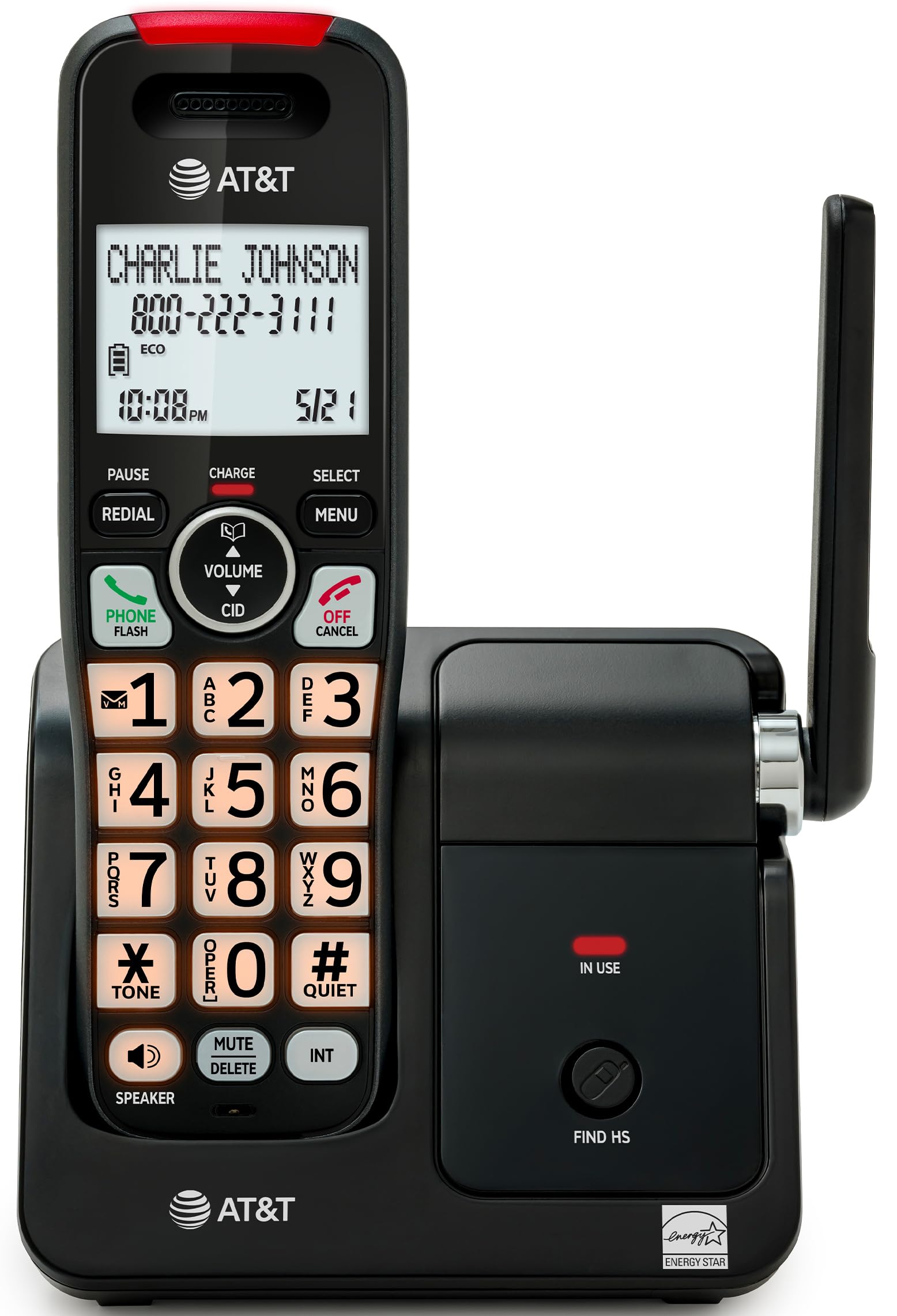
Image: The AT&T EL2131-11 cordless phone, showing the handset docked in its base unit.
Caratteristiche principali:
- Call Blocker: Blocca fino a 50 numeri indesiderati.
- ID chiamante: Stores up to 50 calls, displaying name, number, time, and date.
- Vivavoce full-duplex: Allows both parties to speak and listen simultaneously.
- Display e tastiera retroilluminati: Garantisce una visibilità chiara in condizioni di scarsa illuminazione.
- Modalità silenziosa: Silences the ringer instantly.
- Modalità ecologica: Reduces power consumption and extends battery life.
- Tecnologia DECT 6.0: Ensures interference-free communication and extended range.
Impostare
Cosa c'è nella scatola:
- Unità di base
- 1 ricevitore cordless
- 1 Power Adapter
- Cavo della linea telefonica
- 2 Celle della batteria
- Guida rapida
- Staffa per montaggio a parete
1. Installazione della batteria
- Individuare il vano batteria sul retro del ricevitore.
- Insert the two supplied battery cells, ensuring correct polarity (+ and -).
- Chiudere saldamente il coperchio del vano batterie.
2. Collegamento dell'unità base
- Connect the small end of the power adapter to the power jack on the back of the base unit.
- Collegare l'estremità grande dell'adattatore di alimentazione a una presa elettrica standard.
- Collegare un'estremità del cavo della linea telefonica alla presa TEL LINE sul retro dell'unità base.
- Collegare l'altra estremità del cavo telefonico a una presa telefonica a muro.
3. Ricarica iniziale
Place the handset in the base unit with the display facing forward. The handset will begin charging. Allow the handset to charge for at least 16 hours before initial use to ensure optimal battery performance.

Image: The handset charging in its base, with an overlay indicating a 5-day battery life on a single charge.
Istruzioni per l'uso
Effettuare e ricevere chiamate
- Per effettuare una chiamata: Premere TELEFONO / FLASH, quindi componi il numero.
- Per rispondere a una chiamata: Quando il telefono squilla, premere TELEFONO / FLASH or any dialing key (0-9, * or #).
- Per terminare una chiamata: Premere OFF/ANNULLA oppure rimettere il portatile nell'unità base.
Utilizzo del vivavoce
Durante una chiamata, premere il tasto ORATORE button to activate the full-duplex speakerphone. Press it again to switch back to the handset earpiece.

Image: A man holding a small dog, speaking hands-free using the phone's speakerphone function. The phone's base unit is visible on a table.
ID chiamante
When a call comes in, the caller's information (name and number) will appear on the handset display if you subscribe to Caller ID service. The phone stores up to 50 caller ID records.

Image: A close-up of the phone's display showing a caller's name and number, along with the time and date.
Blocco chiamate
The call blocker feature allows you to block up to 50 unwanted numbers. To block a number:
- During a call or from the Caller ID log, press MENU.
- Scroll to 'Call Blocker' and press SELEZIONARE.
- Follow the on-screen prompts to add the number to the block list.

Image: A visual representation of the call blocker feature, showing a list of blocked numbers on the phone's display.
Modalità silenziosa
Per silenziare temporaneamente la suoneria, tenere premuto il tasto #SILENZIOSO button on the handset. The ringer will be silenced for a set period, typically 1 to 12 hours, which can be adjusted in the settings.

Image: A close-up of the phone's display indicating that 'Quiet mode' is active.
Modalità ecologica
The ECO mode automatically adjusts power consumption to conserve battery life. This mode is typically active by default and indicated by an 'ECO' icon on the display.

Image: The phone's display showing the 'ECO' icon, indicating power-saving mode is active.
Ricomposizione
Per ricomporre l'ultimo numero chiamato, premere il tasto RICOMPOSIZIONE pulsante.

Image: The phone's display showing the 'Redial' function with a previously dialed number.
Display e tastiera retroilluminati
The handset features a backlit LCD display and illuminated keypad for easy readability and operation in various lighting conditions.

Image: A hand holding the phone, demonstrating its bright backlit screen and illuminated keypad in a low-light environment.
Manutenzione
Pulizia del telefono
- Utilizzare una pasta morbida e leggermenteamp cloth to clean the surfaces of the phone and base unit.
- Do not use cleaning sprays or harsh chemicals, as they may damage the finish or electronic components.
- Ensure the phone is unplugged from the power outlet before cleaning.
Cura della batteria
- For optimal battery life, keep the handset in the base unit when not in use.
- If the phone will be unused for an extended period, remove the batteries to prevent leakage.
- Replace batteries when they no longer hold a charge effectively. Use only the specified battery type.
Risoluzione dei problemi
If you experience issues with your AT&T EL2131-11 phone, refer to the following common troubleshooting steps:
| Problema | Soluzione |
|---|---|
| Nessun tono di linea |
|
| Il portatile non si carica |
|
| Non è possibile effettuare/ricevere chiamate |
|
| Scarsa qualità del suono/disturbo statico |
|
Specifiche
| Caratteristica | Dettaglio |
|---|---|
| Marca | AT&T |
| Numero di modello | EL2131-11 |
| Tipo di telefono | Senza fili |
| Tecnologia | DECT 6.0 |
| Colore | Nero e argento |
| Materiale | Plastica |
| Fonte di alimentazione | Alimentato a batteria |
| Dimensioni articolo (L x P x A) | 5.06 x 4.65 x 7.23 pollici (unità base) |
| Tempo di conversazione telefonica | 10 ore |
| Tempo di standby del telefono | 5 giorni |
| Identificazione del chiamante | SÌ |
| Operazione multilinea | Operazione su linea singola |
| Tipo di sistema di risposta | NO |
| Codice UPC | 650530034510 |

Image: The AT&T EL2131-11 base unit with handset, showing its height (7.23 inches), length (5.06 inches), and width (4.65 inches).
Informazioni sulla garanzia
This AT&T EL2131-11 Cordless Landline Phone comes with a Garanzia limitata di 1 anni from the manufacturer. Please retain your proof of purchase for warranty claims. For specific terms and conditions, refer to the warranty card included in your product packaging or visit the official AT&T support websito.
Assistenza clienti
For further assistance, technical support, or to inquire about replacement parts, please contact AT&T customer service. You can typically find contact information on the official AT&T website or in the quick start guide provided with your phone.
Online resources may include FAQs, detailed user manuals, and support forums.


