
1. Impostazione
1.1 Disimballaggio e contenuto della confezione
Carefully remove the television and all components from the packaging. Ensure all items listed below are present.
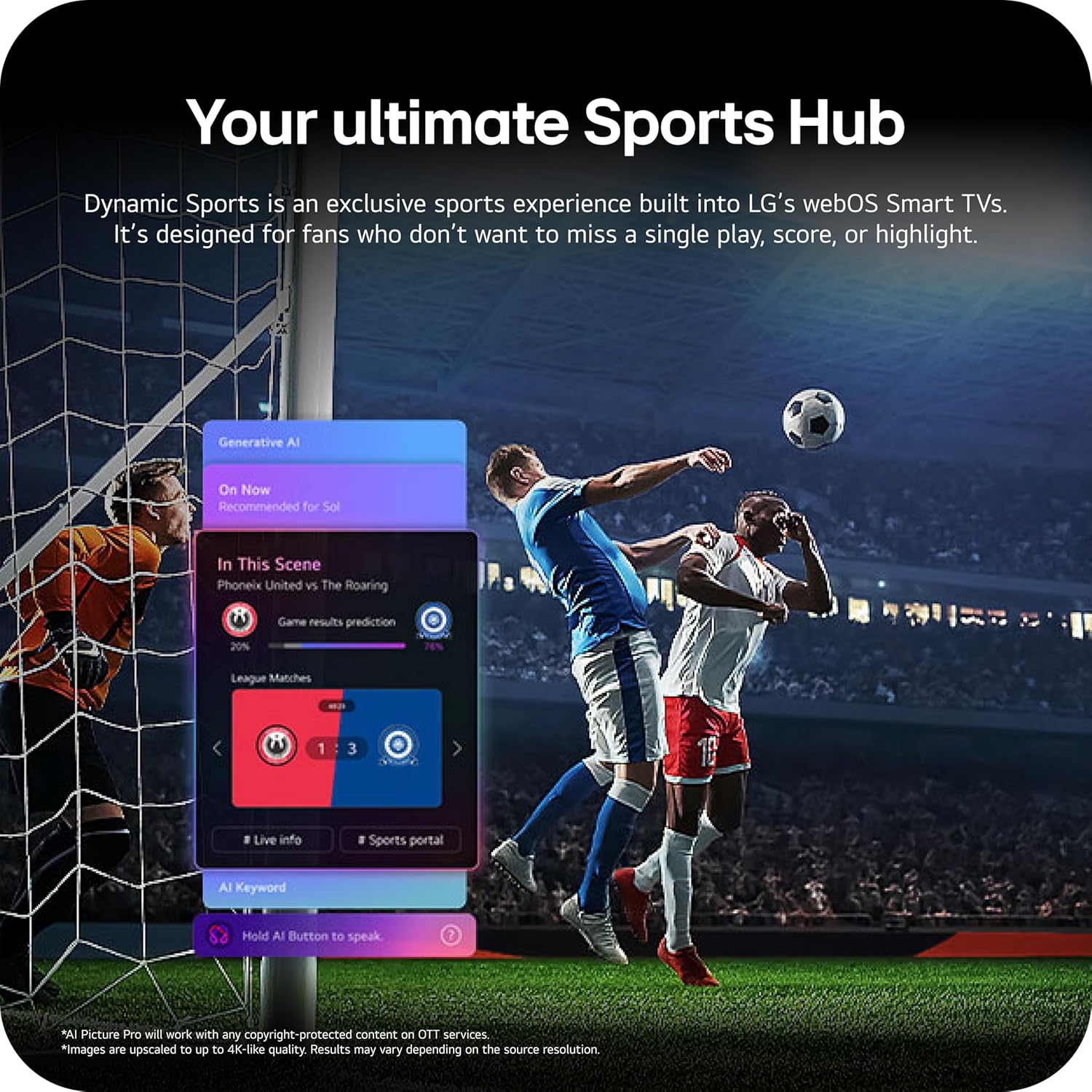
Image: The LG 65-inch OLED TV showing its dimensions with and without the stand, and a list of included accessories such as the Magic Remote, batteries, power cable, stand, and quick start guide.
Componenti inclusi:
- Smart TV LG OLED evo AI 4K serie C6 da 65 pollici
- Telecomando magico
- Batterie per telecomando (2 AAA)
- Cavo di alimentazione
- In piedi
- Manuale dell'utente (questo documento)
1.2 Installazione fisica
The LG OLED65C6PUA can be installed using the included stand or mounted on a wall. Refer to the separate Installation Manual (PDF) for detailed wall mounting instructions.
Installazione del supporto:
- Posizionare lo schermo del televisore su una superficie morbida e piana per evitare danni.
- Attach the stand to the designated area on the bottom of the TV using the provided screws. Ensure it is securely fastened.
- Sollevare con cautela il televisore e posizionarlo su una superficie stabile e piana.
Dimensioni:
- TV Dimensions with Stand (WxHxD): 56.7" x 34.6" x 9.1"
- TV Dimensions without Stand (WxHxD): 56.7" x 32.5" x 1.8"
- Stand Footprint: 18.5"
1.3 Connettività
Connect your external devices to the appropriate ports on the rear and side of the television.

Image: The back panel of the LG OLED TV, displaying multiple HDMI ports, USB ports, Ethernet port, and antenna input for connecting various devices.
- Porte HDMI (4): Connect Blu-ray players, gaming consoles, soundbars, and other HDMI-enabled devices.
- Porte USB (2): Collegare dispositivi di archiviazione USB per la riproduzione di contenuti multimediali o per gli aggiornamenti software.
- Porta Ethernet (LAN): Per la connessione internet cablata.
- Ingresso antenna/cavo: Collegare un'antenna o un segnale TV via cavo.
- Uscita audio digitale ottica (S/PDIF): Per il collegamento a sistemi audio esterni.
1.4 Accensione iniziale e configurazione di rete
- Collegare il cavo di alimentazione al televisore e poi a una presa a muro.
- Premere il pulsante di accensione sul telecomando o sul televisore.
- Seguire le istruzioni sullo schermo per completare la configurazione iniziale, inclusa la selezione della lingua, il fuso orario e la connessione di rete (Wi-Fi o Ethernet).
- An LG account may be required to access network-based smart services.
2. Istruzioni per l'uso
2.1 Telecomando magico
The Magic Remote allows for intuitive control of your TV with point, click, scroll, and voice commands.

Image: The LG Magic Remote, featuring a central scroll wheel, directional buttons, and dedicated buttons for various functions and streaming services.
- Pulsante di accensione: Accende o spegne la TV.
- Pulsanti numerici: Accesso diretto al canale.
- Volume su/giù: Regola il volume.
- Canale su/giù: Cambia canale.
- Pulsante Home: Accede al webSchermata iniziale del sistema operativo Smart TV.
- Pointer/Scroll Wheel: Consente di navigare nei menu e selezionare le voci.
- Pulsante di comando vocale: Activates intelligent voice recognition.
2.2 webOS Smart TV Platform (AI Hub)
IL webOS 2026 platform provides access to streaming services, apps, and AI-powered features.

Image: A visual representation of the LG webOS Smart TV interface, highlighting AI features like Multi AI Search, AI Concierge, AI Voice ID, AI Picture Wizard, AI Chatbot, and AI Sound Wizard, all accessible via the remote's AI button.
- AI Hub: Press the AI button on your remote to access personalized recommendations and AI features.
- Servizi di streaming: Access popular apps like Netflix, Disney+, Prime Video, Apple TV, and YouTube.
- Canali LG: Enjoy over 400 free channels and 10,000+ movies & shows on-demand.
- Multi AI Search: Powered by Google Gemini & Microsoft Copilot for broader, more relevant search results.
2.3 Impostazioni immagine e audio
Ottimizza il tuo viewing and listening experience with advanced picture and sound technologies.

Image: A split screen on an LG OLED TV illustrating the difference between an anti-glare matte display and a Perfect Black & Perfect Color display, emphasizing the deep blacks and vibrant colors achieved by OLED technology.
- Aumento della luminosità: Enhances visuals for brighter, more vivid detail, powered by the α11 AI Processor Gen 3.
- Nero perfetto e colore perfetto: Over 8.3 million self-lit pixels deliver infinite contrast and accurate colors.
- Dolby Vision, HDR10, HLG: Supporta più formati HDR per un contrasto e un colore migliorati.
- Modalità Filmmaker: Preserva la visione originale del regista disattivando il motion smoothing e altre operazioni di post-elaborazione.
- Dolby Atmos: Offre un suono immersivo e multidimensionale.
- AI Picture & AI Sound: AI-assisted deep learning analyzes content to optimize picture and sound settings.
2.4 Caratteristiche di gioco
Experience responsive and fluid gameplay with dedicated gaming enhancements.

Image: A dynamic image of a race car on a track, overlaid with logos for 165Hz refresh rate, NVIDIA G-Sync, and AMD FreeSync Premium, indicating the TV's advanced gaming capabilities.
- Frequenza di aggiornamento 165Hz: Provides ultra-smooth motion for gaming (up to 165Hz for PC gaming).
- Tempo di risposta 0.1 ms: Minimizes input lag for quick reactions.
- NVIDIA G-Sync e AMD FreeSync Premium: Reduces screen tearing and stuttering for compatible graphics cards.
- Quattro ingressi HDMI 2.1: Supports high bandwidth features required for next-gen gaming.
2.5 Dynamic Sports Hub
Access an exclusive sports experience built into LG's webOS Smart TVs.

Image: A soccer match displayed on an LG webOS Smart TV, with an overlay showing the 'Dynamic Sports Hub' interface, offering game results predictions, live info, and a sports portal.
The Dynamic Sports Hub is designed for fans to track scores, highlights, and relevant information without missing live action.
3. Manutenzione
3.1 OLED Care
The OLED Care feature helps protect your OLED display and maintain picture quality over time.

Image: A simple graphic displaying the 'OLED Care' logo with the LG brand, indicating a feature designed for display maintenance.
Access OLED Care settings through the TV menu to manage features like Pixel Cleaning and Screen Shift, which help prevent image retention.
3.2 Pulizia del televisore
- Scollegare sempre la TV prima di pulirla.
- Use a soft, dry microfiber cloth to gently wipe the screen and cabinet.
- Per segni ostinati, leggermente dampen the cloth with water or a specialized screen cleaner (ensure it is safe for OLED displays). Do not spray liquid directly onto the screen.
- Evitare l'uso di detergenti abrasivi, cere o solventi.
4. Risoluzione Dei Problemi
Questa sezione fornisce soluzioni ai problemi più comuni che potresti riscontrare.
4.1 Nessuna alimentazione / La TV non si accende
- Assicurarsi che il cavo di alimentazione sia collegato saldamente sia al televisore sia a una presa a muro funzionante.
- Check if the wall outlet is receiving power by plugging in another device.
- Prova a premere il pulsante di accensione sul televisore stesso, non solo sul telecomando.
4.2 Nessuna immagine o immagine distorta
- Verificare che sia selezionata la sorgente di ingresso corretta (ad esempio, HDMI 1, HDMI 2).
- Check all cable connections between the TV and external devices (HDMI, antenna, etc.). Ensure they are firmly seated.
- Se si utilizza un'antenna, verificarne il collegamento e la posizione.
- Riavviare il dispositivo connesso (ad esempio, decoder, console di gioco).
4.3 Il telecomando non funziona
- Replace the batteries in the Magic Remote (requires 2 AAA batteries).
- Assicurarsi che non vi siano ostacoli tra il telecomando e la TV.
- Re-pair the Magic Remote if it has become disconnected. Point the remote at the TV and press the Wheel (OK) button.
4.4 Nessun suono o suono basso
- Controllare il volume della TV e assicurarsi che non sia disattivato.
- Se si utilizzano dispositivi audio esterni (soundbar, ricevitore), assicurarsi che siano accesi e collegati correttamente.
- Check the audio output settings in the TV menu to ensure the correct output is selected (e.g., TV Speaker, Optical Out).
4.5 Problemi di connessione di rete
- Per il Wi-Fi, assicurati che il router sia acceso e nel raggio d'azione. Prova a riavviare il router.
- Per la connessione cablata, assicurarsi che il cavo Ethernet sia collegato saldamente sia alla TV che al router.
- Check network settings in the TV menu to ensure correct configuration.
5. Specifiche
| Caratteristica | Specificazione |
|---|---|
| Nome del modello | LGOLED65C6PUA |
| Numero di modello | OLED65C6PUA |
| Dimensioni dello schermo | 65 pollici |
| Tecnologia di visualizzazione | OLED |
| Risoluzione | Risoluzione 4K (3840 x 2160) |
| Frequenza di aggiornamento | 120 Hz (Native), up to 165Hz for PC gaming |
| Processore | α11 AI Processor 4K Gen3 (Dual AI Engine) |
| Formato HDR supportato | Dolby Vision, HDR10, HLG |
| Tempo di risposta | 0.1 millisecondi |
| Sistema operativo | webSistema operativo 2026 |
| Tecnologia di connettività | Bluetooth (v5.3), Ethernet, HDMI, USB, Wi-Fi |
| Porte HDMI totali | 4 (HDMI2.1) |
| Porte USB totali | 2 (USB 2.0) |
| Uscita audio | Ottico (S/PDIF) |
| Descrizione dell'altoparlante | Dolby Atmos (2.2 Channel) |
| Caratteristiche speciali | AMD FreeSync, Built-In Speaker, Chromecast, Intelligent Voice Recognition, NVIDIA G-Sync |
| Alimentazione elettrica | 120 volt |
| Peso dell'articolo (senza supporto) | 36.6 libbre |
| Dimensioni dell'articolo (con supporto) | 9.1"P x 56.7"L x 34.6"A |
| Standard di montaggio VESA | 300 x 200 millimetri |
6. Garanzia e supporto
6.1 Garanzia del prodotto
This LG OLED TV (Model OLED65C6PUA) comes with a Garanzia limitata di 1 anno su parti e manodopera dalla data di acquisto. Conservare la prova d'acquisto per eventuali reclami in garanzia.
6.2 Piani di protezione aggiuntivi
I piani di protezione estesa possono essere acquistati separatamente:
- Piano di protezione biennale: Fornisce copertura per 48 mesi.
- Protezione completa: Un piano di abbonamento mensile che copre gli acquisti idonei passati e futuri.
For details on coverage and terms, please refer to the respective plan documentation or contact the provider.
6.3 Assistenza clienti
For technical assistance, troubleshooting beyond this manual, or warranty service, please contact LG Customer Support. You can find contact information on the official LG website or in the Quick Start Guide included with your TV.
Puoi anche fare riferimento al sito ufficiale Manuale utente (PDF) E Manuale di installazione (PDF) per informazioni più dettagliate.