
1. Introduzione
Thank you for choosing the Trisomy 3.5HP Foldable Under Desk Treadmill. This manual provides essential information for the safe and effective use, setup, operation, and maintenance of your new fitness equipment. Please read this manual thoroughly before use and retain it for future reference.
This innovative 4-in-1 walking pad treadmill is designed to support various fitness levels and activities, including walking, running, climbing, and desk workouts. It features an adjustable handlebar, multiple incline settings, a powerful yet quiet motor, and advanced shock absorption for a comfortable and safe exercise experience.
2. Informazioni sulla sicurezza
Per garantire la tua sicurezza e prolungare la durata del tuo tapis roulant, osserva le seguenti precauzioni:
- Posizionare sempre il tapis roulant su una superficie piana e stabile.
- Assicurare uno spazio libero adeguato attorno al tapis roulant (almeno 2 cm ai lati e 6 cm dietro).
- Tenere i bambini e gli animali domestici lontani dal tapis roulant durante il funzionamento.
- Indossare calzature sportive adatte.
- Use the safety clip at all times. Attach it to your clothing before starting your workout.
- Non utilizzare il tapis roulant se è danneggiato o non funziona correttamente.
- Consultare un medico prima di iniziare qualsiasi nuovo programma di esercizi.
- La capacità massima di peso dell'utente è di 350 libbre.
3. Contenuto della confezione
Disimballare con attenzione la scatola e assicurarsi che siano presenti tutti gli articoli:
- Unità tapis roulant
- Guida di installazione rapida
- Porta tablet
- Safe Lock (Safety Clip)
- Chiave a forma di L
- Manuale d'uso
- Telecomando
- Handlebar Fixing Nut (x2)
- Tablet Holder Nut (x2)
- Lubrificante
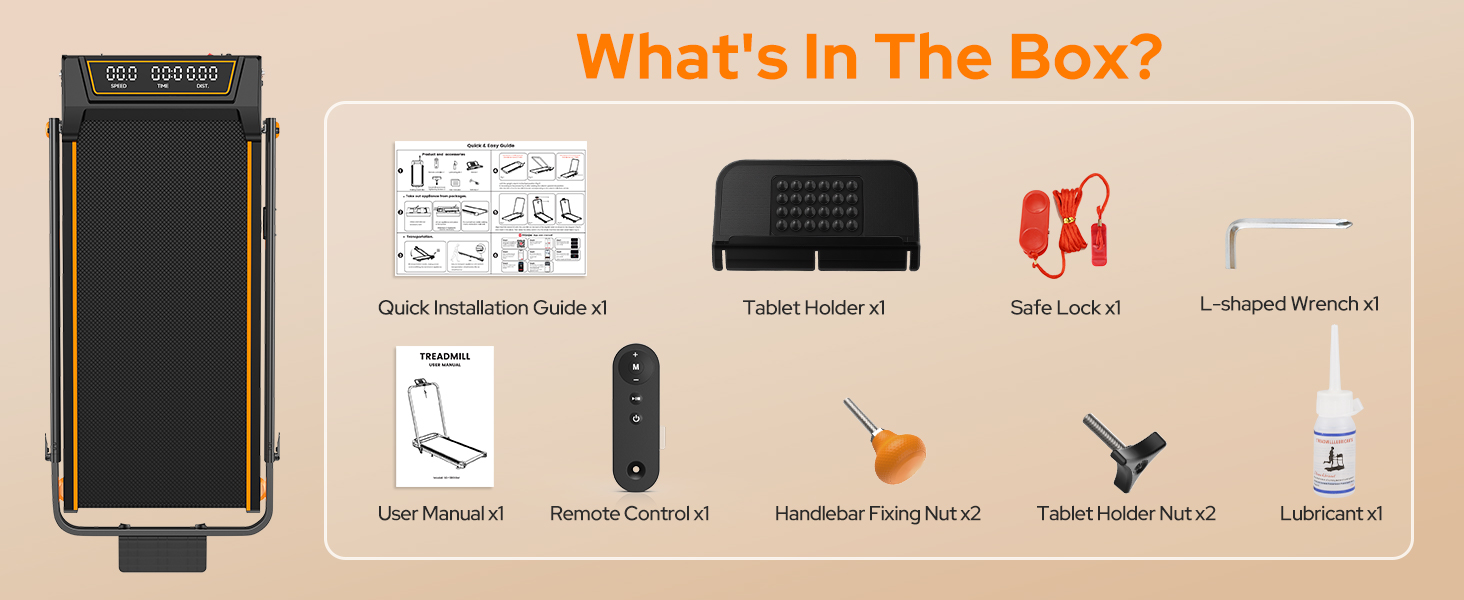
Figura 3.1: Componenti inclusi
4. Impostazione
The Trisomy treadmill is designed for tool-free assembly, making setup quick and easy.
4.1 Apertura del tapis roulant
1. Remove the treadmill from its packaging.

Figure 4.1: Treadmill Unfolded
4.2 Attaching the Handlebar and Tablet Holder
1. Raise the handlebar to the desired height. The handlebar features 6 adjustable levels from 35" to 47".
2. Secure the handlebar in place using the two handlebar fixing nuts. Rotate them by hand until they are firmly tightened.
3. Attach the tablet holder to the top of the handlebar using the two tablet holder nuts, rotating them by hand to secure.

Figure 4.2: Handlebar and Tablet Holder Assembly
4.3 Regolazione dell'inclinazione
The treadmill offers 3 manual incline settings (0-12%).
1. To adjust the incline, locate the incline adjustment screws at the rear of the treadmill.
2. Manually adjust these screws to select your desired incline level (0%, 6%, or 12%).

Figure 4.3: Manual Incline Adjustment
4.4 Collegamento di alimentazione
1. Plug the power cord into a grounded electrical outlet.
2. Turn on the main power switch, usually located near the power cord connection point.
5. Istruzioni per l'uso
Your Trisomy treadmill supports various modes and control options.
5.1 Modalità di funzionamento
The treadmill offers four distinct modes:
- Modalità di lavoro: Handlebar folded down, ideal for light walking under a desk (0.6-1.5 mph).
- Modalità di camminata: Handlebar folded down, for general walking (0.6-4.0 mph).
- Modalità di esecuzione: Handlebar raised, for jogging or running (4.0-6.0 mph).
- Modalità di arrampicata: Handlebar raised with incline activated, for a more intense workout.

Figure 5.1: Treadmill Operating Modes
5.2 Utilizzo del telecomando
The included remote control allows you to start/stop the treadmill, adjust speed, and switch display metrics. It also features a mute option for quiet operation.

Figura 5.2: Display LED e telecomando
5.3 Connettività dell'app
Connect your treadmill to the "FITSHOW" app via Bluetooth for enhanced workout tracking and customized exercise journeys. The app allows you to monitor your duration, distance, speed, and calories burned, and can help you set and achieve fitness goals.

Figura 5.3: Interfaccia di controllo dell'app
6. Manutenzione
Una manutenzione regolare garantisce prestazioni ottimali e longevità del tuo tapis roulant.
6.1 Pulizia
Pulisci il tapis roulant con un pannoamp panno dopo ogni utilizzo per rimuovere sudore e polvere. Evitare l'uso di detergenti abrasivi o solventi.
6.2 Lubrificazione
The running belt requires periodic lubrication to reduce friction and wear. Use the provided lubricant and follow these steps:
- Spegnere e scollegare il tapis roulant.
- Loosen the running belt by turning the rear rollers counter-clockwise (usually 2-3 turns).
- Applicare una piccola quantità di lubrificante in modo uniforme sotto la parte centrale del nastro trasportatore.
- Tighten the running belt by turning the rear rollers clockwise until snug.
- Run the treadmill at a low speed (e.g., 1 mph) for 2-3 minutes to distribute the lubricant.

Figure 6.1: Adjusting the Running Belt
6.3 Regolazione della cinghia
If the running belt is off-center or slipping, adjust it using the L-shaped wrench provided. Refer to the detailed instructions in the Quick Installation Guide for precise adjustments.
7. Risoluzione Dei Problemi
In caso di problemi, fare riferimento ai seguenti problemi comuni e alle relative soluzioni:
- Il tapis roulant non si avvia: Ensure the power cord is securely plugged in, the main power switch is on, and the safety clip is correctly attached.
- Slittamento della cinghia: The running belt may need tensioning or lubrication. Refer to Section 6.2 and 6.3.
- Rumore insolito: Check for loose parts or foreign objects under the belt. Lubricate the belt if necessary.
- Schermo non funzionante: Controllare i collegamenti di alimentazione. Se il problema persiste, contattare l'assistenza clienti.
For more complex issues, please contact Trisomy customer support.
8. Specifiche
| Caratteristica | Specificazione |
|---|---|
| Marca | Trisomy |
| Nome del modello | HSM-T12C1 |
| Colore | Nero |
| Dimensioni del prodotto | 42.5"P x 22.4"L x 4.4"A |
| Peso dell'articolo | 1 Pounds (Note: This seems to be an error in the source data, actual weight is likely higher) |
| Materiale | Acciaio legato |
| Potenza massima | 3.5 cavalli |
| Percentuale di inclinazione massimatage | 12% (3 manual levels) |
| Gamma di velocità | 0.6 - 6.0 mph |
| Altezza del manubrio regolabile | Da 35" a 47" (6 livelli) |
| Tipo di visualizzazione | GUIDATO |
| Peso massimo dell'utente | 350 libbre |
| Caratteristiche speciali | Adjustable Height, Adjustable Speed, Compact Design, Cushioned Running Belt, Foldable, Bluetooth Speaker, APP Control |
9. Conservazione
The Trisomy treadmill is designed for easy storage due to its foldable design and built-in wheels.
1. To fold, loosen the handlebar fixing nuts and lower the handlebar completely.
2. The treadmill can then be moved using its built-in wheels and stored under a sofa, desk, or bed, or leaned against a wall.

Figure 9.1: Easy Storage
10. Garanzia e supporto
The Trisomy treadmill comes with a 2-year warranty. We offer 24/7 customer service and lifetime technical support.
If you have any questions, concerns, or require technical assistance, please do not hesitate to contact us. You can find our contact information in the Quick Installation Guide or on the last page of your User Manual.

Figura 10.1: Informazioni sull'assistenza clienti