
1. Introduzione
Grazie per l'acquistoasing the EUHOMY 2.6kW Portable Spot Cooler. This manual provides essential information for the safe and efficient operation of your appliance. Please read it thoroughly before use and retain it for future reference.

Image 1.1: The EUHOMY 2.6kW Portable Spot Cooler unit.
2. Informazioni sulla sicurezza
Per ridurre il rischio di incendi, scosse elettriche o lesioni, seguire sempre le precauzioni di sicurezza di base quando si utilizza questo apparecchio.
- Assicurarsi che l'alimentazione corrisponda al voltage specificato sulla targhetta dei dati tecnici.
- Non utilizzare l'unità con un cavo o una spina danneggiati.
- Tenere l'apparecchio lontano dall'acqua e da altri liquidi.
- Do not block air inlets or outlets. Maintain at least 50cm clearance from the front and rear, and 30cm from the sides.
- Always ensure the exhaust duct is properly installed to vent hot air outside the room.
- Scollegare l'unità prima di pulirla o di effettuare qualsiasi intervento di manutenzione.
- Questo apparecchio non è destinato all'uso da parte di persone con ridotte capacità fisiche, sensoriali o mentali senza supervisione.
3. Contenuto della confezione
Verificare che tutti gli articoli siano presenti nel pacco:
- Spot Cooler Main Unit (1)
- Window Panels (4)
- Exhaust Duct (1)
- Tubo di scarico (1)
- Exhaust Nozzle (1)
- Duct End Connector (1)
- Controllo remoto (1)
- Manuale d'uso (1)

Image 3.1: Included components of the EUHOMY Portable Spot Cooler.
4. Caratteristiche del prodotto
4.1. Powerful Cooling Performance
The EUHOMY Spot Cooler provides a powerful 2.6kW (60Hz) cooling capacity, capable of lowering room temperature by 5°C within 15 minutes. It is designed for effective cooling in areas up to 10 tatami (approximately 16.5 square meters), making it suitable for living rooms, bedrooms, garages, and warehouses.

Immagine 4.1: Passoview of cooling capabilities and specifications.
4.2. Three Operating Modes
This unit offers three versatile operating modes to suit various seasonal needs:
- Modalità di raffreddamento: Provides rapid cooling for hot environments.
- Modalità deumidificazione: Removes up to 28.98 liters of moisture per day, helping to maintain a comfortable humidity level between 40% and 60% RH, especially useful during rainy seasons.
- Modalità ventola: Circulates air with two adjustable fan speeds (Weak/Strong) to provide ventilation.

Image 4.2: Three-in-one functionality for year-round comfort.
4.3. Modalità di sospensione intelligente
The smart sleep mode adjusts the set temperature gradually to ensure comfortable sleep. After 1 hour, the temperature increases by 1°C, and after 2 hours, it increases by another 1°C (total 2°C increase from initial setting). The unit then maintains this temperature, preventing overcooling or overheating during the night. This mode also reduces power consumption by approximately 25% over 8 hours compared to normal operation.
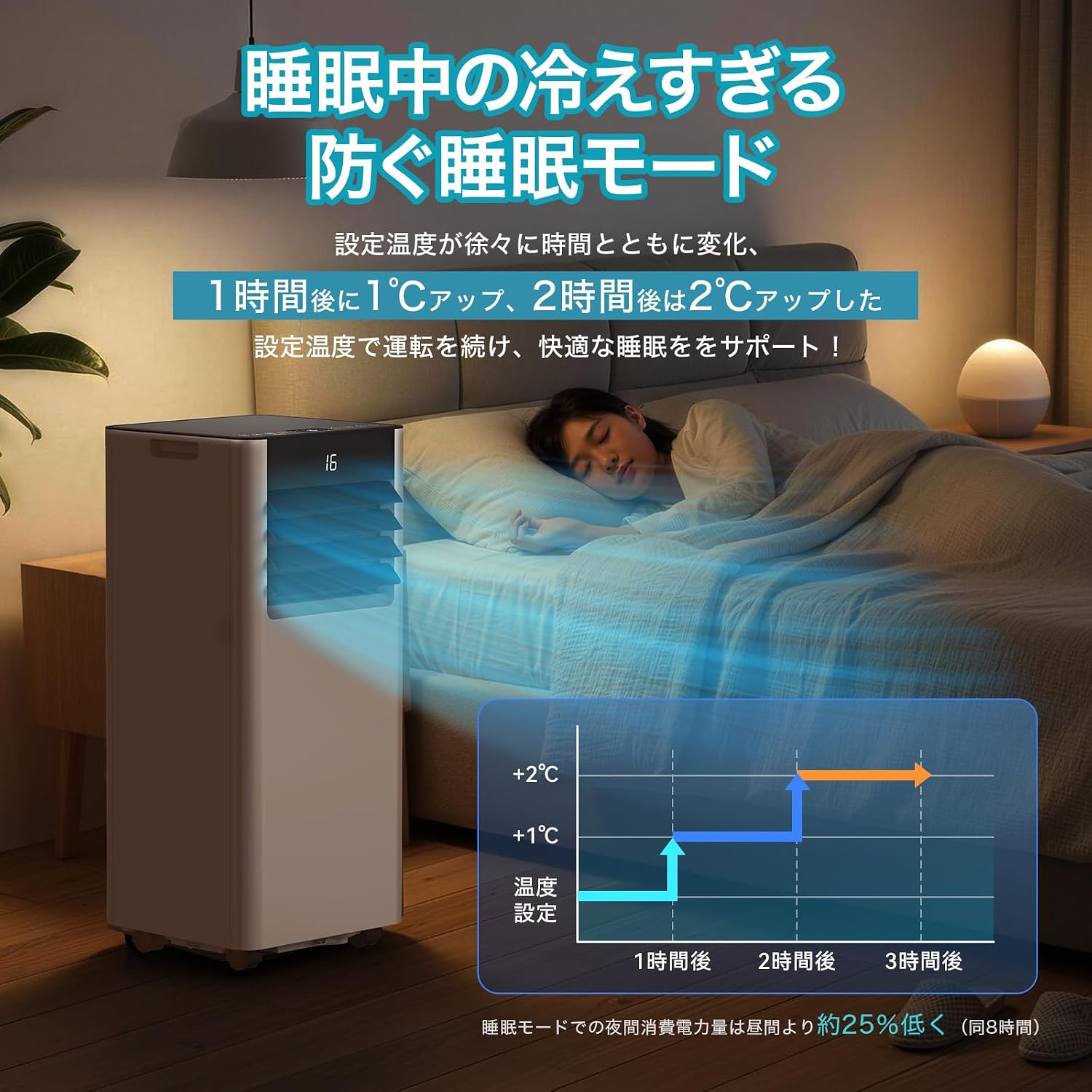
Image 4.3: Smart Sleep Mode for optimized overnight comfort and energy saving.
4.4. 24-Hour Timer Function
Set the unit to automatically turn on or off within a 1 to 24-hour period. This feature allows for efficient operation, ensuring the room is cooled before you arrive home or turns off after you leave, saving energy.
5. Configurazione e installazione
The EUHOMY Spot Cooler is designed for easy installation without requiring professional construction. Follow these steps for setup:
5.1. Posizionamento dell'unità
Place the unit on a flat, stable surface. Ensure there is adequate clearance around the unit for proper airflow (at least 50cm from front/rear, 30cm from sides). The unit is equipped with casters for easy movement between rooms.
5.2. Window Panel Installation
Assemble the window panels according to your window size. The panels are adjustable from 50cm to 135cm to fit various window types (sliding or vertical sash windows). Secure the panels in the window frame using screws. The 2026 model includes four window panels for improved adaptability and sealing.

Image 5.1: Window panel installation guide.
5.3. Exhaust Duct Connection
Attach the exhaust duct to the unit's exhaust outlet and then connect the other end to the window panel. Ensure a secure connection to prevent hot air from re-entering the room. The improved exhaust duct design in the 2026 model enhances sealing performance by 50%.
6. Funzionamento
The unit can be operated using the touch control panel on top of the unit or the included remote control.

Image 6.1: Control panel and remote control layout.
6.1. Accensione/spegnimento
Premere il pulsante di accensione (運転入/切) sul pannello di controllo o sul telecomando per accendere o spegnere l'unità.
6.2. Selezione della modalità
Premere il pulsante Modalità (モード) to cycle through Cooling (冷房モード), Dehumidifying (除湿モード), and Fan (送風モード) modalità.
6.3. Regolazione della temperatura
In Cooling mode, use the Up (+) e giù (-) buttons to set the desired temperature between 16°C and 32°C.
6.4. Regolazione della velocità della ventola
In Fan mode, press the Fan Speed button (風量) to select between Weak (弱) and Strong (強) airflow.
6.5. Impostazione del timer
Premere il pulsante Timer (タイマー機能) to set the auto-on or auto-off time in 1-hour increments, from 1 to 24 hours.
6.6. Attivazione della modalità sospensione
Premere il pulsante Sospensione (睡眠) to activate the smart sleep mode for quiet and comfortable overnight operation.
6.7. Regolazione delle persiane
Manually adjust the vertical louvers to direct the airflow as desired.
7. Manutenzione
Regular maintenance ensures optimal performance and longevity of your spot cooler.
7.1. Drenaggio
The unit is designed with a non-drainage system for cooling mode, where condensed water is evaporated and expelled with the exhaust air. However, in high humidity conditions or during dehumidifying mode, significant water accumulation may occur. Connect the included drain hose to the drainage port for continuous drainage to prevent overflow.
7.2. Pulizia del filtro
Periodically clean the air filter to maintain air quality and unit efficiency. Refer to the detailed instructions in the printed user manual for filter removal and cleaning procedures.
7.3. Pulizia esterna
Pulire l'esterno dell'unità con un panno morbido, damp stoffa. Non utilizzare prodotti chimici aggressivi o detergenti abrasivi.
8. Risoluzione Dei Problemi
Prima di contattare l'assistenza clienti, fai riferimento ai seguenti problemi comuni e alle relative soluzioni:
| Problema | Possibile causa | Soluzione |
|---|---|---|
| L'unità non si accende | Nessuna alimentazione; cavo di alimentazione non collegato; interruttore automatico scattato. | Controllare il collegamento elettrico; ripristinare l'interruttore automatico. |
| Raffreddamento insufficiente | Windows/doors open; Exhaust duct not properly installed; Air filter dirty; Room size too large. | Close windows/doors; Ensure duct is sealed; Clean air filter; Use in recommended room size. |
| Perdita d'acqua | Drain hose not connected or blocked; Water tank full (if applicable). | Connect drain hose; Clear any blockages; Ensure continuous drainage in high humidity. |
| L'unità è rumorosa | Unità non posizionata su una superficie piana; Filtro dell'aria sporco; Rumore di funzionamento normale. | Place on a flat surface; Clean air filter; Some operating noise is normal for portable ACs. |
9. Specifiche
| Caratteristica | Dettaglio |
|---|---|
| Marca | EUHOMY |
| Numero di modello | OL-A016UC26N4 |
| Capacità di raffreddamento | 2.3kW (50Hz) / 2.6kW (60Hz) |
| Area applicabile | 8-10 Tatami |
| Intervallo di impostazione della temperatura | da 16°C a 32°C |
| Alimentazione elettrica | 100 V (50/60 Hz) |
| Consumo di energia di raffreddamento | 750 W (50 Hz) / 800 W (60 Hz) |
| Capacità deumidificante | 28.98 L/giorno |
| Livello di rumore | 55dB (Operating Sound: 43dB) |
| Refrigerante | R-410A |
| Dimensioni dell'unità (P x L x A) | Dimensioni: 30.3 x 28.95 x 67.3 cm |
| Peso unitario | Circa 20.5 kg |
| Tipo di controllore | Controllo touch |

Immagine 9.1: Specifiche dettagliate e dimensioni del prodotto.
10. Garanzia e supporto
10.1. One-Year Quality Guarantee
This product comes with a one-year quality guarantee from the date of purchase. Please retain your proof of purchase for warranty claims.

Image 10.1: One-Year Quality Guarantee.
10.2. Assistenza clienti
For any questions regarding the product or delivery, please contact our customer support. You can reach us via email or inquiry. For inquiries after purchase, navigate to 'Order History' > 'Problem with order' > 'View professionistafile' > 'Ask a question' or refer to the contact information in the Japanese instruction manual.

Image 10.2: Customer support contact options.