
1. Introduzione
The DigiQuest Q99 4K UHD Satellite Receiver is designed for receiving Italian television channels. It supports DVB-S2 and DVB-T2 standards, HEVC HDR, and includes an activated TiVuSat 4K card. This allows access to over 60 programs from RAI, Mediaset, and LA7 in HD and 4K UHD resolution. The receiver incorporates Smart TV functions for media libraries such as Rai Play and Mediaset Infinity, requiring an internet connection. The Q99 operates on 12V, making it suitable for mobile use.
2. Cosa c'è nella scatola
Verificare che tutti i componenti siano presenti nella confezione:
- DigiQuest Q99 4K UHD Combo Satellite Receiver
- Activated TiVuSat 4K UHD Card
- Telecomando
- Adattatore di alimentazione
- HTS e-com HDMI Cable
- User Manual (Italian and English)
3. Impostazione
3.1 Connessioni fisiche
Follow these steps to connect your receiver:
- Collegamento dell'antenna satellitare: Connect your satellite dish cable to the "SAT IN" port on the rear panel. Ensure your satellite dish is pointed to Hotbird 13° East.
- Television Connection: Connect one end of the provided HDMI cable to the "HDMI" port on the receiver and the other end to an available HDMI input on your television.
- Collegamento elettrico: Connect the power adapter to the "DC IN 12V" port on the receiver and then plug it into a power outlet.
- Connessione di rete facoltativa: For Smart TV functions and software updates, connect an Ethernet cable to the "LAN" port on the receiver and to your internet router. Alternatively, a compatible Wi-Fi USB dongle can be used in a USB port.
- Optional USB Storage: For PVR (recording) and Timeshift functions, connect an external USB storage device (e.g., USB stick or hard drive) to one of the "USB" ports.

Figure 1: Rear panel of the DigiQuest Q99 receiver, illustrating satellite input/output, RF in, AV, S/PDIF, HDMI, USB 2.0, USB 3.0, LAN, and DC IN ports.
3.2 TiVuSat Card Insertion
The TiVuSat 4K card is pre-activated. Insert the card into the designated smart card slot on the side of the receiver, ensuring the chip faces downwards and the card is inserted correctly as indicated by the label.

Figura 2: lato view of the DigiQuest Q99 receiver, highlighting the smart card slot for TiVuSat card insertion.
3.3 Accensione iniziale e scansione dei canali
After connecting all cables and inserting the TiVuSat card, turn on your television and select the correct HDMI input. Power on the DigiQuest Q99 receiver. The initial setup wizard will guide you through language selection (Italian/English) and channel scanning. The receiver features an automatic update function for the TiVuSat station list.
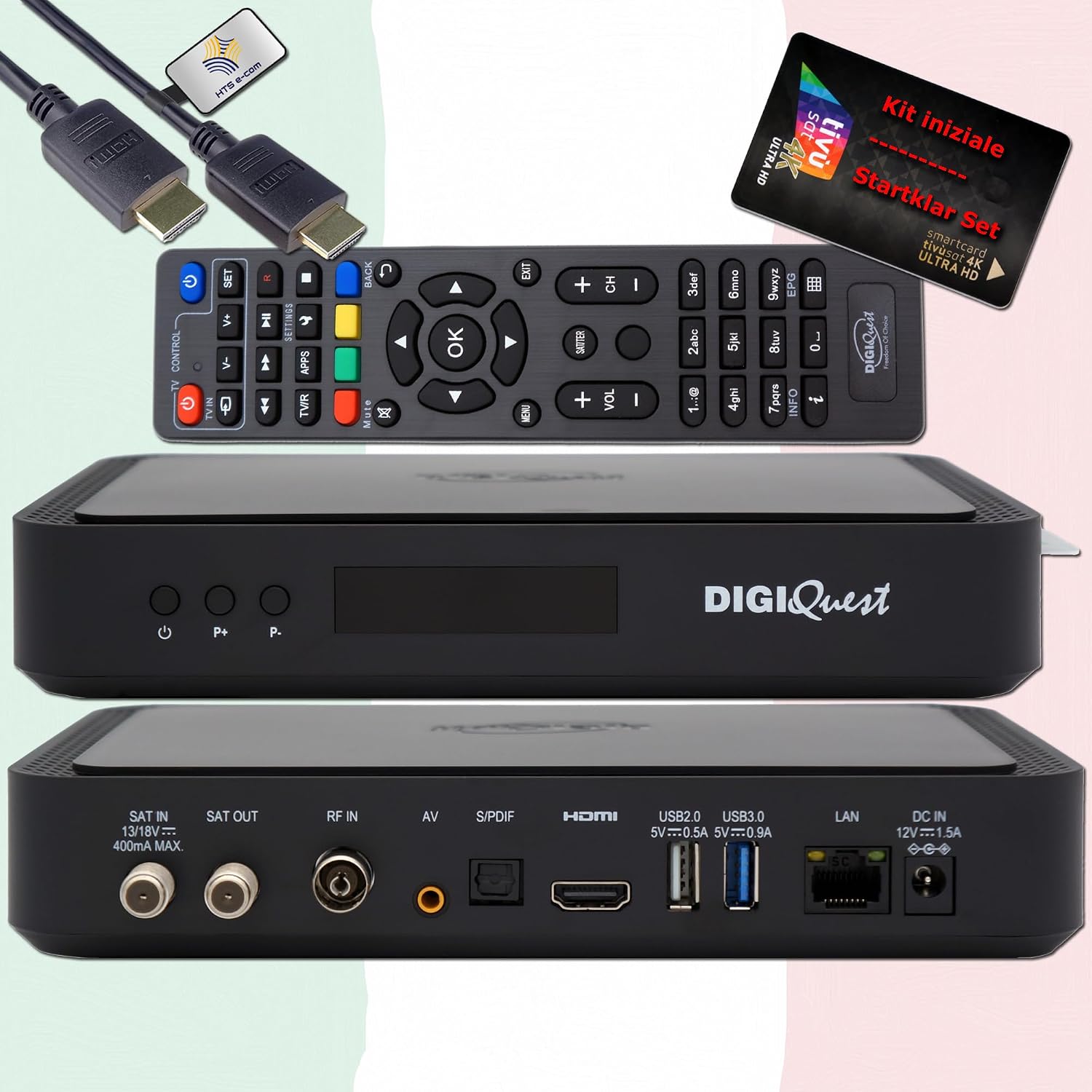
Figura 3: Fronte view of the DigiQuest Q99 receiver, showing the power button and channel selection buttons.
4. Istruzioni per l'uso
4.1 Funzioni di base
Use the remote control to navigate the receiver's functions:
- Selezione canale: Use the "P+" and "P-" buttons or the numeric keypad to change channels.
- Controllo del volume: Regola il volume utilizzando i pulsanti del volume dedicati.
- Guida elettronica ai programmi (EPG): Press the "EPG" button to view palinsesti per le prossime trasmissioni.
- Navigazione nel menu: Accedi al menu principale per impostazioni e funzionalità.

Figure 4: Remote control layout and detailed features of the DigiQuest Q99 receiver.
4.2 Funzionalità avanzate
- PVR (Personal Video Recorder) and Timeshift: With an external USB storage device connected, you can activate PVR functionality to record programs and use Timeshift to pause live TV.
- Funzioni Smart TV: Connect the receiver to the internet via LAN or a compatible Wi-Fi USB dongle to access media libraries such as Rai Play and Mediaset Infinity, and tivùon HbbTV services.
- 4K UHD Channels: The receiver supports 4K UHD content, providing access to channels like Rai 4K and other UHD programs available via TiVuSat.
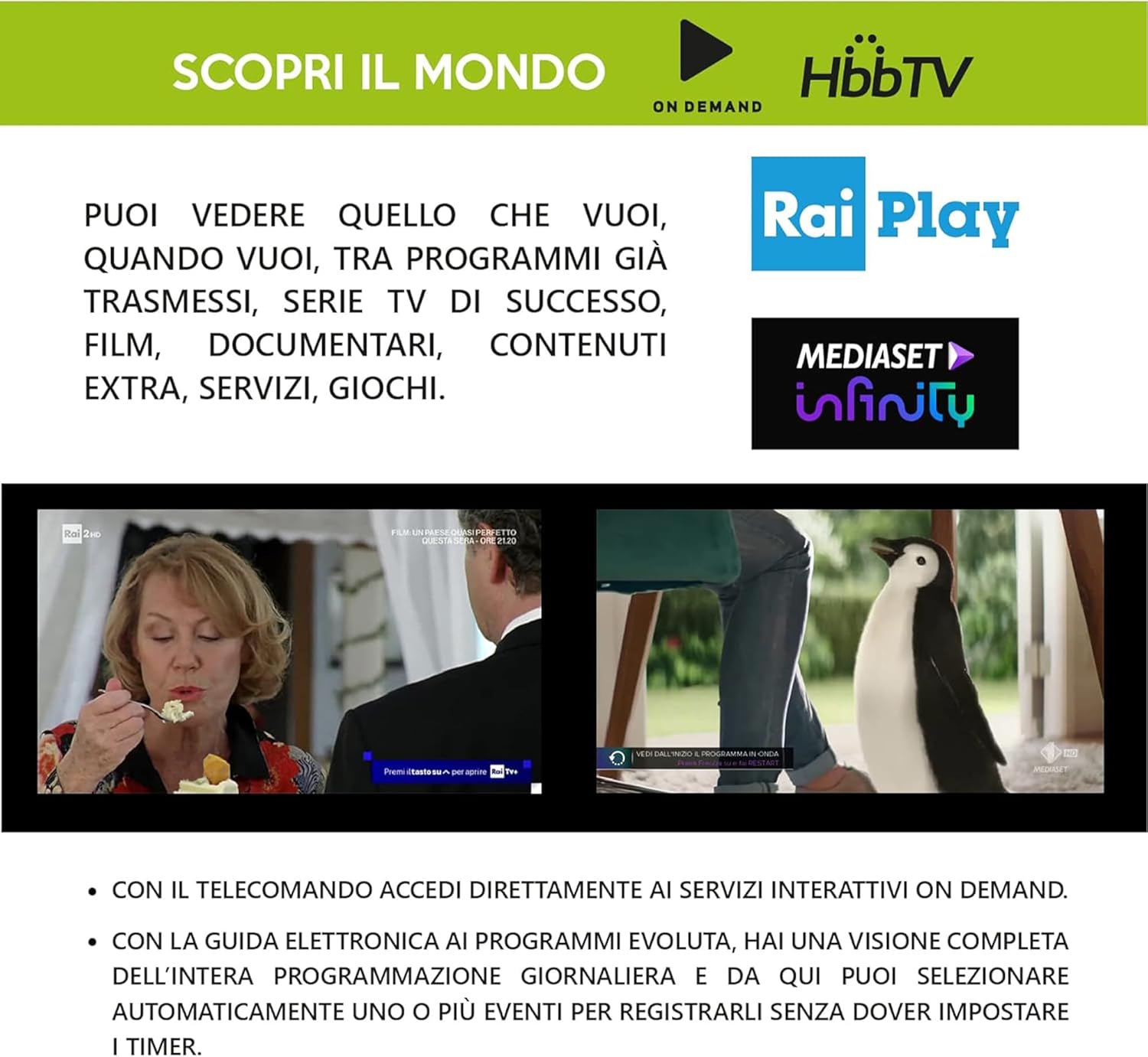
Figure 5: Smart TV capabilities of the DigiQuest Q99, including HbbTV, Rai Play, and Mediaset Infinity.

Figura 6: Esample of 4K Ultra HD channels accessible through the TiVuSat platform.

Figure 7: A selection of Italian and international television channels available with the DigiQuest Q99.
5. Manutenzione
- Aggiornamenti software: The receiver supports software updates via OTA (Over-The-Air), USB, or FTP. Regularly check for and install updates to ensure optimal performance and access to the latest features.
- Pulizia: Utilizzare un panno morbido e asciutto per pulire l'esterno del ricevitore. Non utilizzare detergenti liquidi o materiali abrasivi.
- Ventilazione: Assicurarsi che il ricevitore sia posizionato in un'area ben ventilata per evitare il surriscaldamento. Non ostruire le aperture di ventilazione.
6. Risoluzione Dei Problemi
If you encounter issues with your DigiQuest Q99 receiver, refer to the following common solutions:
- Nessuna immagine/suono:
- Check all cable connections (HDMI, satellite, power).
- Assicurati che la TV sia impostata sull'ingresso HDMI corretto.
- Verificare che il ricevitore sia acceso.
- Nessun segnale satellitare:
- Check the satellite cable connection to the "SAT IN" port.
- Confirm your satellite dish is correctly aligned to Hotbird 13° East.
- Check for any obstructions blocking the satellite signal.
- TiVuSat Card Error:
- Ensure the TiVuSat card is inserted correctly into the smart card slot.
- Verify the card is clean and free from damage.
- Nessuna connessione internet:
- Check the Ethernet cable connection to the "LAN" port and your router.
- If using Wi-Fi, ensure the USB dongle is compatible and properly connected, and check Wi-Fi settings in the receiver's menu.
- Riavviare il router e il ricevitore.
Per una risoluzione dei problemi più dettagliata, fare riferimento al manuale utente completo fornito con il prodotto.
7. Specifiche
| Caratteristica | Descrizione |
|---|---|
| Numero di modello | Q99 |
| Marca | Ricerca digitale |
| Tipo di sintonizzatore | DVB-S2 (Satellite), DVB-T2 (Terrestrial - Italy only) |
| Risoluzione video | Fino a 4K UHD |
| Decodifica video | HEVC H.265 (10-bit), HDR support |
| Modalità di uscita audio | Dolby Digital, Dolby Digital Plus |
| Connettività | HDMI (1), USB (2 - 2.0 & 3.0), LAN (Ethernet), S/PDIF, AV, RF IN, SAT IN/OUT |
| Supporto DiSEqC | DiSEqC 1.2, USALS, SCR, Unicable |
| Caratteristiche speciali | PVR Ready, Timeshift, EPG, Automatic TiVuSat channel list update, Smart TV functions (Rai Play, Mediaset Infinity, HbbTV) |
| Alimentazione elettrica | Funzionamento a 12 V |
| Dimensioni | 210 x 153 x 40 mm (circa) |
8. Garanzia e supporto
Questo prodotto è coperto da garanzia del produttore. Per i termini e le condizioni di garanzia specifici, consultare la scheda di garanzia inclusa nella confezione o contattare il rivenditore.
For technical support or service inquiries, please consult the contact information provided in the full user manual or visit the official DigiQuest websito.