
1. Finitaview
The Philips TAZ2200 is a versatile portable sound machine designed for enjoying various audio formats. It features a top-loading CD player, a front-loading cassette player, FM radio, Bluetooth 6.0 connectivity, USB playback, and a 3.5mm audio input. Equipped with dynamic bass boost and 6W stereo speakers, it delivers rich sound. The unit can be powered by AC mains or batteries and includes a carrying handle for portability.
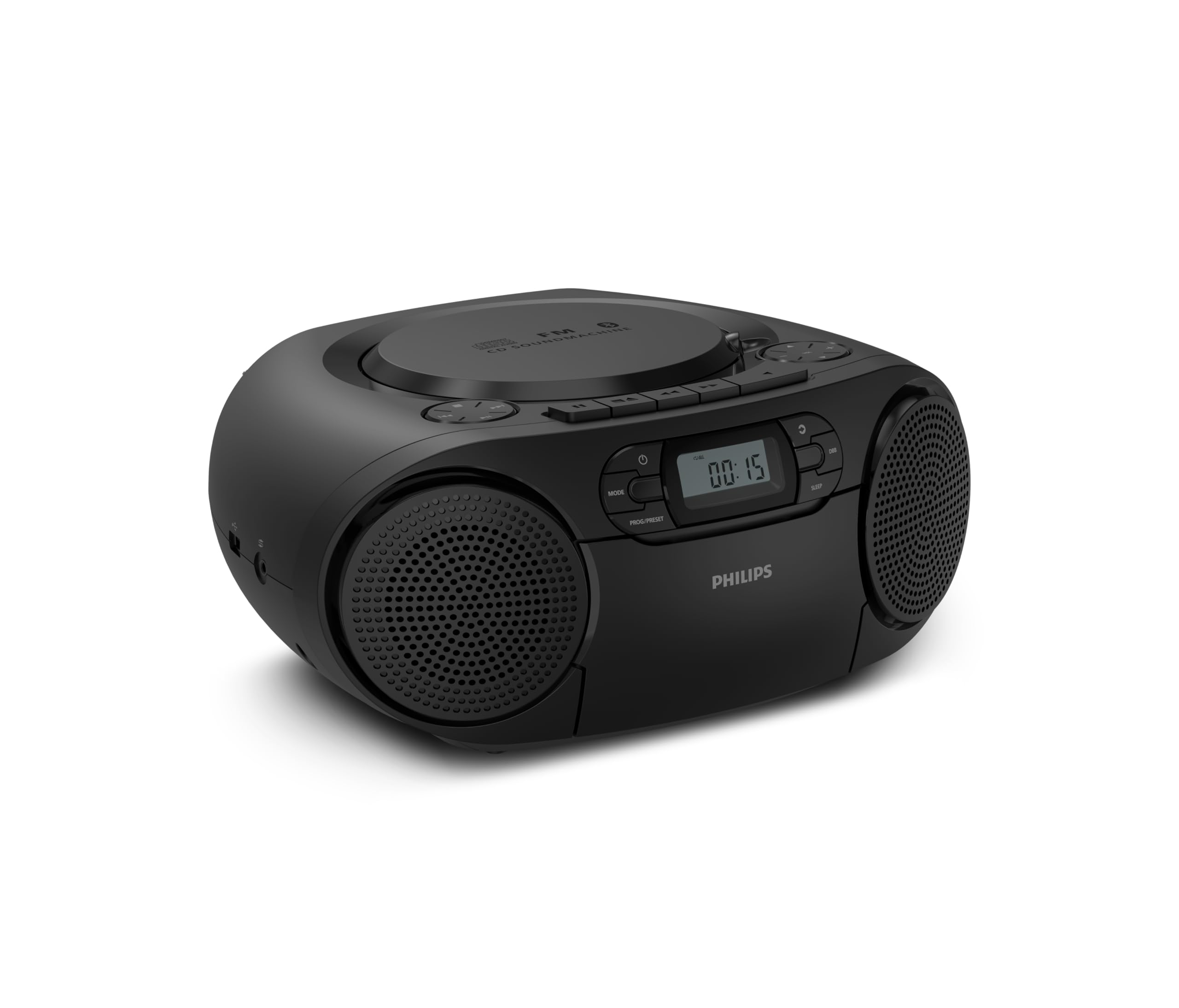
Davanti view of the Philips TAZ2200 CD Soundmachine, showing the main display and control buttons.
2. Informazioni sulla sicurezza
Please read these safety instructions carefully before using your device and keep them for future reference. Incorrect use may result in hazards.
- Fonte di energia: Utilizzare solo l'adattatore di alimentazione o le batterie specificati. Assicurarsi che il volumetage corrisponde ai requisiti dell'unità.
- Acqua e umidità: Non esporre l'unità a pioggia, umidità, gocciolamenti o schizzi. Non posizionare oggetti contenenti liquidi, come vasi, sull'unità.
- Ventilazione: Ensure adequate ventilation. Do not block any ventilation openings. Maintain a minimum distance around the unit for sufficient ventilation.
- Calore: Non posizionare l'unità vicino a fonti di calore quali radiatori, bocchette di riscaldamento, stufe o altri apparecchi (inclusi amplificatori) che producono calore.
- Batterie: Follow correct polarity when inserting batteries. Do not mix old and new batteries, or different types of batteries. Remove batteries if the unit is not used for a long period.
- Pulizia: Scollegare l'unità dalla presa di corrente prima di pulirla. Utilizzare un panno morbido e asciutto. Non utilizzare detergenti liquidi o spray.
- Manutenzione: Non tentare di riparare questo prodotto da soli. Affidare tutte le operazioni di manutenzione a personale di assistenza qualificato.
3. Cosa c'è nella scatola
Dopo aver disimballato, assicurarsi che siano presenti tutti gli articoli elencati di seguito:
- Philips TAZ2200 CD Soundmachine
- Cavo di alimentazione
- Guida rapida
- Libretto di garanzia
- Scheda di sicurezza
4. Controlli e collegamenti
Controlli del pannello frontale
The front panel features the main display, power button, mode selection, program/preset buttons, and dynamic bass boost (DBB) control. Playback controls for CD and USB are also located here.

Fronte dettagliato view showing the display, power, mode, program/preset, and DBB buttons.
Collegamenti laterali e posteriori
The side of the unit provides a USB port for digital audio playback and a 3.5mm audio input jack for connecting external devices.

Lato view illustrating the USB port and Audio Input jack.
The top of the unit houses the CD compartment and additional playback controls, while the rear features the AC power input and the FM antenna.

Superiore view showing the CD compartment and associated controls.

Posteriore view displaying the AC power input and the telescopic FM antenna.
5. Impostazione
5.1 Alimentazione
Alimentazione CA
- Assicurarsi che l'unità sia spenta.
- Connect the supplied power cable to the AC IN socket on the rear of the sound machine.
- Plug the other end of the power cable into a wall power outlet.
Potenza della batteria
For portable use, the unit can operate on 6 x C-type batteries (not included).
- Aprire il coperchio del vano batterie situato nella parte inferiore dell'unità.
- Insert 6 C-type batteries, ensuring correct polarity (+/-) as indicated inside the compartment.
- Chiudere saldamente il coperchio del vano batterie.
5.2 Regolazione dell'antenna
For optimal FM radio reception, fully extend the telescopic antenna located at the rear of the unit. Adjust its position and angle to achieve the clearest signal.
6. Istruzioni per l'uso
6.1 Funzionamento generale
- Accensione/spegnimento: Premere il tasto ENERGIA pulsante per accendere o spegnere l'unità.
- Controllo del volume: Utilizzare il VOL+ or VOL- pulsanti per regolare il livello del volume.
- Potenziamento dinamico dei bassi (DBB): Premere il tasto DBB button to activate or deactivate the dynamic bass boost feature for enhanced bass sound.
- Selezione della modalità: Premere il tasto MODALITÀ button repeatedly to switch between CD, Cassette, FM Radio, Bluetooth, USB, and Audio Input modes.
6.2 Riproduzione CD
- Aprire il coperchio del vano CD nella parte superiore dell'unità.
- Place a CD (CD, CD-R, or CD-RW) with the label side facing up onto the spindle.
- Chiudere il coperchio del vano CD.
- Premere il tasto MODALITÀ per selezionare la modalità CD.
- Premere il tasto RIPRODUCI/PAUSA pulsante per avviare la riproduzione.
- Utilizzare il SALTARE pulsanti (|< or >>|) per saltare le tracce.
- Premere e tenere premuto |< or >>| per cercare all'interno di una traccia.
- Premere il tasto FERMARE per interrompere la riproduzione.
6.3 Riproduzione di cassette
- Open the cassette compartment door on the front of the unit.
- Inserire una cassetta con il bordo aperto rivolto verso l'alto.
- Chiudere lo sportello del vano cassetta.
- Premere il tasto MODALITÀ button to select Cassette mode.
- Premere il tasto GIOCARE pulsante per avviare la riproduzione.
- Utilizzare il AVANTI VELOCE or RIAVVOLGERE buttons to quickly advance or rewind the tape.
- Premere il tasto FERMARE per interrompere la riproduzione.
6.4 Radio FM
- Premere il tasto MODALITÀ pulsante per selezionare la modalità Radio FM.
- Scansione automatica: Premere e tenere premuto il tasto PROG/PRESET pulsante per eseguire la scansione e la memorizzazione automatica delle stazioni FM disponibili.
- Sintonizzazione manuale: Premere il tasto ACCORDATURA pulsanti (|< or >>|) per sintonizzarsi manualmente sulla frequenza desiderata.
- Salvataggio delle preimpostazioni: After tuning to a station, press PROG/PRESET once, then use |< or >>| per selezionare un numero preimpostato e premere PROG/PRESET di nuovo per confermare.
- Richiamo delle preimpostazioni: In modalità FM, premere PROG/PRESET repeatedly to cycle through saved preset stations.
6.5 Riproduzione Bluetooth
- Premere il tasto MODALITÀ button to select Bluetooth mode. The display will show 'BT' and flash, indicating it's in pairing mode.
- Sul tuo dispositivo abilitato Bluetooth (smartphone, tablet), attiva il Bluetooth e cerca i dispositivi disponibili.
- Select "Philips TAZ2200" from the list of devices.
- Once paired, the unit will emit a confirmation sound, and 'BT' will stop flashing.
- Start playing audio on your connected device. The sound will be streamed to the sound machine.
6.6 Riproduzione USB
- Insert a USB flash drive into the USB port on the side of the unit.
- Premere il tasto MODALITÀ per selezionare la modalità USB.
- L'unità rileverà automaticamente e inizierà a riprodurre audio compatibile files (MP3, WAV, WMA).
- Utilizzare i controlli di riproduzione (RIPRODUCI/PAUSA, SALTARE, FERMARE) come faresti per la riproduzione di un CD.
6.7 Audio Input (AUX)
- Connect one end of a 3.5mm audio cable (not included) to the AUDIO IN jack on the side of the sound machine.
- Connect the other end of the audio cable to the headphone jack or audio output of your external device (e.g., MP3 player, turntable).
- Premere il tasto MODALITÀ button to select Audio Input mode.
- Start playing audio on your external device. The sound will be played through the sound machine.
7. Manutenzione
- Pulizia dell'unità: Pulire l'esterno dell'unità con un panno morbido e leggermenteamp panno. Non usare detergenti abrasivi o solventi.
- Cura del lettore CD: Keep the CD compartment clean. If the lens is dirty, use a specialized CD lens cleaner. Avoid touching the lens.
- Cura del lettore di cassette: Pulire periodicamente le testine del nastro e i rulli di pressione con un batuffolo di cotone leggermente damparricchito con alcol isopropilico.
- Sostituzione della batteria: If using batteries, replace all 6 C-type batteries when the unit's performance diminishes or if the unit will not be used for an extended period.
- Magazzinaggio: Quando non in uso, conservare l'unità in un luogo pulito e asciutto, lontano dalla luce solare diretta e da temperature estreme.
8. Risoluzione Dei Problemi
If you encounter any issues with your Philips TAZ2200, please refer to the table below for common problems and solutions.
| Problema | Possibile causa | Soluzione |
|---|---|---|
| Nessun potere | Cavo di alimentazione non collegato; batterie scariche o inserite in modo errato. | Controllare il collegamento dell'alimentazione CA; sostituire le batterie o verificare la corretta polarità. |
| Nessun suono | Volume troppo basso; Modalità selezionata non corretta; Cuffie collegate. | Increase volume; Select the correct source mode (CD, FM, BT, etc.); Disconnect headphones. |
| Il CD non viene riprodotto | CD inserito in modo errato; CD sporco o graffiato; formato CD non supportato. | Insert CD with label side up; Clean or replace CD; Ensure CD is CD-R/RW compatible. |
| La cassetta non funziona | Cassette inserted incorrectly; Tape is damaged. | Insert cassette correctly; Try a different cassette. |
| Scarsa ricezione FM | Antenna not extended or positioned correctly; Weak signal. | Estendere completamente e regolare l'antenna telescopica; provare a spostare l'unità in una posizione diversa. |
| Il Bluetooth non si connette | Unit not in pairing mode; Bluetooth device too far; Device already paired with another unit. | Ensure unit is in Bluetooth mode and flashing; Move device closer; Disconnect from other devices. |
| Problemi di riproduzione USB | Unità USB non inserita correttamente; Incompatibile file formato; unità USB danneggiata. | Reinserire l'unità USB; assicurarsi files are MP3, WAV, or WMA; Try a different USB drive. |
9. Specifiche
| Caratteristica | Specificazione |
|---|---|
| Marca | PHILIPS |
| Numero di modello | TAZ2200/10 |
| Tecnologia di connettività | Bluetooth 6.0, USB, Audio Input (3.5mm) |
| Tipo di altoparlante | Stereo (2 speakers) |
| Potenza di uscita | 6 Watt (massimo) |
| Supporti multimediali | CD, CD-R, CD-RW, Cassette, USB (MP3, WAV, WMA) |
| Sintonizzatore radio | Digital FM with 20 presets |
| Fonte di alimentazione | AC (wired), 6 x C-type batteries (not included) |
| Dimensioni (LxWxH) | Dimensioni: 24.5 x 28.5 x 12.5 cm |
| Peso | 1.35 chilogrammi |
| Colore | Argento |
10. Garanzia e supporto
10.1 Garanzia del prodotto
This Philips TAZ2200 CD Soundmachine comes with a Garanzia di 2 anno dalla data di acquisto. Si prega di conservare la prova d'acquisto per eventuali reclami in garanzia. La garanzia copre difetti di fabbricazione e malfunzionamenti in normali condizioni d'uso.
10.2 Assistenza clienti
For technical assistance, troubleshooting beyond this manual, or warranty service, please refer to the contact information provided in the warranty booklet included with your product. You can also visit the official Philips support website for your region for further assistance and FAQs.