
1. Introduzione
This manual provides essential information for the safe and efficient use of your Kyocera ECOSYS MZ3201ix A3 Laser Multifunction Printer. Please read this manual thoroughly before operating the device and keep it for future reference.
Prodotto finitoview
The Kyocera ECOSYS MZ3201ix is a versatile A3 laser multifunction printer designed for both office and home office environments. It offers high-resolution printing, copying, scanning, and faxing capabilities, ensuring efficient document management.
Caratteristiche principali:
- Print resolution up to 1200 dpi.
- Print speed up to 32/17 pages A4/A3 per minute in black and white.
- 100-sheet universal feeder and 500-sheet cassette.
- Duplex unit for double-sided printing (DIN A5 - DIN A3).
- Integrated high-level security features.
- Automatic Document Feeder (ADF).
- Network-ready with Ethernet and USB connectivity.
- Scan to email functionality.
- Intuitive touch screen interface.
2. Informazioni sulla sicurezza
Per evitare lesioni o danni al dispositivo, osservare sempre le seguenti precauzioni di sicurezza.
- Alimentazione elettrica: Collegare la stampante solo a una presa di corrente con messa a terra e con la tensione corretta.tage. Non sovraccaricare le prese di corrente.
- Posizionamento: Place the printer on a stable, level surface. Ensure adequate ventilation around the device. Avoid placing it near water or heat sources.
- Gestione: Non tentare di smontare o modificare la stampante. Per qualsiasi intervento di assistenza, rivolgersi a personale qualificato.
- Materiali di consumo: Use only genuine Kyocera toner and parts. Keep toner cartridges out of reach of children.
- Spostamento del dispositivo: The printer is heavy (49 kg). Use appropriate lifting techniques or assistance when moving it to prevent injury.
3. Cosa c'è nella scatola
Disimballare con attenzione la scatola e assicurarsi che siano presenti tutti gli articoli:
- Kyocera ECOSYS MZ3201ix Multifunction System
- Cartuccia toner
- Contenitore toner di scarto
- Cavo di alimentazione
- Istruzioni di sicurezza
- Guida rapida
If any items are missing or damaged, please contact your vendor or Kyocera support.
4. Impostazione
4.1 Disimballaggio e posizionamento
- Rimuovere tutti i materiali di imballaggio, i nastri adesivi e le pellicole protettive dalla stampante.
- Place the printer on a sturdy, level surface capable of supporting its weight (approximately 49 kg). Ensure there is sufficient space around the printer for ventilation and access to trays and covers.
4.2 Collegamento del cavo di alimentazione
- Connect the power cable to the power input on the rear of the printer.
- Collegare l'altra estremità del cavo di alimentazione a una presa elettrica dotata di messa a terra.
4.3 Installing Toner and Waste Toner Container
- Aprire il coperchio anteriore della stampante.
- Insert the toner cartridge according to the instructions provided on the cartridge and inside the printer.
- Insert the waste toner container into its designated slot.
- Chiudere saldamente il coperchio anteriore.
4.4 Caricamento della carta
- Pull out the paper cassette (standard 500-sheet tray or 100-sheet universal feeder).
- Adjust the paper guides to the size of the paper you are loading (supports A5 to A3).
- Caricare la risma di carta assicurandosi che non superi la linea di riempimento massimo.
- Spingere delicatamente il cassetto della carta nella stampante.
4.5 Rete e connessione USB
- For Network Connection (Ethernet): Connect an Ethernet cable from your network router/switch to the LAN port on the printer.
- For Direct Connection (USB): Connect a USB 2.0 cable from your computer to the USB port on the printer.
4.6 Installazione del software
- Accendere la stampante utilizzando il pulsante di accensione.
- Follow the on-screen instructions on the printer's touch screen for initial setup, including language and network settings.
- On your computer, insert the driver CD (if provided) or download the latest drivers and utility software from the official Kyocera websito.
- Run the installer and follow the prompts to install the printer drivers and software.
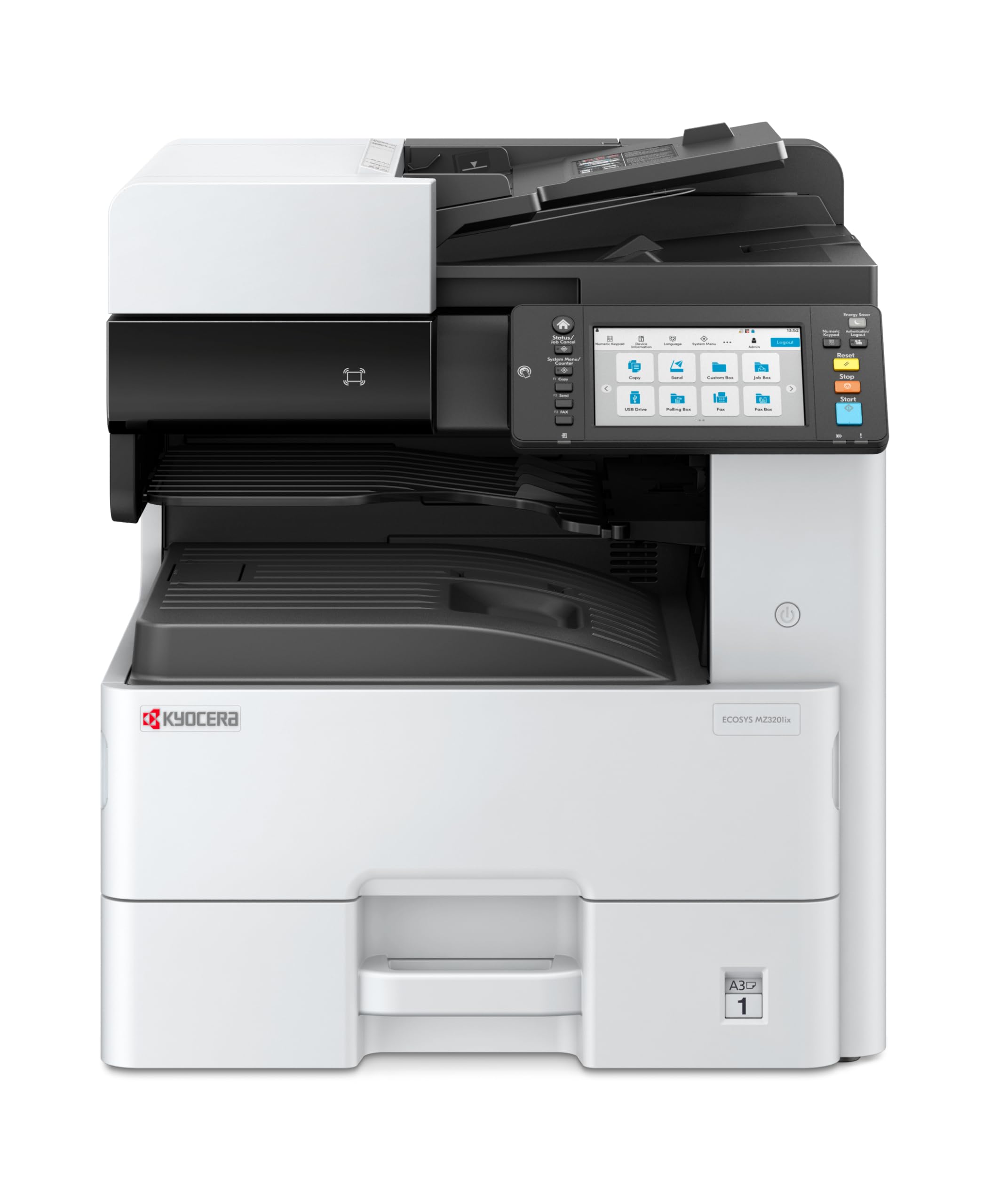
Image 1: Kyocera ECOSYS MZ3201ix A3 Laser Multifunction Printer. This image shows the front view of the printer, highlighting its compact design and the integrated touch screen panel.
5. Istruzioni per l'uso
5.1 Stampa di base
- Apri il documento che desideri stampare sul tuo computer.
- Selezionare File > Stampa.
- Choose the Kyocera ECOSYS MZ3201ix from the list of available printers.
- Regolare le impostazioni di stampa (ad esempio, numero di copie, formato carta, stampa fronte-retro) secondo necessità.
- Clic Stampa.
5.2 Copia dei documenti
- Posizionare il documento con il lato stampato rivolto verso il basso sul vetro dello scanner o con il lato stampato rivolto verso l'alto nell'alimentatore automatico di documenti (ADF).
- On the printer's touch screen, select the Copia funzione.
- Adjust settings such as number of copies (up to 999), zoom, and paper type.
- Premere il tasto Inizio pulsante per iniziare la copia.
5.3 Scansione di documenti
- Posizionare il documento sul vetro dello scanner o nell'ADF.
- On the printer's touch screen, select the Scansione funzione.
- Choose your desired scan destination (e.g., Scan to PC, Scan to Email, Scan to USB).
- Configure scan settings such as resolution (up to 1200 x 1200 dpi), color mode, and file formato.
- Premere il tasto Inizio pulsante per avviare la scansione.
5.4 Invio di documenti via fax
(Note: Fax functionality requires a telephone line connection, not detailed in this manual.)
- Posizionare il documento sul vetro dello scanner o nell'ADF.
- On the printer's touch screen, select the Fax funzione.
- Inserire il numero di fax del destinatario utilizzando la tastiera.
- Regolare le impostazioni fax necessarie.
- Premere il tasto Inizio pulsante per inviare il fax.
6. Manutenzione
Una manutenzione regolare garantisce prestazioni ottimali e prolunga la durata della stampante.
6.1 Pulizia della stampante
- Esterno: Pulire le superfici esterne con un panno morbido, damppanno privo di lanugine. Non utilizzare detergenti abrasivi o solventi.
- Vetro dello scanner: Gently clean the scanner glass with a soft cloth and a non-abrasive glass cleaner.
- Rulli ADF: Pulire periodicamente i rulli dell'ADF con un panno privo di lanugine dampcon alcol isopropilico per evitare inceppamenti della carta.
6.2 Sostituzione della cartuccia del toner
- When the printer indicates low toner, order a new Kyocera toner cartridge.
- Aprire il coperchio anteriore della stampante.
- Rimuovere la cartuccia del toner vuota tirandola verso l'esterno.
- Estrarre la nuova cartuccia del toner dalla confezione e agitarla delicatamente per distribuire il toner.
- Insert the new toner cartridge firmly into its slot until it clicks into place.
- Chiudere il coperchio anteriore.
6.3 Replacing Waste Toner Container
- When the printer indicates the waste toner container is full, prepare a new one.
- Open the cover that provides access to the waste toner container.
- Carefully remove the full waste toner container. Seal it in a plastic bag for proper disposal.
- Insert the new waste toner container into its slot.
- Chiudere il coperchio.
7. Risoluzione Dei Problemi
Questa sezione affronta i problemi più comuni che potresti riscontrare con la tua stampante.
7.1 Inceppamenti della carta
- sintomo: Printer stops, and an error message indicates a paper jam.
- Soluzione: Turn off the printer. Open all covers and trays. Carefully remove any jammed paper, pulling in the direction of the paper path. Ensure no small pieces of paper remain. Close all covers and restart the printer.
7.2 Scarsa qualità di stampa
- sintomo: Faded prints, streaks, or spots on pages.
- Soluzione: Check toner level and replace if low. Perform a print head cleaning or calibration from the printer's maintenance menu. Ensure you are using appropriate paper for your print job.
7.3 La stampante non risponde
- sintomo: Printer is online but does not print documents sent from the computer.
- Soluzione: Check all cable connections (USB/Ethernet). Restart both the printer and your computer. Verify that the correct printer driver is installed and selected. Check the printer's network settings if connected via Ethernet.
7.4 Codici di errore
If an error code appears on the touch screen, refer to the comprehensive user manual (available on the Kyocera website) for specific instructions related to that code. Many codes indicate specific issues like open covers, paper jams, or consumable replacement needs.
8. Specifiche
| Caratteristica | Specificazione |
|---|---|
| Marca | Marca: Kyocera |
| Nome del modello | ECOSYS MZ3201ix |
| Numero di modello | 110C2V3NL0 |
| Tecnologia di connettività | Ethernet, USB 2.0 |
| Tecnologia di stampa | Laser |
| Caratteristiche speciali | Automatic Document Feeder, Auto-Duplex, Network Ready, Scan to Email, Touch Screen |
| Uscita della stampante | Monocromo |
| Max Print Speed Black & White | 32 pagine al minuto (A4) |
| Peso dell'articolo | 49 chilogrammi |
| Dimensioni del prodotto (PxLxA) | 58.5P x 59l x 68.8H cm |
| Max Print Resolution Black & White | 1200 x 1200 dpi |
| Risoluzione scanner | 1200 x 1200 dpi |
| Stampa fronte-retro | Automatico |
| Max Copy Count | 999 |
| Tempo di uscita della prima pagina | 5.2 secondi |
| Max Supported Paper Size | A3 |
| Capacità massima del foglio di input | 1600 |
| Tipo di supporto di stampa | Carta bianca |
| Funzioni | Copy, Fax, Scan, Print |
9. Garanzia e supporto
Your Kyocera ECOSYS MZ3201ix printer comes with a standard manufacturer's warranty. For detailed information regarding warranty terms, duration, and coverage, please refer to the warranty card included with your product or visit the official Kyocera websito.
Assistenza clienti:
If you encounter any issues that cannot be resolved using this manual or require technical assistance, please contact Kyocera customer support. You can find contact information on the Kyocera websito o nella documentazione fornita con la stampante.
When contacting support, please have your printer's model name (ECOSYS MZ3201ix) and serial number ready. The serial number is typically located on a label on the back or bottom of the printer.


