
1. Introduzione
The GOOLOO DS600 is a professional OBD2 diagnostic scanner designed for comprehensive vehicle system analysis. This device provides advanced diagnostic capabilities for a wide range of vehicles, offering essential functions for both automotive enthusiasts and professional technicians. It features a user-friendly interface and robust hardware for reliable performance.
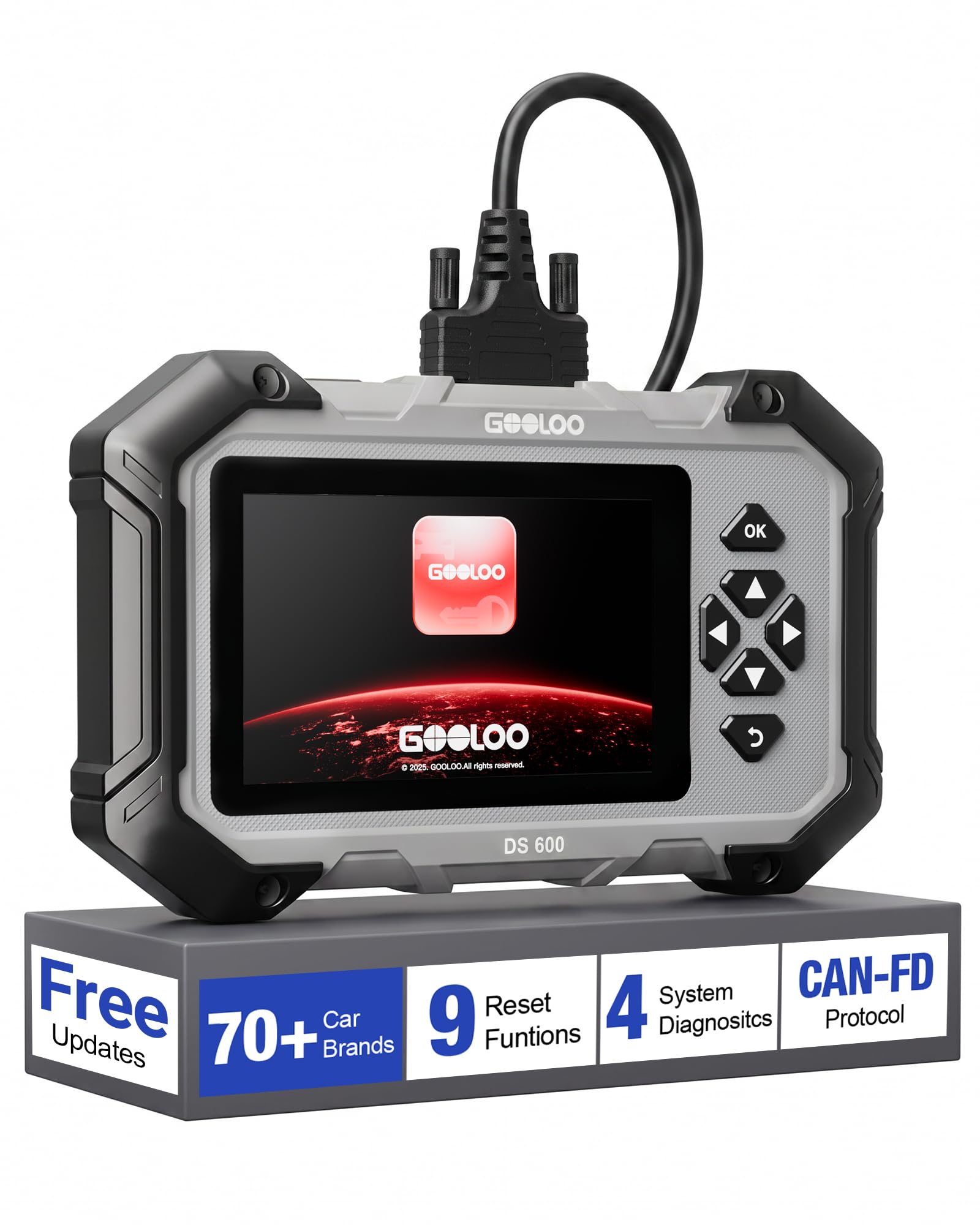
Image 1.1: The GOOLOO DS600 OBD2 Scanner, a handheld diagnostic tool with a 5-inch touchscreen and physical navigation buttons.
2. Prodotto finitoview
2.1 Caratteristiche principali
- Ampia compatibilità con i veicoli: Compatible with OBDII-equipped vehicles built after 1996, supporting over 70 vehicle brands. Supports Diesel (12v only), gasoline, 12V passenger cars, pickups, light-duty trucks, SUVs, and minivans.
- Supporto protocollo: Compatible with OBD2, CAN, and CAN-FD protocols.
- Sistema operativo: Runs on Android 11.0.
- Display: 5-inch touchscreen interface.
- Memoria: 2 GB di RAM e 64 GB di ROM.
- Connettività: 2.4GHz and 5GHz Wi-Fi for updates.
- Energia: Internal 3500mAh lithium battery, rechargeable via USB-C.
- Aggiornamenti: Lifetime free updates and use for core functions.
2.2 Contenuto della confezione
The GOOLOO DS600 package typically includes:
- GOOLOO DS600 OBD2 Scanner Unit
- Cavo di collegamento OBD2
- Cavo di ricarica da USB a USB-C
- Custodia protettiva per il trasporto
- Guida di riferimento rapido
3. Impostazione
3.1 Accensione iniziale e registrazione
- Carica il dispositivo: Connect the scanner to a power source using the provided USB-C charging cable. Ensure the device is sufficiently charged before first use.
- Accensione: Press and hold the power button located on the top edge of the scanner.
- Procedura guidata di configurazione iniziale: Seguire le istruzioni visualizzate sullo schermo per completare la configurazione iniziale, inclusa la selezione della lingua e del fuso orario.
- Connettiti al Wi-Fi: Navigate to the Wi-Fi settings and connect the device to a stable 2.4GHz or 5GHz Wi-Fi network.
- Registra dispositivo: Input your email address when prompted. A verification code will be sent to your email. Enter this code on the device to activate and register it. No personal data beyond email is typically required for basic operation.
- Scarica gli aggiornamenti: After registration, the device will prompt you to download and apply available software and vehicle diagnostic profile updates. It is highly recommended to install all updates to ensure the broadest compatibility and latest features. This process may take some time depending on your internet speed.

Image 3.1: The GOOLOO DS600 displaying the one-click update feature and demonstrating automatic VIN detection.
3.2 Collegamento a un veicolo
- Individuare la porta OBD2: Identify the vehicle's OBD2 diagnostic port, typically located under the dashboard on the driver's side.
- Collegare il cavo: Firmly connect one end of the provided OBD2 cable to the vehicle's OBD2 port and the other end to the designated port on the top edge of the GOOLOO DS600 scanner.
- Accensione inserita: Portare l'accensione del veicolo in posizione "ON" (motore spento).
- Stabilire la comunicazione: The scanner will automatically detect the vehicle's battery voltage and attempt to establish communication.
4. Istruzioni per l'uso
4.1 Diagnostica del sistema principale
The DS600 can perform in-depth diagnostics on four primary vehicle systems:
- Sistema motore: Legge e cancella i codici di errore del motore, views live data related to engine performance.
- Sistema di ritenuta supplementare (SRS): Diagnoses airbag system issues, reads and clears SRS fault codes.
- Sistema di frenatura antibloccaggio (ABS): Checks ABS system status, reads and clears ABS fault codes.
- Sistema di trasmissione: Diagnostica i problemi della trasmissione automatica, legge e cancella i codici di errore della trasmissione.

Image 4.1: The GOOLOO DS600 interface showing options for Engine, SRS, ABS, and Transmission diagnostics.
4.2 Full OBD Functions
Access the 'Diagnostics' menu to perform standard OBD2 functions:
- Leggi e cancella i codici: Recupera i codici di errore diagnostici (DTC) e cancellali dopo le riparazioni.
- Dati in tempo reale: View real-time sensor data, parameters, and PIDs in text or graph format.
- Prontezza I/M: Verificare lo stato di prontezza dei monitor relativi alle emissioni.
- Monitoraggio di bordo: Review results of on-board diagnostic monitoring tests for specific components/systems.
- Prova dei componenti: Avviare un test di tenuta per il sistema EVAP del veicolo.
- Informazioni sul veicolo: Recupera il numero di identificazione del veicolo (VIN), l'ID di calibrazione (CALID) e il numero di verifica della calibrazione (CVN).
- Stato del veicolo: Fornisce un overview of the vehicle's current diagnostic status.

Image 4.2: The GOOLOO DS600 interface showing various full OBD functions.
4.3 Funzioni di reset speciali
The DS600 offers 9 commonly used reset and service functions:
- Ripristino dell'olio: Ripristina il sistema di durata dell'olio dopo un cambio dell'olio.
- Adattamento dell'acceleratore: Re-learns the throttle body position.
- Ripristino freni (ripristino EPB): Ripristina il sistema del freno di stazionamento elettronico dopo la sostituzione delle pastiglie dei freni.
- Sanguinamento ABS: Performs brake fluid bleeding procedures for the ABS system.
- Rigenerazione DPF: Avvia il processo di rigenerazione del filtro antiparticolato diesel.
- Codifica iniettore: Codifica i nuovi numeri degli iniettori nella centralina.
- Ripristino SAS (sensore angolo di sterzata): Reimposta il sensore dell'angolo di sterzata.
- Ripristino BMS (sistema di gestione della batteria): Registra la sostituzione della nuova batteria.
- Ripristino TPMS (sistema di monitoraggio della pressione degli pneumatici): Re-learns TPMS sensors.

Image 4.3: The GOOLOO DS600 interface showing the 9 special reset functions.
4.4 Funzionalità avanzate
- VIN automatico: Automatically identifies the vehicle's Vehicle Identification Number (VIN) for quick and accurate vehicle identification.
- CAN-FD & FCA AutoAuth: Supports the Controller Area Network Flexible Data-Rate (CAN-FD) protocol and FCA AutoAuth for enhanced coverage and direct communication with modern Fiat Chrysler Automobiles (FCA) vehicles protected by a Security Gateway Module (SGW). This allows for deeper, bidirectional diagnostics on compatible vehicles.
- Professional Battery Diagnostics: Assesses battery starting power and monitors real-time voltage trends.

Image 4.4: The GOOLOO DS600 interface highlighting CAN-FD and Gateway Ready capabilities for modern vehicles.

Image 4.5: The GOOLOO DS600 demonstrating professional battery diagnostics, including assessing starting power and monitoring voltage trends.
5. Manutenzione
- Aggiornamenti software: Regularly connect the device to Wi-Fi and check for software updates. GOOLOO provides lifetime free updates for the core OBD2 functions and 9 reset functions. Installing updates ensures optimal performance and compatibility with new vehicle models.
- Pulizia: Utilizzare un panno morbido e asciutto per pulire lo schermo e l'esterno del dispositivo. Evitare l'uso di detergenti abrasivi o solventi.
- Magazzinaggio: When not in use, store the DS600 in its protective carrying case in a cool, dry place to prevent damage from dust, moisture, or impacts.
- Cura della batteria: To prolong battery life, avoid fully discharging the battery frequently. Charge the device periodically if it's not used for extended periods.
6. Risoluzione Dei Problemi
- Il dispositivo non si accende: Assicurati che la batteria sia carica. Collega il dispositivo a una fonte di alimentazione tramite il cavo USB-C e riprova.
- Nessuna comunicazione con il veicolo:
- Verify the OBD2 cable is securely connected to both the scanner and the vehicle's OBD2 port.
- Assicurarsi che l'accensione del veicolo sia in posizione "ON" (motore spento).
- Controllare il volume della batteria del veicolotage. Basso voltagpuò impedire la comunicazione.
- Prova a connetterti a un altro veicolo compatibile per escludere un problema specifico del veicolo.
- Problemi di connessione Wi-Fi:
- Ensure you are within range of a known Wi-Fi network.
- Verificare che la password Wi-Fi sia stata inserita correttamente.
- Riavviare lo scanner e il router Wi-Fi.
- Screen Responsiveness Issues: If the touchscreen is unresponsive or inaccurate, try restarting the device. Ensure the screen is clean and free of debris.
- Prestazioni lente: Ensure the device has the latest software updates installed. Close any unnecessary applications running in the background if applicable.
7. Specifiche
| Numero di modello | DS600 |
| Sistema operativo | Androide 11.0 |
| Dimensioni dello schermo | 5 pollici |
| Memoria RAM | 2 GB |
| ROM | 64 GB |
| processore | 1.8 GHz 4 core |
| Capacità della batteria | 3500mAh |
| Wifi | 2.4GHz / 5GHz |
| Fonte di alimentazione | Alimentato a batteria |
| Dimensioni (circa) | 22.6 cm x 13.7 cm x 3.5 cm (8.9" x 5.4" x 1.4") |
| Peso (circa) | 998 g (19.79 once) |
| Tipo di adattamento automobilistico | Vestibilità universale |
8. Garanzia e supporto
The GOOLOO DS600 comes with lifetime free updates for its full OBD2 functions and the 9 special reset functions, ensuring the device remains current without subscription fees for these core features.
For specific warranty details, including coverage period and terms, please refer to the official GOOLOO website or contact GOOLOO customer support directly. It is recommended to retain your proof of purchase for warranty claims.
For technical assistance, troubleshooting, or any product-related inquiries, please contact GOOLOO customer support through their official channels. Contact information can typically be found on the GOOLOO websito o nella confezione del prodotto.