
1. Introduzione
Thank you for choosing the FLEXISPOT CylineX Pro Electric Standing Desk Frame. This manual provides essential information for the safe and efficient assembly, operation, and maintenance of your new adjustable height desk. Please read these instructions carefully before use and retain them for future reference.
The CylineX Pro features a robust dual-motor system, a user-friendly piano-style control panel, and a wide height adjustment range to support a healthy and productive workspace.
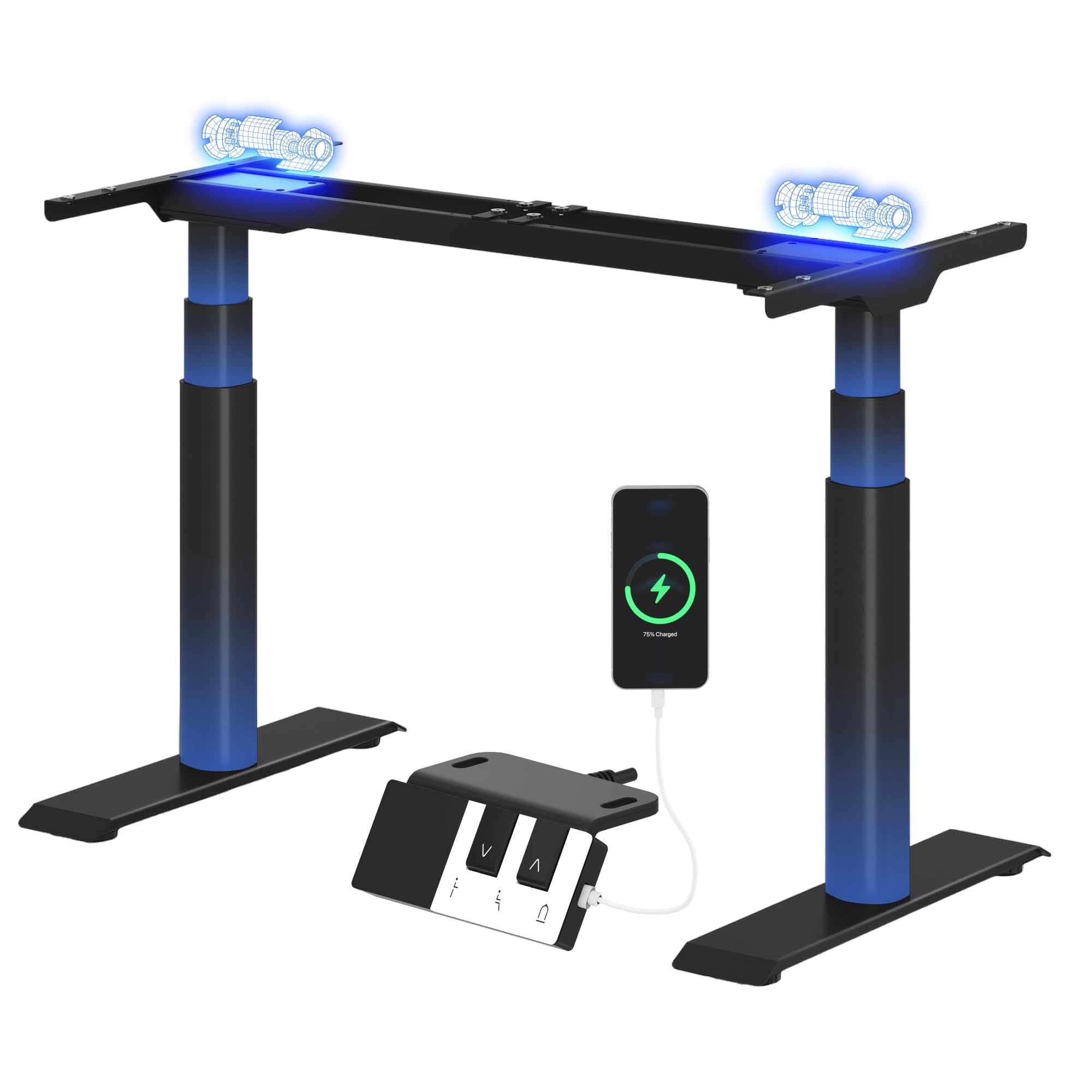
Image: The FLEXISPOT CylineX Pro Electric Standing Desk Frame with a black tabletop in a home office environment.
2. Informazioni sulla sicurezza
Per garantire un funzionamento sicuro ed evitare lesioni o danni, osservare le seguenti precauzioni di sicurezza:
- Assicurarsi che tutti i componenti siano fissati saldamente prima dell'uso.
- Tenere bambini e animali domestici lontani dalla scrivania durante il funzionamento.
- Do not place hands or other objects near moving parts.
- Avoid overloading the desk beyond its specified weight capacity.
- Non sedersi o stare in piedi sul telaio della scrivania.
- Scollegare l'alimentazione prima della pulizia o della manutenzione.
- Utilizzare solo l'alimentatore e gli accessori forniti.
- If any unusual noise, smell, or malfunction occurs, immediately unplug the desk and contact customer support.
- The anti-collision system is designed to prevent damage, but users should still exercise caution during height adjustments.

Image: The integrated anti-collision system provides safer movement by automatically reversing if an obstacle is detected.
3. Istruzioni di montaggio
The FLEXISPOT CylineX Pro desk frame is designed for straightforward assembly. It typically takes about 20 minutes to assemble. Please ensure you have received all packages, as the desk frame may be shipped in multiple boxes.
3.1 Contenuto della confezione
Verify that all parts listed in the included user manual are present before beginning assembly. Contact customer support if any parts are missing or damaged.
3.2 Assemblaggio passo dopo passo
- Disimballare i componenti: Estrarre con cautela tutti i componenti dall'imballaggio e disporli su una superficie morbida e pulita per evitare graffi.
- Montare la traversa: Connect the two halves of the crossbar (if applicable) and secure them according to the detailed instructions in your physical manual.
- Fissare le colonne di sollevamento: Securely attach the lifting columns (legs) to the assembled crossbar.
- Installare i piedi: Attach the foot supports to the bottom of each lifting column.
- Collegare la scatola di controllo: Mount the control box to the designated area on the frame and connect the motor cables and power cable.
- Allega pannello di controllo: Mount the piano-style control panel to the desired location on the desk frame or tabletop.
- Montaggio su tavolo: Carefully place your chosen tabletop onto the assembled frame. Ensure it is centered and aligned, then secure it using the provided screws.
- Gestione dei cavi: Organize and secure all cables using the included cable ties or management accessories.

Image: Components of the desk frame laid out, illustrating the ease of assembly.
4. Istruzioni per l'uso
The CylineX Pro features an intuitive piano-style control panel for easy height adjustment and personalized settings.

Image: The piano-style control panel offers simple and intuitive control with memory functions, sit/stand reminder, child lock, and a USB port.
4.1 Regolazione base dell'altezza
- Premere il tasto Su (^) pulsante per sollevare la scrivania.
- Premere il tasto Giù (v) pulsante per abbassare la scrivania.
- Release the button to stop the desk at the desired height.
4.2 Impostazione delle preimpostazioni di memoria
Il pannello di controllo consente di salvare fino a tre impostazioni di altezza preferite:
- Regolare la scrivania all'altezza desiderata utilizzando i pulsanti Su/Giù.
- Premere il tasto "M" button (Memory) followed by one of the numbered preset buttons (1, 2, or 3). The display will show "S-" followed by the number to confirm the setting is saved.
- Per richiamare un'altezza salvata, è sufficiente premere il pulsante preimpostato numerato corrispondente.
4.3 Sit/Stand Reminder
Activate the sit/stand reminder to prompt you to change positions at regular intervals:
- Premere il tasto Timer button (often depicted as a clock icon) to cycle through reminder intervals (e.g., 30, 45, 60 minutes).
- The desk will beep or vibrate when it's time to change position.
4.4 Funzione blocco bambini
To prevent accidental adjustments, activate the child lock:
- Premere e tenere premuto il tasto Serratura button (often depicted as a padlock icon) for a few seconds until "LOC" appears on the display.
- To unlock, press and hold the Lock button again until "LOC" disappears.
4.5 porta di ricarica USB
The control panel includes a USB port for convenient charging of your mobile devices.
5. Manutenzione
Regular maintenance ensures the longevity and optimal performance of your FLEXISPOT CylineX Pro desk frame.
- Pulizia: Pulisci la struttura della scrivania con un panno morbido eamp cloth. Avoid abrasive cleaners or solvents that could damage the finish. Ensure no liquid enters the electrical components.
- Gestione dei cavi: Periodically check and tidy up cables to prevent tangling or damage, which could interfere with desk movement.
- Controllo del dispositivo di fissaggio: Ogni pochi mesi, controllare tutte le viti e i bulloni per assicurarsi che siano ben serrati. Serrarli nuovamente se necessario.
- Lubrificazione: Le colonne di sollevamento sono pre-lubrificate e generalmente non richiedono ulteriore lubrificazione. Se si nota un attrito insolito, contattare l'assistenza clienti.
6. Risoluzione Dei Problemi
Se riscontri problemi con la tua scrivania, fai riferimento ai seguenti passaggi comuni per la risoluzione dei problemi:
| Problema | Possibile causa | Soluzione |
|---|---|---|
| La scrivania non si muove / Nessuna alimentazione | Power cable disconnected, power outlet issue, control box malfunction. | Check power connections. Ensure the outlet is working. Try a different outlet. If still no power, contact support. |
| Desk moves unevenly or stops | Overload, obstruction, uneven weight distribution, synchronization issue. | Reduce weight on the desk. Check for obstructions. Ensure weight is evenly distributed. Perform a reset (see below). |
| Codice di errore visualizzato (ad esempio, E01, E02) | Motor fault, sensor issue, overheating. | Refer to your physical manual for specific error code meanings. Often, a reset or power cycle can resolve temporary errors. If persistent, contact support. |
| Il sistema anticollisione si attiva troppo facilmente/per niente | Impostazione della sensibilità, ostruzione. | Check for obstructions. Consult your physical manual for instructions on adjusting anti-collision sensitivity. |
| Rumore o odore insolito | Problema con i componenti interni, sforzo del motore. | Immediately unplug the desk. Do not use. Contact FLEXISPOT customer support. |
6.1 Procedura di ripristino
A reset can often resolve minor operational issues. The exact procedure may vary slightly, but a common method is:
- Premere e tenere premuto il tasto Giù (v) button until the desk reaches its lowest position and then slightly rises and lowers again.
- Alternatively, some models require holding the "M" pulsante e Giù (v) button simultaneously, or a specific combination of buttons. Refer to your physical manual for the precise reset sequence for your CylineX Pro model.
7. Specifiche
Key technical specifications for the FLEXISPOT CylineX Pro Electric Standing Desk Frame:

Image: Detailed dimensions and performance specifications of the CylineX Pro desk frame.
| Caratteristica | Specificazione |
|---|---|
| Modello | CylineX Pro |
| Gamma di regolazione dell'altezza | 60 cm - 125 cm (23.6" - 49.2") |
| Velocità di sollevamento | 35 millimetri/secondo |
| Capacità di carico statico | Fino a 200 kg (440 libbre) |
| Capacità di carico dinamico | Fino a 160 kg (352 libbre) |
| Tipo di motore | Sistema a doppio motore |
| Livello di rumore | Meno di 50 dB |
| Consumo energetico in standby | Meno di 0.5 W |
| Larghezza del piano del tavolo compatibile | 120 cm - 200 cm (47.2" - 78.7") |
| Profondità del piano del tavolo compatibile | 60 cm - 80 cm (23.6" - 31.5") |
| Pannello di controllo | Piano-style with Memory Presets, Sit/Stand Reminder, Child Lock, USB Charging Port |
| Caratteristiche di sicurezza | Sistema anticollisione |

Image: The desk's robust construction supports a maximum static load of 200 kg and a dynamic load of 160 kg.
8. Garanzia e supporto
FLEXISPOT si impegna a fornire prodotti di alta qualità e un eccellente servizio clienti.
8.1 Informazioni sulla garanzia
The FLEXISPOT CylineX Pro desk frame comes with a Garanzia di 10 anno. This warranty covers defects in materials and workmanship under normal use. Please retain your proof of purchase for warranty claims. For full warranty terms and conditions, please refer to the official FLEXISPOT websito o contattare il servizio clienti.
8.2 Assistenza clienti
If you have any questions, require assistance with assembly, or encounter any issues not covered in this manual, please do not hesitate to contact FLEXISPOT customer support. Our team is available to help you.
- Supporto online: Visit the official FLEXISPOT websito per FAQ, articoli di supporto e moduli di contatto.
- Supporto via e-mail: Refer to your purchase documentation for the appropriate email address.
- Supporto telefonico: Check the FLEXISPOT websito per i numeri di contatto regionali.