
1. Introduzione
Thank you for choosing the Thomson 24HQG3S15C Smart TV. This manual provides essential information for the safe and efficient operation of your new television. Please read these instructions thoroughly before using the product and retain them for future reference.
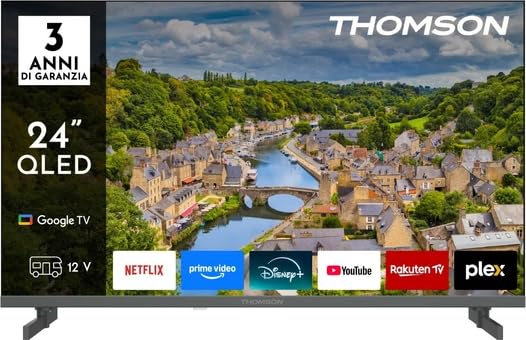
Figura 1: Fronte view of the Thomson 24HQG3S15C Smart TV.
2. Informazioni sulla sicurezza
Osservare sempre le seguenti precauzioni di sicurezza per evitare scosse elettriche, incendi o danni al televisore.
- Fonte di energia: Garantire l'alimentazione voltage matches the rating label on the TV.
- Ventilazione: Non ostruire le aperture di ventilazione. Lasciare spazio sufficiente attorno al televisore per un corretto flusso d'aria.
- Acqua e umidità: Non esporre il televisore a pioggia o umidità. Non posizionare oggetti contenenti liquidi, come vasi, sul televisore.
- Pulizia: Scollegare il televisore prima di pulirlo. Utilizzare un panno morbido e asciutto. Non utilizzare detergenti liquidi o spray.
- Posizionamento: Posizionare il televisore su una superficie stabile e piana. Evitare di esporlo alla luce diretta del sole o vicino a fonti di calore.
- Bambini: Sorvegliare i bambini per assicurarsi che non si arrampichino sulla TV o ci giochino.
- Manutenzione: Non tentare di riparare il televisore da soli. Per qualsiasi intervento di assistenza, rivolgersi a personale qualificato.
3. Contenuto della confezione
Carefully unpack your Thomson 24HQG3S15C Smart TV and check that all the following items are included:
- Thomson 24HQG3S15C Smart TV
- Telecomando
- Cavo di alimentazione
- Manuale dell'utente (questo documento)
- TV Stand (if applicable, check packaging)
- Viti per il supporto TV (se applicabile)
Se qualche articolo risulta mancante o danneggiato, contattare immediatamente il rivenditore.
4. Impostazione
4.1 Fissaggio del supporto (facoltativo)
If you are not wall-mounting the TV, you will need to attach the included stand. Follow these steps:
- Posizionare il televisore a faccia in giù su una superficie morbida e pulita per evitare di danneggiare lo schermo.
- Allineare il supporto con i fori di montaggio nella parte inferiore del televisore.
- Fissare il supporto utilizzando le viti in dotazione. Assicurarsi che siano ben serrate.
4.2 Montaggio a parete (opzionale)
The TV supports VESA standard mounting (100 x 100 mm). Use a compatible wall-mount bracket (not included) and follow the instructions provided with the bracket. Ensure the wall can support the weight of the TV.
Note: Remove the stand before wall mounting.
4.3 Collegamento di dispositivi esterni
Refer to the following connection options:
- HDMI (x3): Connect Blu-ray players, game consoles, or set-top boxes. The TV supports HDMI 1.4 and Audio Return Channel (ARC) on one port.
- USB 2.0 (x2): Collegare dispositivi di archiviazione USB per la riproduzione di contenuti multimediali.
- Ingresso antenna/cavo: Connect an antenna for DVB-T/T2 or a cable for DVB-C.
- Ingresso satellitare: Connect a satellite dish for DVB-S/S2.
- Ethernet (LAN): Collegare un cavo Ethernet per una connessione Internet cablata.
- Slot CI+: Insert a Common Interface Plus module for encrypted channels.
4.4 Accensione iniziale e configurazione iniziale
- Collegare il cavo di alimentazione al televisore e poi a una presa di corrente.
- Premere il pulsante di accensione sul telecomando o sul televisore.
- The TV will guide you through the initial setup process, including language selection, network connection (Wi-Fi or Ethernet), channel scanning, and Google TV account setup.
5. Utilizzo della Smart TV
5.1 Controllo remoto finitoview
The included remote control allows you to access all functions of your TV. Familiarize yourself with the buttons for power, volume, channel, input selection, and Smart TV navigation.
Note: Insert two AAA batteries (not included) into the remote control, observing polarity.
5.2 Funzioni TV di base
- Accensione/spegnimento: Premere il tasto Energia pulsante.
- Controllo del volume: Utilizzare il volume +/- pulsanti.
- Selezione canale: Utilizzare il CH +/- pulsanti o tastierino numerico.
- Sorgente di input: Premere il tasto Fonte pulsante per passare tra HDMI, TV, USB, ecc.
- Menu: Accedi al menu delle impostazioni TV.
5.3 Funzionalità Smart TV (Google TV)
Your Thomson 24HQG3S15C runs on Google TV, offering a personalized entertainment experience.
- Schermata iniziale: Access recommended content, installed apps (e.g., Disney+), and settings.
- Controllo vocale: Use the Google Assistant feature (if available on your remote) to search for content, control smart home devices, and more.
- App Store: Scarica altre app dal Google Play Store.
- HbbTV: Access interactive services from broadcasters (if supported in your region).
- Modalità intelligenti: Select from various picture and sound modes like Energy Saving, Game, Movie, Sport, Standard, and Vivid.
6. Connettività
La TV offre diverse opzioni di connettività per un'integrazione perfetta con la rete domestica e i dispositivi.
- Wifi: Built-in Wi-Fi allows wireless connection to your home network for internet access and streaming.
- Bluetooth 5.1: Collega cuffie wireless, soundbar o altri dispositivi abilitati Bluetooth.
- LAN ethernet: Fornisce una connessione Internet cablata stabile.
- HDMI (x3): High-Definition Multimedia Interface for digital audio and video. One port supports ARC (Audio Return Channel) for simplified audio connections to compatible sound systems.
- USB 2.0 (x2): Universal Serial Bus ports for connecting external storage devices to play media files (3GP, AVI, FLV, MKV, MOV, MP4, MPG, WEBM for video; AAC, FLAC, MP3, WAV for audio; BMP, GIF, JPG, PNG for images).
- Digital Tuners: Supports DVB-C, DVB-S, DVB-S2, DVB-T, DVB-T2 for various digital broadcast standards.
7. Manutenzione
7.1 Pulizia del televisore
- Schermo: Pulire delicatamente lo schermo con un panno morbido e privo di lanugine. Per macchie ostinate, strofinare leggermenteampPulire il panno con acqua o con un detergente specifico per schermi (non spruzzare mai direttamente sullo schermo).
- Consiglio dei ministri: Per pulire il mobile TV, utilizzare un panno morbido e asciutto.
- NON usare: Abrasive cleaners, waxes, or solvents like alcohol, benzene, or thinners, as these can damage the TV's finish or screen.
- Scollegare sempre la TV prima di pulirla.
7.2 Aggiornamenti software
Your Smart TV may receive software updates to improve performance and add new features. Ensure your TV is connected to the internet. Updates can usually be checked and installed via the TV's settings menu (System > About > System update).
8. Risoluzione Dei Problemi
Se riscontri problemi con il tuo televisore, fai riferimento ai seguenti problemi comuni e alle relative soluzioni:
| Problema | Possibile causa/soluzione |
|---|---|
| Nessun potere |
|
| Nessuna immagine, ma l'audio è presente |
|
| Nessun suono, ma l'immagine è presente |
|
| Il telecomando non funziona |
|
| Impossibile connettersi al Wi-Fi |
|
Se il problema persiste, contattare l'assistenza clienti.
9. Specifiche
| Caratteristica | Dettaglio |
|---|---|
| Modello | Thomson 24HQG3S15C |
| Dimensioni dello schermo | 24 pollici (61 cm di diagonale) |
| Risoluzione | 1366 x 768 pixel (HD) |
| Tecnologia di visualizzazione | QLED |
| Frequenza di aggiornamento | Frequenza 60 Hz |
| Piattaforma Smart TV | TV di Google |
| Sintonizzatore digitale | DVB-C, DVB-S, DVB-S2, DVB-T, DVB-T2 |
| Wifi | SÌ |
| Bluetooth | Versione 5.1 |
| Rete Ethernet | SÌ |
| Porte HDMI | 3 (HDMI 1.4, one with ARC) |
| Porte USB 2.0 | 2 |
| Uscita audio (RMS) | 6 W (2 altoparlanti) |
| Supporto HDR | L'HDR10 |
| Montaggio VESA | 100 x 100 millimetri |
| Dimensioni (con supporto) | 53.5 cm (L) x 15.1 cm (P) x 35.3 cm (A) |
| Peso (con supporto) | 2.4 kg |
| Classe di efficienza energetica (SDR) | E |
| Consumo energetico (SDR) | 17 kWh/1000h |
10. Garanzia e supporto
For warranty information, please refer to the warranty card included in your product packaging or contact your retailer. Thomson provides customer support for technical assistance and service inquiries.
Please visit the official Thomson website or refer to your purchase documentation for contact details and further support resources.