Introduzione
This manual provides detailed instructions for the setup, operation, and maintenance of your Audiovox CE-122 Personal CD Player with Car Kit. Please read this manual thoroughly before using your device to ensure proper functionality and to maximize your listening experience.
The Audiovox CE-122 is a portable CD player designed for versatile use, featuring a Digital Anti-Shock System (DASS) for uninterrupted playback during movement, a 22-track programmable memory, and a bass boost function. It includes a complete car kit for in-vehicle use.
Contenuto della confezione
Verifica che tutti gli articoli elencati di seguito siano inclusi nel tuo pacchetto:
- Audiovox CE-122 Portable CD Player
- Cuffie
- Adattatore CA
- Adattatore per auto
- Adattatore per cassette
- Manuale dell'utente (questo documento)
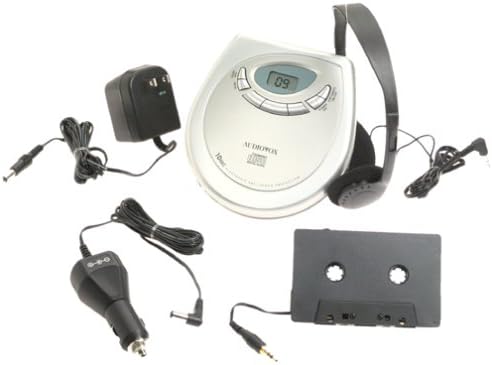
Immagine: The Audiovox CE-122 portable CD player shown with all its accessories, including headphones, AC adapter, car adapter, and cassette adapter.
Caratteristiche del prodotto
- Plays audio CD and CD-R/RW discs.
- AC/DC operation for home and portable use.
- Complete car kit included for in-vehicle audio.
- Digital Anti-Shock System (DASS) provides up to 20 seconds of skip protection.
- 22-track programmable memory for custom playback sequences.
- Bass boost feature for enhanced audio.
- Forward and reverse search functions.
- Repeat and pause functions.
- Key hold switch to prevent accidental button presses.
- Line out jack for connecting to external audio systems.
- Funzione di spegnimento automatico per preservare la durata della batteria.
- Dual stereo headphone jack for shared listening.
- Built-in charger for rechargeable batteries (rechargeable batteries not included).
Impostare
1. Inserimento delle batterie
The CD player operates on 4 AA batteries (included). For rechargeable batteries (not included), ensure they are inserted correctly for charging.
- Aprire il coperchio del vano batterie situato nella parte inferiore dell'unità.
- Inserire 4 batterie AA, rispettando la polarità corretta (+/-) come indicato all'interno del vano.
- Chiudere saldamente il coperchio del vano batterie.
2. Connecting Power (AC Adapter)
For home use or to charge rechargeable batteries:
- Plug the small end of the AC adapter into the DC IN 4.5V jack on the CD player.
- Collega l'altra estremità dell'adattatore CA a una presa a muro standard.
- If using rechargeable batteries, select the 'charge' function (if available on your model) to begin charging.
3. Collegamento delle cuffie
Plug the headphones into one of the two headphone jacks on the side of the CD player.

Immagine: Un primo piano view of the headphones included with the Audiovox CE-122 CD player.
4. Car Kit Setup
To use the CD player in your vehicle:
- Plug the car adapter into your vehicle's cigarette lighter or 12V power outlet.
- Connect the small end of the car adapter to the DC IN 4.5V jack on the CD player.
- Insert the cassette adapter into your vehicle's cassette player.
- Connect the audio cable from the cassette adapter to the LINE OUT jack on the CD player.
- Ensure your car stereo is set to the cassette function to hear the CD player's audio.
Istruzioni per l'uso
1. Inserimento di un CD
- Premere il pulsante OPEN per aprire il coperchio del vano CD.
- Place a CD (audio CD or CD-R/RW) onto the center spindle with the label side facing up.
- Premere delicatamente il CD verso il basso finché non scatta in posizione.
- Chiudere saldamente il coperchio del vano CD finché non si blocca.

Immagine: The Audiovox CE-122 portable CD player with its lid open, revealing the disc compartment where a CD is placed.
2. Riproduzione di base
- Giocare: Premere il tasto RIPRODUCI/PAUSA button to start playback. The track number will appear on the display.
- Pausa: Premere il tasto RIPRODUCI/PAUSA button during playback to pause. Press again to resume.
- Stop: Premere il tasto FERMARE per interrompere la riproduzione.
3. Navigazione della traccia
- Salta traccia: Premere il tasto SALTA AVANTI (►►) o SALTA INDIETRO (◄◄) buttons to move to the next or previous track.
- Ricerca: Premere e tenere premuto il tasto SALTA AVANTI (►►) o SALTA INDIETRO (◄◄) buttons during playback to fast forward or rewind within a track.
4. Funzione di ripetizione
Premere il tasto RIPETERE button to cycle through repeat modes:
- Ripeti 1: Ripete la traccia corrente.
- Ripeti tutto: Ripete tutte le tracce del disco.
- Ripeti: Disables repeat function.
5. Programmable Memory
È possibile programmare fino a 22 tracce da riprodurre in un ordine specifico:
- With the CD stopped, press the PROGRAMMA pulsante.
- Utilizzare il SALTA AVANTI (►►) o SALTA INDIETRO (◄◄) per selezionare la traccia desiderata.
- Premere PROGRAMMA again to add the track to the memory.
- Repeat steps 2 and 3 for up to 22 tracks.
- Premere RIPRODUCI/PAUSA to start playback of the programmed sequence.
6. Amplificazione dei bassi
Premere il tasto AUMENTO DEI BASSI pulsante per attivare o disattivare la funzione di potenziamento dei bassi.
7. Key Hold Switch
Fai scorrere il PRESA switch to the ON position to disable all buttons, preventing accidental operation during transport.
8. Digital Anti-Shock System (DASS)
The DASS provides up to 20 seconds of skip protection. This feature is automatically active during playback to ensure smooth audio even during movement.
9. Spegnimento automatico
The unit will automatically power off after a period of inactivity or when a CD finishes playing to conserve battery life.

Immagine: The Audiovox CE-122 portable CD player, a silver-colored device with a digital display and control buttons, shown alongside its black over-ear headphones.
Manutenzione
1. Cleaning the CD Player
- Pulire l'esterno dell'unità con un panno morbido e asciutto. Non utilizzare detergenti abrasivi o solventi.
- Per pulire la lente, utilizzare un disco CD specifico per la pulizia delle lenti. Non toccare direttamente la lente.
2. Cura della batteria
- Rimuovere le batterie se l'unità non verrà utilizzata per un periodo prolungato per evitare perdite.
- Replace all batteries at the same time; do not mix old and new batteries or different types of batteries.
3. Conservazione
Conservare il lettore CD in un luogo fresco e asciutto, lontano dalla luce solare diretta e da temperature estreme.
Risoluzione dei problemi
If you encounter issues with your Audiovox CE-122, please refer to the following common problems and solutions:
- Nessun potere:
• Check if batteries are inserted correctly and are not depleted. Replace if necessary.
• Ensure the AC adapter or car adapter is securely connected and the power source is active. - CD non riprodotto / Errore disco:
• Ensure the CD is inserted correctly with the label side up.
• Check if the CD is scratched or dirty. Clean the CD with a soft, lint-free cloth.
• Make sure the CD compartment lid is fully closed.
• The disc format may not be supported (e.g., data CD instead of audio CD or CD-R/RW). - Skipping During Playback:
• While the DASS provides protection, severe shocks or vibrations can still cause skipping. Try to keep the player stable.
• Ensure the CD is clean and free of scratches.
• Low battery power can sometimes affect anti-shock performance. Replace or recharge batteries. - Nessun suono:
• Check headphone connection and ensure they are fully plugged in.
• Regolare il livello del volume.
• If using the car kit, ensure the car stereo is set to the correct input (cassette function) and volume is up. - I pulsanti non rispondono:
• Verificare se il PRESA switch is in the ON position. Slide it to OFF to enable buttons.
Specifiche
| Numero di modello | CE-122 |
| Formati di dischi supportati | Audio CD, CD-R/RW (MP3 compatible) |
| Protezione antiurto | 20 seconds (Digital Anti-Shock System) |
| Memoria programmabile | 22 tracce |
| Fonte di alimentazione | 4 x AA batteries, AC adapter (4.5V DC), Car adapter (12V DC) |
| Connettività | Auxiliary (Line Out), Dual Headphone Jacks |
| Dimensioni (circa) | 11.1 x 7.8 x 3.2 pollici (confezione) |
| Peso (circa) | 1.5 libbre |
Garanzia e supporto
For warranty information and customer support, please refer to the documentation provided at the time of purchase or contact Audiovox customer service. Keep your proof of purchase for warranty claims.


