Introduzione
This manual provides comprehensive instructions for the operation, maintenance, and troubleshooting of your Fujifilm FinePix 3800 Digital Camera. Designed for both novice and experienced photographers, the FinePix 3800 offers a 3.0-megapixel sensor, 6x optical zoom, and various features to capture high-quality images and videos.
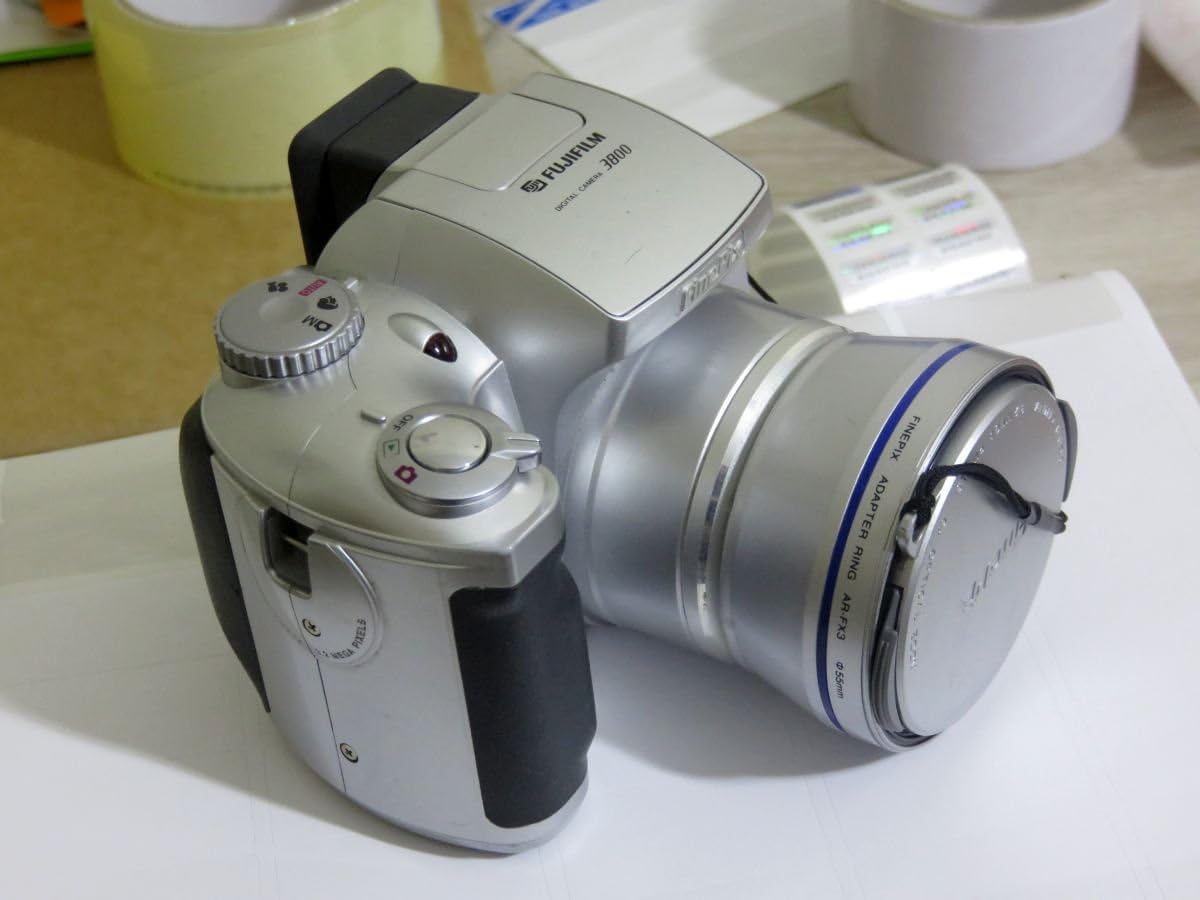
Figura 1: Fronte view of the Fujifilm FinePix 3800 Digital Camera with the lens cap attached, showcasing its silver body and ergonomic grip.
Impostare
1. Installazione della batteria
The FinePix 3800 operates on four (4) AA batteries. For optimal performance and extended usage, it is highly recommended to use rechargeable Nickel Metal Hydride (NiMH) batteries. Alkaline batteries are suitable for temporary use but will deplete quickly.
- Individuare il coperchio del vano batteria nella parte inferiore o laterale della fotocamera.
- Per aprire il vano, far scorrere o sollevare il coperchio.
- Inserire quattro batterie AA, assicurandosi che la polarità (+/-) sia corretta, come indicato all'interno del vano.
- Chiudere saldamente il coperchio del vano batteria finché non scatta in posizione.
2. Installazione della scheda di memoria
The camera uses xD-Picture Card memory. A 16 MB xD card is typically included, capable of storing approximately 12 images in fine mode or 26 images in normal mode.
- Individuare lo slot della scheda di memoria, solitamente vicino al vano batteria.
- Aprire il coperchio dello slot della scheda di memoria.
- Insert the xD-Picture Card with the metal contacts facing the correct direction (refer to the diagram inside the slot). Push gently until it clicks into place.
- Chiudere bene il coperchio dello slot della scheda di memoria.
3. Accensione iniziale e impostazione di data/ora
After installing batteries and the memory card, power on the camera for the first time.
- Turn the power dial or press the power button to switch on the camera.
- The LCD monitor will display the initial setup screen, prompting you to set the date and time.
- Use the camera's navigation buttons to adjust the year, month, day, hour, and minute.
- Confirm the settings to proceed. Correct date and time settings are crucial for proper image file gestione.
Istruzioni per l'uso
1. Modalità fotografiche di base
The FinePix 3800 offers various shooting modes to suit different conditions and user preferences.
- Modalità automatica: For simple point-and-shoot operation. The camera automatically adjusts aperture, shutter speed, and white balance.
- Modalità manuale: Provides control over settings such as aperture, exposure compensation, and white balance for advanced users.
- Scene Position: Optimize settings for specific scenes like landscape or portrait.

Figure 2: The Fujifilm FinePix 3800 with its lens extended and the pop-up flash activated, ready for capturing images.
2. Operazione Zoom
The camera features a 6x optical zoom Fujinon lens (equivalent to 38-228mm on a 35mm camera) and a variable digital zoom.
- Use the zoom lever (typically located near the shutter button) to zoom in (telephoto) or zoom out (wide-angle).
- Optical zoom provides higher quality images. Digital zoom can be used to extend magnification further (up to 3.25x in 640x480 pixel mode), but may result in reduced image quality.
3. Modalità flash
The built-in pop-up flash offers several modes:
- Flash automatico: La fotocamera determina automaticamente se è necessario il flash.
- Riduzione effetto occhi rossi: Emits pre-flashes to reduce red-eye effect.
- Forced Flash: Il flash si attiva indipendentemente dalla luce ambientale.
- Suppressed Flash: Il flash è disabilitato.
- Sincro lenta: Combines flash with a slow shutter speed for balanced exposure of subject and background in low light.
4. White Balance and Exposure
- Bilanciamento del bianco: In manual mode, select from 6 preset positions (e.g., Daylight, Cloudy, Fluorescent) or use automatic white balance for accurate color reproduction.
- Velocità dell'otturatore: The camera supports shutter speeds from 3 to 1/1,500 second. In manual mode, you can adjust this setting to control motion blur or freeze action.
5. LCD Monitor and Electronic Viewcercatore (EVF)
The FinePix 3800 features a 1.8-inch LCD monitor and an electronic viewfinder for composing shots and reviewimmagini.

Figura 3: Posteriore view of the Fujifilm FinePix 3800, highlighting the 1.8-inch LCD monitor, electronic viewfinder e pulsanti di controllo.
- Use the LCD for a larger preview e navigazione nel menu.
- The EVF is useful in bright sunlight or to conserve battery power during image playback.
- A dedicated button (e.g., "EVF/LCD") allows switching between the two displays.
6. Movie and Voice Memo Capabilities
- Modalità film: Record digital videos with sound in QVGA (320 x 240) format, up to approximately 60 seconds in length at 10 frames per second.
- Memo vocale: Add up to 30 seconds of voice tags to your captured images for personal notes or descriptions.
7. Image Transfer to PC
Transferring images and videos to your computer is straightforward using the included USB cable and FinePixViewsoftware.
- Connect one end of the USB cable to the camera's USB port and the other end to your computer.
- Ensure the camera is powered on. Your computer should automatically recognize the camera as a removable storage device.
- Use the FinePixViewer software (included on CD-ROM) or your computer's file explorer to browse and transfer files.
Manutenzione
1. Pulizia della fotocamera
- Lente: Use a soft, lint-free cloth specifically designed for optical lenses. Gently wipe in a circular motion. Avoid using harsh chemicals.
- Corpo: Pulire il corpo della fotocamera con un panno morbido e asciutto. Per lo sporco ostinato, leggermente dampen the cloth with water, then wipe dry. Do not use solvents.
- Schermo LCD: Use a soft, dry cloth. For smudges, a screen cleaner designed for electronics can be used sparingly.
2. Cura della batteria
- Se si prevede di non utilizzare la fotocamera per un periodo prolungato, rimuovere le batterie per evitare perdite.
- Conservare le batterie in un luogo fresco e asciutto.
- If using rechargeable batteries, follow the charger manufacturer's instructions for charging and maintenance.
3. Gestione della scheda di memoria
- Formattare sempre le nuove schede di memoria nella fotocamera prima del primo utilizzo.
- Avoid removing the memory card while the camera is writing data (e.g., after taking a photo) to prevent data corruption.
- Keep memory cards away from strong magnetic fields and extreme temperatures.
Risoluzione dei problemi
This section addresses common issues you might encounter with your FinePix 3800.
La fotocamera non si accende
- Assicurarsi che le batterie siano inserite correttamente e con la giusta polarità.
- Check battery charge level. Replace with fresh alkaline batteries or fully charged NiMH batteries.
- Verificare che il coperchio del vano batteria sia ben chiuso.
Scarsa qualità dell'immagine
- Immagini sfocate: Ensure the lens is clean. Check if the camera is in focus. Use a tripod in low light or for slow shutter speeds.
- Colori errati: Adjust white balance settings to match the lighting conditions.
- Dark/Overexposed Images: Check flash settings. Adjust exposure compensation if available in manual mode.
Errori della scheda di memoria
- Assicurarsi che la scheda di memoria sia inserita correttamente e completamente.
- Prova a formattare la scheda di memoria (Note: This will erase all data on the card. Back up important fileè il primo.).
- If errors persist, the memory card may be faulty and require replacement.
Computer Does Not Recognize Camera
- Assicurarsi che il cavo USB sia collegato saldamente sia alla fotocamera che al computer.
- Verify the camera is powered on and in the correct connection mode (if applicable).
- Install or reinstall the FinePixViewer software and USB drivers from the included CD-ROM.
- Prova una porta USB diversa sul tuo computer.
Specifiche
Key technical specifications for the Fujifilm FinePix 3800 Digital Camera:
| Caratteristica | Specificazione |
|---|---|
| Nome del modello | Fujifilm FinePix 3800 |
| Risoluzione fissa efficace | 3.0 Megapixel |
| Tecnologia del sensore fotografico | CCD |
| Zoom ottico | 6x |
| Digital Zoom | Up to 3.25x (in 640x480 mode) |
| Lunghezza focale massima | 228 millimetri (equivalente a 35 mm) |
| Lunghezza focale minima | 38 millimetri (equivalente a 35 mm) |
| Apertura massima | apertura f/2.8 |
| Velocità dell'otturatore | da 3 a 1/1,500 secondi |
| Sensibilità ISO | ISO 100 equivalent (Expanded ISO Minimum: 100, Maximum: 1600) |
| Dimensioni dello schermo LCD | 1.8 pollici |
| Viewcercatore | Elettronico |
| Tipo di memoria | xD-Picture Card (16 MB included) |
| Connettività | USB |
| Fonte di alimentazione | 4 batterie AA |
| Dimensioni (A x L x P) | Circa. 3.03 x 3.9 x 2.7 pollici |
| Peso | Approx. 0.88 Pounds (without batteries/card) |
| Risoluzione video | QVGA (320x240) with audio, max 60 seconds |
Garanzia e supporto
Informazioni sulla garanzia
The Fujifilm FinePix 3800 Digital Camera comes with a Garanzia limitata di 1 anno from the manufacturer. Please retain your proof of purchase for warranty claims. For detailed terms and conditions, refer to the warranty card included with your product or contact Fujifilm customer support.
Risorse aggiuntive
- Manuale utente ufficiale (PDF): Per una guida più dettagliata, puoi scaricare il manuale ufficiale in formato PDF: Manuale Scarica il PDF
- Fujifilm Store: Explore other Fujifilm products and support resources: Visit Fujifilm Store