Introduzione
This manual provides essential instructions for the safe and efficient operation of your Sharper Image SO226 Compact CD Stereo with AM/FM Digital Tuner. Please read this manual thoroughly before using the unit and retain it for future reference.
Importanti istruzioni di sicurezza
- Leggere tutte le istruzioni prima di mettere in funzione l'apparecchio.
- Conservare questo manuale per riferimento futuro.
- Non utilizzare questo apparecchio vicino all'acqua.
- Pulire solo con un panno asciutto.
- Non ostruire le aperture di ventilazione. Installare secondo le istruzioni del produttore.
- Non installare vicino a fonti di calore come radiatori, bocchette di riscaldamento, stufe o altri apparecchi (inclusi amplificatori) che producono calore.
- Proteggere il cavo di alimentazione per evitare che venga calpestato o schiacciato, in particolare in corrispondenza delle spine, delle prese di corrente e del punto in cui esce dall'apparecchio.
- Utilizzare solo accessori/componenti specificati dal produttore.
- Affidare tutte le operazioni di manutenzione a personale di assistenza qualificato. L'assistenza è necessaria quando l'apparecchio è stato danneggiato in qualsiasi modo.
Contenuto della confezione
Verificare che tutti gli articoli siano presenti al momento del disimballaggio:
- Sharper Image SO226 Compact CD Stereo Unit
- AC Power Adapter (if applicable, check packaging)
- Manuale dell'utente (questo documento)
Prodotto finitoview
Familiarize yourself with the components and controls of your SO226 unit.
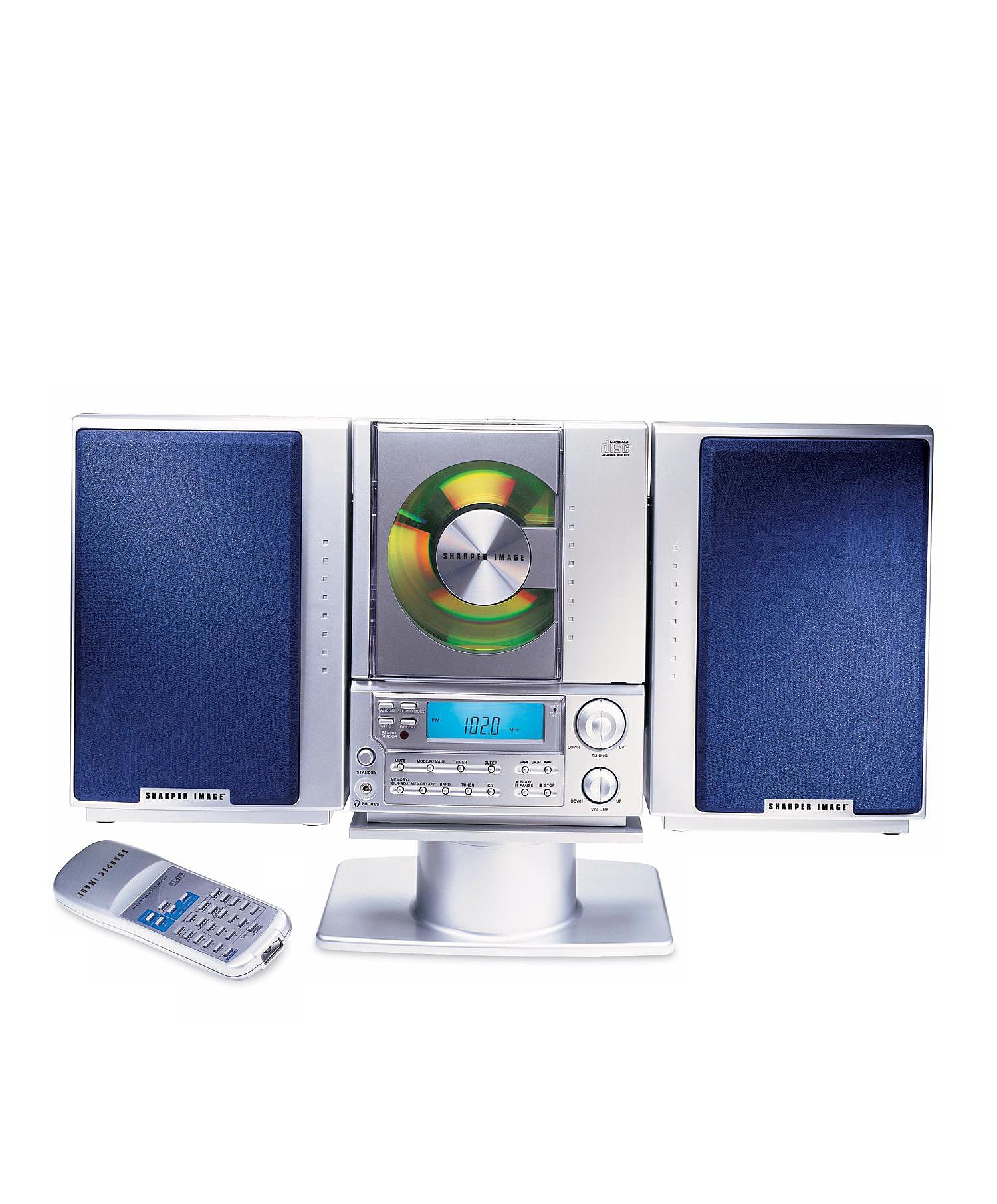
This image displays the front panel of the Sharper Image SO226 Compact CD Stereo. Visible features include the top-loading CD compartment, the digital display for radio frequencies and CD track information, and various control buttons for power, volume, CD playback, and radio tuning.
Pannello di controllo (layout tipico)
- Pulsante di accensione: Accende o spegne l'unità.
- Pulsante FUNZIONE/MODALITÀ: Switches between CD, AM, and FM modes.
- Pulsanti VOLUME +/-: Regola il livello di uscita audio.
- Pulsante RIPRODUCI/PAUSA: Avvia o mette in pausa la riproduzione del CD.
- Pulsante STOP: Interrompe la riproduzione del CD.
- Pulsanti SALTA/CERCA (◀◀ / ▶▶): Skips tracks on CD or tunes radio frequencies.
- Pulsante PROGRAMMA: Utilizzato per programmare le tracce del CD.
- Tasto SONNO: Attiva la funzione del timer di spegnimento.
- Pulsanti TUNING +/-: Ottimizza le frequenze radio.
- Pulsanti PRESET: Memorizza e richiama le stazioni radio preferite.
- Schermo LCD: Mostra la modalità corrente, il numero della traccia, la frequenza e l'ora.
Impostare
Collegamento di potenza
- Assicurarsi che l'unità sia posizionata su una superficie stabile e piana.
- If using batteries (not included), open the battery compartment on the bottom or back of the unit and insert the required batteries, observing correct polarity.
- Alternatively, connect the AC power adapter (if supplied) to the DC IN jack on the unit and then plug the adapter into a standard wall outlet.
Configurazione dell'antenna
- For FM reception, extend the telescopic antenna fully. Adjust its position for optimal reception.
- For AM reception, the unit has a built-in ferrite bar antenna. Rotate the entire unit for best AM reception.
Istruzioni per l'uso
Funzionamento del lettore CD
- Premere il tasto ENERGIA pulsante per accendere l'unità.
- Premere il tasto FUNZIONE/MODALITÀ ripetutamente il pulsante finché sul display non appare la scritta "CD".
- Aprire il coperchio del vano CD.
- Inserire un CD nel vano con l'etichetta rivolta verso l'alto.
- Close the CD compartment cover. The unit will read the CD, and the total number of tracks will be displayed.
- Premere il tasto RIPRODUCI/PAUSA pulsante per avviare la riproduzione.
- Per mettere in pausa, premere RIPRODUCI/PAUSA di nuovo. Premerlo ancora una volta per riprendere.
- Per interrompere la riproduzione, premere il pulsante FERMARE pulsante.
- Per passare alla traccia successiva, premere il tasto SKIP/SEARCH ▶▶ pulsante.
- To go back to the beginning of the current track or to the previous track, press the SKIP/SEARCH ◀◀ pulsante.
- Per avanzare o riavvolgere rapidamente all'interno di una traccia, tenere premuto il tasto SKIP/SEARCH ▶▶ or ◀◀ pulsante durante la riproduzione.
Funzionamento della radio AM/FM
- Premere il tasto ENERGIA pulsante per accendere l'unità.
- Premere il tasto FUNZIONE/MODALITÀ button repeatedly until 'AM' or 'FM' appears on the display.
- Sintonizzazione manuale: Premere il tasto ACCORDATURA +/- pulsanti per regolare la frequenza passo dopo passo.
- Scansione automatica: Premere e tenere premuto il tasto ACCORDATURA +/- buttons for a few seconds. The tuner will scan and stop at the next strong station.
- Memorizzazione delle preimpostazioni: Sintonizzati sulla stazione desiderata. Premi il tasto PROGRAMMA pulsante. Il numero preimpostato lampeggerà. Utilizzare il pulsante SALTA/CERCA pulsanti per selezionare un numero preimpostato, quindi premere PROGRAMMA di nuovo per confermare.
- Richiamo delle preimpostazioni: In modalità radio, premere il tasto PRESET buttons to cycle through your stored stations.
Funzione Sleep Timer
The unit features a convenient sleep timer that automatically turns off the sound after a set period.
- Mentre l'unità è in riproduzione (CD o radio), premere il tasto SONNO pulsante.
- Ogni pressione del SONNO button will cycle through available sleep times (e.g., 10, 20, 30, 60, 90 minutes, or OFF).
- Select your desired sleep duration. The unit will automatically power off after the selected time has elapsed.
Manutenzione
- Pulizia dell'unità: Pulire l'esterno dell'unità con un panno morbido e asciutto. Non utilizzare detergenti abrasivi o solventi.
- Cura del CD: Handle CDs by their edges. Keep them clean and free of scratches. If a CD is dirty, wipe it gently with a soft, lint-free cloth from the center outwards.
- Magazzinaggio: When not in use for extended periods, disconnect the power adapter and remove batteries. Store the unit in a cool, dry place.
Risoluzione dei problemi
In caso di problemi, fare riferimento ai seguenti problemi comuni e alle relative soluzioni:
- Nessun potere:
- Ensure the AC power adapter is securely plugged into both the unit and a working wall outlet.
- If using batteries, check if they are inserted correctly and are not depleted. - Nessun suono:
- Check the volume level and increase it if necessary.
- Ensure the correct function mode (CD/AM/FM) is selected. - CD Not Playing / Skipping:
- Ensure the CD is inserted correctly with the label side up.
- Clean the CD for any dirt or scratches.
- Try a different CD to rule out a faulty disc.
- Ensure the CD compartment cover is fully closed. - Scarsa ricezione radio:
- For FM, fully extend and adjust the telescopic antenna.
- For AM, rotate the entire unit for better signal.
- Move the unit away from other electronic devices that may cause interference. - I pulsanti non rispondono:
- Try turning the unit off and on again.
- Disconnect power for a few minutes, then reconnect.
Specifiche
| Numero di modello | SO226 |
| Dimensioni del prodotto (L x P x A) | 1.3 x 19 x 5.5 pollici (3.3 x 48.3 x 14 cm) |
| Peso dell'articolo | 5 libbre (2.27 kg) |
| Tipo di altoparlante | Stereo |
| Fonte di alimentazione | Battery Powered (AC adapter typically included or sold separately) |
| Color (as per specific variant) | Blu |
Garanzia e supporto
Per informazioni sulla garanzia e sull'assistenza clienti, fare riferimento alla documentazione inclusa con l'acquisto o visitare il sito ufficiale Sharper Image websito. Conservare la prova d'acquisto per eventuali reclami in garanzia.