1. Introduzione
This manual provides essential information for the proper setup, operation, and maintenance of your Crown D-75A D Series Power Amplifier. The D-75A is a robust and reliable power amplifier, widely recognized for its performance in various professional audio environments, including laboratories, touring setups, public facilities, recording studios, and home audio systems. It delivers up to 110 watts into 8 ohms of power.
2. Informazioni sulla sicurezza
Si prega di leggere e comprendere tutte le istruzioni di sicurezza prima di utilizzare il amplificatore. Conservare questo manuale per riferimento futuro.
- Fonte di energia: Collegare il amplifier only to the type of power source indicated on the unit. Ensure the AC line has a standard three-wire grounded connector.
- Ventilazione: Non ostruire le aperture di ventilazione. Garantire un flusso d'aria adeguato attorno all'unità per evitare il surriscaldamento.
- Umidità: Non esporre il amplifier to rain or moisture. Do not place objects filled with liquids, such as vases, on the apparatus.
- Manutenzione: Non tentare di riparare questo prodotto da soli. Affidare tutte le operazioni di manutenzione a personale di assistenza qualificato.
- Pulizia: Scollegare l'unità dalla presa di corrente prima di pulirla. Utilizzare un panno asciutto per la pulizia.
3. Prodotto finitoview
The Crown D-75A D Series Power Amplifier is designed for high-fidelity audio amplification. Its AB+B class circuitry ensures maximum efficiency with minimal crossover distortion.
Caratteristiche principali:
- Balanced three-pin Neutrik combination XLR and 1/4" phone jack for each channel.
- Four-terminal barrier block (two per channel) for speaker connections.
- Stereo headphone jack for monitoring.
- AC line with a standard three-wire grounded connector.
- Powerful AB+B class circuitry for efficient operation.
Controlli e indicatori del pannello frontale:
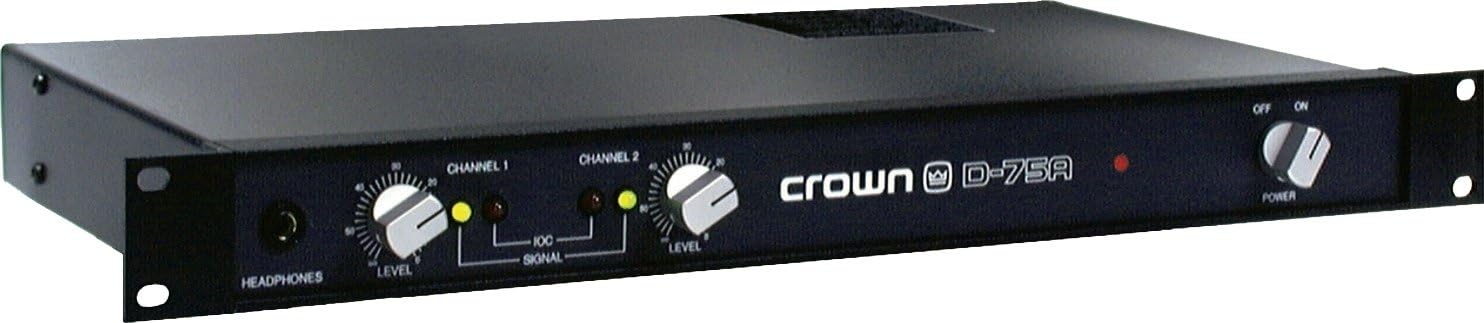
Figure 3.1: Crown D-75A Front Panel. This image displays the front panel of the Crown D-75A D Series Power Amplifier. From left to right, it features a headphone jack, a 'LEVEL' control knob for Channel 1, a 'SIGNAL' indicator light for Channel 1, a 'LEVEL' control knob for Channel 2, a 'SIGNAL' indicator light for Channel 2, the 'crown D-75A' logo, a red power indicator light, and a 'POWER' switch with 'OFF' and 'ON' positions.
4. Impostazione
Follow these steps to properly set up your Crown D-75A amplificatore:
- Posizionamento: Posizionare il amplifier in a location with adequate ventilation, away from direct sunlight, heat sources, and moisture. Ensure it is placed on a stable surface.
- Connessioni di ingresso: Collega la tua sorgente audio (ad esempio, mixer, preamplifier) al amplifier's input jacks. The D-75A features balanced three-pin Neutrik combination XLR and 1/4" phone jacks for each channel. Use appropriate cables for your source.
- Connessioni di uscita: Connect your speakers to the four-terminal barrier block outputs on the rear of the amplifier. Ensure correct polarity (+ to + and - to -) for each channel.
- Collegamento elettrico: Assicurare il amplifier's power switch is in the 'OFF' position. Connect the AC power cord to a grounded electrical outlet. The amplifier requires a standard three-wire grounded connection.
- Initial Level Settings: Before powering on, set both Channel 1 and Channel 2 'LEVEL' control knobs to their minimum (fully counter-clockwise) position.
5. Istruzioni per l'uso
Una volta il amplifier è configurato, seguire questi passaggi per il funzionamento:
- Accensione: Flip the 'POWER' switch to the 'ON' position. The red power indicator light on the front panel will illuminate.
- Regola i livelli: Start playing audio from your source. Slowly turn the 'LEVEL' control knobs clockwise for Channel 1 and Channel 2 until the desired volume is achieved.
- Indicatori di segnale: Observe the 'SIGNAL' indicator lights for each channel. These lights illuminate when an audio signal is present. If the lights are consistently bright or clipping, reduce the input level from your source or the amplifier's level controls to prevent distortion.
- Monitoraggio delle cuffie: For private listening or monitoring, plug stereo headphones into the 'HEADPHONES' jack. The headphone output level is typically controlled by the main level controls.
- Spegni: When finished, turn the 'LEVEL' control knobs to their minimum position, then flip the 'POWER' switch to 'OFF'.
6. Manutenzione
Una manutenzione regolare garantisce la longevità e le prestazioni ottimali del tuo amppiù vivace.
- Pulizia: Pulire periodicamente l'esterno del amplifier with a soft, dry cloth. Do not use liquid cleaners or solvents. Ensure ventilation grilles are free from dust and debris.
- Ventilazione: Controllare regolarmente che il amplifier's ventilation openings are not obstructed. Proper airflow is crucial to prevent overheating.
- Connessioni: Occasionally inspect all input and output connections for secure fit and signs of wear. Loose connections can lead to signal loss or intermittent performance.
- Magazzinaggio: Se si memorizza il amplifier for an extended period, ensure it is kept in a dry, dust-free environment within its operating temperature range.
7. Risoluzione Dei Problemi
This section addresses common issues you might encounter with your Crown D-75A amppiù vivace.
| Problema | Possibile causa | Soluzione |
|---|---|---|
| No power, power indicator off | Power cord disconnected; no power from outlet; faulty power switch. | Check power cord connection; test outlet with another device; if problem persists, seek professional service. |
| Nessuna uscita audio | Input cables disconnected; speaker cables disconnected or incorrect polarity; amplifier level controls set too low; source device not playing. | Verify all cable connections; ensure speaker polarity is correct; increase amplifier level controls; check audio source. |
| Suono distorto | Segnale di ingresso troppo alto; amplifier overloaded; faulty cables or speakers. | Ridurre il livello di input dalla sorgente; abbassare amplifier level controls; inspect cables and speakers for damage. |
| Surriscaldamento | Ventilazione bloccata; carico eccessivo. | Ensure clear airflow around the unit; reduce output level or check speaker impedance. |
If these troubleshooting steps do not resolve the issue, please contact qualified service personnel.
8. Specifiche
The following are the technical specifications for the Crown D-75A D Series Power Amplificatore:
- Uscita Wattage: 110 Watts (into 8 ohms)
- Dimensioni del prodotto: 21.5 x 12.5 x 3 pollici
- Peso dell'articolo: 10.9 libbre
- Numero modello: Modello GD75A
- ASIN: B0002L8XLU
- Marca: Corona
- Produttore: Corona Audio
- Colore: Grigio
- Dispositivi compatibili: A wide range of professional audio equipment
- Data prima disponibilità: 6 settembre 2007
9. Garanzia e supporto
For warranty information and technical support, please refer to the official Crown Audio website or contact your authorized Crown dealer. Keep your purchase receipt as proof of purchase for any warranty claims.


