Introduzione
Grazie per l'acquistoasing the La Crosse Technology 801-403 Radio-Controlled Schoolhouse Clock. This clock features precise radio-controlled time synchronization, a classic schoolhouse design with a cherry finish, and a decorative swinging pendulum. It automatically adjusts for Daylight Saving Time, providing accurate timekeeping with minimal effort. Please read this manual carefully to ensure proper setup and operation.
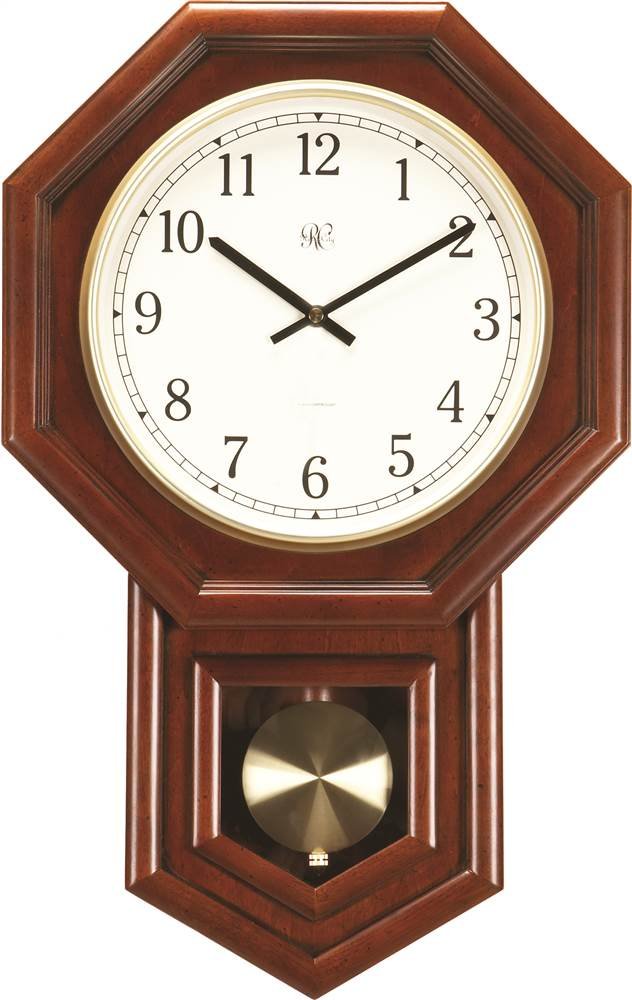
Image: The La Crosse Technology 801-403 Radio-Controlled Schoolhouse Clock, showcasing its cherry finished wooden case and the visible swinging pendulum.
Impostare
1. Disimballaggio
- Estrarre con cautela l'orologio dalla confezione.
- Inspect the clock for any signs of damage. If damaged, contact customer support.
- Remove any protective films or inserts from the clock face and pendulum area.
2. Installazione della batteria
- Individuare il vano batteria sul retro dell'orologio.
- Insert two (2) fresh AA alkaline batteries, observing the correct polarity (+ and -) as indicated inside the compartment.
- Chiudere saldamente il coperchio del vano batterie.
3. Installazione del pendolo
- Gently hang the pendulum onto the hook located behind the clock face, ensuring it swings freely.
4. Sincronizzazione iniziale dell'ora
- After battery installation, the clock will automatically attempt to receive the radio time signal. This process may take several minutes to several hours, depending on your location and signal strength.
- Place the clock near a window or an exterior wall, preferably facing west, for optimal signal reception. Avoid placing it near electronic devices that may cause interference.
- Once the signal is received, the clock will set itself to the correct time and date, including automatic adjustment for Daylight Saving Time.
5. Montaggio
- This clock is designed for wall mounting. Use a sturdy screw or hook (not included) appropriate for your wall material.
- Ensure the clock is securely mounted and level to allow the pendulum to swing correctly.
Istruzioni per l'uso
Impostazione automatica dell'ora
The 801-403 clock is equipped with a radio-controlled movement that receives a time signal to ensure accuracy. Once the signal is acquired during setup, the clock will continuously monitor and update its time. No manual adjustment is typically required for daily operation.
Regolazione dell'ora legale (DST)
The clock is designed to automatically adjust for Daylight Saving Time changes. When DST begins or ends, the clock will receive an updated signal and adjust itself accordingly. This process usually occurs overnight.
Pendulum Movement
The pendulum is a decorative feature and will swing continuously once the clock is operational. Ensure it is not obstructed and can move freely.
Manutenzione
Sostituzione della batteria
- Replace batteries annually or when the clock stops functioning or the pendulum movement becomes weak.
- Always replace both AA batteries at the same time with new, high-quality alkaline batteries.
- Smaltire le batterie usate secondo le normative locali.
Pulizia
- To clean the cherry finished Alder wood case, use a soft, dry cloth.
- Avoid using abrasive cleaners, solvents, or polishes that may damage the finish.
- For the clock face and glass, use a soft, lint-free cloth, possibly dampened with a mild glass cleaner, then wipe dry.
Assistenza generale
- Evitare di esporre l'orologio a temperature estreme, alla luce solare diretta o a elevata umidità.
- Do not attempt to disassemble the clock or its movement, as this may void the warranty and cause damage.
Risoluzione dei problemi
| Problema | Possibile causa | Soluzione |
|---|---|---|
| Clock not setting time or displaying incorrect time. | Weak or no radio signal; low batteries. | Ensure fresh batteries are installed. Move the clock to a location with better signal reception (e.g., near a window, away from electronics). Allow up to 24 hours for signal acquisition. |
| Il pendolo non oscilla. | Pendulum not properly installed; obstruction; low batteries. | Check that the pendulum is correctly hooked and swings freely. Ensure fresh batteries are installed. |
| L'orologio non si regola sull'ora legale. | Signal reception issue; outdated clock movement. | Verify signal reception. If the issue persists, the clock may require manual adjustment if it's an older model that doesn't recognize newer DST rules. (Note: This model is designed for automatic DST adjustment, but signal issues can prevent it.) |
| Clock stops working. | Batterie scariche. | Sostituisci entrambe le batterie AA con batterie nuove. |
Specifiche
- Marca: Tecnologia La Crosse
- Numero modello: 801-403
- Colore: Ciliegia
- Dimensioni del prodotto: Circa 10.16 x 35.56 x 53.34 cm (4 x 14 x 21 pollici)
- Peso dell'articolo: Circa 3.18 chilogrammi (7 libbre)
- Caratteristiche speciali: Daylight Saving, Radio-Controlled Time
- Tipo di visualizzazione: Analogico
- Stile: Pendolo
- Fonte di energia: Alimentato a batteria (2 batterie AA, non incluse)
- Materiale del telaio: Wood (Alder wood with Cherry finish)
- Tipo di montaggio: Montaggio a parete
Garanzia e supporto
For warranty information or technical support, please refer to the documentation included with your purchase or visit the official La Crosse Technology websito. Conservare la prova d'acquisto per eventuali reclami in garanzia.
If you encounter issues not covered in this manual, please contact La Crosse Technology customer service for assistance.