Introduzione
This manual provides essential instructions for setting up, operating, maintaining, and troubleshooting your Olympus SP-350 8MP Digital Camera. Please read this manual thoroughly to ensure proper use and to maximize the camera's capabilities.
The Olympus SP-350 is an 8.0-megapixel digital camera equipped with a 3x optical zoom lens, designed for capturing high-quality images. It features a 2.5-inch LCD for viewing and playback, and offers both automatic and full manual control settings. The camera supports various shooting modes and can be expanded with conversion lenses and external flashes.

Figure 1: Olympus SP-350 Digital Camera. This image shows the front view of the black Olympus SP-350 digital camera with its lens extended, highlighting its compact design.
Impostare
1. Installazione della batteria
The Olympus SP-350 can be powered by one CR-V3 battery or two AA-size batteries. Ensure batteries are inserted with correct polarity.
- Open the battery compartment cover, typically located on the bottom or side of the camera.
- Insert the CR-V3 battery or two AA-size batteries according to the polarity indicators (+/-).
- Chiudere saldamente il coperchio del vano batterie.
2. Installazione della scheda di memoria
The camera uses xD-Picture Cards for image storage, with a maximum supported size of 2 GB.
- Individuare lo slot della scheda di memoria, solitamente vicino al vano batteria.
- Insert the xD-Picture Card into the slot until it clicks into place. Ensure the card is oriented correctly.
- Chiudere il coperchio dello slot della scheda di memoria.
3. Accensione iniziale
After installing batteries and a memory card, press the power button to turn on the camera. Follow any on-screen prompts for initial setup, such as setting the date and time.
Utilizzo della fotocamera
1. Modalità di scatto di base
The camera offers Automatic, Program, and Scene shooting modes, along with 27 creative scene options.
- Modalità automatica: La fotocamera regola automaticamente le impostazioni per un'esposizione ottimale.
- Modalità programma: Allows some manual control over settings while the camera maintains proper exposure.
- Modalità scena: Select from various preset scenes (e.g., landscape, portrait, night scene) for specific shooting conditions.
2. Funzione Zoom
The SP-350 features a 3x optical zoom and a 5x digital zoom.
- Use the zoom lever/buttons to adjust the focal length. Optical zoom provides higher quality without pixelation.
- Digital zoom extends the magnification but may reduce image quality.
3. Controllo della messa a fuoco
The camera uses Contrast Detection autofocus and supports both autofocus and manual focus modes.
- Messa a fuoco automatica (AF): The camera automatically focuses on the subject. Half-press the shutter button to engage AF.
- Messa a fuoco manuale (MF): Allows you to manually adjust the focus for precise control. Refer to the on-screen display for focus indicators.
4. Utilizzo del flash
The camera has an automatic flash mode and supports external flashes via a hot shoe.
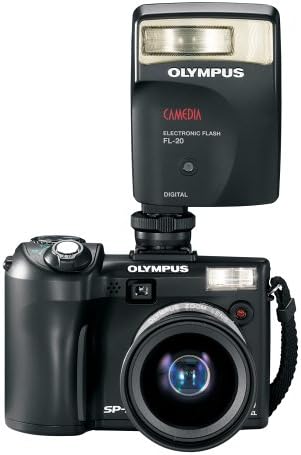
Figure 2: Olympus SP-350 Digital Camera with an attached external flash. This image illustrates how an external flash unit can be mounted on the camera's hot shoe for enhanced lighting.
- Flash integrato: Operates in automatic mode, firing when lighting conditions require it.
- External Flash: For more advanced lighting control, attach a compatible external flash unit to the camera's hot shoe.
5. Modalità film
Record videos with audio in QuickTime Movie Mode (MOV format) at 480p resolution.
- Select Movie Mode from the shooting mode dial.
- Premere il pulsante di scatto per avviare e interrompere la registrazione.
6. Riproduzione delle immagini
Utilizzare lo schermo LCD da 2.5 pollici per riview foto e video acquisiti.
- Press the playback button to enter playback mode.
- Use the directional pad to navigate through images and videos.
7. Connettività
Connect the camera to a computer or PictBridge-enabled printer using the multi-connector for USB and AV.
- Connessione USB: Transfer images and videos to a computer using the provided USB cable.
- PictBridge: Print photos directly from the camera to a compatible printer without a computer.
Manutenzione
1. Pulizia
- Per pulire il corpo della fotocamera, utilizzare un panno morbido e privo di lanugine.
- Per la lente e lo schermo LCD, utilizzare un panno e una soluzione specifici per la pulizia delle lenti. Evitare prodotti chimici aggressivi.
- Keep the battery and memory card contacts clean and dry.
2. Conservazione
- Conservare la fotocamera in un luogo fresco e asciutto, lontano dalla luce solare diretta e da temperature estreme.
- Se si prevede di non utilizzare la fotocamera per un periodo prolungato, rimuovere le batterie per evitare perdite.
- Utilizzare una custodia o una borsa per proteggere la macchina fotografica dalla polvere e dai danni fisici.
Risoluzione dei problemi
- La fotocamera non si accende: Ensure batteries are correctly inserted and charged. Try new batteries.
- Le immagini sono sfocate o fuori fuoco: Check focus mode settings. Ensure sufficient lighting. Clean the lens.
- Il flash non si attiva: Verify flash mode settings. Ensure external flash is properly attached and powered.
- Slow startup or shot-to-shot time: Ensure a high-speed xD-Picture Card is used.
- Errore della scheda di memoria: Reinsert the memory card. Try a different, compatible xD-Picture Card. Ensure the card is not full or locked.
- LCD screen is blank: Check if the camera is powered on. Adjust brightness settings if available.
Specifiche
| Caratteristica | Specificazione |
|---|---|
| Nome del modello | Olympus SP-350 |
| Risoluzione fissa efficace | 8 MP |
| Zoom ottico | 3x |
| Digital Zoom | 5x |
| Dimensioni dello schermo | 2.5 pollici |
| Tecnologia del sensore fotografico | CMOS |
| Stabilizzazione dell'immagine | Digitale, Ottico |
| Supportato File Formato | RAW, JPEG |
| Tipo di memoria flash | xD Picture Card, Internal |
| Dimensione massima supportata della memoria flash | 2 GB |
| Tecnologia di connettività | USB |
| Interfaccia Hardware | PictBridge, USB |
| Modalità di scatto | Automatic, Program, Scene |
| Modalità film | Yes (480p, MOV) |
| Tecnologia di messa a fuoco automatica | Rilevamento del contrasto |
| Tipo di messa a fuoco | Messa a fuoco automatica e manuale |
| Tipo di batteria | CR-V3 or 2x AA-size |
| Peso dell'articolo | 0.54 libbre |
| Colore | Nero |
Cosa c'è nella scatola
The standard package for the Olympus SP-350 Digital Camera includes:
- Olympus SP-350 Digital Camera
- Cinghia
- Multi-connector for USB and AV
- CR-V3 Battery
- Basic Instruction Manual (this document)
- Guida rapida
- Scheda di garanzia
- CD ROM: Olympus Master Software, and advanced manual
Garanzia e supporto
For warranty information and technical support, please refer to the warranty card included in your product package or visit the official Olympus support websito. Conservare la ricevuta d'acquisto come prova d'acquisto per eventuali reclami in garanzia.


