Introduzione
Grazie per l'acquistoasing the Lexon Cubissimo Alarm Clock. This manual provides detailed instructions to help you set up, operate, and maintain your new alarm clock. Please read this manual thoroughly before use and keep it for future reference.
Informazioni sulla sicurezza
- Non esporre il dispositivo a temperature estreme, alla luce solare diretta o a elevata umidità.
- Evitare di far cadere o sottoporre il dispositivo a forti impatti.
- Tenere fuori dalla portata dei bambini.
- Non tentare di smontare o riparare il dispositivo da soli. Contattare personale di assistenza qualificato.
- Smaltire le batterie usate secondo le normative locali. Non mischiare batterie vecchie e nuove o tipi diversi di batterie.
Contenuto della confezione
Si prega di controllare la confezione per verificare la presenza dei seguenti elementi:
- Lexon Cubissimo Alarm Clock (1 unit)
- Manuale di istruzioni (questo documento)
Note: AAA batteries are required but not included in the package.
Prodotto finitoview
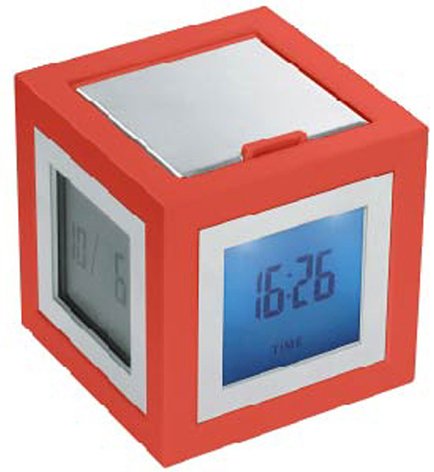
Figura 1: Fronte view of the Lexon Cubissimo Alarm Clock.
The Lexon Cubissimo Alarm Clock is a compact, cube-shaped device designed for timekeeping and alarm functions. It features a digital display and intuitive controls for setting time and alarm. Its minimalist design makes it suitable for various environments.
I componenti chiave in genere includono:
- Digital Display: Shows time and alarm status.
- Control Buttons: For setting time, alarm, and other functions.
- Battery Compartment: Located on the back or bottom.
Impostare
1. Installazione della batteria
- Individuare il coperchio del vano batterie sul retro o sul fondo della sveglia.
- Aprire il coperchio facendolo scorrere o sollevandolo delicatamente.
- Inserire due (2) batterie AAA, assicurandosi della corretta polarità (+ e -) come indicato all'interno del vano.
- Riposizionare saldamente il coperchio del vano batteria.
2. Accensione iniziale
Once batteries are installed, the clock should automatically power on and display the time (possibly 12:00 AM or a default time). If not, check battery installation or press any button to activate the display.
Istruzioni per l'uso
1. Impostazione dell'ora
- Premere e tenere premuto il tasto IMPOSTAZIONE DELL'ORA button (or similar, refer to device markings) until the hour digits begin to flash.
- Utilizzare il ORA E MINUTO pulsanti (o +/- pulsanti) per regolare rispettivamente l'ora e i minuti.
- Premere IMPOSTAZIONE DELL'ORA nuovamente per confermare e uscire dalla modalità di impostazione dell'ora.
2. Impostazione dell'allarme
- Premere e tenere premuto il tasto SET ALLARME button (or similar) until the alarm hour digits begin to flash.
- Utilizzare il ORA E MINUTO pulsanti (o +/- buttons) to adjust the desired alarm hour and minute.
- Premere SET ALLARME nuovamente per confermare e uscire dalla modalità di impostazione della sveglia.
3. Turning the Alarm On/Off
Premere il tasto ALLARME ON / OFF button (or similar) to toggle the alarm function. An alarm icon (e.g., a bell) will typically appear on the display when the alarm is active.
4. Funzione snooze
Quando suona la sveglia, premere il tasto POSTICIPARE button (often a large button on top) to temporarily silence the alarm. The alarm will sound again after a few minutes (typically 5-10 minutes).
5. Arresto dell'allarme
To stop the alarm completely, press any button other than the POSTICIPARE o premere il tasto ALLARME ON / OFF pulsante per disattivarlo.
Manutenzione
Pulizia
Pulisci l'orologio con un panno morbido e asciutto. Non utilizzare detergenti abrasivi o solventi, poiché potrebbero danneggiare la finitura.
Sostituzione della batteria
When the display dims or the clock functions erratically, it's time to replace the batteries. Follow the "Battery Installation" steps in the Setup section to replace the two AAA batteries.
Risoluzione dei problemi
| Problema | Possibile causa | Soluzione |
|---|---|---|
| L'orologio non si accende. | Batteries are not installed or are depleted. Incorrect battery polarity. | Ensure batteries are correctly installed with proper polarity. Replace with new AAA batteries. |
| L'allarme non suona. | Alarm function is not activated. Alarm volume is too low (if adjustable). | Ensure the alarm is turned ON (check for alarm icon on display). (Note: This model may not have adjustable volume). |
| Il display è scuro o tremolante. | Batteria scarica. | Sostituire le batterie con nuove batterie AAA. |
Specifiche
- Marca: Lexon
- Numero modello: lr79-DR 2910146
- Materiale: Acrilonitrile-butadiene-stirene (ABS), Alluminio
- Peso: 6.4 once (circa 157 g)
- Dimensioni: 2.52 x 2.44 x 2.44 pollici (6.4 x 6.2 x 6.2 cm)
- Fonte di energia: 2 batterie AAA (non incluse)
- Tipo di montaggio: Da tavolo
- Funzione di allarme: SÌ
- Modalità operativa: Elettrico
Garanzia e supporto
Lexon products are designed for quality and reliability. For specific warranty information, please refer to the warranty card included with your purchase or visit the official Lexon website. If you encounter any issues or require technical assistance, please contact Lexon customer support through their official channels.
Spesso è possibile trovare le informazioni di contatto dell'assistenza sul sito web del produttore website or by searching for "Lexon customer support".