
Introduzione
Thank you for choosing the Casio EDIFICE EFA-113D-2AVEF watch. This manual provides detailed instructions on how to set up, operate, and maintain your timepiece. Please read this manual carefully to ensure proper use and to fully utilize all the features of your watch. Keep this manual for future reference.
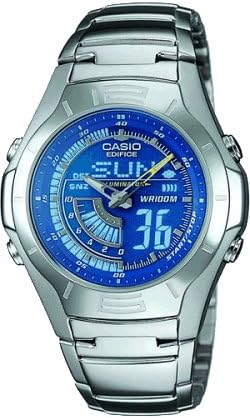
The image above shows the Casio EDIFICE EFA-113D-2AVEF men's watch, featuring a silver-tone stainless steel case and bracelet with a blue dial and digital display elements.
Impostare
Before using your watch, it is important to perform the initial setup steps to ensure accurate timekeeping and functionality.
1. Impostazione iniziale di data e ora
Your watch features both analog hands and a digital display. Both need to be synchronized for correct time display.
- Entrare nella modalità di impostazione dell'ora: Premere e tenere premuto il tasto MODALITÀ button (usually bottom-left) until the digital display starts flashing, indicating it is in setting mode.
- Select Time Zone/City: Utilizzare il REGOLARE button (usually top-left) to cycle through settings. When the city code or time zone is flashing, use the INOLTRARE (in alto a destra) e INVERSIONE (bottom-right) buttons to select your desired home city.
- Set Digital Time: Continua a premere REGOLARE to move to the hour, minute, second, 12/24-hour format, year, month, and day settings. Use INOLTRARE E INVERSIONE per modificare i valori.
- Synchronize Analog Hands: After setting the digital time, the analog hands may need adjustment. In the setting mode, navigate to the hand setting option (often indicated by 'H-SET' or similar). Use the INOLTRARE E INVERSIONE buttons to align the analog hands with the digital time.
- Uscita dalla modalità di impostazione: Premere il tasto MODALITÀ button once to exit the setting mode. The digital display will stop flashing.
Funzionamento dell'orologio
Your Casio EDIFICE EFA-113D-2AVEF watch offers various modes and functions. Use the buttons on the side of the watch to navigate and operate these features.
1. Modalità di navigazione
Premere il tasto MODALITÀ button (typically bottom-left) to cycle through the different operational modes:
- Modalità di indicazione dell'ora: Displays the current time and date. This is the default mode.
- Modalità cronometro: Used for measuring elapsed time.
- Modalità sveglia: Allows you to set daily alarms.
- Modalità doppio orario: Visualizza l'ora in un secondo fuso orario.
2. Funzione cronometro
Per utilizzare il cronometro:
- Entrare in modalità cronometro premendo il tasto MODALITÀ pulsante.
- Premere il tasto AVVIO/ARRESTO button (typically top-right) to start timing.
- Premere AVVIO/ARRESTO di nuovo per fermare il cronometraggio.
- Premere il tasto RESET button (typically bottom-right) to clear the stopwatch to zero.
3. Funzione di allarme
Per impostare una sveglia:
- Entrare in modalità Allarme premendo il tasto MODALITÀ pulsante.
- Utilizzare il REGOLARE button to select the alarm number (if multiple alarms are available).
- Premere e tenere premuto il tasto REGOLARE finché l'ora della sveglia non inizia a lampeggiare.
- Utilizzare il INOLTRARE E INVERSIONE pulsanti per impostare l'ora e i minuti desiderati per la sveglia.
- Premere REGOLARE per confermare e uscire dall'impostazione.
- Per accendere/spegnere la sveglia, premere il tasto INOLTRARE button while in Alarm Mode. An alarm indicator will appear/disappear.
4. Illuminazione
Premere il tasto LEGGERO button (typically top-left) to illuminate the digital display for easy viewing in low-light conditions. The illumination duration is preset.
Manutenzione
Proper care and maintenance will help ensure the longevity and optimal performance of your Casio watch.
1. Resistenza all'acqua
Your watch is marked with Modello WR100M, indicating it is water resistant to 100 meters. This means it is suitable for everyday use, swimming, and snorkeling. However, it is non suitable for scuba diving. Avoid operating buttons while the watch is wet or submerged.
2. Pulizia
- Watch Case and Bracelet: Wipe with a soft, dry cloth. For stubborn dirt, use a soft brush with mild soap and water, then rinse thoroughly and dry.
- Cinturino in resina: Wash with water and dry with a soft cloth. Avoid solvents or harsh cleaners.
3. Sostituzione della batteria
The watch is powered by a battery. When the display becomes dim or functions become erratic, it is an indication that the battery needs replacement. Battery replacement should be performed by an authorized Casio service center or a qualified watch technician to ensure water resistance is maintained.
4. Precauzioni generali
- Evitare di esporre l'orologio a temperature estreme (calde o fredde) per periodi prolungati.
- Proteggere l'orologio da urti o colpi forti.
- Tenere l'orologio lontano da forti campi magnetici.
- Avoid contact with gasoline, cleaning solvents, aerosol sprays, adhesives, paints, etc., as these can damage the watch's seals, case, and band.
Risoluzione dei problemi
Se riscontri problemi con il tuo orologio, fai riferimento ai seguenti problemi comuni e alle relative soluzioni:
- Il display digitale è vuoto o poco luminoso: The battery may be low or depleted. Arrange for battery replacement.
- Le lancette analogiche non corrispondono all'ora digitale: The analog hands may have become misaligned due to impact or magnetic exposure. Refer to the "Synchronize Analog Hands" step in the Setup section to re-align them.
- I pulsanti non rispondono: Ensure the watch is not in a mode that locks buttons. If the issue persists, a full reset (if available for your module, consult a service center) or battery replacement might be necessary.
- L'ora è imprecisa: Check your home city setting and ensure the time is correctly set. Strong magnetic fields can also affect accuracy.
Per problemi non trattati qui, contattare l'assistenza clienti Casio.
Specifiche
- Modello: EFA-113D-2AVEF
- Marca: Casio EDIFICE
- Resistenza all'acqua: 100 metri (WR100M)
- Cronometraggio: Display analogico e digitale
- Funzioni: Stopwatch, Daily Alarm, Dual Time, Full Auto-Calendar, LED Light (Illuminator)
- Precisione: ±30 secondi al mese (senza calibrazione del segnale)
- Durata della batteria: Approximately 2 years (on CR2016, typical usage)
Garanzia e supporto
Your Casio EDIFICE EFA-113D-2AVEF watch is covered by a manufacturer's warranty against defects in materials and workmanship. The specific terms and duration of the warranty may vary by region. Please refer to the warranty card included with your purchase for detailed information.
Per supporto tecnico, assistenza o reclami in garanzia, contattare il centro di assistenza Casio autorizzato locale o visitare il sito ufficiale Casio websito per le informazioni di contatto.
Importante: Unauthorized repair or modification of the watch may void the warranty.


