1. Introduzione
The Plantronics Vista M22 Audio Processor is designed to enhance sound quality and provide acoustic protection for telephone users, especially with telephones that do not allow direct headset connection. It incorporates advanced technologies to ensure clear, consistent, and comfortable communication.
Le caratteristiche principali includono:
- Acoustic Protection: SoundGuard Plus technology reduces loud tones to comfortable levels while maintaining natural voice clarity.
- Chiarezza delle chiamate: Electronic signal processing minimizes phone noise and maintains consistent volume levels.
- Compatibilità cuffie: Enables headset use with telephones not designed for direct headset connection.
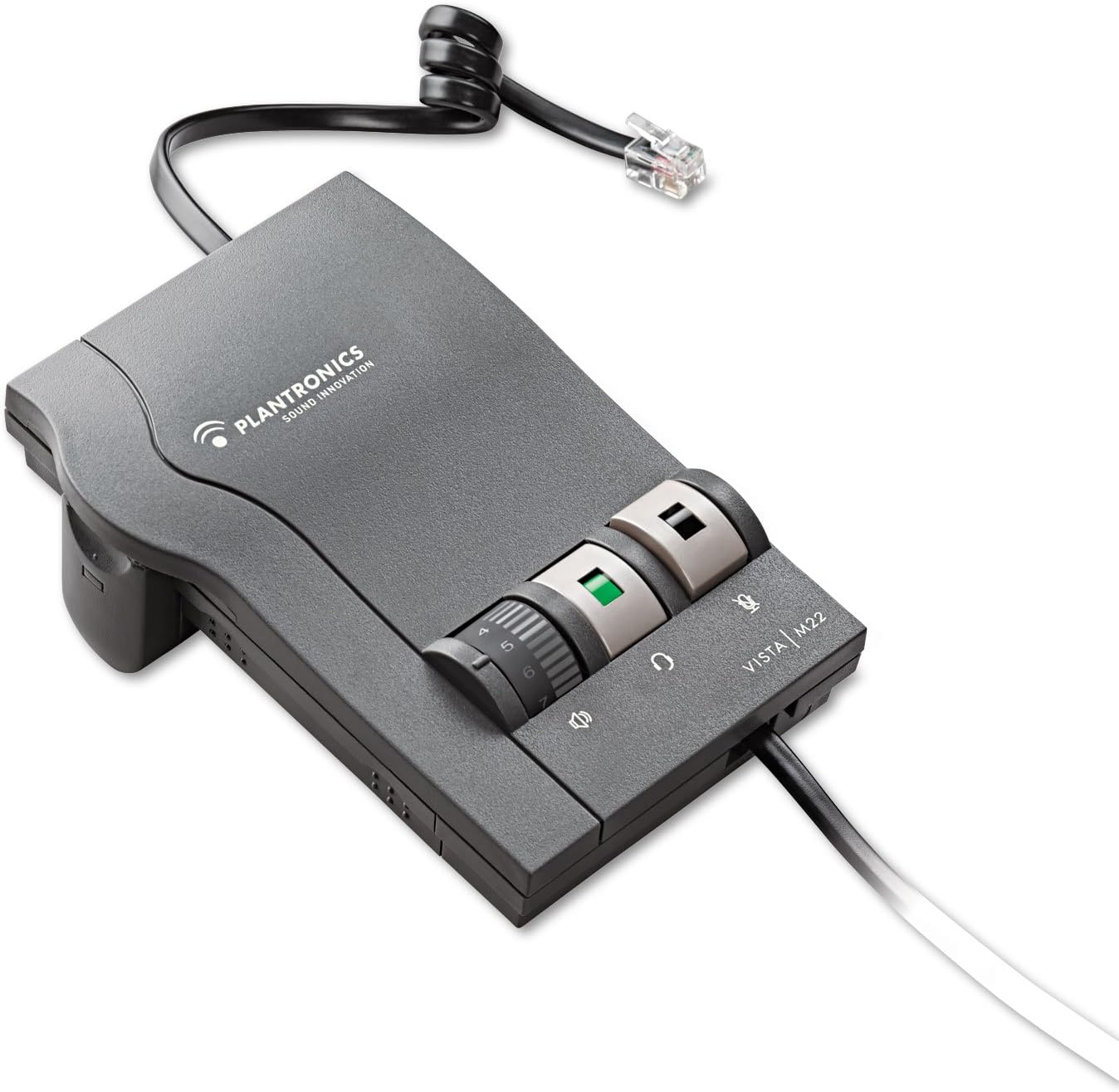
Figure 1: Plantronics Vista M22 Audio Processor. This image shows the compact, gray audio processor with its coiled cord and control dials.
2. Informazioni sulla sicurezza
- Leggere attentamente tutte le istruzioni prima dell'uso.
- Tenere il dispositivo lontano da acqua e umidità.
- Non tentare di aprire o riparare il dispositivo autonomamente. Rivolgersi a personale qualificato.
- Use only specified power sources (2 AA batteries or compatible AC adapter, sold separately).
- Evitare di esporre il dispositivo a temperature estreme.
- Garantire una ventilazione adeguata per evitare il surriscaldamento.
3. Contenuto della confezione
The Plantronics Vista M22 Audio Processor package includes:
- 1 x Plantronics Vista M22 Headset Amppiù vivace
- 2 batterie AA (incluse)
- Necessary connection cables (headset connection cable, telephone connection cable)
4. Istruzioni per l'installazione
Follow these steps to set up your Plantronics Vista M22 Audio Processor:
- Installa le batterie: Open the battery compartment on the side of the M22 unit and insert the two AA batteries. Close the compartment securely. Alternatively, connect an optional AC power adapter (not included) to the power port on the back.
- Connetti l'auricolare: Plug your Plantronics headset's Quick Disconnect (QD) cable into the corresponding port on the front of the M22 amppiù vivace.
- Connect to Telephone:
- Disconnect the coiled handset cord from the base of your telephone.
- Plug the telephone connection cable (typically a short, coiled cord with RJ9 connectors) from the M22 amplifier into the handset port on your telephone base.
- Plug your telephone's handset into the handset port on the M22 amppiù vivace.
- Adjust Compatibility Switch: On the side of the M22 unit, there is a compatibility switch (labeled 1-6 or 1-7). Adjust this switch until you hear a clear dial tone in your headset. Setting 5 is a common starting point.
- Regola il volume del microfono: On the bottom of the M22 unit, there is a small dial for microphone volume. Use the provided tool (or a small screwdriver) to adjust this dial if your voice is too quiet or too loud for the listener. Rotate clockwise to increase volume, counter-clockwise to decrease.

Figure 2: The Plantronics Vista M22 features Clearline audio technology for superior voice clarity and reduces background noise for clear communication.
5. Istruzioni per l'uso
Once set up, operating the M22 is straightforward:
- Headset/Handset Switch: Press the button with the headset icon to switch audio to your headset. Press the button with the handset icon to switch audio back to your telephone's handset.
- Controllo del volume: Use the large rotary dial on the front of the M22 to adjust the listening volume in your headset.
- Tasto muto: Press the button with the microphone icon to mute your headset microphone. Press it again to unmute.
- Effettuare/risposta alle chiamate:
- To make a call: Press the headset button on the M22, lift your telephone's handset, dial the number, and then place the handset back on the cradle once the call connects.
- To answer a call: Press the headset button on the M22, then lift your telephone's handset.
- To end a call: Place your telephone's handset back on the cradle, then press the headset button on the M22 to switch back to handset mode (or simply leave it in headset mode if preferred).
6. Manutenzione
- Pulizia: Wipe the unit with a soft, dry cloth. Do not use liquid cleaners or aerosols.
- Sostituzione della batteria: Replace AA batteries when the power indicator light dims or the unit stops functioning.
- Magazzinaggio: Store the M22 in a cool, dry place when not in use for extended periods.
7. Risoluzione Dei Problemi
| Problema | Soluzione |
|---|---|
| No dial tone or poor audio quality. |
|
| Caller cannot hear me or my voice is too quiet/loud. |
|
| Ronzio o rumore statico. |
|
| Headset volume is too low/high. |
|
8. Specifiche
| Caratteristica | Dettaglio |
|---|---|
| Numero di modello | 43596-64 |
| Dimensioni del prodotto | 0.03 x 0.03 x 0.03 pollici |
| Peso dell'articolo | 0.48 once (0.03 libbre) |
| Fonte di alimentazione | Battery Powered (2 AA batteries included) / Optional AC Adapter (not included) |
| Materiale | Plastica |
| Colore | Nero |
| Compatibilità | Telephones that do not allow direct connection of headsets |
| Caratteristiche speciali | SoundGuard Plus, Call Clarity Technology |
9. Garanzia e supporto
Disclaimer legale: La garanzia non copre l'uso improprio del prodotto.
For further assistance, please refer to the official Plantronics webo contattare l'assistenza clienti. Conservare la ricevuta d'acquisto per eventuali reclami in garanzia.


