1. Introduzione
Grazie per l'acquistoasing the JVC KW-AVX810 Vehicle Multimedia Receiver. This unit is designed to provide advanced audio and video entertainment in your vehicle, featuring a 7-inch touch panel monitor, DVD playback, USB connectivity for iPod/iPhone, and Bluetooth readiness. This manual provides essential information for the proper installation, operation, and maintenance of your new multimedia receiver.
2. Informazioni sulla sicurezza
- Installazione professionale consigliata: Data la complessità degli impianti elettrici dei veicoli, si consiglia vivamente l'installazione da parte di un professionista per evitare danni all'unità o al veicolo.
- Alimentazione elettrica: This unit is designed for 12V DC negative ground electrical systems. Ensure correct wiring to avoid short circuits or damage.
- Sicurezza di guida: Do not operate the unit's advanced features or watch videos while driving. Always prioritize safe driving practices.
- Frontalino staccabile: Handle the detachable faceplate with care. Avoid exposing it to direct sunlight or high temperatures for extended periods.
- Ventilazione: Assicurare un'adeguata ventilazione attorno all'unità per evitare il surriscaldamento. Non ostruire le aperture di ventilazione.
3. Contenuto della confezione
Si prega di verificare che tutti gli articoli siano presenti nel pacco:
- JVC KW-AVX810 Multimedia Receiver
- Frontalino staccabile
- Cablaggio elettrico
- Hardware di montaggio
- Telecomando (se incluso)
- Manuale dell'utente (questo documento)
4. Configurazione e installazione
4.1 Collegamenti di cablaggio
Refer to the wiring diagram below for proper connection of the power, speaker, and auxiliary cables. Incorrect wiring can cause damage to the unit or vehicle electrical system.
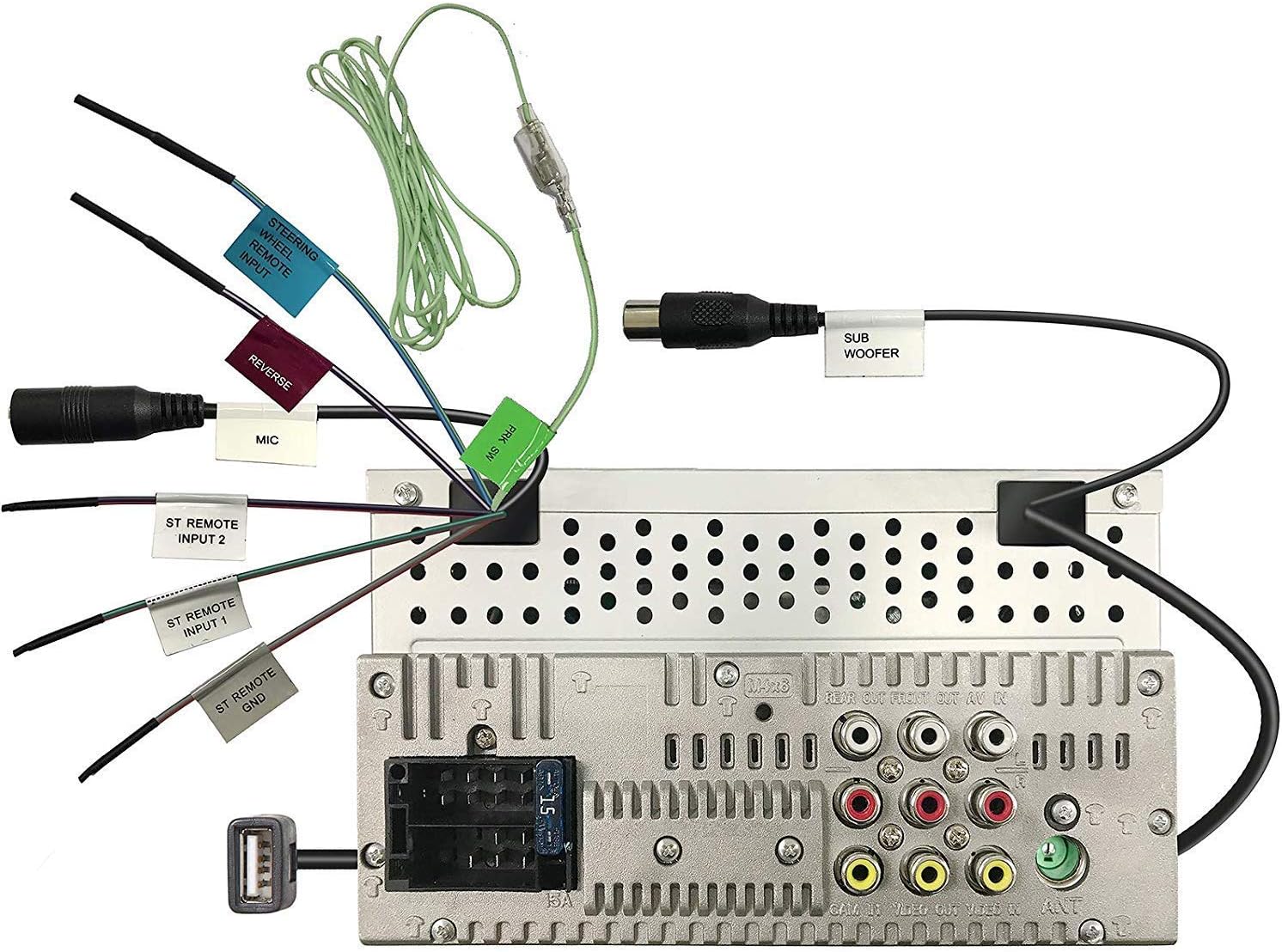
Figure 4.1: Rear panel wiring connections. This image displays the back of the JVC KW-AVX810 unit, illustrating various input and output ports. Key connections include the main power harness, speaker outputs, RCA pre-outs for front, rear, and subwoofer, video input/output, USB port, microphone input, and steering wheel remote input. Each connection is clearly labeled for identification.
- Connessioni di alimentazione: Collegare il filo giallo all'alimentazione costante da 12 V, il filo rosso all'alimentazione accessoria da 12 V e il filo nero a una buona messa a terra del telaio.
- Collegamenti degli altoparlanti: Collegare i cavi degli altoparlanti agli altoparlanti corrispondenti del veicolo, assicurandosi della corretta polarità.
- Ingresso USB: The USB port allows connection of compatible devices like iPods/iPhones for audio and video playback, and charging.
- Uscite RCA: Utilizzali per collegare dispositivi esterni ampamplificatori per i canali anteriori, posteriori e subwoofer.
- Ingresso / uscita video: For connecting external video sources or monitors.
- Ingresso telecomando al volante: Connect to a compatible steering wheel control interface (sold separately) for integrated control.
4.2 Montaggio dell'unità
The KW-AVX810 is a double-DIN unit. Ensure your vehicle's dashboard opening is compatible. Secure the unit using the provided mounting brackets and screws. After mounting, connect all wiring harnesses before reassembling the dashboard.
5. Istruzioni per l'uso
5.1 Controlli di base e display
The unit features a 7-inch touch panel monitor for intuitive control. The main interface provides access to various functions.

Figure 5.1: Front panel and display. This image shows the JVC KW-AVX810's 7-inch touch panel display, featuring a graphical user interface with icons for various functions such as Tuner, Mirroring, AV-IN, Phone, BT Audio, and Settings. Volume controls and power button are visible on the left bezel. The current time is displayed prominently in the center.
- Accensione/spegnimento: Press the power button (usually located on the left bezel) to turn the unit on or off.
- Controllo del volume: Use the volume up/down buttons or the on-screen controls to adjust the audio level.
- Selezione della fonte: Tap the desired source icon (e.g., Tuner, DVD, USB, BT Audio, AV-IN) on the touch screen to switch between functions.
- Frontalino staccabile: To detach the faceplate, press the release button (refer to the unit's specific mechanism). Always detach the faceplate when leaving the vehicle to deter theft.
5.2 Riproduzione multimediale
- Riproduzione DVD/CD: Insert a disc into the slot. The unit will automatically switch to DVD/CD mode. Use the touch screen for playback controls (play, pause, skip, menu).
- USB/iPod/iPhone: Connect your device to the USB port. The unit will detect the device and allow you to browse and play media files. The KS-U20 cable (sold separately) may be required for iPod video functionality.
- Audio Bluetooth: Pair your Bluetooth-enabled device with the KW-AVX810. Once paired, you can stream audio wirelessly.
- Sintonizzatore radio: Select the Tuner source. Use the touch screen to scan for stations, save presets, and switch between AM/FM bands.
5.3 Impostazioni e personalizzazione
Access the 'Settings' menu from the main screen to customize various aspects of the unit, including:
- Impostazioni audio: Adjust equalizer (7-Band iEQ), balance, fader, subwoofer levels, and sound effects (Dolby 5.1 headphone surround sound).
- Impostazioni di visualizzazione: Adjust brightness, contrast, and background.
- Impostazioni di sistema: Language, time, and other general preferences.
- Impostazioni Bluetooth: Gestisci i dispositivi associati e le opzioni di connessione.
6. Manutenzione
- Pulizia dello schermo: Use a soft, dry cloth to wipe the touch screen. For stubborn smudges, lightly dampPulire il panno con acqua o con un detergente per schermi specifico per dispositivi elettronici. Non utilizzare detergenti abrasivi.
- Pulizia del frontalino: Wipe the detachable faceplate with a soft, dry cloth. Avoid harsh chemicals.
- Cura del disco: Maneggiare i dischi tenendoli per i bordi. Mantenerli puliti e privi di graffi. Conservare i dischi nelle loro custodie quando non vengono utilizzati.
- Cura generale: Tenere l'unità lontana da polvere e umidità. Evitare temperature estreme.
7. Risoluzione Dei Problemi
If you encounter problems with your KW-AVX810, refer to the following common issues and solutions:
| Problema | Possibile causa | Soluzione |
|---|---|---|
| Nessun potere | Cablaggio errato; fusibile bruciato; problema alla batteria del veicolo. | Check power connections (yellow, red, black wires). Inspect the unit's fuse and vehicle's fuse box. Ensure vehicle battery is charged. |
| Nessun suono | Volume troppo basso; Disattivazione audio attivata; Cablaggio altoparlanti non corretto; Ampproblema del lificatore. | Increase volume. Check if mute is on. Verify speaker connections. If using external amplificatore, controllarne l'alimentazione e i collegamenti. |
| Display non funzionante | Faceplate not properly attached; Display settings. | Ensure faceplate is securely attached. Check display brightness/contrast settings. |
| USB/iPod not recognized | Incompatible format; Loose connection; Device issue. | Garantire i media files are in a supported format. Reconnect the USB device. Try a different USB device. Update iPod/iPhone software if necessary. |
| Problemi di connessione Bluetooth | Dispositivo non in modalità di associazione; Interferenza; Già associato a un altro dispositivo. | Assicurati che il Bluetooth sia abilitato su entrambi i dispositivi e in modalità di associazione. Elimina le associazioni precedenti e ripeti l'associazione. Avvicinati all'unità. |
Se il problema persiste dopo aver provato queste soluzioni, contattare l'assistenza clienti JVC o un tecnico qualificato.
8. Specifiche
- Dimensioni del prodotto: Dimensioni: 18.39 x 17.81 x 10.01 cm; 2.6 kg
- Numero modello articolo: KWM150BT+XV95BK+MAGNET
- Marca: JVC
- Tecnologia di connettività: Bluetooth, USB
- Tipo di controller: Android (compatibile)
- Caratteristiche speciali: Built-In Bluetooth, FM Tuner, Subwoofer Pre-out
- Dispositivi compatibili: Smartphone
- Porte HDMI totali: 1 (Note: This may refer to an internal component or specific model variant, as the main description does not highlight HDMI)
- Tipo di connettore: USB
- Modalità di uscita audio: Circondare
- Configurazione del canale audio surround: 4.1
- Produttore: JVC
9. Garanzia e supporto
9.1 Informazioni sulla garanzia
The JVC KW-AVX810 Vehicle Multimedia Receiver comes with a warranty. For Mobile Products, the warranty covers 1 anno di ricambi e manodopera from the date of purchase. Please retain your proof of purchase for warranty claims. The warranty does not cover damage caused by improper installation, accident, misuse, abuse, or unauthorized modification.
9.2 Assistenza clienti
For technical assistance, service, or warranty inquiries, please contact JVC customer support. Refer to the official JVC websito o sulla confezione del prodotto per ottenere le informazioni di contatto più aggiornate.


