Introduzione
The Focusrite ISA 428 MkII is a high-quality, four-channel microphone preamplifier designed for professional audio recording environments. Building on the legacy of the original ISA110 modules, it features transformer-based preamps, variable input impedance, and comprehensive I/O options. This manual provides detailed information on the setup, operation, and maintenance of your ISA 428 MkII.
Caratteristiche principali:
- Four ISA series transformer-based preamps, providing the classic Focusrite sound.
- Selectable input impedance settings, including the 'Vintage ISA110' mode, for microphone matching and tonal variation.
- Four front-panel instrument inputs for direct connection of guitars, basses, and other instruments.
- Dedicated analogue insert points on each channel for integrating external signal processors.
- Versatile variable high-pass filter per channel to control low-frequency content.
- Accurate 6-LED metering for precise level monitoring.
- Optional eight-channel A-D converter for direct digital integration with DAWs (sold separately).
Cosa c'è nella scatola
Upon unboxing your Focusrite ISA 428 MkII, please ensure all the following items are present:
- Focusrite ISA 428 MkII unit
- Cavo di alimentazione IEC
- Manuale dell'utente (questo documento)
If any items are missing or damaged, please contact your dealer or Focusrite support immediately.
Prodotto finitoview
Pannello frontale

Figure 1: Front Panel of the ISA 428 MkII
The front panel of the ISA 428 MkII provides access to all primary controls and instrument inputs. It is divided into four identical channel strips and a master metering/power section.
- Instrument Inputs (1-4): Four 1/4" TS jacks for connecting instruments directly.
- Controllo di guadagno: Rotary knob for adjusting the input gain for microphone, line, or instrument sources.
- Selettore di impedenza: Button to cycle through four input impedance settings (Low, Med, High, ISA110).
- Alimentazione phantom +48 V: Button to engage phantom power for condenser microphones.
- Phase Invert: Button to invert the phase of the input signal.
- Filtro passa alto: Rotary knob to adjust the cutoff frequency of the high-pass filter.
- Inserisci pulsante: Engages the channel's insert send/return points.
- Dosaggio: 6-LED ladder meters per channel to display output level.
- Interruttore di alimentazione: Interruttore principale di accensione/spegnimento.
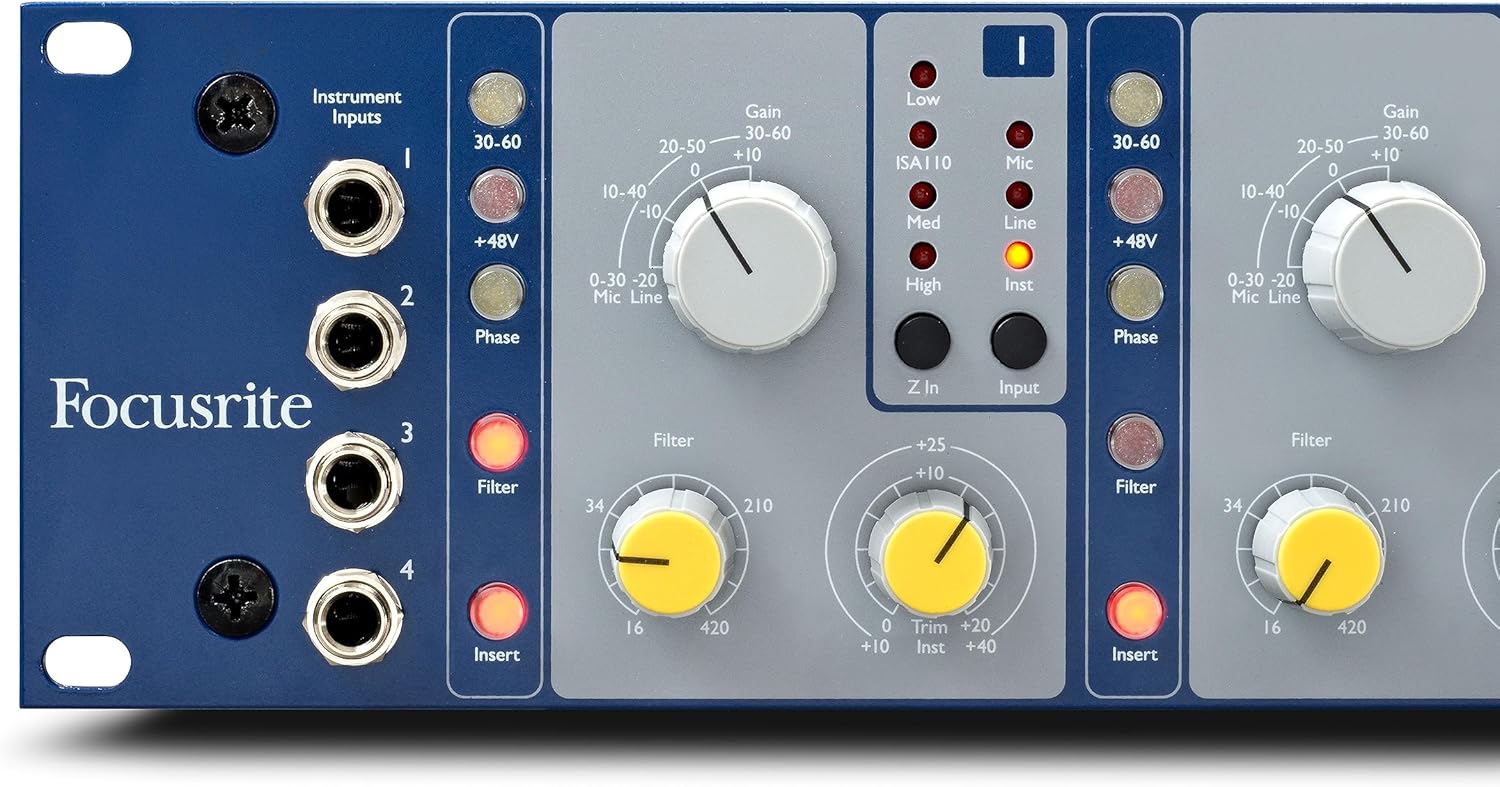
Figure 2: Detail of Front Panel Controls
Pannello posteriore

Figure 3: Rear Panel of the ISA 428 MkII
The rear panel houses all the primary audio input and output connections.
- Mic Input (XLR): Balanced XLR inputs for connecting microphones.
- Line Input (1/4" TRS): Balanced 1/4" TRS inputs for connecting line-level sources.
- Insert Send (1/4" TRS): Output for sending signal to external processors.
- Insert Return (1/4" TRS): Input for receiving signal from external processors.
- Output (XLR): Balanced XLR outputs for connecting to an audio interface, mixer, or other recording device.
- ADC Input (D-sub): Connector for the optional 8-channel A-D converter.
- IEC Power Inlet: For connecting the supplied IEC power cable.
Impostare
Collegamento di potenza
- Ensure the ISA 428 MkII's power switch is in the OFF position.
- Connect the supplied IEC power cable to the IEC inlet on the rear panel of the unit.
- Plug the other end of the power cable into a suitable AC mains outlet.
Connessioni audio
The ISA 428 MkII offers versatile connectivity for various audio sources and destinations.
- Microfoni: Connect microphones to the balanced XLR Mic Inputs on the rear panel. For condenser microphones, ensure +48V phantom power is engaged on the front panel for the respective channel.
- Line-Level Sources: Connect line-level devices (e.g., synthesizers, external preamps) to the balanced 1/4" TRS Line Inputs on the rear panel.
- Strumenti: Connect instruments (e.g., electric guitar, bass) directly to the 1/4" TS Instrument Inputs on the front panel. Using these inputs automatically bypasses the rear panel Mic/Line inputs for that channel.
- Risultati: Connect the balanced XLR Outputs on the rear panel to the inputs of your audio interface, mixing console, or other recording equipment.
- External Processors (Inserts): To integrate external effects or dynamics processors, connect the ISA 428 MkII's Insert Send to the input of your processor and the processor's output to the ISA 428 MkII's Insert Return. Engage the Insert button on the front panel for the desired channel.
- Optional A-D Converter: If you have the optional 8-channel A-D converter, connect it to the ADC Input D-sub connector on the rear panel. Refer to the A-D converter's manual for specific setup instructions.
Istruzioni per l'uso
This section details the function of each control on the ISA 428 MkII and how to use them effectively.
Ottieni il controllo
The large rotary Guadagno knob adjusts the input level for the selected source (Mic, Line, or Instrument). Rotate clockwise to increase gain and counter-clockwise to decrease it. Always set the gain to achieve a healthy signal level without clipping, indicated by the channel's LED meters.
Selettore di impedenza
IL Impedenza button cycles through four distinct input impedance settings, allowing you to optimize the preamp's interaction with different microphones and achieve various tonal characteristics:
- ISA110 (600Ω): The original impedance setting from the classic ISA110 module, offering a distinct sonic signature.
- Low (600Ω): Suitable for a wide range of microphones, providing a balanced response.
- Med (1400Ω): Can provide a slightly brighter sound with some microphones.
- High (2400Ω): Often results in a more open and detailed sound, particularly with dynamic and ribbon microphones.
Experiment with these settings to find the best match for your microphone and desired sound.
Filtro passa alto
IL Filtro rotary knob controls a variable high-pass filter. This filter attenuates frequencies below the selected cutoff point, helping to remove unwanted low-end rumble, proximity effect, or stage noise. The filter is continuously variable from 16Hz to 420Hz.
Inserisci punti
Each channel features dedicated analogue insert points. Pressing the Inserire button on the front panel activates the send and return jacks on the rear, allowing you to patch in external compressors, EQs, or other signal processors between the preamp and the output stage. This provides flexibility for further signal shaping.
Alimentazione Phantom +48V
IL +48V button supplies phantom power to the connected microphone. This is essential for operating most condenser microphones. Ensure this is only engaged when a condenser microphone requiring phantom power is connected. Do not engage for ribbon microphones unless explicitly stated by the microphone manufacturer, as it can cause damage.
Inversione di fase
IL Fase button inverts the polarity of the input signal by 180 degrees. This is useful when recording with multiple microphones to correct phase cancellation issues that can occur when sound waves arrive at different microphones at slightly different times.
Misurazione
Each channel is equipped with a 6-LED meter that displays the output level. Aim to keep the signal within the green and yellow segments. Occasional peaks into the red segment are acceptable, but sustained red indication suggests clipping and should be avoided by reducing the gain.
Specifiche tecniche
Below are the key technical specifications for the Focusrite ISA 428 MkII:
| Specificazione | Valore |
|---|---|
| Marca | Messa a fuoco |
| Numero di modello | AMS-ISA428MK2 |
| Tipo di montaggio | Rackmount |
| Numero di canali | 4 |
| Tipo di interfaccia | Rackmount Microphone Preamp |
| Peso dell'articolo | 17.75 libbre |
| Dimensioni del prodotto | 24.41 x 18.11 x 8.27 pollici |
| Nome del colore | Blue / Gray |
| Piattaforma hardware | Preamplificatore microfonoamp |
Manutenzione
To ensure the longevity and optimal performance of your ISA 428 MkII, follow these maintenance guidelines:
- Pulizia: Use a soft, dry, lint-free cloth to clean the exterior of the unit. Do not use abrasive cleaners, solvents, or waxes.
- Ambiente: Operate the unit in a clean, dry environment, away from direct sunlight, excessive heat sources, and moisture. Ensure adequate ventilation around the unit, especially if rack-mounted.
- Spegni: Prima di pulire o effettuare qualsiasi intervento di manutenzione, spegnere sempre l'unità e scollegarla dalla rete elettrica.
- Manutenzione: There are no user-serviceable parts inside the ISA 428 MkII. Refer all servicing to qualified Focusrite service personnel.
Risoluzione dei problemi
If you encounter issues with your ISA 428 MkII, please consult the following common troubleshooting steps:
- Nessuna uscita del segnale:
- Check that the unit is powered on and the power LED is illuminated.
- Verificare che tutti i cavi audio siano collegati saldamente agli ingressi e alle uscite corretti.
- Ensure the Gain knob for the active channel is turned up sufficiently.
- If using a microphone, confirm that +48V phantom power is engaged if required.
- Check that the correct input source (Mic, Line, Instrument) is selected or automatically engaged (e.g., Instrument input).
- If using the Insert points, ensure the external processor is powered on and functioning correctly, and the Insert button is engaged.
- Distorted or Clipped Sound:
- Reduce the Gain knob on the ISA 428 MkII.
- Check the input level of the device connected to the ISA 428 MkII (e.g., microphone output level).
- Monitor the LED meters; if they are consistently in the red, the signal is clipping.
- Ronzio o rumore:
- Ensure all cables are balanced (XLR or TRS) where appropriate.
- Check for ground loops by ensuring all equipment is plugged into the same power circuit or using a power conditioner.
- Allontanare i cavi audio dai cavi di alimentazione o da altre fonti di interferenza elettromagnetica.
- Experiment with different Impedance settings, as some microphones may be more susceptible to noise at certain impedances.
For further assistance, please refer to the comprehensive User Guide PDF available online or contact Focusrite support.
Garanzia e supporto
Focusrite products are designed to be reliable and durable. For detailed information regarding the warranty period and terms for your ISA 428 MkII, please refer to the official Focusrite website or the full User Guide PDF. In case of technical issues or questions not covered in this manual, please contact Focusrite Customer Support.
You can find the full User Guide (PDF) Qui.


