Introduzione
This manual provides essential information for the safe and efficient installation, operation, and maintenance of your HP ATX 300W Power Supply, Model 366505-001. This power supply is designed to provide reliable power to compatible personal computer systems.
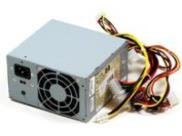
Immagine 1: anteriore view of the HP ATX 300W Power Supply. This image displays the compact form factor and primary connectors of the power supply unit.
Si prega di leggere attentamente il presente manuale prima di procedere con qualsiasi installazione o utilizzo. Conservare il manuale per riferimento futuro.
Informazioni sulla sicurezza
- Rischio elettrico: Gli alimentatori contengono alta tensionetage componenti. Non aprire l'alimentatore casing. Rischio di scossa elettrica.
- Ventilazione: Ensure adequate ventilation around the power supply. Do not block air vents. Overheating can cause damage or fire.
- Messa a terra: Collegare sempre l'alimentatore a una presa elettrica correttamente messa a terra.
- Umidità: Do not expose the power supply to water or excessive moisture.
- Installazione professionale: If you are unsure about the installation process, seek assistance from a qualified technician.
- Compatibilità: Use only with compatible personal computer systems as specified.
Configurazione e installazione
Follow these steps for proper installation of the HP ATX 300W Power Supply into your personal computer system:
- Preparazione:
- Spegnere il computer e scollegarlo dalla presa a muro.
- Open the computer case according to your computer's manufacturer instructions.
- Scaricare l'elettricità statica toccando un oggetto metallico collegato a terra prima di maneggiare i componenti.
- Rimuovere il vecchio alimentatore (se applicabile):
- Disconnect all cables from the existing power supply to the motherboard, graphics card, hard drives, and other components.
- Unscrew the old power supply from the computer case and carefully remove it.
- Installare un nuovo alimentatore:
- Carefully place the HP ATX 300W Power Supply into the designated power supply bay in your computer case.
- Secure the power supply to the case using the appropriate screws.
- Collegare i cavi:
- Connect the main 20+4 pin ATX connector to the motherboard.
- Collegare il connettore di alimentazione della CPU a 4 o 8 pin alla scheda madre.
- Connect SATA power connectors to hard drives, SSDs, and optical drives.
- Connect any necessary PCIe power connectors to graphics cards (if applicable).
- Assicurarsi che tutti i collegamenti siano saldi e correttamente inseriti.
- Passaggi finali:
- Organize cables to improve airflow and prevent interference.
- Chiudi il case del computer.
- Plug the computer's power cord into the power supply and then into a grounded wall outlet.
Operazione
Once installed, the HP ATX 300W Power Supply operates automatically with your computer system. When you power on your computer, the power supply will deliver stable and consistent power to all connected components.
- Accensione/spegnimento: The power supply is controlled by your computer's power button. Ensure the main power switch on the back of the power supply (if present) is in the 'ON' position before powering on the computer.
- Raffreddamento: The integrated air cooling system will activate automatically to maintain optimal operating temperatures. Ensure the fan intake and exhaust are not obstructed.
- Potenza in uscita: This unit provides a maximum output of 300 Watts. Ensure your system's total power requirements do not exceed this limit for stable operation.
Manutenzione
Una manutenzione regolare contribuisce a garantire la longevità e le prestazioni ottimali del tuo alimentatore:
- Pulizia: Periodically clean the exterior of the power supply and its fan vents to prevent dust buildup. Use compressed air to gently clear dust from the fan and internal components (with the computer powered off and unplugged).
- Ispezione: Occasionally inspect power cables for any signs of wear, fraying, or damage. Replace damaged cables immediately.
- Ambiente: Operate the computer in a clean, dry, and well-ventilated environment to prevent dust accumulation and overheating.
Risoluzione dei problemi
Se riscontri problemi con l'alimentatore, prendi in considerazione i seguenti passaggi comuni per la risoluzione dei problemi:
- Nessun potere:
- Verificare che il cavo di alimentazione sia collegato saldamente sia all'alimentatore che alla presa a muro.
- Assicurarsi che l'interruttore principale dell'alimentatore sia in posizione "ON".
- Verificare che la presa a muro funzioni collegandovi un altro dispositivo.
- Check all internal power connections (motherboard, CPU, peripherals) are firmly seated.
- Instabilità intermittente del sistema/alimentazione:
- Ensure the power supply's wattage (300W) is sufficient for all your computer components. Upgrading components may require a higher wattage alimentazione elettrica.
- Check for overheating. Ensure proper airflow and clean any dust from the power supply fan.
- Inspect for loose cable connections.
- Rumori insoliti:
- A grinding or loud fan noise may indicate a failing fan. Consider professional inspection or replacement.
If problems persist after attempting these steps, contact HP customer support or a qualified computer technician.
Specifiche
| Marca | HP |
| Nome/numero del modello | 366505-001 |
| Fattore di forma | ATX |
| Uscita Wattage | 300 Watt |
| Tipo di connettore | ATX |
| Dispositivi compatibili | Personal computer |
| Metodo di raffreddamento | Aria |
| Dimensioni del prodotto (L x P x A) | 9.5 x 12 x 4 pollici |
| Peso dell'articolo | 5.59 libbre (2.54 chilogrammi) |
| ASIN | B001U0ICS6 |
| Data prima disponibilità | 16 agosto 2010 |
Garanzia e supporto
For information regarding the warranty coverage for your HP ATX 300W Power Supply, please refer to the warranty documentation provided with your original computer system or contact HP customer support directly. Warranty terms and conditions may vary based on region and purchase date.
For technical support, service, or further inquiries, please visit the official HP support website or contact their customer service department. Have your product model number (366505-001) and serial number (if applicable) ready when contacting support.
Supporto HP Websito: www.hp.com/support