1. Prodotto finitoview
The One For All URC 3940 is a universal remote control designed to simplify your home entertainment experience by consolidating control of up to four devices into a single unit. It is pre-programmed for easy setup and can replace lost or broken remotes, including those for Freeview/DVB-T systems.
Le caratteristiche principali includono:
- Pre-programmed for easy setup with various devices.
- Capable of operating up to 4 devices simultaneously.
- Includes dedicated Freeview/DVB-T special functions such as Info, Guide, and Exit.
- Compatible with a wide range of devices including TVs, plasma screens, LCDs, projectors, DVD/Blu-ray players, satellite receivers, cable boxes, DVB-T boxes, and VCRs.

This image displays the front of the One For All URC 3940 Universal Remote Control, highlighting its button layout including power, device selection, number pad, volume, channel, navigation, and special function buttons.
2. Istruzioni per l'installazione
2.1. Installazione della batteria
- Individuare il vano batterie sul retro del telecomando.
- Per aprire, far scorrere il coperchio della batteria verso il basso o verso l'esterno.
- Inserire due batterie AAA, assicurandosi che i terminali positivo (+) e negativo (-) siano allineati con le marcature all'interno del vano.
- Riposizionare il coperchio della batteria finché non scatta saldamente in posizione.
2.2. Device Pairing (Code Setup)
The URC 3940 remote uses a code-based system to connect with your devices. Refer to the code list provided with your remote for specific manufacturer codes. If a code list is not available, a code search method can be used.
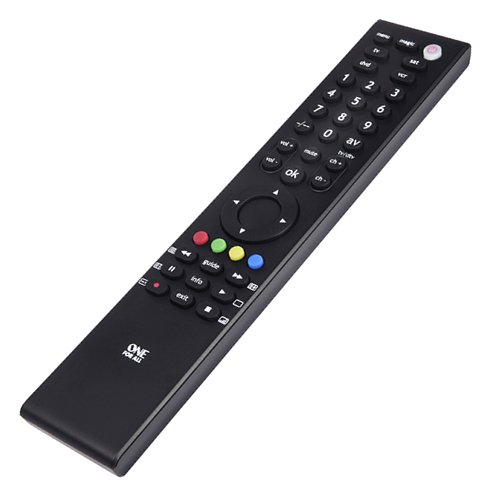
An angled perspective of the One For All URC 3940 Universal Remote Control, showing its slim profile and ergonomic design, with the button layout visible.
Method 1: Direct Code Entry
- Accendi il dispositivo che desideri controllare (ad esempio, TV, lettore DVD).
- Premere e tenere premuto il tasto MAGIA button until the LED light under the power button blinks twice and stays lit.
- Premere il pulsante del dispositivo che si desidera programmare (ad esempio, TV, DVD, SAB, Videoregistratore). The LED will blink once and remain lit.
- Enter the 4-digit code for your device's brand from the code list. The LED will blink twice to confirm a valid code. If the LED shows a long blink, the code is invalid; re-enter the code.
- Point the remote at your device and test its functions (e.g., Power, Volume). If the device responds correctly, the setup is complete. If not, try the next code for your brand or proceed to Method 2.
Method 2: Code Search
- Accendi il dispositivo che desideri controllare.
- Premere e tenere premuto il tasto MAGIA button until the LED blinks twice and stays lit.
- Press the device button you want to program. The LED will blink once and remain lit.
- Premere il tasto ENERGIA button once. The LED will blink once.
- Puntare il telecomando verso il dispositivo e premere ripetutamente il tasto ENERGIA button (approximately every 3 seconds) until your device turns off.
- Una volta spento il dispositivo, premere immediatamente il tasto MAGIA button to store the code. The LED will blink twice to confirm.
- Test other functions. If the device does not respond correctly, repeat the search process.
3. Utilizzo del telecomando
Once programmed, the URC 3940 remote allows you to control your devices using its various buttons.
- Device Buttons (TV, DVD, SAT, VCR): Press the corresponding button to select the device you wish to control. The remote will then send commands to that specific device.
- Pulsante di accensione: Accende o spegne il dispositivo selezionato.
- Tastierino numerico (0-9): Used for direct channel entry or inputting numbers for menus.
- VOL +/-: Adjusts the volume of the selected audio device (usually TV).
- CH +/-: Changes channels on the selected TV or set-top box.
- MUTO: Mutes the audio of the selected device.
- OK / Navigation Buttons: Utilizzato per navigare nei menu e confermare le selezioni.
- AV / TV/DTV: Switches between input sources or TV/Digital TV modes.
- Pulsanti colorati (rosso, verde, giallo, blu): These buttons often correspond to specific functions within menus or interactive services (e.g., Freeview/DVB-T).
- INFO, GUIDE, EXIT: Dedicated buttons for accessing information, electronic program guides, and exiting menus, particularly useful for Freeview/DVB-T devices.
4. Manutenzione
4.1. Sostituzione della batteria
The remote requires two AAA batteries. Replace them when the remote's response becomes sluggish or the LED indicator does not light up. The average battery life is approximately 12 months under normal usage. Follow the battery installation steps in Section 2.1.
4.2. Pulizia
To clean the remote, gently wipe it with a soft, dry cloth. Avoid using abrasive cleaners, solvents, or wet cloths, as these can damage the remote's surface or internal components.
5. Risoluzione Dei Problemi
- Il telecomando non risponde:
- Controllare che le batterie siano inserite correttamente e non siano scariche. Sostituirle se necessario.
- Assicurarsi che non vi siano ostacoli tra il telecomando e il ricevitore a infrarossi del dispositivo.
- Verify that the correct device button (TV, DVD, SAT, VCR) is selected for the device you intend to control.
- Device not responding after code entry:
- Try other codes listed for your device's brand.
- Perform the Code Search method (Section 2.2, Method 2) to find a compatible code.
- Ensure the device is powered on before attempting to program or control it.
- Alcune funzioni non funzionano:
- Not all functions of an original remote may be available on a universal remote.
- The URC 3940 does not feature a learning mode, meaning it cannot learn commands directly from another remote.
- If specific functions are critical, try alternative codes for your device.
6. Specifiche
- Marca: Uno per tutti
- Modello: URC 3940 (FBA_URC3940)
- Produttore: Elettronica universale
- Dispositivi compatibili: DVD/Blu-ray Player, Projector, Television, VCR
- Numero massimo di dispositivi supportati: 4
- Tecnologia di connettività: Infrarossi
- Caratteristiche speciali: Gratuitoview/DVB-T Special Functions
- Batterie richieste: 2 batterie AAA (non incluse)
- Durata media della batteria: Approximately 12 Months
- Dimensioni del prodotto: Dimensioni: 8.4 x 2.8 x 29.4 cm
- Peso dell'articolo: 18 grammi
7. Garanzia e supporto
Information regarding product warranty and customer support details is not available in the provided product data. Please refer to the product packaging or the manufacturer's official websito per i termini di garanzia e le informazioni di contatto.


