Introduzione
This manual provides essential instructions for the safe and efficient operation of your Optoma TX612 XGA DLP Multimedia Projector. Please read this manual thoroughly before using the projector and retain it for future reference. The Optoma TX612 is designed to deliver clear and vibrant images for various presentation environments.
Informazioni sulla sicurezza
- Do not look directly into the projector lens quando la lamp è acceso. La luce intensa può danneggiare gli occhi.
- Garantire una ventilazione adeguata intorno al proiettore. Non bloccare le aperture di ventilazione as this can lead to overheating.
- Avoid placing the projector in direct sunlight, near heat sources, or in environments with high humidity or excessive dust.
- Use only the power cord supplied with the projector. Connect to a properly grounded outlet.
- Non tentare di riparare questo prodotto da soli. Affidare tutti gli interventi di assistenza a personale qualificato.
- Scollegare il cavo di alimentazione from the wall outlet before cleaning or if the projector will not be used for an extended period.
Caratteristiche del prodotto
- Alta luminosità: 3500 ANSI lumens for clear, easy-to-read text and vibrant images.
- Alto rapporto di contrasto: 3000:1 contrast ratio enhances image detail.
- Risparmio energetico: Standby VGA and audio pass-through features reduce power consumption.
- Connettività wireless: Supports optional wireless dongle for flexible setup.
- Funzionalità di sicurezza: Control panel lock and password protection to customize security settings.
- Bassa manutenzione: Filter-free design contributes to a low cost of ownership.
Impostare
1. Connessioni fisiche
Connect your video sources and audio devices to the appropriate ports on the rear panel of the projector. Ensure all cables are securely connected.
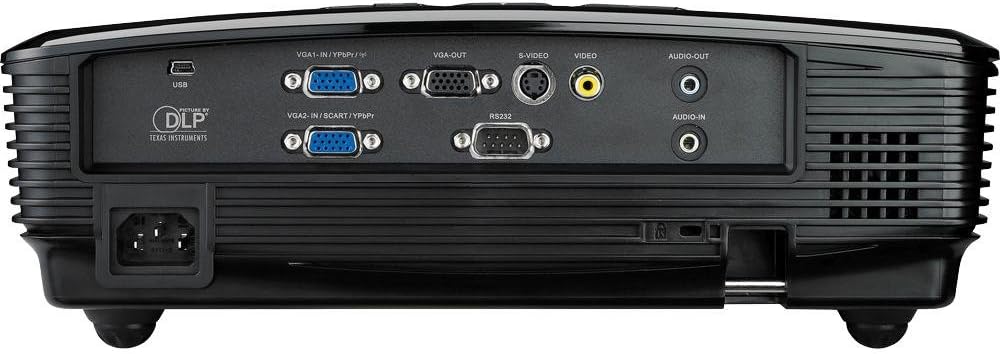
This image displays the rear panel of the Optoma TX612 projector, highlighting various connectivity options including VGA-IN (VGA1-IN/YPbPr, VGA2-IN/SCART/YPbPr), VGA-OUT, S-VIDEO, VIDEO, AUDIO-OUT, AUDIO-IN, RS232, and USB ports, along with the power input.
- VGA-IN (VGA1-IN/YPbPr, VGA2-IN/SCART/YPbPr): Connect to a computer or other VGA-compatible device.
- VIDEO: Connect to composite video sources.
- S-VIDEO: Connect to S-Video sources.
- AUDIO-IN: Connect audio cables from your source device.
- AUDIO-OUT: Connect to external speakers if desired.
- USB: For service or optional wireless dongle.
- RS232: Per il controllo del proiettore tramite computer o sistema di controllo.
- Potenza in ingresso: Collegare qui il cavo di alimentazione in dotazione.
2. Accensione/spegnimento
- Per accendere: Collegare il cavo di alimentazione e premere Energia button on the control panel or remote control. The power indicator light will turn on.
- Per spegnere: Premere il tasto Energia button twice. The projector will enter a cooling down cycle before completely shutting off. Do not unplug the projector during the cooling cycle.
3. Regolazione dell'immagine
Adjust the projected image using the lens rings and control panel buttons.

This image shows the top of the Optoma TX612 projector, featuring the control panel with buttons for power, source selection, re-sync, and navigation. Also visible are the focus and zoom rings for lens adjustment.
- Anello di messa a fuoco: Ruotare il MESSA A FUOCO ring around the lens until the image is sharp and clear.
- Anello dello zoom: Ruotare il ZOOM ring to adjust the size of the projected image.
- Correzione trapezoidale: Utilizzare le opzioni del menu per correggere la distorsione trapezoidale se il proiettore non è perfettamente perpendicolare allo schermo.
Funzionamento del proiettore
1. Selezione della sorgente di ingresso
Premere il tasto FONTE button on the control panel or remote control to cycle through available input sources (VGA1, VGA2, Video, S-Video, etc.) until your desired source is displayed.
2. Navigazione nel menu
Premere il tasto MENU button to access the On-Screen Display (OSD) menu. Use the arrow buttons to navigate through options and the ENTRARE pulsante per selezionare. Premere MENU di nuovo per uscire.
- Impostazioni immagine: Adjust brightness, contrast, color, tint, and sharpness.
- Impostazioni di visualizzazione: Configure aspect ratio, keystone correction, and projection mode.
- Setup Settings: Manage language, auto power off, and security features.
Manutenzione
- Lamp Sostituzione: Il proiettore lamp ha una durata di vita finita. Quando lamp l'indicatore si illumina o l'immagine diventa scura, lamp potrebbe essere necessario sostituirlo. Fare riferimento al manuale di assistenza completo per informazioni dettagliateamp replacement instructions or contact qualified service personnel.
- Pulizia della lente: Utilizzare un panno morbido e privo di lanugine, specificamente progettato per lenti ottiche. Non utilizzare detergenti abrasivi o solventi.
- Pulizia del proiettore Casing: Pulisci il casing con un morbido, damp stoffa. Evitare l'uso di prodotti chimici aggressivi.
- Design senza filtri: The Optoma TX612 features a filter-free design, reducing the need for regular filter cleaning.
Risoluzione dei problemi
| Problema | Possibile soluzione |
|---|---|
| Nessuna immagine visualizzata |
|
| L'immagine è sfocata |
|
| L'immagine è distorta (forma trapezoidale) |
|
| Nessun audio |
|
Specifiche
| Caratteristica | Dettaglio |
|---|---|
| Numero di modello | Modello TX612 |
| Risoluzione dello schermo | Risoluzione: 1024 x 768 (XGA) |
| Luminosità | 3500 ANSI Lumen |
| Rapporto di contrasto | 3000:1 |
| Tecnologia di connettività | Wireless (with optional dongle) |
| Caratteristica speciale | Altoparlanti integrati |
| Dimensioni del prodotto | 9.21 x 12.76 x 3.82 pollici |
| Peso dell'articolo | 10 libbre |
| Produttore | Optoma |
| Lingua | Inglese |
Garanzia e supporto
For detailed warranty information, technical support, or service inquiries, please refer to the warranty card included with your product or visit the official Optoma websito. Conservare la ricevuta d'acquisto come prova d'acquisto per eventuali reclami in garanzia.
Risorse online: For the latest drivers, firmware updates, and additional support documentation, please visit www.optoma.com.