1. Introduzione e oltreview
The Mitel 5312 IP Phone is a versatile and user-friendly communication device designed for modern office environments. It features a full-duplex handsfree speakerphone, a multi-line backlit display, and programmable feature keys, providing intuitive access to advanced call handling and converged applications supported by Mitel's IP communication platforms.
This manual provides comprehensive instructions for setting up, operating, maintaining, and troubleshooting your Mitel 5312 IP Phone, ensuring optimal performance and user experience.
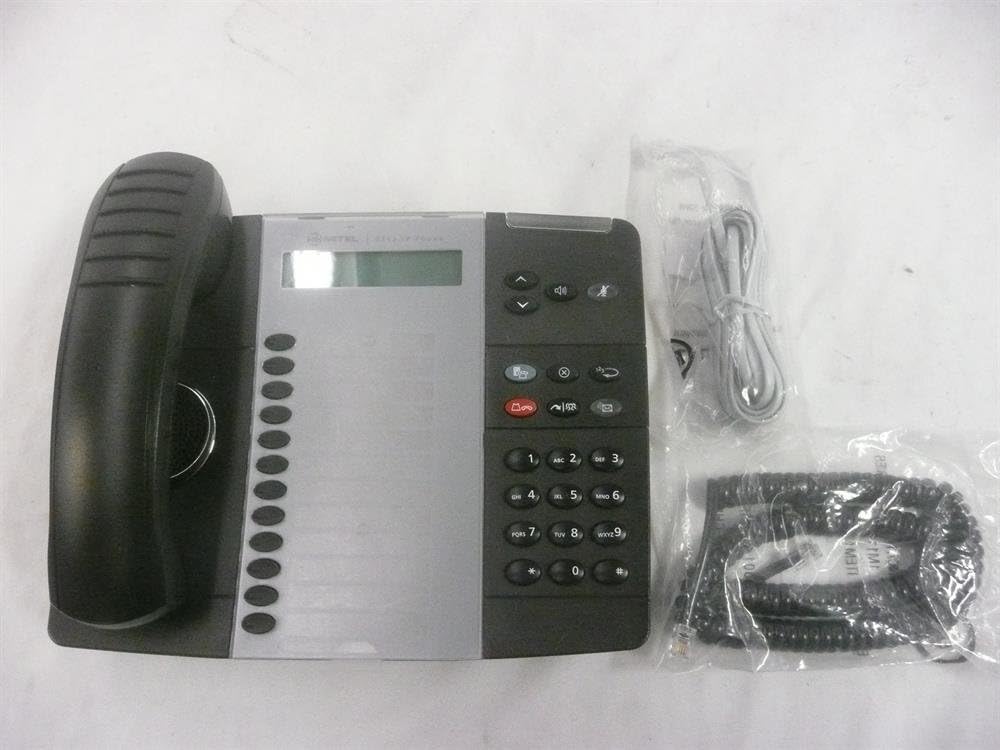
Figure 1: Mitel 5312 IP Phone with included accessories.
2. Caratteristiche principali
- Display: Two-line by 20-character white, backlit, graphics display with contrast control and auto-dimming.
- Tasti programmabili: Twelve multi-function keys with dual-color LED indicators for speed dialing, line appearances, and feature access.
- Tasti funzione: Dedicated keys for Hold, Menu, Message, Speaker, Mute, Transfer/Conference, Redial, and Cancel.
- Vivavoce: Full duplex handsfree speakerphone operation.
- Personalizzazione: Browser-based desktop user tool programming for easy access to telephone system features.
3. Guida all'installazione
3.1 Contenuto della confezione
Prima di iniziare, assicurati che tutti i componenti siano presenti:
- Unità telefonica IP Mitel 5312
- Cornetta e cavo a spirale
- Cavo Ethernet
- Adattatore di alimentazione (se non si utilizza Power over Ethernet - PoE)
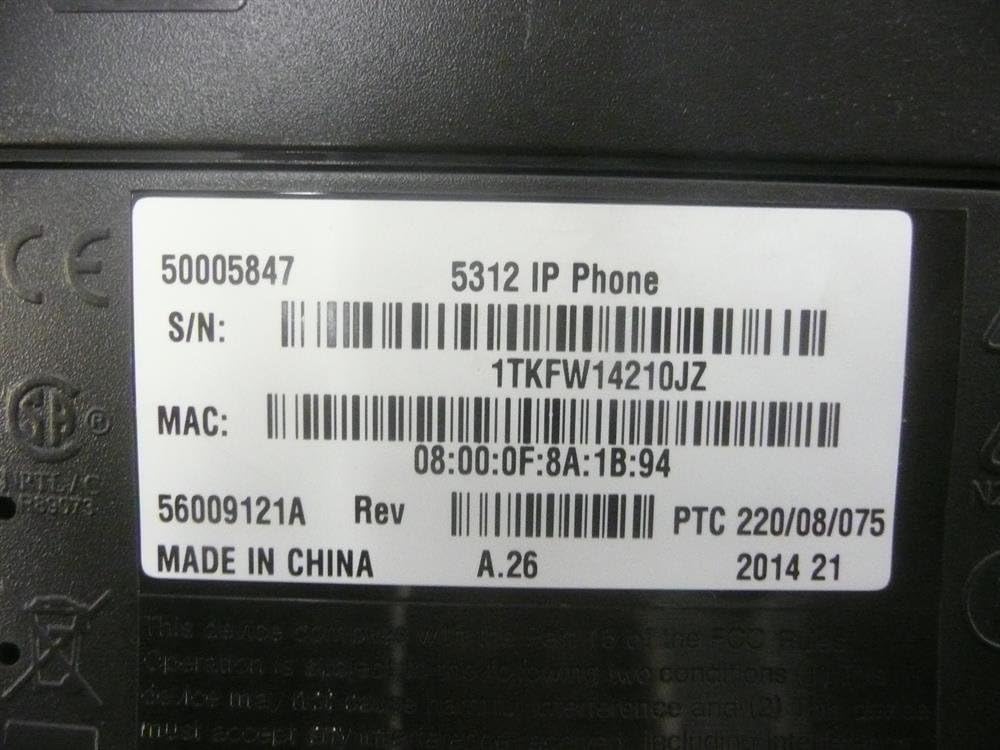
Figure 2: Mitel 5312 IP Phone and its primary accessories.
3.2 Collegamento del telefono
- Collegare il portatile: Inserire un'estremità del cavo a spirale nel ricevitore e l'altra estremità nella porta del ricevitore sulla base del telefono.
- Connetti alla rete:
- Se si utilizza Power over Ethernet (PoE), collegare un'estremità del cavo Ethernet alla porta LAN del telefono e l'altra estremità a uno switch o router di rete abilitato PoE.
- If not using PoE, connect one end of the Ethernet cable to the LAN port on the phone and the other end to your network switch/router. Then, connect the power adapter to the phone's power port and plug it into a power outlet.
- Connessione PC opzionale: Se desideri collegare un computer tramite il telefono, collega un cavo Ethernet dal computer alla porta PC del telefono.
- Avvio iniziale: The phone will power on and begin its boot-up sequence. This may take a few moments as it obtains network configuration and registers with your IP communications platform.
4. Istruzioni per l'uso
4.1 Funzioni di chiamata di base
- Effettuare una chiamata: Lift the handset, press a line key, or press the Speaker button. Dial the number.
- Risposta a una chiamata: Lift the handset, press the flashing line key, or press the Speaker button.
- Terminare una chiamata: Replace the handset, or press the Speaker button if using speakerphone.
- Presa: Durante una chiamata, premere il tasto Presa key. To retrieve, press the flashing line key.
- Disattiva audio: Premere il tasto Muto key to mute your microphone during a call. Press again to unmute.
- Vivavoce: Premere il tasto Oratore key to activate or deactivate the speakerphone.
4.2 Funzionalità avanzate
- Trasferimento: Durante una chiamata, premere il tasto Transfer/Conference key. Dial the transfer destination, then press Transfer/Conference again to complete (blind transfer) or wait for an answer and announce the call (supervised transfer).
- Conferenza: Durante una chiamata, premere il tasto Transfer/Conference key. Dial the number of the third party. Once connected, press Transfer/Conference di nuovo per unirsi a tutte le parti.
- Ricomposizione: Premere il tasto Ricomposizione tasto per chiamare l'ultimo numero chiamato.
- Message Access: Premere il tasto Messaggio key to access your voicemail.
- Tasti programmabili: The twelve programmable keys can be configured for speed dialing, line appearances, or quick access to system features. Consult your system administrator for specific programming details.
5. Manutenzione
Proper care and maintenance will extend the life of your Mitel 5312 IP Phone.
- Pulizia: Utilizzare una pasta morbida e leggermenteamp cloth to clean the phone's surface. Avoid abrasive cleaners, solvents, or strong chemicals. Do not spray liquids directly onto the phone.
- Ambiente: Keep the phone in a dry environment, away from direct sunlight, excessive heat, or extreme cold. Ensure proper ventilation.
- Gestione: Handle the phone and its components with care. Avoid dropping the handset or pulling excessively on cords.
6. Risoluzione Dei Problemi
This section addresses common issues you might encounter with your Mitel 5312 IP Phone.
| Problema | Possibile causa | Soluzione |
|---|---|---|
| Nessun segnale di linea / Telefono non registrato | Network cable disconnected, no power (if not PoE), incorrect network configuration, server issue. | Check Ethernet cable connection. Ensure power adapter is plugged in (if applicable). Verify network settings with your IT administrator. Restart the phone by unplugging and replugging the power/Ethernet cable. |
| Il display è vuoto o illeggibile | No power, display settings, hardware fault. | Check power connection. Adjust display contrast (if available). If the issue persists, contact support. |
| Non riesco a sentire il chiamante / Il chiamante non riesce a sentirmi | Volume too low, Mute activated, faulty handset/speakerphone, network quality. | Adjust volume. Check if Mute is active. Try speakerphone or handset to isolate the issue. Check network connection quality. |
If you continue to experience issues, please contact your IT support or Mitel customer service. Be prepared to provide the model number and serial number of your device.
7. Specifiche
Detailed technical specifications for the Mitel 5312 IP Phone (Model: 50005847).
| Caratteristica | Dettaglio |
|---|---|
| Numero di modello | 50005847 |
| Marca | Mitel |
| Peso dell'articolo | 3 libbre |
| Colore | Nero, Argento |
| Tipo di telefono | filo |
| Materiale | Plastica |
| Fonte di alimentazione | Elettrico con cavo |
| Tipo di combinatore | Tastiera singola |
| Tipo di sistema di risposta | Digitale |
| Dispositivi compatibili | Mitel's IP communications platforms, VoIP services, PSTN networks |
| Capacità di teleconferenza | Di base |
| Prima data disponibile | 4 agosto 2009 |

Figure 3: Product label with identification details.
Extracted details from label:
Numero di serie: 1TKFW14210JZ, FSABV9236
Indirizzo MAC: 08:00:0F:8A:1B:94, 08-00-0F-3B-E5-DA
Revisione: A.26, A.2
8. Supporto e garanzia
For technical assistance, troubleshooting beyond this manual, or warranty inquiries, please contact Mitel customer support or your authorized Mitel reseller.
When contacting support, please have your product model number (50005847) and serial number ready. The serial number can be found on the label at the bottom of your phone unit (refer to Figure 3).
Information regarding protection plans and return policies may be available from your point of purchase.


