1. Introduzione
The Conceptronic CSATAI23U is a versatile adapter designed to connect Serial ATA (SATA) and Integrated Drive Electronics (IDE) devices to a computer via a USB 2.0 interface. This device facilitates data transfer, backup, and recovery from various storage and optical drives, including 2.5-inch and 3.5-inch hard drives, CD-ROMs, CD-RWs, DVD-RWs, and Blu-ray drives.
This manual provides detailed instructions for the proper setup, operation, maintenance, and troubleshooting of your Conceptronic CSATAI23U adapter.
2. Contenuto della confezione
Si prega di verificare che tutti gli articoli siano presenti nel pacco:
- Conceptronic CSATAI23U Adapter
- Cavo USB 2.0
- Adattatore di alimentazione CA.
- 4-pin Power Cable (for IDE devices)
- Cavo dati SATA
- Cavo di alimentazione SATA
3. Istruzioni per l'installazione
Follow these steps to connect your storage or optical drive to the Conceptronic CSATAI23U adapter.
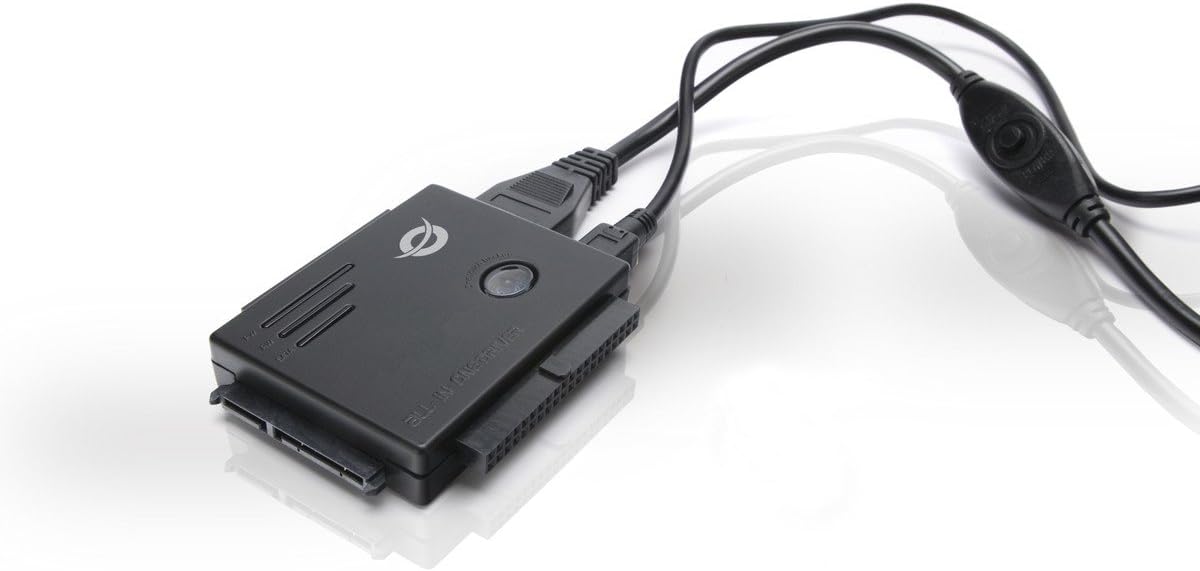
Image: The Conceptronic CSATAI23U adapter with various cables connected, illustrating its compact design and multiple interface options for SATA and IDE devices.
3.1. Connecting an IDE Device (2.5-inch or 3.5-inch)
- Identify the IDE Port: Locate the 40-pin IDE connector on the adapter. For 2.5-inch IDE drives, use the smaller 44-pin connector if available, or the 40-pin with an appropriate adapter (not included).
- Connect the IDE Drive: Carefully align and connect your IDE hard drive or optical drive to the corresponding IDE port on the adapter. Ensure a firm connection.
- Connect Power to IDE Drive: For 3.5-inch IDE drives, connect the 4-pin power cable from the AC power adapter directly to the IDE drive's power input. For 2.5-inch IDE drives, power is typically supplied via the IDE data cable, but some may require external power.
- Connect Adapter Power: Connect the AC power adapter to the Conceptronic CSATAI23U adapter's power input.
- Connessione al computer: Plug the USB 2.0 cable into the adapter and then into an available USB port on your computer.
3.2. Connecting a SATA Device (2.5-inch or 3.5-inch)
- Identify the SATA Port: Locate the SATA data and power connectors on the adapter.
- Collegare l'unità SATA: Connect the SATA data cable from the adapter to the SATA data port on your hard drive or optical drive.
- Connect Power to SATA Drive: Connect the SATA power cable from the AC power adapter to the SATA power port on your drive.
- Connect Adapter Power: Connect the AC power adapter to the Conceptronic CSATAI23U adapter's power input.
- Connessione al computer: Plug the USB 2.0 cable into the adapter and then into an available USB port on your computer.
Important Note on Power: Always ensure the external power supply is connected to both the adapter and the drive (if required by the drive) before connecting the USB cable to your computer. This ensures stable power delivery and proper device recognition.
4. Istruzioni per l'uso
Once the device is physically connected as described in the Setup section, follow these steps to operate the adapter:
- Accensione: If your adapter has a power switch, turn it on. The power LED on the adapter should illuminate.
- Riconoscimento del dispositivo: Your computer's operating system (Windows, macOS, Linux) should automatically detect and install the necessary drivers for the USB 2.0 device. This is typically a plug-and-play process.
- Accesso all'unità:
- Per Windows: Open "This PC" or "My Computer." The connected drive should appear as a new removable disk. If it's a new or unformatted drive, you may need to initialize and format it using Disk Management.
- Per macOS: The drive icon should appear on your desktop or in Finder under "Locations." If it's a new or unformatted drive, you may need to use Disk Utility to initialize and format it.
- Trasferimento dati: Ora puoi trascinare e rilasciare files to and from the connected drive, or use backup software as needed.
- Rimozione sicura: Before disconnecting the adapter or drive, always safely eject the device from your operating system to prevent data corruption.
- Per Windows: Click the "Safely Remove Hardware and Eject Media" icon in the system tray.
- Per macOS: Trascina l'icona dell'unità nel Cestino oppure fai clic sul pulsante Espelli accanto all'unità nel Finder.
5. Manutenzione
Proper maintenance ensures the longevity and reliable performance of your adapter.
- Pulizia: Utilizzare un panno morbido e asciutto per pulire l'adattatore. Evitare detergenti liquidi o solventi.
- Magazzinaggio: Quando non viene utilizzato, conservare l'adattatore in un luogo fresco e asciutto, lontano dalla luce solare diretta e da temperature estreme.
- Gestione: Handle the adapter and connected drives with care to avoid physical damage to connectors or internal components.
- Gestione dei cavi: Avoid bending or kinking cables sharply, as this can damage internal wires.
6. Risoluzione Dei Problemi
If you encounter issues with your Conceptronic CSATAI23U adapter, refer to the following common solutions:
- Dispositivo non riconosciuto:
- Ensure all cables (USB, power to adapter, power to drive) are securely connected.
- Verify the power adapter is plugged into a working outlet and the adapter's power switch (if present) is on.
- Prova a collegare l'adattatore a una porta USB diversa del computer.
- Ensure the drive itself is functional by testing it in another system if possible.
- Per le nuove unità, assicurati che siano inizializzate e formattate nella Gestione disco (Windows) o nell'Utility Disco (macOS) del tuo sistema operativo.
- Connection Sequence Issues: Some users report that the connection sequence can affect recognition. Try this sequence:
- Connect the drive to the adapter.
- Connect the external power supply to the drive (if required) and then to the adapter.
- Turn on the adapter's power (if applicable).
- Connect the USB cable from the adapter to your computer.
- Trasferimento dati lento:
- Ensure you are using a USB 2.0 port on your computer. While compatible with USB 1.1, performance will be limited.
- Check the condition of the USB cable; a damaged cable can affect speed.
- L'unità si disconnette in modo casuale:
- Verify the external power supply is providing sufficient and stable power to both the adapter and the drive.
- Assicurarsi che tutti i collegamenti siano saldi e non allentati.
- Avoid using long USB extension cables, which can lead to power or signal degradation.
7. Specifiche
| Caratteristica | Dettaglio |
|---|---|
| Marca | Concettoronico |
| Numero di modello | CSATAI23U |
| Dimensioni del prodotto | Dimensioni: 7.3 x 6.2 x 1.3 cm |
| Peso del prodotto | 430 grammi |
| Porte USB | 1 (USB 2.0) |
| Consumo energetico | 2 Watt |
| Dispositivi compatibili | Personal computer |
| Tipo di connettore | SATA, IDE, USB |
| Tipi di unità supportati | 2.5" / 3.5" SATA HDD/SSD, 2.5" / 3.5" IDE HDD, 5.25" Optical Drives (CD-ROM, CD-RW, DVD-RW, Blu-ray) |
8. Garanzia e supporto
For warranty information and technical support, please refer to the documentation included with your purchase or visit the official Conceptronic websito. Conservare la prova d'acquisto per eventuali reclami in garanzia.
For further assistance, you may contact Conceptronic customer service through their official support channels.


