Introduzione
This manual provides comprehensive instructions for setting up, operating, and maintaining your Pure Siesta FLOW digital radio alarm clock. Please read this manual thoroughly before using the device to ensure proper functionality and to maximize your user experience.

Davanti view of the Pure Siesta FLOW digital radio alarm clock, showcasing its display and front controls.
Impostare
1. Disimballaggio e posizionamento
- Carefully remove the Siesta FLOW from its packaging.
- Place the unit on a stable, flat surface, away from direct sunlight, heat sources, or excessive moisture.
- Assicurare un'adeguata ventilazione attorno all'unità.
2. Collegamento elettrico
Connect the supplied power adapter to the DC input port on the back of the Siesta FLOW, then plug the adapter into a wall outlet. The unit will power on automatically.
3. Installazione guidata iniziale
Upon first power-on, the Siesta FLOW will guide you through an initial setup wizard. Use the navigation buttons (Up/Down/Select) to configure the following:
- Lingua: Seleziona la lingua preferita.
- Ora e data: The unit can synchronize time via DAB or internet. You may set it manually if needed.
- Connessione di rete (Wi-Fi):
- Seleziona la tua rete Wi-Fi dall'elenco.
- Enter your Wi-Fi password using the navigation controls. The touch-sensitive buttons on the front panel require a light touch for input.
- Conferma la connessione.

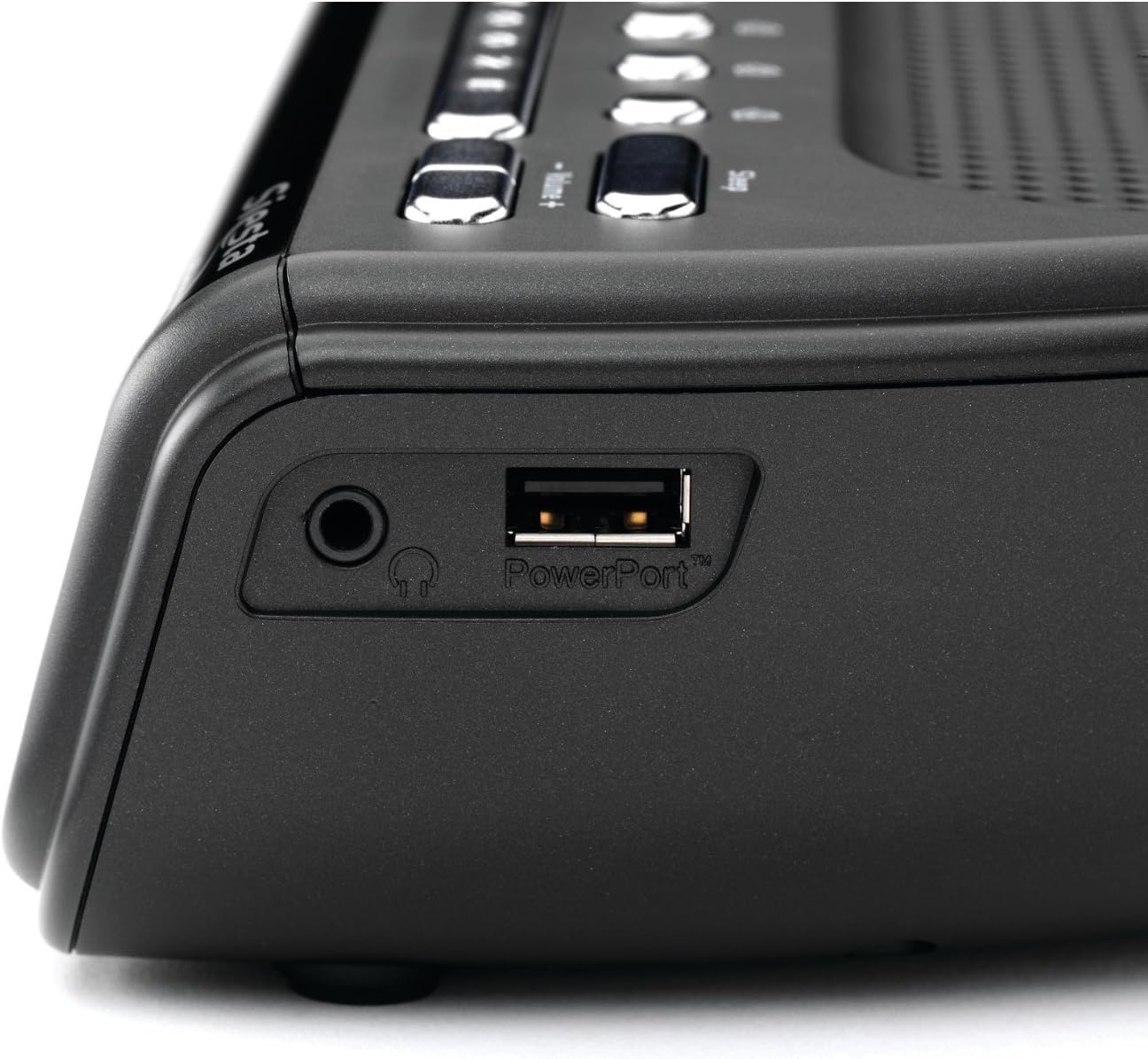
Lato view of the Pure Siesta FLOW, highlighting the headphone jack and the PowerPort USB connection for charging external devices.
4. Regolazione dell'antenna
Extend the telescopic antenna fully for optimal DAB and FM radio reception. Adjust its position to improve signal strength if necessary.
Istruzioni per l'uso
1. Controlliview

Superiore view of the Pure Siesta FLOW, illustrating the layout of the control buttons including Standby, Source, Presets, Snooze, and Volume.
- Pulsante Standby: Powers the unit on or off (to standby mode).
- Pulsante sorgente: Cycles through available audio sources (DAB, FM, Internet Radio, Aux In).
- Pulsanti preimpostati (1-4): Quick access to saved radio stations.
- Pulsante Ripeti: Temporarily silences an active alarm.
- Pulsanti Volume +/-: Regola il livello di uscita audio.
- Navigation Buttons (Up/Down/Select) & Back Button: Used for menu navigation and selection on the front panel. These are touch-sensitive.
2. Funzioni radio
- Radio DAB/FM:
- Premere il tasto Fonte button to select DAB or FM.
- The unit will scan for available stations. Use navigation buttons to browse and select.
- To save a preset, tune to the desired station, then press and hold one of the Preimpostato buttons (1-4) until "Preset Saved" appears.
- Radio Internet:
- Assicurarsi che l'unità sia connessa al Wi-Fi.
- Select "Internet Radio" as the source.
- Browse stations by location, genre, or search. You can also manage favorites via the Pure Lounge websito.
3. Funzioni di allarme
The Siesta FLOW supports multiple alarms (up to 4). Access alarm settings via the main menu.
- Impostazione di un allarme:
- Select an alarm slot (e.g., Alarm 1).
- Imposta l'ora della sveglia.
- Choose the alarm source: DAB, FM, Internet Radio, or built-in tones/sounds.
- Select the alarm frequency (Daily, Weekdays, Weekends, Once).
- Regola il volume della sveglia.
- Assicurarsi che la sveglia sia impostata su "On".
- Posticipa: Quando suona un allarme, premere il tasto Posticipare button to temporarily pause it. The snooze duration can be configured in settings.
- Arresto di un allarme: Press any button other than Snooze to turn off the active alarm.
The display of the Pure Siesta FLOW, showing the selection of a built-in sound, "Forest Birds," as an alarm or relaxation option.
4. Timer di spegnimento
The sleep timer allows the radio to play for a set duration before automatically turning off. Access the Sleep Timer option from the main menu and select your desired duration.
5. Impostazioni display
The Siesta FLOW features an auto-dimming display that adjusts to ambient light. You can also manually adjust the brightness or set a minimum brightness level in the display settings menu.
6. USB PowerPort
The USB PowerPort on the side of the unit (labeled "PowerPort") can be used to charge compatible external devices, such as smartphones or MP3 players. This port is for charging only and does not support data transfer.
Manutenzione
1. Pulizia
- Scollegare l'adattatore di alimentazione prima di pulire.
- Wipe the unit with a soft, dry, lint-free cloth.
- Non utilizzare detergenti abrasivi, cere o solventi poiché potrebbero danneggiare la finitura.
2. Aggiornamenti software
Periodically check for software updates via the system settings menu. Updates can provide new features and performance improvements. Follow the on-screen instructions to install any available updates.
Risoluzione dei problemi
| Problema | Possibile causa | Soluzione |
|---|---|---|
| Nessuna alimentazione / Unità non risponde | Adattatore di alimentazione non collegato o presa difettosa. | Assicurarsi che l'adattatore di alimentazione sia collegato correttamente e provare una presa di corrente diversa. |
| Scarsa ricezione radio (DAB/FM) | Antenna non estesa o area con segnale debole. | Fully extend and adjust the telescopic antenna. Try relocating the unit to an area with better reception. |
| Buffering o disconnessione della radio Internet | Segnale Wi-Fi debole o congestione della rete. | Ensure the unit is within range of your Wi-Fi router. Restart your router. Check for other devices consuming bandwidth. |
| Touch buttons unresponsive or slow | Incorrect touch technique or temporary software glitch. | Use a light, firm touch. Restart the unit by unplugging and re-plugging the power. |
| L'unità si blocca o non risponde più | Errore software. | Disconnect the power adapter for 10 seconds, then reconnect it to perform a soft reset. If issues persist, consider a factory reset (see manual for specific steps). |
Ripristino delle impostazioni di fabbrica
If problems persist, a factory reset may resolve them. This will erase all saved settings, presets, and alarms. Refer to the system settings menu on your device for the "Factory Reset" option.
Specifiche
| Caratteristica | Dettaglio |
|---|---|
| Marca | Puro |
| Numero di modello | VL-61220 |
| Dimensioni (L x P x A) | Dimensioni: 16.6 x 18 x 6.6 cm |
| Peso | 420 grammi |
| Potenza in uscita | 4.6 watt |
| Caratteristiche speciali | Alarm, Snooze, Radio (DAB/FM/Internet), Timer, USB PowerPort |
| Fonte di alimentazione | Elettrico con cavo |
| Tipo di montaggio | Da tavolo |
Garanzia e supporto
Per informazioni sulla garanzia e supporto tecnico, fare riferimento alla documentazione fornita con l'acquisto o visitare il sito ufficiale Pure websito. Conservare la prova d'acquisto per eventuali reclami in garanzia.


