1. Introduzione
Thank you for choosing the Domo DO9089W Digital Kitchen Scale. This manual provides essential information for the safe and efficient operation, maintenance, and troubleshooting of your new kitchen scale. Please read these instructions carefully before first use and keep them for future reference.
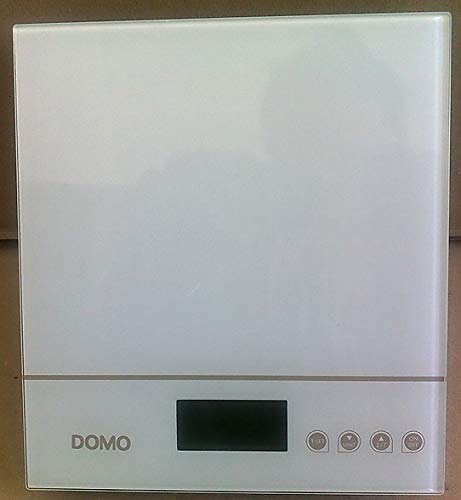
Figura 1: Domo DO9089W Digital Kitchen Scale. This image shows the compact design of the scale with its glass weighing platform and LCD display.
2. Istruzioni di sicurezza
- Non immergere la bilancia in acqua o altri liquidi.
- Pulisci la bilancia con adamp solo stoffa. Non utilizzare detergenti abrasivi.
- Place the scale on a firm, flat, and stable surface for accurate measurements.
- Non sovraccaricare la bilancia oltre la sua capacità massima di 5 kg.
- Tenere la bilancia lontana da temperature estreme, luce solare diretta e umidità elevata.
- Questo apparecchio è destinato esclusivamente all'uso domestico.
3. Contenuto della confezione
Verificare che tutti gli articoli siano presenti nel pacco:
- 1 x Domo DO9089W Digital Kitchen Scale
- 1 x Manuale utente (questo documento)
- Batteries (may or may not be included, check packaging)
4. Impostazione
4.1. Installazione della batteria
- Individuare il vano batterie nella parte inferiore della bilancia.
- Aprire il coperchio del vano batterie.
- Insert the required 3V batteries (typically 2x CR2032, check compartment for exact type and polarity). Ensure correct polarity (+/-).
- Chiudere saldamente il coperchio del vano batterie.
4.2. Posizionamento
Place the scale on a hard, flat, and level surface. Uneven surfaces can affect weighing accuracy.
5. Istruzioni per l'uso
5.1. Accensione/spegnimento
- Per accendere: premere il tasto ACCESO/SPENTO button. The LCD display will show '0g' or '0lb'.
- Per spegnere: tenere premuto il tasto ACCESO/SPENTO button for a few seconds, or the scale will automatically shut off after a period of inactivity.
5.2. Pesare gli articoli
- Ensure the scale is on and displays '0g' or '0lb'.
- Place the item to be weighed directly onto the glass weighing platform.
- The weight will be displayed on the large LCD screen.
5.3. Funzione Tara (Azzeramento)
La funzione tara consente di pesare più ingredienti nello stesso contenitore o di sottrarre il peso di un contenitore.
- Posizionare un contenitore vuoto sulla piattaforma di pesatura. Il display ne mostrerà il peso.
- Premere il tasto TARA button (often labeled 'T' or integrated with the ON/OFF button). The display will reset to '0g'.
- Add the ingredient to the container. The display will show only the weight of the ingredient.
- Repeat the tare process for additional ingredients.
5.4. Conversione unità
To switch between weighing units (e.g., grams, pounds, ounces), press the UNITÀ or MODALITÀ button (if available). The current unit will be indicated on the LCD display.
5.5. Spegnimento automatico
The scale is equipped with an automatic shut-off feature to conserve battery life. It will turn off after a period of inactivity, typically around 60-120 seconds.
6. Manutenzione e pulizia
- Pulisci la scala con una leggera damp stoffa. Non utilizzare detergenti chimici o abrasivi.
- Non lasciare che l'acqua penetri all'interno della bilancia.
- Rimuovere le batterie se la bilancia non viene utilizzata per un periodo prolungato per evitare perdite.
7. Risoluzione Dei Problemi
| Problema | Possibile causa | Soluzione |
|---|---|---|
| La bilancia non si accende | Batterie scariche o installate in modo errato. | Sostituire le batterie con batterie nuove, assicurandosi che la polarità sia corretta. |
| Inaccurate readings / Cannot zero | Scale on an uneven surface; Overloaded; Internal error. | Place scale on a flat, stable surface. Ensure weight is within 5 kg limit. Try removing batteries for 10 seconds and reinserting. |
| Il display mostra 'Err' o 'O-Ld' | La scala è sovraccarica. | Remove items from the scale immediately. Do not exceed 5 kg. |
| Buttons unresponsive or sensitive | Moisture or debris on buttons; Software glitch. | Ensure buttons are clean and dry. Remove batteries for a few seconds to reset the scale. |
8. Specifiche
| Caratteristica | Specificazione |
|---|---|
| Numero di modello | DO9089W |
| Marca | DOMO |
| Capacità massima | 5 kg |
| Precisione | 1 grammi |
| Tipo di visualizzazione | LCD |
| Materiale | Piattaforma di pesatura in vetro |
| Dimensioni (L x P x A) | Dimensioni: 18 x 18 x 4 cm |
| Peso | Circa 762 g |
| Fonte di alimentazione | 3V batteries (type may vary, check compartment) |
| Spegnimento automatico | SÌ |
9. Garanzia e supporto
Questo prodotto viene fornito con un Garanzia di 24 mesi for the appliance itself. For items equipped with batteries, the batteries are guaranteed for 6 months. This warranty covers manufacturing defects under normal use. It does not cover damage resulting from misuse, accidents, unauthorized modifications, or normal wear and tear.
For warranty claims or technical support, please contact your retailer or the DOMO customer service department. Please have your proof of purchase and model number (DO9089W) ready.


