1. Prodotto finitoview
The TP-Link TL-SF1008D Fast Ethernet Switch is designed to expand your network connectivity for small office or home office (SOHO) environments. This unmanaged switch offers 8 10/100 Mbps auto-negotiation RJ45 ports, providing a simple and efficient solution for adding more wired connections to your router or modem. Its plug-and-play design requires no configuration, making setup straightforward. The device incorporates innovative energy-efficient technology to reduce power consumption and features a fanless design for quiet operation.
Caratteristiche principali:
- Collega e usa: Easy setup with no configuration or software needed.
- 8 porte Fast Ethernet: 8 10/100 Mbps auto-negotiation RJ45 ports for expanding network capacity.
- Efficienza energetica: Innovative green technology saves power consumption by up to 70%.
- Design senza ventole: Ensures quiet operation, ideal for any environment.
- Auto-MDI/MDIX: Elimina la necessità di cavi crossover.
- Trasferimento dati affidabile: IEEE 802.3x flow control provides dependable data transmission.
- Design compatto: Desktop or wall-mounting options for flexible placement.
2. Contenuto della confezione
Verifica che il pacco contenga i seguenti articoli:
- TP-Link 8-Port 10/100Mbps Desktop Switch (TL-SF1008D)
- Adattatore di alimentazione
- Guida per l'utente
3. Descrizione fisica
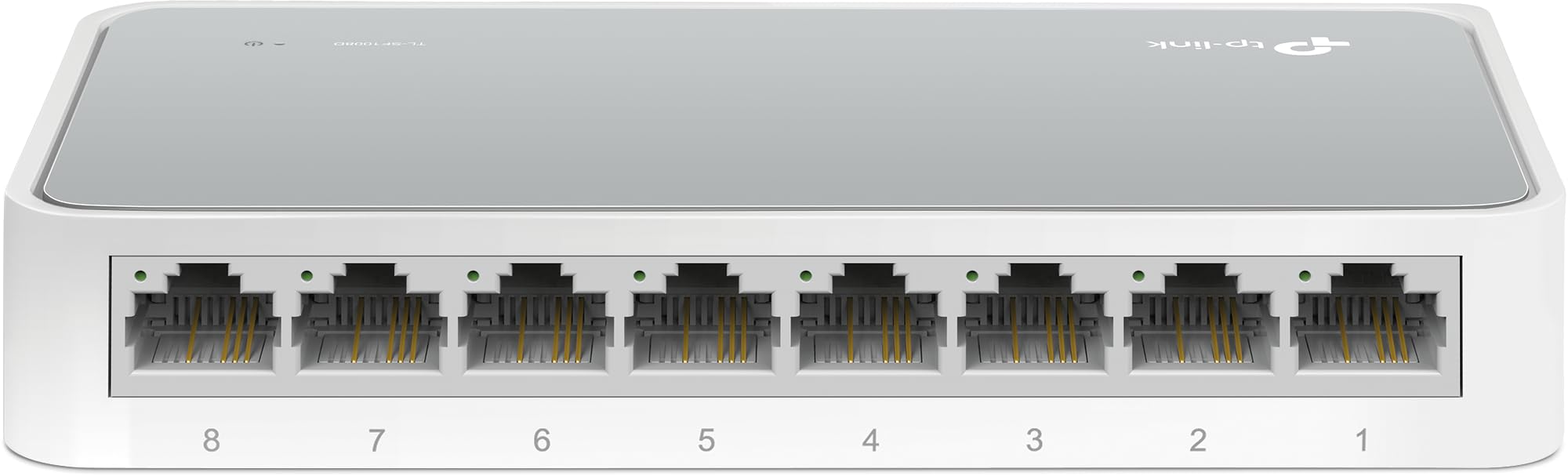
Figura 1: Angolo dall'alto verso il basso view of the TP-Link TL-SF1008D 8-Port Fast Ethernet Switch, showing the compact white casing and the eight RJ45 ports on the front.

Figura 2: Angolato frontale view of the TP-Link TL-SF1008D 8-Port Fast Ethernet Switch, highlighting the eight RJ45 ports labeled 1 through 8, and the power LED indicator.

Figura 3: in alto view of the TP-Link TL-SF1008D 8-Port Fast Ethernet Switch, showing the TP-Link logo, model number, and the power and link/activity LED indicators.
Indicatori LED:
- LED di potenza: Indicates the power status of the switch. On when powered, off when not.
- LED Link/Act (1-8): Indicates the link status and network activity for each port. Solid green indicates a valid network link, blinking indicates data transmission.
4. Configurazione e installazione
The TL-SF1008D switch is designed for simple plug-and-play installation. No software configuration is required.
- Collegare l'adattatore di alimentazione: Plug the provided power adapter into the switch's power port and then into a standard electrical outlet. Ensure the Power LED on the switch illuminates.
- Connettiti alla tua rete: Connect an Ethernet cable from your router or modem to any of the 8 RJ45 ports on the switch. The corresponding Link/Act LED for that port should light up, indicating a successful connection.
- Collega i tuoi dispositivi: Connect your network devices (e.g., computers, gaming consoles, printers, smart TVs) to the remaining RJ45 ports on the switch using Ethernet cables. The Link/Act LEDs for these connected devices should also light up.
The switch automatically detects the speed and cable type (Auto-MDI/MDIX) for each connected device, eliminating the need for manual configuration or special crossover cables.
5. Istruzioni per l'uso
Once installed, the TL-SF1008D operates automatically. It functions as an unmanaged switch, meaning it requires no user intervention for basic network operation. Data packets are forwarded and filtered at full wire-speed for maximum throughput.
Negoziazione automatica:
Each port on the switch supports auto-negotiation, which automatically determines the optimal connection speed (10 Mbps or 100 Mbps) and duplex mode (half or full duplex) with the connected device. This ensures compatibility and optimal performance without manual settings.
Controllo del flusso:
The switch supports IEEE 802.3x flow control. This mechanism helps prevent data loss during periods of high network traffic by temporarily pausing data transmission from a congested device, ensuring reliable data transfer across your network.
6. Manutenzione
To ensure optimal performance and longevity of your TP-Link TL-SF1008D switch, consider the following maintenance tips:
- Posizionamento: Place the switch in a well-ventilated area to prevent overheating. Avoid placing it near heat sources or in enclosed spaces.
- Pulizia: Pulire regolarmente l'esterno dell'interruttore con un panno morbido e asciutto. Non utilizzare detergenti liquidi o spray.
- Gestione dei cavi: Ensure Ethernet cables are neatly organized and not excessively bent or kinked to prevent damage and maintain signal integrity.
- Alimentazione elettrica: Utilizzare solo l'alimentatore fornito con il dispositivo.
7. Risoluzione Dei Problemi
If you encounter issues with your TL-SF1008D switch, try the following basic troubleshooting steps:
- Nessun potere: Check if the power adapter is securely connected to the switch and a working electrical outlet. Verify the Power LED is on.
- Nessun collegamento/attività su una porta:
- Assicurarsi che il cavo Ethernet sia collegato saldamente sia alla porta dello switch sia al dispositivo collegato.
- Prova a utilizzare un cavo Ethernet diverso per escludere che si tratti di un cavo difettoso.
- Verificare che il dispositivo collegato sia acceso e funzioni correttamente.
- Prova a connettere il dispositivo a una porta diversa sullo switch.
- Bassa velocità di rete:
- Ensure all connected devices and cables support 100 Mbps speeds for optimal performance.
- Controlla se sulla tua rete è in esecuzione un traffico di rete eccessivo o applicazioni che richiedono molta larghezza di banda.
Per ulteriore assistenza, fare riferimento alle informazioni di supporto nella Sezione 9.
8. Specifiche
| Dimensioni del prodotto | 5.3 cm L x 5.3 cm P x 0.9 cm A |
| Peso dell'articolo | 0.86 libbre (13.8 once) |
| Voltage | 110 Volt (CA) |
| Materiale della cassa | Aluminum or Alloy Steel or Metal |
| Valutazione della temperatura superiore | 40 gradi Celsius |
| Tipo di interfaccia | RJ45 |
| Velocità di trasferimento dati | 100 Megabit al secondo |
| Valutazione attuale | 0.6 Amps |
| Numero di porte | 8 |
| Colore | Bianco |
| Dispositivi compatibili | Desktop, console di gioco, router, stampante, portatile, macchina fotografica |
9. Garanzia e supporto
TP-Link provides unlimited 24/7 technical support for free. For any issues or questions regarding your TL-SF1008D switch, please contact TP-Link support.
Informazioni sui contatti:
- Supporto telefonico: (866) 225-8139
- Websito: myproducts.tp-link.com/us
- Supporto via e-mail: support.USA@tp-link.com
Disclaimer legale:
Each item is provided AS IS, and there is no warranty on these items. If an item does not work, please contact the manufacturer directly, as we do not test every unit for reliability.


