Introduzione
The LeapFrog My Own Leaptop is an interactive learning toy designed to introduce young children to letters, numbers, and basic computer literacy skills. Featuring a larger screen and four engaging learning modes, this device offers a fun and portable way for children to explore and learn.
Cosa c'è nella scatola
- LeapFrog My Own Leaptop
- Guida rapida
Impostare
Installazione della batteria
The Leaptop requires 3 AA batteries. Batteries are included for demonstration purposes only. For regular use, new batteries are recommended to ensure optimal performance.
- Locate the battery compartment on the underside of the Leaptop.
- Utilizzando un cacciavite, aprire il coperchio del vano batteria.
- Inserire 3 batterie AA nuove, assicurandosi della corretta polarità (+/-).
- Riposizionare il coperchio del vano batterie e serrare la vite.
Personalizzazione
To personalize the Leaptop with your child's name and custom content, connect the device to a computer and visit the LeapFrog Learning Path website. Follow the on-screen instructions to download songs and set up pretend emails.
Prodotto finitoview
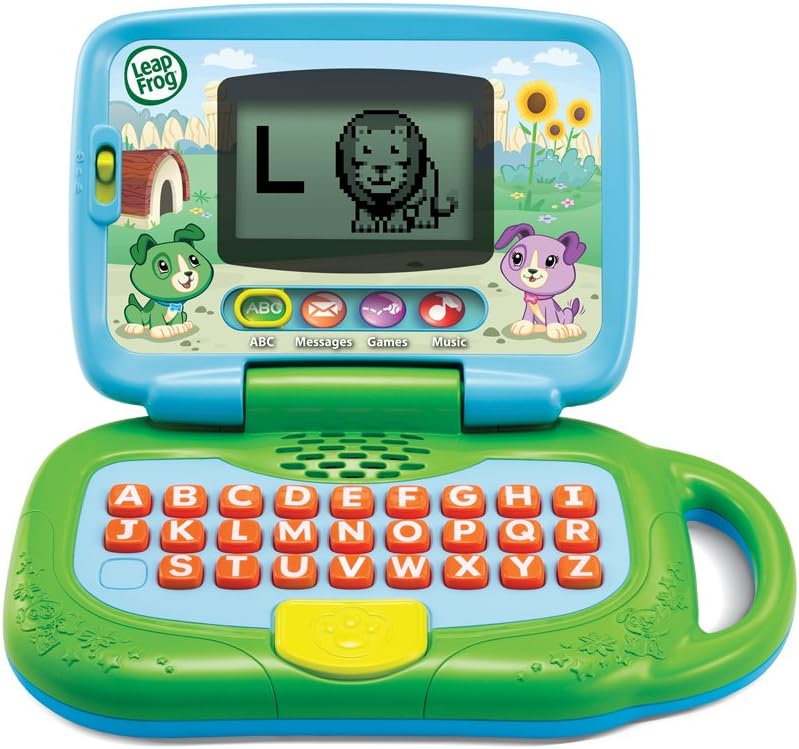
Figura 1: Fronte view of the LeapFrog My Own Leaptop.
The Leaptop features a durable, child-friendly design with a large screen for engaging animations. The keyboard includes all letters of the alphabet, along with dedicated buttons for different learning modes. A convenient handle allows for easy portability.
Controlli e caratteristiche
- Interruttore On/Off/Volume: Located on the side, this switch controls power and adjusts the sound level.
- Alphabet Keyboard: Features large, easy-to-press buttons for each letter.
- Pulsanti modalità: Dedicated buttons for ABCs, Messages, Games, and Music modes.
- Schermo: Displays letters, animations, and interactive content.
- Maniglia: Integrato per un facile trasporto.
Modalità operative

Figure 2: Child engaging with the Leaptop in learning mode.
The Leaptop offers four interactive learning modes to keep children engaged:
- ABCs Mode: Press any letter button to hear the letter name, its sound, and a word that starts with that letter. The screen displays corresponding animal animations (26 in total).
- Messages Mode: Engage in pretend email exchanges with characters like Scout or Violet. This mode encourages imaginative role-play and early communication skills.
- Modalità giochi: Play fun animal trivia and letter games designed to reinforce learning.
- Modalità Musica: Enjoy 16 songs and melodies. Children can bop along and explore musical sounds.

Figure 3: Child interacting with the Leaptop's keyboard.
Cura e manutenzione
- Keep the Leaptop clean by wiping it with a slightly damp panno. Non immergere in acqua.
- Evitare di esporre il dispositivo a temperature estreme o alla luce solare diretta.
- Rimuovere le batterie se l'unità non verrà utilizzata per un periodo prolungato per evitare perdite.
Risoluzione dei problemi
If the Leaptop does not function as expected, please try the following:
- Ensure batteries are correctly installed and are not depleted. Replace with fresh batteries if necessary.
- Spegnere e riaccendere l'unità per resettarla.
- If issues persist, refer to the LeapFrog support websito per ulteriore assistenza.
Specifiche
| Specificazione | Valore |
|---|---|
| Dimensioni del prodotto | 3.8 x 11.5 x 11.4 pollici |
| Peso dell'articolo | 1.56 libbre |
| Numero modello articolo | 80-19150E |
| Età consigliata dal produttore | 24 mesi - 4 anni |
| Batterie | Sono necessarie 3 batterie AA (incluse per la dimostrazione) |
| Data di rilascio | 1 maggio 2018 |
| Produttore | VTech |
Garanzia e supporto
For warranty information or technical support, please visit the official LeapFrog websito o contattare il servizio clienti. Conservare la ricevuta d'acquisto come prova d'acquisto.


