Introduzione
This manual provides essential instructions for the setup, operation, maintenance, and troubleshooting of your Toshiba DR430 DVD Recorder. Please read this manual thoroughly before using the device to ensure proper functionality and to maximize your user experience.
The Toshiba DR430 allows you to convert and archive home videos to DVD, and experience your DVD collection with 1080p upconversion via HDMI. It features one-touch recording, multi-format recording and playback, and HDMI-CEC for simplified control.
Impostare
Disimballaggio e posizionamento
Carefully remove the DVD recorder from its packaging. Place the unit on a stable, level surface with adequate ventilation. Avoid placing it near heat sources or in direct sunlight.
Connecting the DR430
The DR430 offers various connection options for video and audio. Choose the connection method that best suits your television and other audio/video equipment.
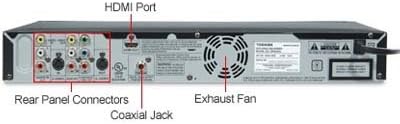
Immagine: Rear panel of the Toshiba DR430 DVD Recorder. This view displays the HDMI port, coaxial jack, and various rear panel connectors including composite video, S-video, and component video inputs and outputs.

Immagine: Detailed diagram of the rear panel connectors. This diagram highlights Audio In (L1), S-Video In/Out, Audio Out, Component Video Out, HDMI Out, and Coaxial Digital Audio Output ports.
Connessione HDMI (consigliata per la migliore qualità)
Connect an HDMI cable from the HDMI OUT port on the DR430 to an HDMI IN port on your television or A/V receiver. This connection supports video upconversion up to 1080p resolution.
Connessione video componente
Connect component video cables (red, green, blue) from the COMPONENT VIDEO OUT ports on the DR430 to the corresponding component video IN ports on your television. Connect audio cables (red, white) from the AUDIO OUT ports on the DR430 to the audio IN ports on your television or A/V receiver.
Connessione S-Video
Connect an S-Video cable from the S-VIDEO OUT port on the DR430 to an S-VIDEO IN port on your television. Connect audio cables (red, white) from the AUDIO OUT ports on the DR430 to the audio IN ports on your television or A/V receiver.
Connessione video composito
Connect a composite video cable (yellow) from the VIDEO OUT port on the DR430 to the VIDEO IN port on your television. Connect audio cables (red, white) from the AUDIO OUT ports on the DR430 to the audio IN ports on your television or A/V receiver.
Collegamento audio digitale
For digital audio output, connect a coaxial digital audio cable from the COAXIAL DIGITAL AUDIO OUTPUT port on the DR430 to a digital audio input on your A/V receiver.
Ingressi del pannello frontale
The front panel includes a DV Input and composite video/audio inputs for convenient connection of camcorders or other portable devices.

Immagine: Front panel of the Toshiba DR430 DVD Recorder with the input flap open. This reveals the front-facing composite video (yellow) and audio (red, white) inputs, as well as a DV input.
Collegamento di potenza
After all audio/video connections are made, plug the power cord into an AC outlet.

Immagine: Connection diagram illustrating how to connect the DR430 to a television. It shows RCA video and audio cables connecting the DVD recorder's output to the TV's input for playback, and external source's output to the DVD recorder's input for recording.
Istruzioni per l'uso
Riproduzione di base
- Insert a DVD into the disc tray.
- Turn on the DR430 and your television.
- Select the correct input on your television (e.g., HDMI 1, Video 1) corresponding to the connection used.
- Playback should begin automatically or by pressing the PLAY button on the remote control.
Registrazione con un solo tocco
To record from an external source (e.g., cable box, satellite receiver, VCR):
- Connect the external source to the DR430's input (e.g., composite, S-Video).
- Insert a recordable DVD (DVD-R, DVD-RW, DVD+R, DVD+RW) into the DR430.
- Tune your external source to the desired program.
- Premere il tasto DOCUMENTAZIONE button on the DR430 or its remote control. Recording will begin immediately.
- Premere il tasto FERMARE pulsante per terminare la registrazione.
Multi-Format Recording and Playback
The DR430 supports recording and playback on DVD-R, DVD-RW, DVD+R, and DVD+RW discs, offering flexibility for your recording needs.
Auto Finalize
The Auto Finalize feature simplifies the recording process by automatically finalizing your recorded disc. Finalizing a disc makes it playable on most standard DVD players. Refer to the on-screen menu for options to enable or disable this feature.
HDMI-CEC (controllo dell'elettronica di consumo)
If connected to other HDMI-CEC compatible devices via an HDMI cable, you can control multiple components using a single remote. This feature may require activation in the system settings.
Front DV Input Usage
Use the front DV input to easily transfer video from a digital camcorder to a DVD. Connect your camcorder to the DV input and follow the on-screen instructions for recording.
Simultaneous Playback and Recording
The DR430 allows you to play back a previously recorded title on the same disc while a new recording or timer recording is in progress.
Riproduzione multimediale supportata
In addition to DVDs, the DR430 supports playback of MP3 audio files from CDs and DVDs. It does not support MP4 video files.
Manutenzione
Pulizia dell'unità
Wipe the exterior of the unit with a soft, dry cloth. Do not use liquid or aerosol cleaners, as they may damage the finish. Ensure the unit is unplugged before cleaning.
Cura del disco
Handle discs by their edges to avoid fingerprints. Store discs in their cases away from direct sunlight and extreme temperatures. Clean dirty discs with a soft, lint-free cloth, wiping from the center outwards.
Ventilazione
Ensure that the ventilation openings on the unit are not blocked to prevent overheating. Maintain adequate space around the unit for proper airflow.
Risoluzione dei problemi
Nessun potere
- Assicurarsi che il cavo di alimentazione sia collegato saldamente sia all'unità sia a una presa CA funzionante.
- Verificare che la presa di corrente funzioni collegandovi un altro dispositivo.
Nessuna immagine o suono
- Verify that all audio and video cables are securely connected to the correct input/output ports on both the DR430 and your television/receiver.
- Assicurati che il televisore sia impostato sulla sorgente di ingresso corretta (ad esempio, HDMI 1, Video 1).
- Check the volume level on your television or A/V receiver.
Disc Not Playing/Recording
- Assicurarsi che il disco sia inserito correttamente con il lato dell'etichetta rivolto verso l'alto.
- Check if the disc is clean and free of scratches or smudges.
- Verify that the disc type is supported by the DR430 (DVD-R, DVD-RW, DVD+R, DVD+RW for recording; standard DVDs, MP3 CDs/DVDs for playback). Note that dual-layer blank discs and MP4 video filenon sono supportati.
- For recording, ensure the disc has sufficient free space.
Problemi di controllo remoto
- Replace the batteries in the remote control (requires 2 AA batteries).
- Ensure there are no obstructions between the remote control and the DR430's remote sensor.
- Puntare il telecomando direttamente verso l'unità.
Difficulty with Disc Titling/Menu
- Refer to the on-screen menu and the detailed instructions in the full product manual for specific steps on editing titles and navigating disc menus. The titling interface may require character-by-character selection rather than a full keyboard.
Specifiche
| Caratteristica | Dettaglio |
|---|---|
| Numero di modello | DR430 |
| Marca | TOSHIBA |
| Dimensioni (L x P x A) | 16.5 x 9.7 x 2.3 pollici (circa) |
| Peso | 5.28 libbre |
| Risoluzione video | Up to 1080p (via HDMI upconversion) |
| Video Progressive Scan | 3:2 Abbassamento |
| Riproduzione audio | MP3 Only (from CD/DVD) |
| Ingressi | 2x Audio Input (RCA), 2x Composite Video (RCA), 2x S-Video, 1x Component Video, 1x DV Input, 1x USB Port |
| Risultati | 1x HDMI, 1x Digital Coaxial Audio, 1x S-Video, 1x RCA Video (Composite), 1x RCA Audio |
| Playable Disc Types | DVD+R, DVD+RW, DVD-R, DVD-RW, DVD-Video, Audio CD, MP3 CD/DVD |
| Recording Disc Types | DVD+R, DVD+RW, DVD-R, DVD-RW |
| CEC HDMI | SÌ |
| Caratteristiche speciali | One Touch Recording, Auto Finalize, Simultaneous Playback and Recording |
| Consumo energetico | Conformità Energy Star |
Informazioni sulla garanzia
The Toshiba DR430 DVD Recorder comes with a 1-year parts and 90-day labor warranty. Please retain your proof of purchase for warranty claims. For detailed terms and conditions, refer to the warranty card included with your product or contact Toshiba customer support.
Supporto
If you encounter issues not covered in the troubleshooting section or require further assistance, please contact Toshiba customer support. You can typically find contact information on the Toshiba official websito o nella documentazione fornita con il prodotto.
When contacting support, please have your model number (DR430) and serial number ready.


